
Best Visix (visix.com) alternatives in 2027 for digital signage and meeting room displays
Visix (visix.com) is a US digital signage company based in Peachtree Corners, Georgia, with roots going back to 1980. Its AxisTV Signage Suite runs lobby screens, video walls, wayfinding kiosks and emergency alerts, mostly for universities, government, healthcare and large companies. Visix also sells room signs: LCD panels (Touch and Connect) and ePaper signs (EPS) with a 5-year battery, plus Choros for QR-code booking.
Teams look for Visix alternatives for a few reasons. Visix room signs show bookings, but the booking system usually comes from somewhere else. Pricing is quote-only, with support and training sold as extra subscriptions. And reviewers describe the AxisTV interface as dated.
We compared 7 digital signage and meeting room display tools on booking, hardware, pricing and setup effort. Joan is on the list, and for every tool we say who it really fits. If you also run a digital workplace platform, see our Best Appspace alternatives →. Or read our Best Logitech alternatives if purpose-built room panels are on your list.
Quickly jump to:
- Why teams look past Visix
- Digital signage for meeting rooms: tools compared
- 7 Visix alternatives for signage and room displays
- Picking the right room display and signage setup
- Joan vs. Visix at a glance
- Frequently asked questions about Visix alternatives
Why teams look past Visix
The signs show bookings, but someone else takes them
Visix EPS ePaper signs display schedules from your existing calendar or scheduling system. They don’t include a booking engine of their own, and booking at an EPS sign means scanning a QR code. Without a booking platform, you add Choros or a third-party tool, which means a second contract and a second support line. Visix publishes integrations with systems like EMS, CollegeNET, Tango Reserve and OfficeSpace, which helps if you already use one of them.
Quote-only pricing, plus support and training subscriptions
Visix doesn’t publish prices. A new system includes 90 days of priority support; after that, software updates and support need an annual support subscription. Visix also sells a training subscription for its learning platform, a real cost for teams running AxisTV. Capterra reviewers call the product expensive and its licence tiers inflexible. Visix does offer Hardware as a Service, which spreads the hardware cost into a yearly fee.
A dated interface and a lot to manage
AxisTV has a 3.9 rating on Capterra across 14 reviews. One reviewer says the interface “has the look and feel of a Windows 95 program,” and several mention a learning curve. A full Visix setup can mean the AxisTV CMS, room sign software, an RF network for ePaper signs and a booking platform. One long-term user also reported players that “were unreliable and required constant updates.”
Digital signage for meeting rooms: tools compared
| Tool | Best for | Built-in room booking | Room displays | Digital signage | Starts at |
|---|---|---|---|---|---|
| Joan | One platform for booking, ePaper room displays and workplace signage | ✅ | ✅ Own ePaper displays | ✅ | $51/month |
| Appspace | Large companies that want signage, intranet and booking together | ✅ | ⚠️ Third-party screens | ✅ | Free (2 users, 1 device); paid plans on quote |
| Yodeck | Low-cost digital signage on many screens | ❌ | ⚠️ Shows calendars, no booking | ✅ | Free (1 screen); $8/screen/month |
| Logitech Tap Scheduler | Offices standardised on Logitech meeting room gear | ⚠️ Needs a booking service | ✅ Own PoE panel | ❌ | $699/room + $199/room/year |
| Humly | Wired room panels sold through AV resellers | ✅ | ✅ Own PoE panel | ❌ | Quote; Booking Devices from $249/unit |
| Meetingroom365 | Cheap room display software for tablets you already own | ✅ | ⚠️ Your own tablets | ⚠️ Room TV add-on | $9/display/month |
| Robin | Enterprises with 500+ employees | ✅ | ⚠️ Third-party tablets | ❌ | Custom quote |
| Visix | Campus-wide enterprise signage with room signs added | ❌ Display only (Choros for QR booking) | ✅ LCD and ePaper signs | ✅ AxisTV | Quote only |
Prices checked October 2026 from public pricing pages. Verify current pricing with each vendor before purchasing.
7 Visix alternatives for signage and room displays
1. Joan — Best for booking, ePaper room displays and signage in one platform
Joan combines its own ePaper room displays with a cloud platform for room booking, desk booking, visitor management and workplace digital signage. The booking engine is built in, so the display at the door and the system behind it come from one vendor. The Joan 6 RE, Joan 6 Pro and Joan 13 Pro sit outside rooms, and visitors get a Joan ePaper badge on arrival.
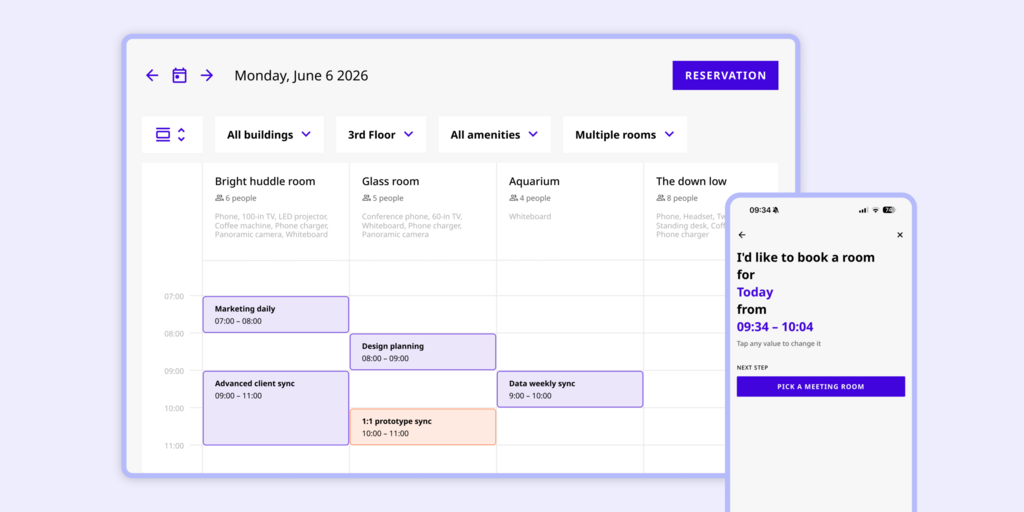
This is the main difference from Visix. Joan room displays sync with Microsoft 365 or Google Workspace in real time, and on the touch models people can check in, book on the spot and free up no-show rooms automatically. Signage, rooms, desks and visitors run on one subscription.
What makes Joan stand out
- Booking engine included: no separate scheduling system or QR booking product to buy.
- Act at the door, not just look: check-in, book now and auto-release on Joan 6 Pro and Joan 13 Pro.
- Signage on the same platform: workplace signage for ePaper and LCD screens, managed next to rooms and desks.
- Physical visitor badges: the Joan ePaper badge is issued at check-in, something Visix doesn’t offer.
Joan pricing
Plans start at $51/month. Additional users are $1.09/user/month and additional device licences are $10.99/device/month (annual billing). Employees who book only through Outlook or Google Calendar are not billed. Every feature is included, with no tier gates. ePaper hardware is a one-time purchase, separate from the subscription, with a 30-day money-back guarantee. See current pricing.
Joan limitations
- Interactive displays use more power: Joan batteries last 6–12 months depending on the model, or you can use a PoE wall mount. Visix markets 5 years for its display-only ePaper signs.
- Cloud only, with fewer niche integrations: Joan connects natively to Microsoft 365, Exchange and Google Workspace, not campus systems like EMS or CollegeNET, and has no on-premise option.
Best for: Any organisation managing physical workspaces, from a small team with a few rooms to a global enterprise across hundreds of locations.
2. Appspace — Best for large companies that want signage, intranet and booking together
Appspace is a digital workplace platform that combines digital signage, an employee app and intranet, and room and desk booking. Like Visix, it started with signage; unlike Visix, booking is part of the platform.
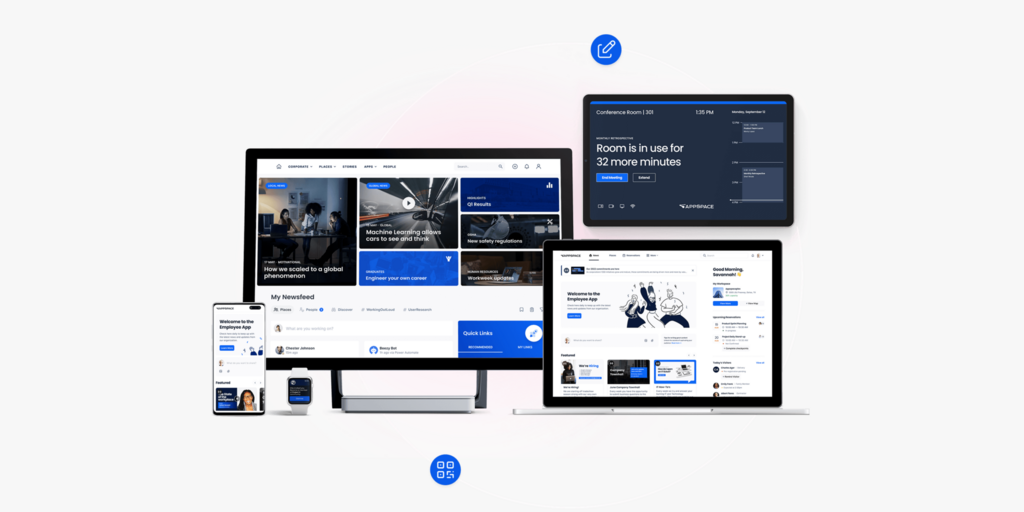
What makes Appspace stand out
- Strong digital signage and employee communications in one product.
- Room and desk booking on the same platform.
- A free tier for 2 users and 1 device to test it.
Appspace pricing
The free tier covers 2 users and 1 device. Express and Enterprise plans are priced per user and per device, and the numbers come from sales. Verify current pricing at Appspace’s website before purchasing.
Appspace limitations
- You pay for both users and devices: the bill grows on two counters at once.
- More platform than many teams need: you pay for intranet and comms features even if you only want signage and room booking.
- No physical room displays of its own: it runs on third-party screens, and setup usually needs IT time.
Best for: Large organisations that want signage, internal comms and booking from one enterprise vendor.
Looking for Appspace alternatives instead? See our Best Appspace alternatives →
3. Yodeck — Best for low-cost digital signage on many screens
Yodeck is cloud digital signage software with simple per-screen pricing and a free player on annual plans. It is a good fit if lobby and hallway screens matter more than room booking.
What makes Yodeck stand out
- Low, public per-screen pricing.
- Free Yodeck Player hardware with annual plans.
- Unlimited users and a free plan for one screen.
Yodeck pricing
Free covers 1 screen. Basic costs $8/screen/month, Premium $12/screen/month and Enterprise $16/screen/month. Annual plans include a free Yodeck Player. Verify current pricing at Yodeck’s website before purchasing.
Yodeck limitations
- No booking engine: Yodeck can show room schedules, but nobody can book or check in at the screen.
- No desk booking or visitor management: you would need separate tools for both.
- Signage only, not room displays: there is no purpose-built panel for meeting room doors.
Best for: Teams that want affordable signage across many screens and already have a separate room booking tool.
4. Logitech Tap Scheduler — Best for offices standardised on Logitech meeting room gear
Logitech Tap Scheduler is a purpose-built room booking panel from the video conferencing brand. It fits offices that already run Logitech Rally or Tap gear in their meeting rooms.
What makes Logitech Tap Scheduler stand out
- Purpose-built hardware, not consumer tablets.
- Works with Logitech room systems for occupancy-based auto booking and release.
- Device management through Logitech Sync.
Logitech Tap Scheduler pricing
The panel costs $699 per room in hardware, and room booking software needs the Essential service plan at $199 per room per year. Verify current pricing at Logitech’s website before purchasing.
Logitech Tap Scheduler limitations
- Every door needs a PoE cable: the panel is wired, with no battery option.
- Meeting rooms only: no desk booking, visitor management or digital signage.
- Best features need more Logitech gear: auto book and auto release need a Logitech Rally Bar in the room.
Best for: Companies standardised on Logitech video conferencing that only need room panels.
Looking for Logitech alternatives instead? See our Best Logitech alternatives →
5. Humly — Best for wired room panels sold through AV resellers
Humly is a Swedish workplace company that makes its own room displays and booking devices, plus desk booking software. Like Visix, it sells mainly through AV resellers and partners.
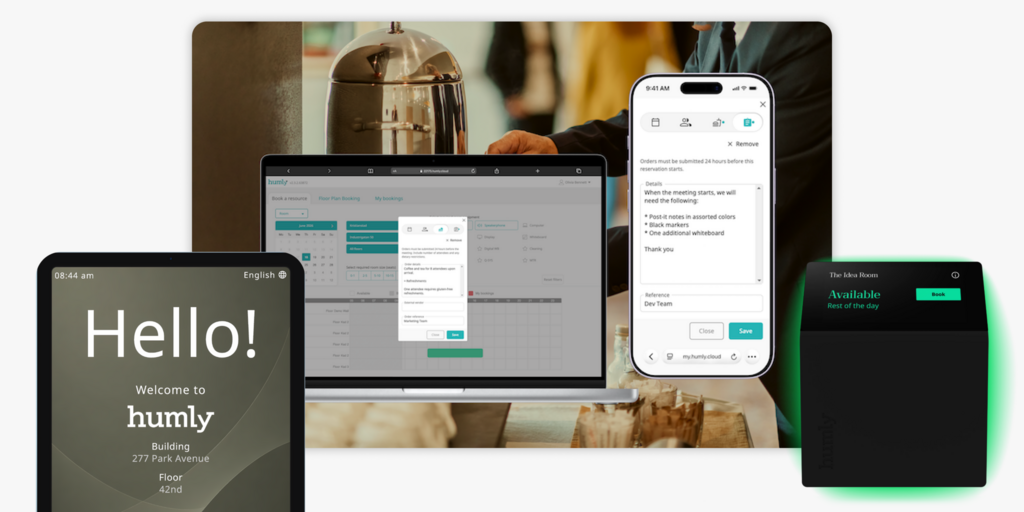
What makes Humly stand out
- Its own room display hardware, not consumer tablets.
- Room and desk booking from one vendor.
- A wide reseller network for installation and support.
Humly pricing
Humly does not publish full pricing. The only public figure is Booking Devices from $249 per unit, sold in packs of five, including one year of the Humly Access licence. Verify current pricing with Humly or a reseller before purchasing.
Humly limitations
- Every door needs PoE cabling: Humly room displays have no battery option.
- No visitor management or signage: neither the room display nor desk booking covers visitors or lobby screens.
- Prices go through resellers: each component carries its own licence, so costs build up module by module.
Best for: Companies with an AV partner that can run PoE to every room.
Looking for Humly alternatives instead? See our Best Humly alternatives →
6. Meetingroom365 — Best for cheap room display software on tablets you already own
Meetingroom365 is room display software that runs on iPads, Android and Fire tablets, and Windows. It also sells a meeting room TV product, desk booking and a visitor kiosk on the same account.
What makes Meetingroom365 stand out
- Low, public per-display pricing with monthly billing and no lock-in.
- Desk booking, room TVs and a visitor kiosk available on one account.
- Syncs with Microsoft 365, Exchange and Google Workspace.
Meetingroom365 pricing
Meeting room displays cost $9/display/month, meeting room TVs $9/room/month, desk booking $19/workspace/month and a visitor kiosk $49/kiosk/month. Annual billing saves about 10%. There is a 30-day free trial. Verify current pricing at Meetingroom365’s website before purchasing.
Meetingroom365 limitations
- You still buy and manage the tablets: every screen needs a mount, power and updates.
- Desk booking costs more than room displays: at $19 per workspace per month, 50 desks add $950 a month.
- Not an enterprise signage CMS: room TVs show schedules, not full lobby or campus content.
Best for: Small offices with spare tablets that want the cheapest room display software.
7. Robin — Best for enterprises with 500+ employees
Robin is a hybrid workplace platform covering desk, room, parking and locker booking, visitor management, analytics and wayfinding. Room displays run on third-party tablets.
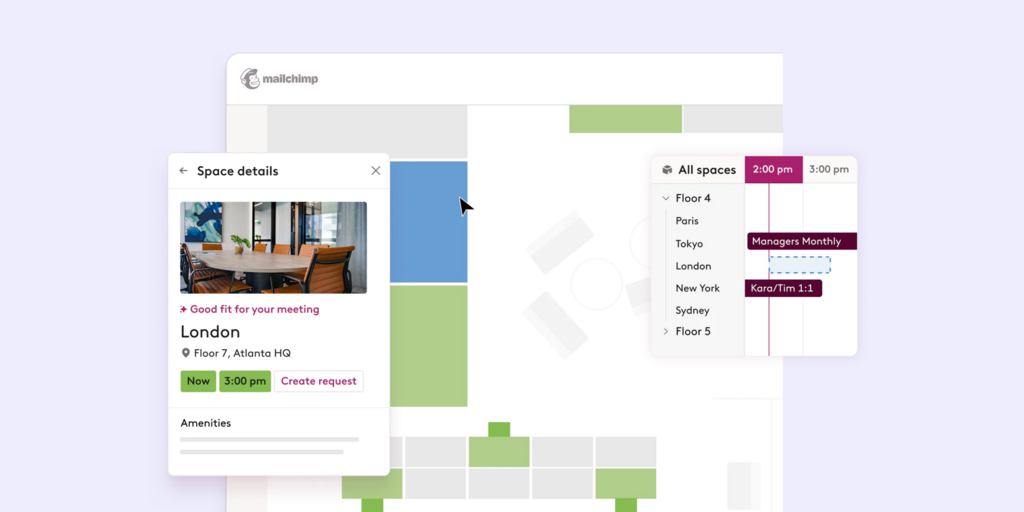
What makes Robin stand out
- Broad platform that replaces several point tools.
- Deep calendar and Microsoft 365 workflows.
- Strong analytics for space planning across buildings.
Robin pricing
No public pricing. Robin sends custom quotes after a sales call, and all subscriptions are billed annually. Verify current pricing at Robin’s website before purchasing.
Robin limitations
- No price until you talk to sales: no public tiers and no free trial.
- Built for large offices: the stated focus on 500+ employees leaves smaller teams with more platform than they need.
- No signage and tablets at the door: there is no digital signage product, and room displays rely on third-party tablets.
Best for: Large hybrid enterprises that want one vendor for booking, visitors and analytics, and have budget for an annual contract.
Looking for Robin alternatives instead? See our Best Robin alternatives →
Picking the right room display and signage setup
If you need full campus signage, video walls and wayfinding
Visix AxisTV and Appspace are built for that scale. Joan covers workplace signage well, but an enterprise lobby and video wall program may still need a dedicated signage CMS.
If room displays must take bookings, not just show them
Joan, Humly and Logitech Tap Scheduler all let people act at the door. Joan is the only one of the three with a battery option and built-in signage and visitor management.
If you only want cheap screens with content
Yodeck is the low-cost signage pick, from $8 per screen per month. Pair it with a separate booking tool if you need rooms.
If you already use EMS or CollegeNET
Check integrations first. Visix supports many campus scheduling systems; Joan supports Microsoft 365, Exchange and Google Workspace natively.
Why Joan is usually the best Visix alternative
Most teams moving off Visix want three things: room signs that take bookings, one vendor instead of a stack, and a clear price. Joan delivers all three with its own ePaper displays and a built-in booking engine. Signage, rooms, desks and visitors sit on one subscription with public pricing.
Joan vs. Visix at a glance
| Joan | Visix | |
|---|---|---|
| Booking engine | ✅ Built in | ❌ Display only; uses your calendar or a separate booking platform (Choros for QR booking) |
| Book and check in at the sign | ✅ On Joan 6 Pro and Joan 13 Pro | ⚠️ On Touch and Connect LCD signs; EPS ePaper signs are display-only |
| Auto-release of no-shows | ✅ | ⚠️ Not documented for EPS signs |
| ePaper room signs | ✅ Own displays, battery (6–12 months) or PoE | ✅ EPS signs, 5-year battery, separate RF network |
| Desk booking | ✅ | ⚠️ Through Choros (QR) |
| Visitor management | ✅ included, with Joan ePaper badge | ❌ Not offered |
| Digital signage | ✅ Workplace signage on the same platform | ✅ AxisTV, deeper for kiosks, wayfinding and video walls |
| Deployment | Cloud | Cloud, on-premise or hybrid |
| Calendar and scheduling systems | Microsoft 365, Exchange, Google Workspace | Adds EMS, CollegeNET, Mazévo, Tango Reserve and more |
| Pricing | ✅ Public, from $51/month | ❌ Quote only; support subscription after 90 days; Hardware as a Service option |
Based on public information, October 2026.
Ready to make the switch?
Joan is free to try for 30 days, with no commitment. Put one display outside a busy meeting room and see how many bookings happen at the door.
Frequently asked questions about Visix alternatives
Is there a free Visix alternative?
Yodeck is free for one screen and Appspace has a free tier for 2 users and 1 device. Joan isn’t free long-term but offers a 30-day free trial of the full platform. That includes room booking, desk booking, visitor management and digital signage.
How much does Visix cost?
Visix doesn’t publish pricing; every system is quoted. New systems include 90 days of priority support, then updates and support need an annual subscription. Visix also sells training subscriptions and offers Hardware as a Service, which turns the hardware cost into a yearly fee.
Do Visix room signs include room booking?
Not on their own. Visix EPS ePaper signs display schedules from your calendar or scheduling system, and booking at the sign uses a QR code through Choros. Joan includes the booking engine, so the display and the booking system come from one vendor.
Does Visix make ePaper room signs?
Yes. Visix sells EPS ePaper room and desk signs with a 5-year battery, which run on a separate RF network and update within a few minutes of a change. Joan ePaper displays sync in real time and, on touch models, let people book and check in at the door.
What is Visix best at?
Enterprise digital signage. Its AxisTV Signage Suite handles lobby screens, video walls, wayfinding kiosks and emergency alerts across large campuses. If that is your main need, Visix is a strong choice; if you mainly need room and desk booking, a workplace platform like Joan fits better.
What is the best Visix alternative for meeting room displays?
Joan, for most offices: it makes its own ePaper displays and includes the booking engine, desk booking, visitors and signage. Humly and Logitech Tap Scheduler are good options if you prefer wired panels and only need room booking.
Page last updated: October 2026. Pricing verified from public sources. Always confirm live pricing directly with each vendor before purchasing.
About the author
