
List of the best Yodeck alternatives
Yodeck is a capable cloud-based digital signage platform built around Raspberry Pi hardware. For teams running lobby screens, menu boards, or KPI dashboards, it delivers solid performance at a competitive price — the free single-screen plan is hard to beat for basic deployments.
But many teams reach a ceiling with Yodeck fast. The platform is digital signage and nothing else — there is no room booking, no desk reservations, no visitor management, and no way to show live meeting room status at the door. Teams that discover they need those features mid-deployment have no upgrade path inside Yodeck; they need to buy a separate product. On top of that, users on G2 and Capterra regularly flag hardware reliability concerns with the Raspberry Pi players and a content design experience that lags behind newer platforms.
We compared six Yodeck alternatives across pricing, features, hardware options, and fit for office environments — so you can choose the right one without starting from scratch. Joan is included and consistently comes out ahead for teams managing physical workspaces. We also cover tools that are better fits if you need pure signage at lower cost. If you’re evaluating hardware-based room scheduling, see our Best Logitech Alternatives →. For enterprise-grade workplace communications, see our Best Appspace Alternatives →.
- Why teams start looking for Yodeck alternatives
- Quick comparison table
- The 6 best Yodeck alternatives in 2027
- How to choose the right Yodeck alternative
- Joan vs. Yodeck: quick comparison
- Frequently asked questions about Yodeck alternatives
Why teams start looking for Yodeck alternatives
No room booking — and no path to add it
Yodeck was built for broadcast signage: menus, announcements, dashboards. It has no concept of a bookable space. Teams that want to show meeting room availability on a screen outside the door can use a Yodeck screen to display a calendar — but it is a read-only display, not an interactive booking panel. Employees can’t book, extend, or release a room from the screen. There is no ghost-meeting detection, no auto-release, and no desk booking. Teams needing even basic room management have to layer a separate room booking tool on top, paying for and managing two platforms.
Raspberry Pi hardware is capable but fragile at scale
Yodeck’s free and low-cost plans are possible partly because they rely on Raspberry Pi hardware — including a free player included with annual plans. For single-location deployments this works well. At scale, users on G2 consistently report hardware failures, SD card corruption, and overheating in enclosed installations. Replacing a failed Pi means shipping a new unit, re-provisioning it, and re-mounting — not trivial across a multi-site deployment. Users who need enterprise-grade hardware uptime often find Yodeck’s support response slow relative to the urgency.
Content design tools that feel like an afterthought
Yodeck’s template library covers the basics but multiple Capterra reviews flag that the editor lacks the design flexibility of newer platforms. Custom layouts require technical effort; the drag-and-drop experience is functional rather than polished. For marketing or HR teams who want on-brand, visually rich content without a designer, Yodeck’s content tools are limiting. Newer platforms offer AI-assisted design, Canva integration, and far deeper template libraries out of the box.
Quick comparison: Yodeck alternatives at a glance
| Tool | Best for | Room booking | Desk booking | Starts at | Hardware? |
|---|---|---|---|---|---|
| Joan | All-in-one workplace management: rooms, desks, signage, visitors | ✅ | ✅ | $51/month | ✅ ePaper displays |
| ScreenCloud | Enterprise-grade digital signage with strong app integrations | ❌ | ❌ | $20/screen/month | ❌ (BYOD) |
| OptiSigns | Budget-conscious teams needing flexible digital signage | ❌ | ❌ | ~$10/screen/month | ❌ (BYOD) |
| Rise Vision | Teams wanting transparent pricing + signage + screen sharing | ❌ | ❌ | $11/screen/month | ❌ (BYOD) |
| Appspace | Large enterprises managing comms, rooms, desks, and signage | ✅ | ✅ | Contact sales | ❌ (BYOD) |
| Logitech | Teams already invested in Microsoft Teams or Zoom Rooms | ✅ | ❌ | Hardware purchase + software | ✅ (Tap Scheduler panel) |
| Yodeck | Pure digital signage at low cost | ❌ | ❌ | Free (1 screen) / $8/screen/month | ✅ Raspberry Pi |
Prices verified October 2026 — confirm live pricing directly with each vendor before purchasing
The 6 best Yodeck alternatives in 2027
1. Joan — Best for teams that want digital signage as part of a full workplace platform
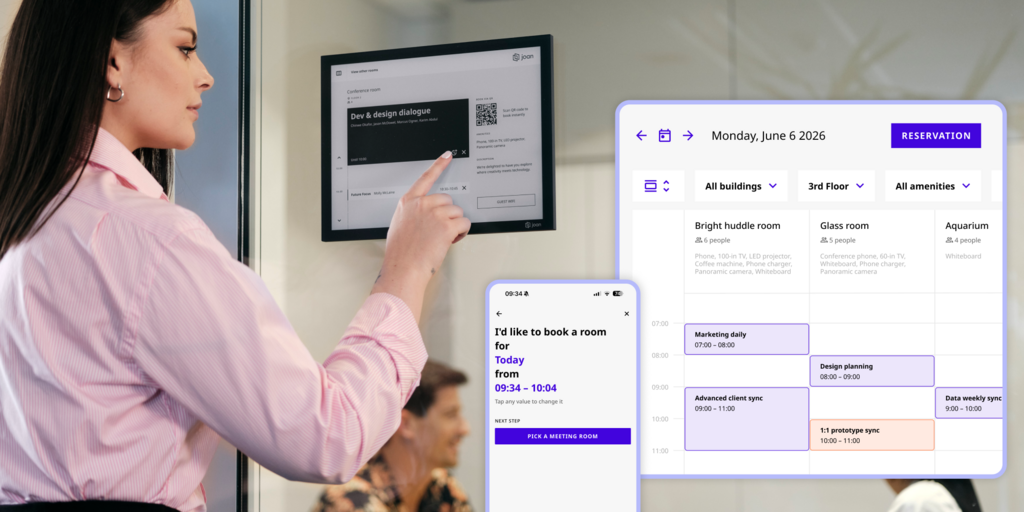
Joan is a workplace management platform that pairs cloud software with purpose-built ePaper hardware. Where Yodeck shows content on a screen, Joan shows live room status at the door — without anyone opening an app. Joan 6 RE, Joan 6 Pro, and Joan 13 Pro displays are battery-powered and always-on, meaning they mount in minutes and never go dark between meetings. The platform covers room booking, desk booking, visitor management, digital signage (Joan on any display, including existing TVs and monitors), parking reservations, and asset tracking — all under a single subscription.
For teams who adopted Yodeck to show meeting room schedules or lobby information and then discovered they needed actual room booking, Joan is the direct upgrade path. Digital signage in Joan is not a bolt-on — it is the same platform as room booking. A screen outside a meeting room shows live availability and can be booked from the display, from Outlook, from Google Calendar, or from the Joan app.
What makes Joan stand out
- ePaper displays eliminate booking confusion at the door — always-on, battery-powered, readable in any light; no tablet maintenance, no screen burn, no charging cables
- One subscription, every workplace feature — rooms, desks, signage, visitors, parking, assets; no per-feature add-ons
- Analytics built into every plan — utilization data, peak hours, no-show tracking; no separate reporting module
- Works on existing screens — Joan digital signage runs on third-party monitors and TVs; no hardware purchase required if you already have screens
Joan pricing
Plans start at $51/month. Additional users are $1.09/user/month; additional device licenses are $10.99/device/month (annual billing). The full platform is included in every plan — no tier gates on room booking, desk booking, visitor management, or signage. ePaper hardware (Joan 6 RE, Joan 6 Pro, Joan 13 Pro) is a one-time purchase, separate from the software subscription. A 30-day free trial is available with no credit card required. See current pricing →
Joan limitations
The full ePaper experience requires a hardware purchase, which is a higher upfront cost than pure-software alternatives. For teams that genuinely want no hardware, Joan on any display covers the gap — but you lose the always-on, battery-powered advantage.
Joan is a workplace management platform, not a full Integrated Workplace Management System (IWMS). It does not cover lease management, maintenance ticketing, or CAD floor plan editing — for teams needing those, Joan is a strong piece of the stack but not a complete replacement.
Best for: Any organisation managing physical workspaces — single-office teams with a handful of meeting rooms to global enterprises across hundreds of locations.
2. ScreenCloud — Best for enterprise digital signage with deep app integrations
ScreenCloud is a cloud-based digital signage platform built for large-scale, multi-location deployments. It offers 80+ integrations — Power BI, Google Slides, SharePoint, live data feeds — and a content management system designed for teams that push different content to screens across multiple buildings or time zones. ScreenCloud works with any commercial display; there is no proprietary hardware.
Where Yodeck is hardware-focused, ScreenCloud is software-led. Its channel and playlist management is built for content teams, not IT teams. Roles, permissions, and content approval workflows let marketing departments manage screens without touching the CMS login every time.
What makes ScreenCloud stand out
- App marketplace with 100+ integrations including Slack, Google Slides, Power BI, and social feeds
- No proprietary hardware required — runs on BrightSign, Amazon Fire TV, Chrome OS, and others
- Studio interface for creating content without design experience
- Solid scheduling and screen grouping for multi-location deployments
ScreenCloud pricing
Core plan: $20/screen/month (annual). Pro: $30/screen/month (annual). Enterprise: contact sales. No free permanent plan; 14-day trial available. Verify current pricing at ScreenCloud’s website before purchasing.
ScreenCloud limitations
- No room booking or workplace management — pure digital signage only; teams needing meeting room displays to double as booking panels need a separate tool
- At $20/screen/month, costs add up quickly for large deployments — a 50-screen setup is $1,000/month on the Core plan alone
- Pricing reportedly jumped significantly after early customer pricing agreements ended, which surprised some long-term accounts
Best for: Enterprise marketing and communications teams managing signage across multiple locations, with existing commercial displays and no room booking requirement.
See our Best Appspace Alternatives → if you need comms and room management in one tool.
3. OptiSigns — Best for budget-conscious teams needing flexible digital signage
OptiSigns is a digital signage platform aimed at small and mid-size businesses that want broad hardware support and an approachable price point. It runs on Android, Fire Stick, Chrome OS, Windows, Raspberry Pi, and LG WebOS — meaning most teams can start with hardware they already own. The template library covers retail, restaurants, offices, and healthcare.
OptiSigns competes directly with Yodeck on price and hardware flexibility. It is worth evaluating if your primary reason for leaving Yodeck is the content design experience or the per-screen cost, and if room booking is not a requirement.
What makes OptiSigns stand out
- Broad hardware support — works on Android sticks, Fire TV, Chrome OS, Windows, and more
- Canva integration and a built-in editor with more design flexibility than Yodeck
- Free plan available for a single screen; paid plans start at a lower per-screen cost than ScreenCloud
OptiSigns pricing
From approximately $10/screen/month on the Standard plan (annual billing). Enterprise plans with custom features are available on request. Verify current pricing at OptiSigns’ website before purchasing.
OptiSigns limitations
- No room booking or workplace management features — pure digital signage only
- Occasional sync delays and content update lag on lower-end hardware, per G2 reviews
- Support quality for paid plans is inconsistent — multiple reviews mention delayed responses to technical issues
Best for: SMBs and retail/restaurant environments where the primary need is flexible, affordable digital signage and room booking is not a requirement.
4. Rise Vision — Best for teams that want transparent pricing and included screen sharing
Rise Vision is a digital signage and screen sharing platform with transparent public pricing, a 30-day risk-free trial, and a strong track record in education, healthcare, and corporate environments. It runs on virtually any hardware — Amazon Signage Stick, BrightSign, Android, Chrome OS, Windows, Apple TV, and more. Unlike Yodeck, screen sharing is built into the platform alongside digital signage, which removes the need for a separate presentation tool.
Rise Vision prices by screen rather than by feature tier, which makes budgeting predictable. The SOC 2 Type 2 certification makes it easier to clear security reviews in enterprise environments.
What makes Rise Vision stand out
- Built-in screen sharing alongside digital signage — useful for meeting room displays or presentation setups
- Works on any hardware or OS, including hardware-as-a-service options
- Transparent, public per-screen pricing with volume discounts at 11, 70, and 200+ displays
- SOC 2 Type 2 certified
Rise Vision pricing
From $11/display/month (Basic plan) for businesses and educational institutions. Annual plans include volume discounts. Hardware is purchased separately or available as a hardware-as-a-service subscription. 30-day risk-free trial with no credit card required. Verify current pricing at Rise Vision’s website before purchasing.
Rise Vision limitations
- No room booking, desk booking, or visitor management — pure digital signage and screen sharing
- Advanced calendar integrations require the Advanced or Enterprise tier — the Basic plan only covers basic scheduling
- Emergency alert features (CAP protocol integration) require the Advanced plan, which is annual-only
Best for: Corporate teams, schools, and healthcare organisations that want transparent per-screen pricing and the option to use screen sharing on the same platform.
5. Appspace — Best for large enterprises managing internal comms, room booking, and signage
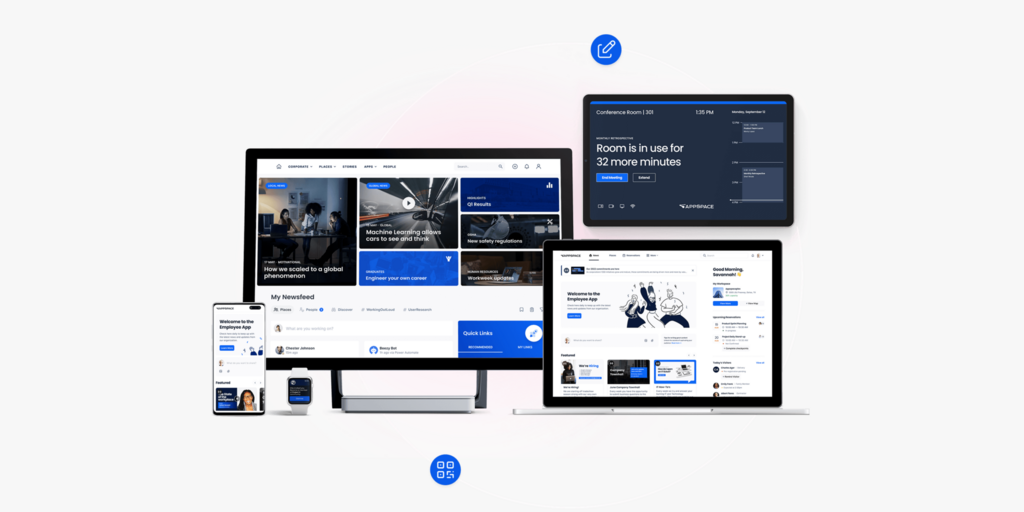
Appspace is an enterprise workplace platform that covers employee communications (intranet, employee app), digital signage, space reservation (rooms and desks), visitor management, and wayfinding. It was named a Leader in the 2026 Gartner Magic Quadrant for Intranet Packaged Solutions. For large organisations that currently stitch together separate tools for signage, room booking, and internal comms, Appspace provides a single vendor.
Appspace is positioned above Yodeck in both scope and price. The comparison is less direct — Yodeck users typically come to Appspace when they realise they need far more than signage — but teams making that jump will find a substantially more capable platform.
What makes Appspace stand out
- Full workplace platform: signage, room and desk booking, visitor management, intranet, and employee app in one product
- Native integrations with Microsoft Teams, Outlook, and Google Calendar
- Works on Logitech Tap Scheduler panels — useful for teams already invested in Logitech hardware
- Gartner Magic Quadrant recognition gives enterprise procurement teams a defensible vendor choice
Appspace pricing
Appspace does not publish pricing publicly. Plans are based on the number of premium users and device IDs; a free plan exists for up to 2 users and 1 device. Contact sales for Express and Enterprise pricing. Verify current pricing at Appspace’s website before purchasing.
Appspace limitations
- No transparent pricing — the sales-first model adds friction and makes budget planning harder; expect a multi-step sales process
- Implementation complexity is higher than Yodeck or Joan — Appspace is designed for IT and facilities teams, not for a small team self-deploying
- Customer support quality can be inconsistent at scale — multiple G2 reviewers note improvement post-acquisition but flag support gaps
Best for: Large enterprises (500+ employees) that need a single platform for employee communications, room and desk booking, and digital signage across multiple locations.
6. Logitech — Best for teams already running Microsoft Teams or Zoom Rooms
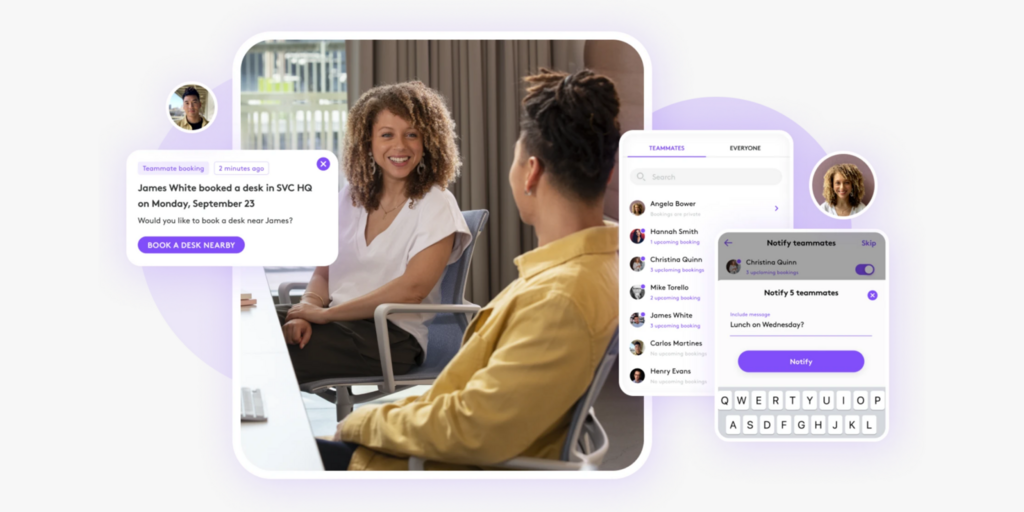
Logitech’s meeting room hardware ecosystem — particularly the Logitech Tap Scheduler — is a purpose-built scheduling panel for meeting rooms. It integrates natively with Microsoft Teams, Zoom Rooms, Robin, Appspace, Envoy, and other room scheduling platforms. The LED ring on the Tap Scheduler glows green (available) or red (occupied), signalling room status at a distance.
Logitech is a hardware-first solution, not a software platform. The Tap Scheduler itself needs to connect to a room scheduling service — Logitech Room Booking, Microsoft Teams Rooms, or a third-party platform — to show live data. The comparison to Yodeck is narrow: for teams whose use case is specifically meeting room scheduling displays (not general-purpose signage), Logitech is a compelling option if the IT stack already runs on Teams or Zoom.
What makes Logitech stand out
- Purpose-built for meeting room scheduling — the hardware design (green/red LED, 10.1″ touchscreen) is optimised for door-side room panels
- Native Microsoft Teams Rooms and Zoom Rooms certification — minimal configuration if you’re already on either platform
- Logitech Sync provides remote management of all devices from a single dashboard
Logitech pricing
Logitech Tap Scheduler is sold as hardware (contact your Logitech reseller for pricing — typically in the $400–650 range per unit). A software subscription (Logitech Room Booking or the chosen scheduling platform) is required separately. Logitech Sync management is available on Essential and Select service plans. Verify current pricing at Logitech’s website before purchasing.
Logitech limitations
- Not a digital signage platform — the Tap Scheduler only shows room scheduling data; you cannot push branded content, announcements, or KPI dashboards to it
- Requires a room scheduling software subscription in addition to hardware — the total cost of ownership is higher than it appears from the hardware price alone
- No desk booking, visitor management, or multi-purpose display capability
Best for: Organisations already running Microsoft Teams Rooms or Zoom Rooms that need purpose-built scheduling panels and have no requirement for general digital signage.
See our Best Logitech Alternatives → for a full comparison of room scheduling panel options.
How to choose the right Yodeck alternative
If you need room booking alongside signage
The only tools on this list that combine room booking with digital signage are Joan and Appspace. Joan is the better fit for most teams — faster to deploy, with purpose-built ePaper hardware and a transparent pricing model. Appspace is the right call for large enterprises that also need a full internal communications platform and have a dedicated IT team to implement it.
If you need physical displays at the door
Joan ePaper displays are the only purpose-built option on this list. Joan 6 RE, Joan 6 Pro, and Joan 13 Pro are battery-powered, always-on displays that mount outside meeting rooms and show live availability without ever needing a wall outlet. Logitech Tap Scheduler also shows room status at the door, but only for scheduling — it cannot double as a general-purpose signage screen.
If you need pure digital signage at a lower price than Yodeck Basic
Rise Vision and OptiSigns both offer lower per-screen costs than ScreenCloud and comparable or lower pricing to Yodeck Basic ($8/screen/month). Rise Vision includes screen sharing out of the box. OptiSigns supports the widest range of hardware. Both lack room booking.
If budget is the primary constraint
Yodeck itself has a free permanent plan for a single screen. Among alternatives, OptiSigns and Rise Vision are the most affordable for multi-screen deployments. Joan is not free long-term, but the 30-day trial is free with no credit card required — and for teams that convert, the single-subscription model often replaces multiple line items (room booking tool + signage tool + analytics add-on).
Why Joan is usually the best Yodeck alternative
The core reason teams leave Yodeck is that it only does one thing — and most offices need more. Joan is the only tool on this list that ships both the hardware and the software as a unified system built for workplaces: ePaper displays at the door, room and desk booking from any device, visitor management with physical ePaper badges, and digital signage for lobby screens — all under one subscription. If you need any of those things beyond a basic screen with content, Joan is where the migration ends.
Joan vs. Yodeck: quick comparison
| Joan | Yodeck | |
|---|---|---|
| Room booking | ✅ | ❌ |
| Desk booking | ✅ | ❌ |
| Visitor management | ✅ included | ❌ |
| Physical room displays | ✅ ePaper (Joan 6 RE, Joan 6 Pro, Joan 13 Pro) | ✅ Raspberry Pi (signage-only) |
| Always-on (no wake delay) | ✅ ePaper — always on | ⚠️ Dependent on Pi health |
| Digital signage | ✅ | ✅ |
| Joan ePaper badge (visitor) | ✅ | ❌ |
| Analytics | ✅ built into all plans | ⚠️ Basic playback reports; advanced analytics limited |
| Room booking + signage in one platform | ✅ | ❌ |
| SSO | ✅ | ✅ Enterprise tier only |
| Calendar integrations | Microsoft 365, Google Workspace, Teams, Slack | Google Calendar (via app), Microsoft 365 apps |
| Public pricing | ✅ | ✅ |
| Free trial | ✅ 30 days, no credit card | ✅ 30 days |
| Hardware | ✅ Purpose-built ePaper (one-time purchase) | ✅ Raspberry Pi (free with annual plan) |
Prices verified October 2026.
Ready to make the switch?
Joan gives you 30 days to run the full platform — rooms, desks, signage, and visitor management — with no credit card and no commitment. If you’re leaving Yodeck because you need more than a screen with content, that’s exactly where Joan starts.
Frequently asked questions about Yodeck alternatives
Is there a free Yodeck alternative?
Yodeck itself has a permanent free plan for a single screen — so if cost is the issue and you only need one display, you can stay on Yodeck for free. Among alternatives: OptiSigns and Rise Vision both offer free trials (not permanent free plans for multi-screen use). Joan offers a 30-day free trial of the full platform with no credit card required. None of the tools on this list offer a permanent free multi-screen plan.
How much does Yodeck cost?
Yodeck’s free plan covers one screen permanently. Paid plans start at $8/screen/month (Basic, annual billing), with free Raspberry Pi hardware included with annual subscriptions. Premium is $12/screen/month (annual), and Enterprise is $16/screen/month (annual). Add-ons like Embeddable Feeds start at $6/month. Verify current pricing at Yodeck’s website before purchasing.
What is Yodeck’s biggest limitation?
The most consistent complaint across G2 and Capterra is that Yodeck is signage-only — it cannot handle room booking, desk reservations, or visitor management. Teams that discover they need even basic space management have to add a separate product. The second most common complaint is Raspberry Pi hardware reliability: at scale, SD card failures and overheating are recurring issues, and hardware replacement logistics can be slow.
Does Yodeck support room booking?
No. Yodeck can display a Google or Outlook calendar feed on a screen, but it does not have interactive room booking. Employees cannot book, extend, or release a room from a Yodeck screen. For teams that want meeting room panels that both show availability and allow bookings, Joan and Appspace are the two tools on this list that support this natively.
What’s the best Yodeck alternative for small teams?
For small teams that only need digital signage, Rise Vision and OptiSigns are the most affordable and easiest to set up — both start under $12/screen/month and support any existing hardware. For small teams that also manage meeting rooms or visitors, Joan is the better call: the base plan covers the full platform and the free trial makes it easy to evaluate without upfront cost.
Does Yodeck work without a Raspberry Pi?
Yes — Yodeck now supports Android devices, LG WebOS, Samsung Tizen, BrightSign, Amazon Fire Stick, and Windows players, in addition to its own Yodeck Player (Raspberry Pi). The proprietary hardware is optional; the free Pi with annual plans is a bonus, not a requirement. However, the platform’s roots are in Pi-based deployment, and some advanced features are Pi-optimised.
Page last updated: October 2026. Pricing verified from public sources — always confirm live pricing directly with each vendor before purchasing.
About the author
