
Best DeskFlex (deskflex.com) alternatives in 2026: Ranked for modern offices
DeskFlex (deskflex.com) is desk hoteling and room reservation software from Epazz, a software company based in Chicago. It covers desk booking, meeting room scheduling, visitor management, floor plans and workplace analytics, and it sells a lobby kiosk and PoE room displays. It is a good fit for multi-location companies that want desks, rooms and visitors in one office space management tool.
Teams start looking for DeskFlex alternatives for a few reasons. There are very few independent reviews to check before you buy. Pricing is based on space caps and annual contracts. And the room displays need a network cable run to every door.
We compared 7 alternatives on pricing, features, hardware and setup effort, so you can make the switch with confidence. Joan is on the list, and for every tool we explain who it actually fits. If you are weighing enterprise tools too, see our Best OfficeSpace alternatives →. Or read our Best Condeco alternatives if Outlook-heavy room booking is your main need.
Quickly jump to:
- Why teams start looking for DeskFlex alternatives
- Quick comparison table
- The 7 best DeskFlex alternatives in 2026
- How to choose the right DeskFlex alternative
- Joan vs. DeskFlex: quick comparison
- Frequently asked questions about DeskFlex alternatives
Why teams start looking for DeskFlex alternatives
Very few independent reviews to go on
DeskFlex has one verified review on Capterra and Software Advice. G2 lists the product but shows no rating. That review is positive, but one data point is thin for a tool you sign an annual contract for. It is hard to check vendor claims against real users. Most buyers expect to read dozens of reviews from companies their size before they commit.
Space caps decide your plan, not your headcount
DeskFlex prices by the number of workplace spaces. The Growth plan covers up to 25 spaces and the Professional plan covers up to 50. Each plan includes only one or two floor plans. Every desk and room counts toward the cap. A single floor with 40 desks and 8 meeting rooms is already close to the Professional limit, and a second floor plan or a few more desks moves you to a custom Enterprise quote. Standard plans are sold as annual subscriptions only.
Employees skip the app, and the displays need cabling
The one verified reviewer wrote that “most employees don’t care enough to download” the DeskFlex mobile app and use the website instead. If people don’t book from their phones, desks and rooms go unclaimed or get double-used. DeskFlex room displays are tablets powered over Ethernet. Every door needs a network cable run before the display works. In older buildings or leased offices, that adds an IT and facilities project to the rollout.
Quick comparison table
| Tool | Best for | Room booking | Desk booking | Visitor management | Starts at | Hardware? |
|---|---|---|---|---|---|---|
| Joan | Any office that wants ePaper displays plus a full workplace platform | ✅ | ✅ | ✅ included | $51/month | ✅ Battery-powered ePaper displays |
| OfficeSpace | Large enterprises that need move management and space planning | ✅ | ✅ | ✅ | Custom quote | ⚠️ Third-party tablets |
| Robin | Enterprises with 500+ employees on Microsoft 365 | ✅ | ✅ | ✅ | Custom quote | ⚠️ Third-party tablets |
| Eptura Engage (Condeco) | Large companies deep in Outlook | ✅ | ✅ | ⚠️ Limited | Custom quote | ⚠️ Screens as add-on |
| YAROOMS | Mid-size teams that want on-premise deployment | ✅ | ✅ | ⚠️ $99/location/month add-on | $99/month | ✅ YAROOMS displays (add-on) |
| Skedda | Simple space booking with a fixed space count | ✅ | ✅ | ⚠️ $99/month add-on | $249/month (US) | ❌ |
| Deskbird | Desk-first hybrid teams on a per-user budget | ✅ | ✅ | ⚠️ Add-on | $3.75/active user/month | ⚠️ Check-in Dock (Professional) |
| DeskFlex | Multi-location teams that want space-based pricing | ✅ | ✅ | ✅ included | $50/month (25 spaces) | ⚠️ PoE tablets, lobby kiosk |
Prices checked October 2026 from public pricing pages, billed annually. Verify current pricing with each vendor before purchasing.
The 7 best DeskFlex alternatives in 2026
1. Joan — Best for teams that want an all-in-one workspace platform with physical ePaper displays
Joan combines purpose-built ePaper displays with a cloud platform for room booking, desk booking, visitor management, digital signage, parking and asset reservations. Live availability shows at the door, so nobody has to open an app. The Joan 6 RE, Joan 6 Pro and Joan 13 Pro sit outside rooms and desks, and visitors get a Joan ePaper badge on arrival.
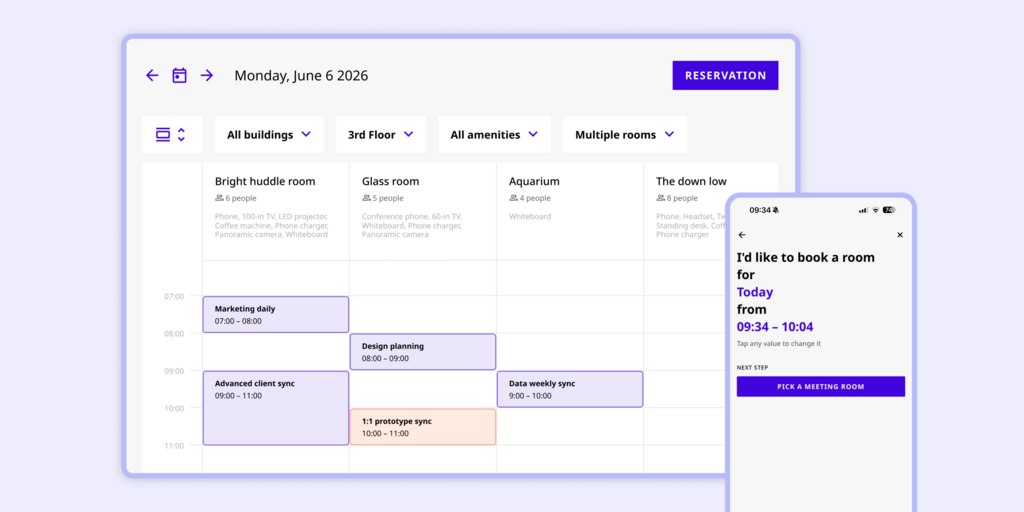
This answers the two DeskFlex problems that hit day to day. Joan displays run on batteries, so there is no cable run to each door. And because the display shows status and takes bookings on the spot, adoption does not depend on people downloading an app.
What makes Joan stand out
- No cabling, installs in minutes: Joan ePaper displays are battery-powered and mount without power outlets or Ethernet runs.
- Booking works without the app: employees book from Outlook, Google Calendar, Teams, Slack or the meeting room display itself.
- Physical visitor badges: the Joan ePaper badge is issued at check-in, a feature very few competitors offer.
- No space cap: pricing scales by active users and devices, not by how many desks and rooms you add.
Joan pricing
Plans start at $51/month. Additional users are $1.09/user/month and additional device licences are $10.99/device/month (annual billing). Employees who book only through Outlook or Google Calendar are not billed. Every feature is included, with no tier gates. ePaper hardware is a one-time purchase, separate from the subscription, with a 30-day money-back guarantee. See current pricing.
Joan limitations
- Hardware is a one-time investment: the full Joan experience means buying ePaper displays, so the upfront cost is higher than a software-only tool.
- Focused on booking and presence, not a full IWMS: Joan does not cover lease management, maintenance ticketing or CAD floor plan editing.
Best for: Any organisation managing physical workspaces, from a small team with a few rooms to a global enterprise across hundreds of locations.
2. OfficeSpace — Best for large enterprises that need space planning and move management
OfficeSpace Software is an enterprise workplace platform. It covers desk and room booking, visitor management, move management and detailed space planning. Real estate and facilities teams in large companies use it to plan where teams sit.
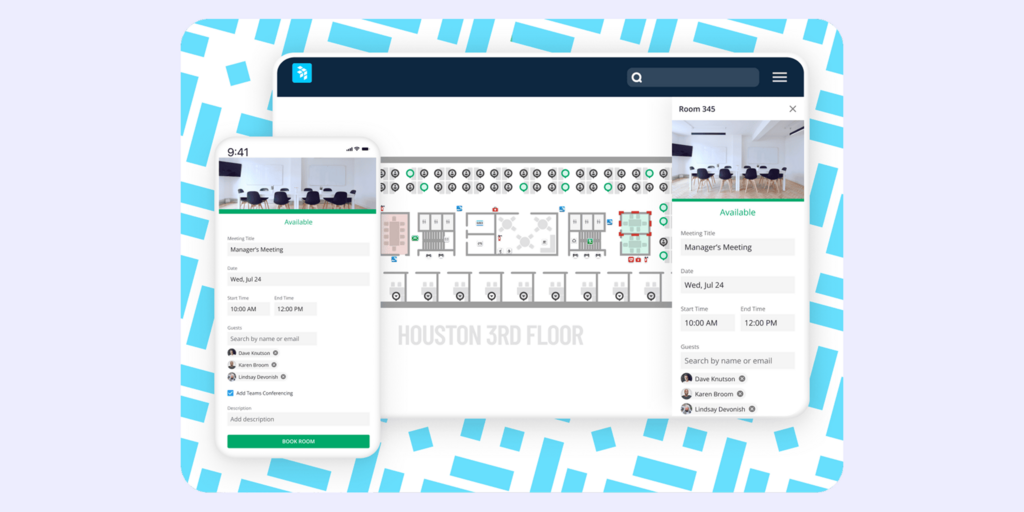
What makes OfficeSpace stand out
- Move management and stack planning go deeper than most booking tools.
- Strong space utilisation reporting for real estate decisions.
- Built for multi-site enterprises with complex org structures.
OfficeSpace pricing
No public pricing. OfficeSpace sells on custom quotes, and Vendr data puts the average contract at about $22,000 per year. There is no free trial. Verify current pricing at OfficeSpace’s website before purchasing.
OfficeSpace limitations
- You pay for employees who rarely come in: per-user billing does not match hybrid attendance.
- Floor plan changes go through their team: edits are sent to OfficeSpace rather than made by your admins.
- Long rollout: the official timeline is 35 days, and reviewers report closer to 60.
Best for: Enterprises with a dedicated real estate team that needs move management, not just booking.
Looking for OfficeSpace alternatives instead? See our Best OfficeSpace alternatives →
3. Robin — Best for enterprises with 500+ employees on Microsoft 365
Robin is a hybrid workplace platform covering desk, room, parking and locker booking, visitor management, analytics and wayfinding. Robin says its ideal customer has 500+ employees across multiple floors or buildings.
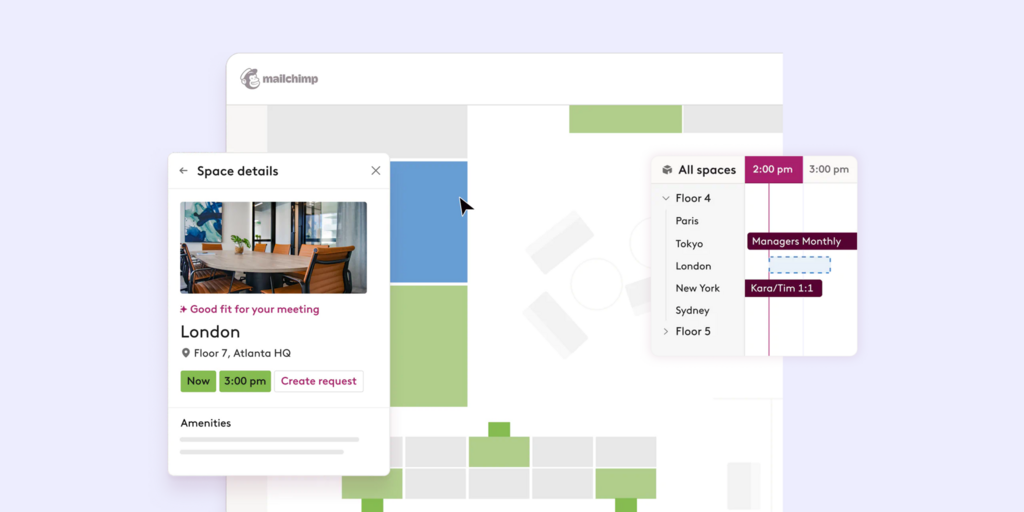
What makes Robin stand out
- Broad platform that replaces several point tools.
- Deep calendar and Microsoft 365 workflows.
- Strong analytics for space planning across buildings.
Robin pricing
No public pricing. Robin sends custom quotes after a sales call, and all subscriptions are billed annually. Verify current pricing at Robin’s website before purchasing.
Robin limitations
- No price until you talk to sales: no public tiers and no free trial.
- Built for large offices: the stated focus on 500+ employees leaves smaller teams with more platform than they need.
- Friction in Microsoft environments: multiple reviewers report sync issues despite the M365 focus.
Best for: Large hybrid enterprises that want one vendor for booking, visitors and analytics, and have budget for an annual contract.
Looking for Robin alternatives instead? See our Best Robin alternatives →
4. Eptura Engage (formerly Condeco) — Best for large companies deep in Outlook
Eptura Engage is the room and desk booking product formerly known as Condeco. It is a mature enterprise tool with a long history in Outlook-based room booking. It now sits inside the wider Eptura portfolio.
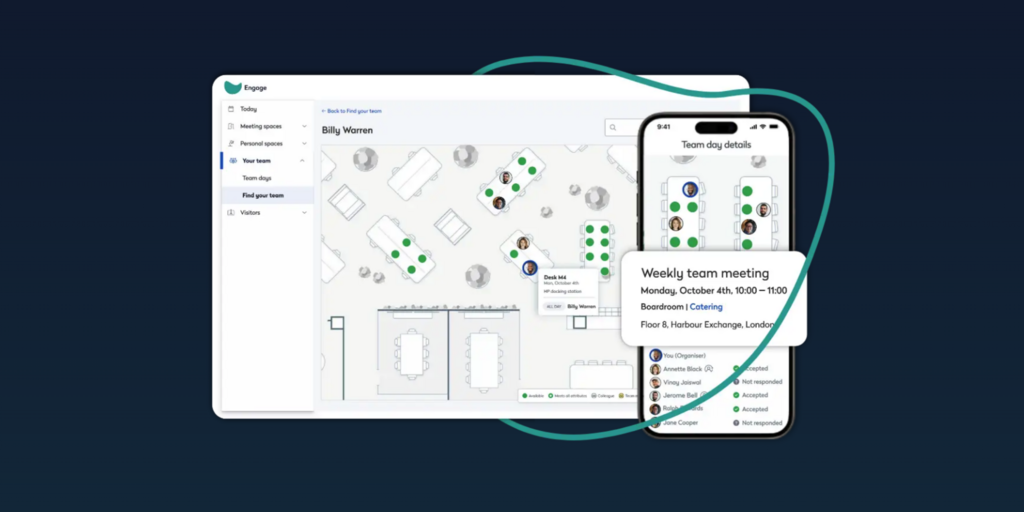
What makes Eptura Engage stand out
- Long track record with large, global enterprises.
- Outlook add-in and Microsoft Teams booking on the Power tier.
- Room and desk screens available as a hardware add-on.
Eptura Engage pricing
No public pricing. Eptura lists two tiers, Advanced and Power, and quotes both on request. Industry estimates based on enterprise contracts suggest roughly $10–$15/user/month for large deployments, plus professional services. Verify current pricing at Eptura’s website before purchasing.
Eptura Engage limitations
- The Outlook add-in can break: one enterprise user on Capterra noted it stopped working “for the second time in 6 months.”
- Reporting is weak: a long-term customer called the reporting function “dire,” with no custom attributes in reports.
- Slow product updates: reviewers say the product has not kept pace since the Eptura acquisition.
Best for: Large organisations already standardised on Outlook that need enterprise contracts and global support.
Looking for Condeco alternatives instead? See our Best Condeco alternatives →
5. YAROOMS — Best for mid-size teams that want on-premise deployment
YAROOMS is a hybrid scheduling platform for desks, rooms and team planning, with an AI assistant called Yarvis. Like DeskFlex, it suits buyers who care about where their data is hosted. The Enterprise plan supports Azure, AWS or on-premise deployment.
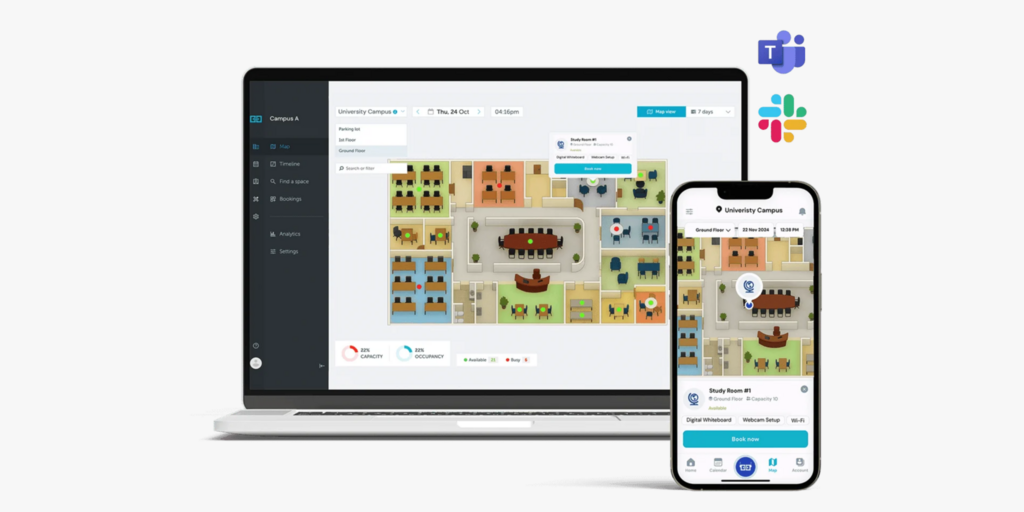
What makes YAROOMS stand out
- Public, tiered pricing.
- On-premise or private cloud hosting on Enterprise.
- Its own meeting room and lobby displays, sold as add-ons.
YAROOMS pricing
Starter is $99/month (20 users, 1 location), Business is $399/month (200 users, 2 locations) and Enterprise is $899/month (unlimited users, 5+ locations). Annual billing saves 20%. Visitor management is a separate product at $99/location/month. Verify current pricing at YAROOMS’ website before purchasing.
YAROOMS limitations
- Visitor management costs extra per location: $99/location/month on top of the plan.
- A third office forces a big jump: Business covers 2 locations, so a third site means moving to Enterprise.
- Analytics are missing on Starter: reporting starts on Business, with 90-day data retention.
Best for: Mid-size companies that need on-premise hosting and are happy to add visitor management separately.
Looking for YAROOMS alternatives instead? See our Best YAROOMS alternatives →
6. Skedda — Best for simple space booking with a fixed space count
Skedda is a space booking tool for desks, rooms, parking and other shared spaces. It is popular with offices that want a clean booking flow and interactive floor plans without a long rollout.
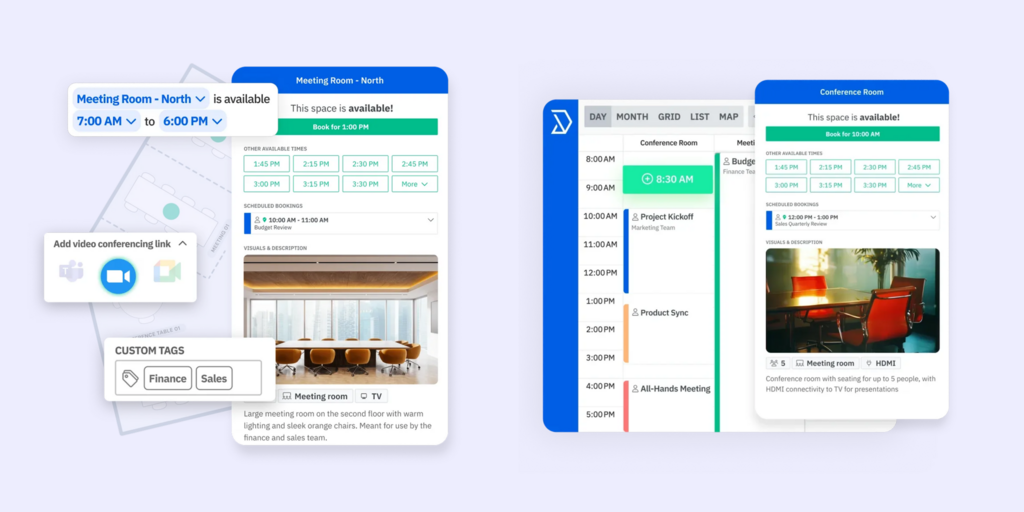
What makes Skedda stand out
- Unlimited users and bookings on every plan.
- Interactive floor plans and calendar sync with Microsoft 365 and Google Workspace.
- Fast to set up for a single office.
Skedda pricing
In the US and Canada, Plus starts at $249/month (35 spaces) and Premier at $349/month (45 spaces), billed annually. EMEA and APAC plans start at $99/month (15 spaces). Enterprise is custom. Visitor management is a $99/month add-on. Verify current pricing at Skedda’s website before purchasing.
Skedda limitations
- Every bookable resource counts toward the cap: desks, rooms, lockers and parking spots all use up spaces, the same problem as DeskFlex.
- Visitor management is an add-on: it costs $99/month on top of any plan.
- No physical displays: nothing shows live room or desk status at the door, so ghost meetings continue.
Best for: Single offices with a stable number of spaces that want simple booking and no hardware.
Looking for Skedda alternatives instead? See our Best Skedda alternatives →
7. Deskbird — Best for desk-first hybrid teams on a per-user budget
Deskbird is a hybrid work app focused on desk booking, with room and parking booking and a strong Microsoft Teams integration. It is priced per active user, which suits companies where many employees come in only some days.
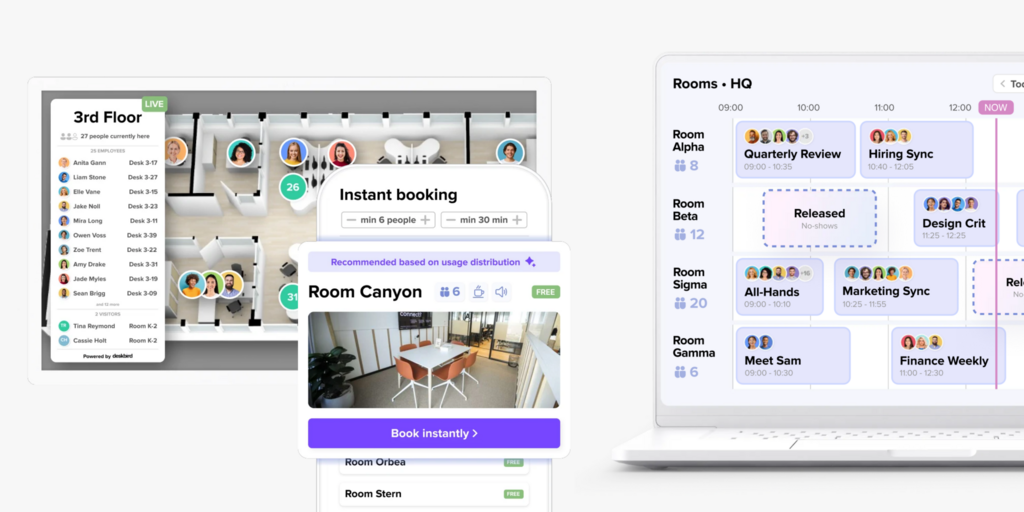
What makes Deskbird stand out
- Transparent per-active-user pricing.
- Native mobile apps and Teams integration on the base plan.
- A free Starter plan for up to 15 users.
Deskbird pricing
Business costs $3.75/active user/month billed annually ($4.75 monthly). Professional and Enterprise are custom. Visitor management, digital signage for rooms and SAML/SCIM are paid add-ons. Verify current pricing at Deskbird’s website before purchasing.
Deskbird limitations
- Key features are add-ons: visitor management, room signage and SSO provisioning are priced separately.
- Advanced analytics need a higher tier: Business includes only basic analytics.
- No room displays of its own: room status relies on existing screens or apps.
Best for: Desk-first hybrid teams that want low per-user pricing and work mainly in Microsoft Teams.
Looking for Deskbird alternatives instead? See our Best Deskbird alternatives →
How to choose the right DeskFlex alternative
If you want plenty of reviews from companies like yours
Pick a tool with a large public review base on G2 and Capterra. Read reviews from companies your size before you sign an annual contract.
If you need physical displays at the door
Joan is the only option here with purpose-built ePaper displays. They run on batteries, so you skip the Ethernet run to every door that DeskFlex PoE tablets need, and status stays readable in any light.
If on-premise hosting is a hard requirement
YAROOMS Enterprise supports on-premise, Azure or AWS deployment. Check this early, because most tools on this list are cloud-only.
If budget is the primary constraint
Deskbird has the lowest entry price and a free plan for up to 15 users. You give up included visitor management and room displays. Joan starts at $51/month with every feature included and no space cap, which often costs less once visitors and signage are in scope.
Why Joan is usually the best DeskFlex alternative
DeskFlex users run into three things: space caps, a mobile app employees skip, and displays that need cabling. Joan removes all three with one subscription and battery-powered hardware. There is no space cap, people can book from their calendar or the display, and installation takes minutes instead of an IT project.
Joan vs. DeskFlex: quick comparison
| Joan | DeskFlex | |
|---|---|---|
| Room booking | ✅ | ✅ |
| Desk booking | ✅ | ✅ |
| Visitor management | ✅ included, with Joan ePaper badge | ✅ included, badge printing |
| Physical displays | ✅ ePaper, battery-powered (Joan 6 RE, Joan 6 Pro, Joan 13 Pro, Joan ePaper badge) | ⚠️ PoE tablets (cable to each door), 16″ lobby kiosk |
| Digital signage | ✅ | [verify] |
| Parking and asset booking | ✅ | ✅ |
| Analytics | ✅ built into all plans | ✅ all plans |
| SSO | ✅ | ✅ Google Workspace, Microsoft Entra, Okta |
| Pricing model | Users + devices, no space cap | Spaces: 25 (Growth), 50 (Professional), 100+ custom |
| Public pricing | ✅ | ✅ Growth and Professional; Enterprise custom |
| Trial | ✅ 30-day free trial | Not listed on pricing page |
| Calendar integrations | Microsoft 365, Google Workspace, Teams, Slack | Microsoft 365, Outlook, Teams, Google Workspace |
Based on public information, October 2026.
Ready to make the switch?
Joan is free to try for 30 days, with no commitment. Set it up next to your current DeskFlex rollout and see how your team books with ePaper displays at the door.
Frequently asked questions about DeskFlex alternatives
Is there a free DeskFlex alternative?
Deskbird has a free Starter plan for up to 15 users, which works for very small desk-booking setups. Joan isn’t free long-term but offers a 30-day free trial of the full platform. That includes room booking, desk booking, visitor management and digital signage.
How much does DeskFlex cost?
DeskFlex Growth costs $50/month for up to 25 spaces and Professional costs $75/month for up to 50 spaces, sold as annual subscriptions. Enterprise is custom for 100+ spaces. Every desk and room counts as a space, and each plan includes only one or two floor plans. Some software directories still list an older price of $99.92 per user per year, so confirm the current model with DeskFlex.
What is DeskFlex’s biggest limitation?
The space cap is the main constraint for growing offices. Adding desks, rooms or floors pushes you into a higher plan or a custom quote. Buyers also have very few independent reviews to check, with one verified review on Capterra.
Does DeskFlex have physical room displays?
Yes. DeskFlex sells room displays that run on Power over Ethernet and a 16-inch lobby kiosk. PoE displays need a network cable at every door. Joan ePaper displays are battery-powered and install in minutes without cabling.
What’s the best DeskFlex alternative for small teams?
For a handful of desks, Deskbird’s free plan or YAROOMS Starter at $99/month are low-cost options. Joan makes sense at small scale too, because the $51/month plan includes every feature and adding rooms or desks never hits a cap.
Who makes DeskFlex, and is it the same as other “Deskflex” products?
DeskFlex (deskflex.com) is desk hoteling and room scheduling software from Epazz, Inc., a software company headquartered in Chicago. It is not related to other products with similar names, such as KVM switches or desk accessories. This page compares DeskFlex the workplace booking software.
Page last updated: October 2026. Pricing verified from public sources. Always confirm live pricing directly with each vendor before purchasing.
About the author
