
Best Humly Alternatives in 2026
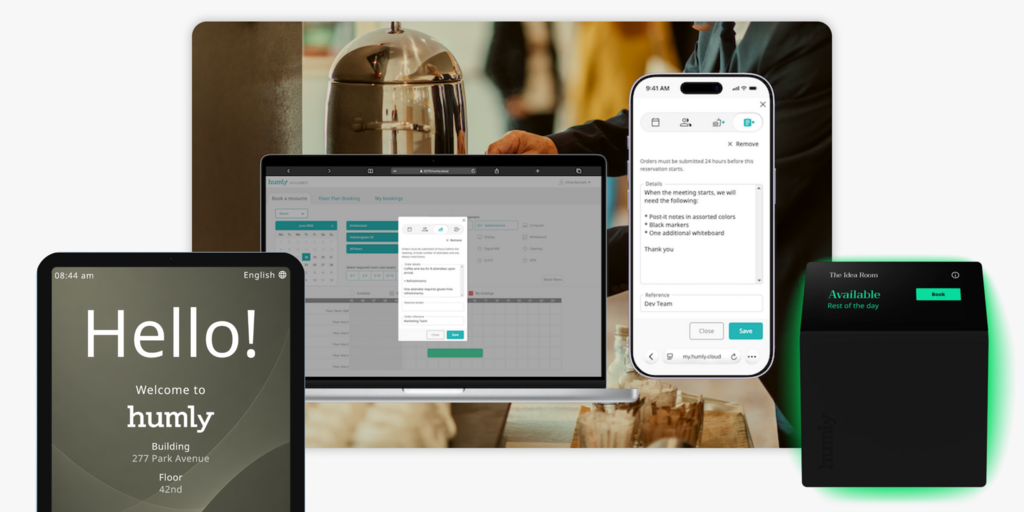
Humly builds some of the most polished room booking hardware on the market. The Swedish company’s LCD displays are award-winning, the build quality is enterprise-grade, and the ecosystem — rooms, desks, visitors, wayfinding, IoT analytics — covers a lot of ground. For organisations that prioritise design and security (it holds ISO 27001, 9001, and 14001 certifications), Humly is easy to justify.
But two things make teams start shopping around. First, Humly does not publish pricing. The entire product line is sold through AV resellers and partners; the only public number on the website is a starting price for a five-pack of Booking Devices. Room Display licenses, Visitor, Wayfinding, and Sense are all contact-reseller territory. Second, Humly Room Display runs on Power over Ethernet — no battery option exists — which means every room door needs a PoE switch or a separate power run before you can hang a single panel.
Neither of those is a dealbreaker for everyone. But if your team is evaluating workplace tech and can’t get a clear price without a sales call, or you’re retrofitting an older building where running ethernet to meeting room doors is a project in itself, the friction adds up fast.
We’ve compared six alternatives across pricing, hardware, features, setup complexity, and fit — so you can make the switch (or make an informed stay) confidently. Joan is included and we’ll explain who each tool is actually best for.
If you’re also evaluating Logitech Tap Scheduler, see our Best Logitech Alternatives →.
Quickly jump to:
- Why teams start looking for Humly alternatives
- Quick comparison table
- The 6 best Humly alternatives in 2026
- How to choose the right Humly alternative
- Joan vs. Humly: Quick comparison
- Frequently asked questions about Humly alternatives
Why teams start looking for Humly alternatives
No public pricing — everything goes through resellers
Humly’s Room Display is sold exclusively through AV integrators and certified partners. You can request a demo, find a dealer, and get a quote — but you cannot see a price on the website. The only exception is the Booking Device package (from $249 per unit in packs of five, which includes one year of the Humly Access license). After year one, renewal costs for Room Display licenses and platform add-ons are quoted by the reseller. Teams used to SaaS pricing pages find this model harder to budget and slower to approve — particularly when IT or finance teams want to run a quick self-serve comparison before involving procurement.
LCD displays require PoE infrastructure
The Humly Room Display is an 8-inch LCD IPS touchscreen. It runs on Power over Ethernet (PoE IEEE 802.3af/at) or a 12V barrel jack adapter — the PoE adapter is sold separately. This means deploying Humly in a building without PoE switches already at each meeting room requires either a cabling project or a device-by-device power adapter run. A consistent complaint from facilities teams is that the infrastructure requirement slows rollout and increases project scope well beyond the hardware itself. There is no battery-powered Humly Room Display option.
Per-module licensing stacks up without a single bill
Humly’s ecosystem spans Room Display, Booking Device, Reservations (desk booking), Visitor, Wayfinding, Floor Plan, Sense (IoT/analytics), and QR Booking. Each component carries its own license. For teams that want the full platform — not just a room panel — the cost compounds module by module, and each piece is priced and quoted through a reseller rather than consolidated into a single subscription. The Visitor product itself debuted publicly at ISE 2026, so teams that adopted Humly primarily for room booking before that may be looking at a new licensing conversation to add guest management capabilities.
Quick comparison table
| Tool | Best for | Type | Room booking | Desk booking | Visitor management | Starts at |
|---|---|---|---|---|---|---|
| Joan | Offices wanting battery-powered ePaper displays + full platform in one subscription | Hardware + software | ✅ | ✅ | ✅ | From €49/month |
| Robin | Large enterprises needing hybrid scheduling layers | Software | ✅ | ✅ | ❌ | Contact |
| Skedda | Teams wanting transparent, per-space pricing | Software | ✅ | ✅ | ✅ add-on | From $99/month |
| Deskbird | Desk-forward hybrid offices on per-user pricing | Software | ✅ | ✅ | ✅ add-on | From €2.75/user/month |
| Envoy | Visitor-first workplaces with modular workspace needs | Software | ✅ | ✅ | ✅ | Contact |
| YAROOMS | Hybrid work scheduling + space management | Software | ✅ | ✅ | ✅ | Contact |
| Humly | Enterprise offices wanting premium LCD room displays with IoT analytics | Hardware + software | ✅ | ✅ | ✅ | Contact reseller |
The 6 best Humly alternatives in 2026
1. Joan — Best for teams that want battery-powered ePaper displays and a full workspace platform in one subscription
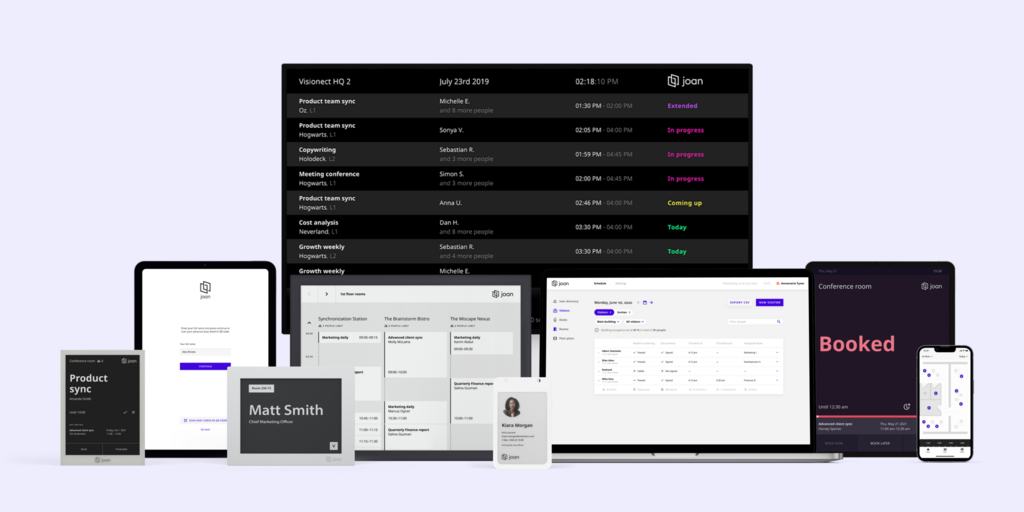
Joan builds both the hardware and the software in a single system, which means you’re not assembling a platform from modules and reseller quotes. The hardware lineup — Joan 6 RE, Joan 6 Pro, Joan 13 Pro — runs on batteries (months per charge, no PoE required, installs in minutes without cabling). The Joan ePaper badge extends the same battery-powered hardware philosophy to visitor management: a physical, ePaper badge issued to visitors on arrival, which very few competitors in the market offer. The software platform covers rooms, desks, visitor management, digital signage, parking, asset reservations, and analytics — all under one subscription, with no feature gating by plan tier.
What makes Joan stand out
- Battery-powered ePaper displays install in minutes without PoE infrastructure — Joan 6 RE, Joan 6 Pro, and Joan 13 Pro run on batteries for months per charge; no cabling project, no PoE switches, no power adapter runs. Stick the display to the wall and you’re done.
- The Joan ePaper badge is a hardware differentiator no panel-only competitor has — physical visitor badges are issued at check-in and powered by ePaper; they look professional, work without charging, and make visitor management tangible rather than just a screen tap.
- Joan AI Agent for Microsoft Teams books rooms and desks inside a Teams conversation — employees type a request in Teams chat and Joan finds the space, checks availability, and confirms the booking without leaving the app.
- One subscription, all features — pricing is based on users and devices, not which features are active; analytics, visitor management, signage, desk booking, and room booking are all included without add-ons.
Joan pricing
Joan pricing starts from €49/month for the base plan, with additional users at €0.99/user/month and additional device licences at €9.99/device/month. All features are included in every plan — nothing is gated by tier. Hardware (Joan 6 RE, Joan 6 Pro, Joan 13 Pro, Joan ePaper badge) is a separate one-time purchase. A free 30-day trial is available with no commitment. See current pricing at getjoan.com/pricing.
Joan limitations
- Upfront hardware investment: the full ePaper experience means purchasing displays. For teams that want a pure software-only solution, Joan works on any existing display via the Joan platform, but the cable-free ePaper advantage only comes with Joan devices.
- Joan is a booking and presence platform, not a full IWMS. It does not cover lease management, maintenance ticketing, or CAD floor plan editing.
Best for: Any organisation managing physical workspaces — from a small office with a handful of rooms to a global enterprise across hundreds of locations. No minimum size.
Start your free Joan trial here.
2. Robin — Best for large enterprises needing hybrid scheduling and space intelligence
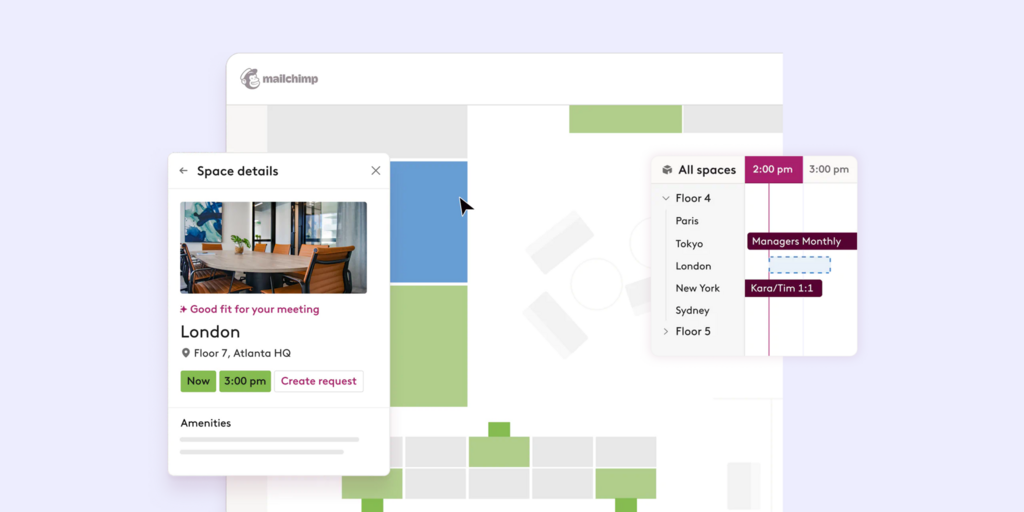
Robin is a workplace platform built for complex, multi-location organisations. It layers a hybrid scheduling and team-coordination system on top of room and desk booking — employees can see who’s coming in on a given day, find where their team is sitting, and book space around actual presence data. Robin integrates deeply with Outlook, Google Calendar, and Teams.
What makes Robin stand out
- Hybrid work coordination layer shows team schedules alongside space availability, which helps employees plan in-office days around who else will be there
- Strong analytics and occupancy reporting for enterprise IT and facilities teams
- Native integrations with Slack, Teams, Outlook, and Google Calendar; SAML SSO and SCIM support for large directory setups
Robin pricing
Robin does not publish pricing publicly. The platform is generally suited for organisations of 500+ employees and is positioned at the enterprise end of the market. Contact robinpowered.com for a quote.
Robin limitations
- No visitor management — Robin does not include guest check-in or visitor badge workflows; visitor management needs a separate tool.
- Pricing is enterprise-only and opaque — the lack of published pricing makes early-stage budget conversations difficult, and the minimum viable deployment tends to be larger than mid-market teams need.
- No proprietary room display hardware — Robin is software-only; room display requires a third-party tablet (iPad, Android) which brings ongoing charging, maintenance, and breakage exposure.
Best for: Enterprises of 500+ employees with complex hybrid work coordination needs and an existing AV/IT infrastructure for room displays.
Looking for Robin alternatives instead? See our Best Robin Alternatives.
3. Skedda — Best for teams wanting transparent, per-space pricing without hardware commitment
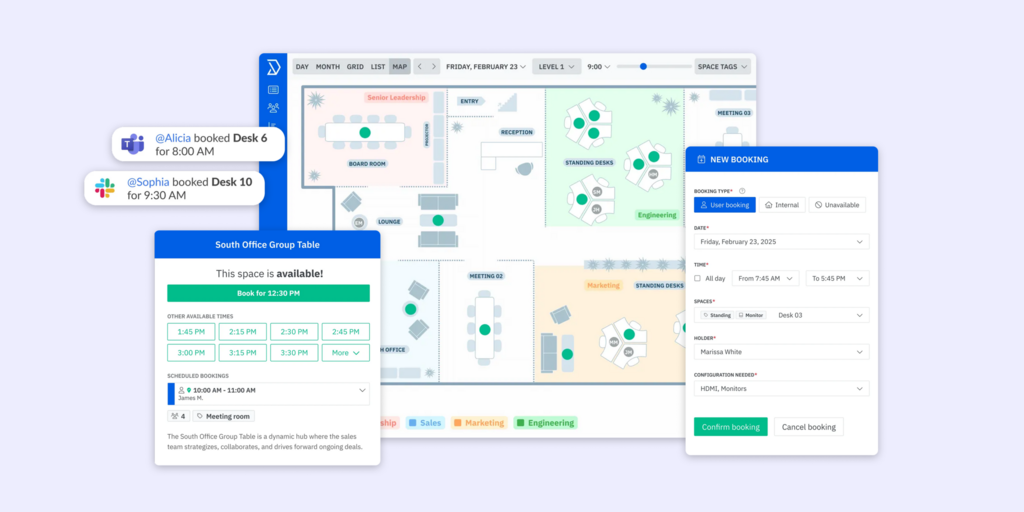
Skedda is a space booking platform with one of the most clearly structured pricing pages in the category. Plans are per space rather than per user, which makes budgeting predictable for offices with a stable number of rooms and desks. The platform covers room booking, desk booking, floor plans, and (as an add-on) visitor management. There is no proprietary hardware — displays run on tablets.
What makes Skedda stand out
- Per-space pricing model is transparent and easy to model: Starter at $99/month covers 15 spaces, all users and bookings included
- Interactive floor plans available on all paid tiers, which helps employees navigate larger offices visually
- Solid rules engine for controlling who can book which spaces and when; booking conditions, quotas, and approval flows are configurable without IT involvement
Skedda pricing
Skedda Starter plan starts at $99/month (billed annually), covering 15 spaces with unlimited users and bookings. Plus starts at $149/month (20 spaces), Premier at $199/month (25 spaces). Visitor management is a $99/month add-on on top of any plan. See full pricing at skedda.com/pricing.
Skedda limitations
- Visitor management is a separate add-on cost — $99/month on top of the base plan; not included in any tier by default.
- No proprietary hardware — Skedda runs on tablets (iPad, Android); no purpose-built room display, no ePaper option, no badge printing; tablet maintenance falls to the team.
- No digital signage — Skedda does not support workplace signage or content management; a separate CMS tool is needed.
Best for: Teams that want transparent, predictable per-space pricing for room and desk booking and are comfortable running displays on existing tablets.
Looking for Skedda alternatives instead? See our Best Skedda Alternatives.
4. Deskbird — Best for hybrid offices prioritising desk booking and per-user pricing
Deskbird is a desk-forward hybrid workplace platform. Its Business plan covers desk booking, room booking, and parking out of the box at €2.75/user/month (annual), which makes it one of the more accessible per-user price points in the category. Visitor management and room display signage are available as paid add-ons (Visitors Plus and Rooms Plus).
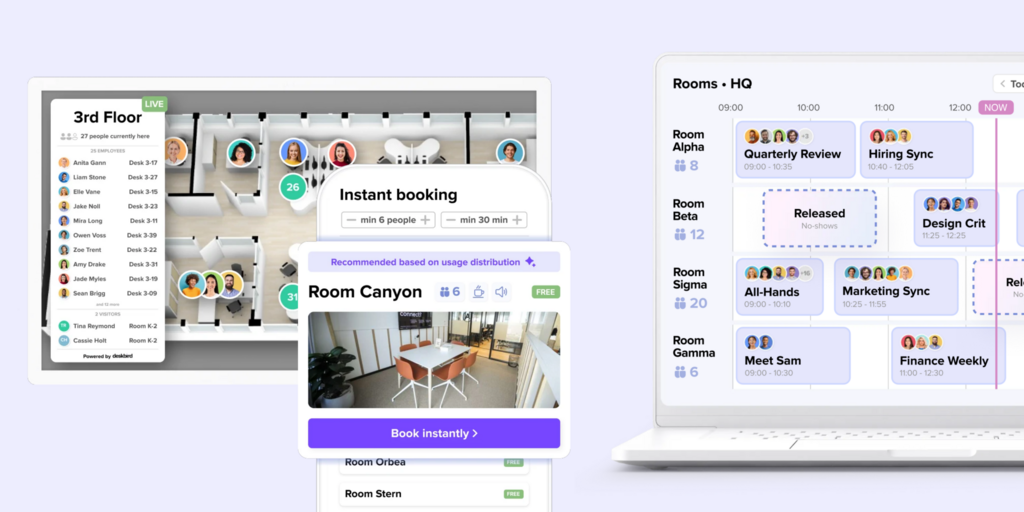
What makes Deskbird stand out
- Per-user pricing at €2.75/user/month (annual) is among the lowest publicly listed rates in the category for a platform that includes both desk and room booking
- Native Microsoft Teams and Slack apps mean employees book without switching context; Outlook add-in is also included
- AI-powered floor plan designer and smart booking recommendations help employees find desks near their team without manual searching
Deskbird pricing
Deskbird Business plan: €2.75/user/month (annual) or €3.50/user/month (monthly). Professional and Enterprise plans are custom pricing. Visitor management (Visitors Plus) and room display kiosk mode (Rooms Plus) are add-ons beyond the base plan. See current pricing at deskbird.com/pricing.
Deskbird limitations
- Visitor management requires a paid add-on — the Visitors Plus add-on is not included in the Business plan; pre-visit registration, kiosk check-in, and Teams notifications all require upgrading.
- Room display kiosk mode (Rooms Plus) is also an add-on — interactive kiosks on meeting room displays, catering requests, and service manager roles are not part of the base plan.
- No proprietary hardware — Deskbird is software-only; like Skedda and Robin, displays depend on third-party tablets.
Best for: Desk-first hybrid offices that want transparent per-user pricing and native Teams/Slack integrations, and are comfortable adding visitor management as a separate line item.
Looking for Deskbird alternatives instead? See our Best Deskbird Alternatives .
5. Envoy — Best for visitor-first workplaces with modular workspace needs
Envoy started as a visitor management platform and has built out room and desk booking on top. The visitor experience is the strongest part of the product — pre-registration, branded check-in, host notifications, NDA signing, and detailed visitor logs are all well-developed. Workspace management (rooms, desks) layers on as additional modules. iPad kiosks are the primary hardware option.
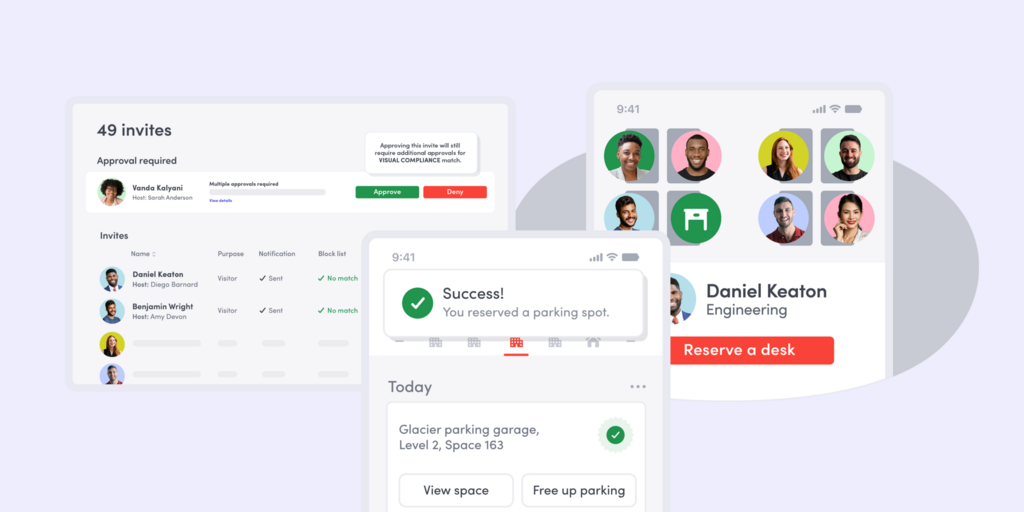
What makes Envoy stand out
- Visitor management is the most mature part of the platform and covers the full guest lifecycle: pre-registration, check-in kiosk, host notification, badge printing, compliance logging
- Modular structure lets organisations start with visitor management and add rooms and desks as needed
- Strong enterprise integrations: Slack, Teams, Active Directory, Okta, and access control systems
Envoy pricing
Envoy does not publish pricing publicly. Contact envoy.com for current rates. Plans are modular — pricing varies based on which features (visitors, rooms, desks) are activated and at what scale.
Envoy limitations
- iPad-only kiosk hardware — Envoy check-in is iPad-based; no ePaper displays, no purpose-built room panels; iPads require charging, software updates, and physical security considerations.
- Modular pricing means costs compound — activating visitor management, room booking, and desk booking as separate modules often results in a higher total cost than bundled platforms, and the lack of public pricing makes this hard to model upfront.
- No ePaper room displays — Envoy does not have purpose-built room booking hardware; room booking relies on the software platform and third-party displays.
Best for: Organisations where the visitor experience is the primary requirement and workspace booking is secondary; particularly suited to offices with a high volume of external guests.
Looking for Envoy alternatives instead? See our Best Envoy Alternatives .
6. YAROOMS — Best for hybrid work scheduling and team coordination
YAROOMS combines space booking with hybrid work scheduling — employees can set their work location for each day (office, home, or other), and managers get a view of who is coming in and when. Room and desk booking sits alongside this attendance planning layer. The platform also includes visitor management, hot desk booking, and a meeting room booking interface.
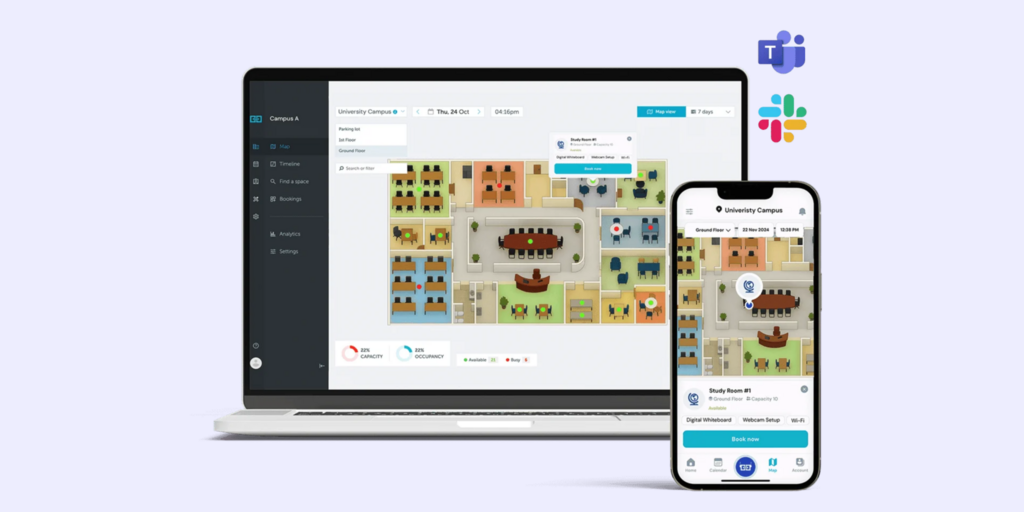
What makes YAROOMS stand out
- Hybrid work scheduling and space booking in one tool: employees plan their week, the platform surfaces who is in the office, and room/desk booking is built into the same interface
- Visitor management is included in the platform, not a separate add-on
- Multi-location support with a single admin interface for managing multiple offices and their booking rules
YAROOMS pricing
YAROOMS does not publish pricing publicly. Contact yarooms.com for current rates based on team size and feature requirements.
YAROOMS limitations
- No proprietary hardware — YAROOMS is software-only; room displays require tablets or third-party screens; no purpose-built ePaper or LCD room panel.
- No digital signage CMS — YAROOMS does not have a built-in signage content management system; workplace communications screens need a separate tool.
- Pricing opacity — like Envoy and Robin, the absence of public pricing makes budget comparison harder at the research stage.
Best for: Mid-market teams building out a hybrid work scheduling layer alongside room and desk booking, particularly where managers need visibility into in-office attendance patterns.
How to choose the right Humly alternative
If transparent pricing is the deciding factor
Joan and Skedda are the clearest options. Joan pricing is published at getjoan.com/pricing and scales on users and devices with all features included. Skedda pricing is per space and straightforward to model. Both let you run a budget scenario without a sales call.
If cable-free hardware is the priority
Joan is the only alternative on this list with battery-powered ePaper room displays. Joan 6 RE, Joan 6 Pro, and Joan 13 Pro install with no cabling, no PoE infrastructure, and no power runs — the display attaches to the wall and runs for months. For older buildings or for teams that want to deploy fast without an infrastructure project, this removes a significant deployment obstacle.
If rooms, desks, signage, and visitor management need to be on one platform
Joan covers all of this in a single subscription. Room booking, desk booking, visitor management (including the ePaper badge), digital signage, and analytics are all included. The Joan AI Agent for Microsoft Teams adds a conversational booking layer for Teams-heavy organisations.
If budget is the primary constraint
Deskbird Business at €2.75/user/month is the lowest publicly listed rate that covers both desk and room booking. Note that visitor management and room display kiosks are add-ons. Skedda Starter at $99/month covers 15 spaces with unlimited users. Joan starts from €49/month with all features included.
If complex enterprise security or regulated industry compliance is required
Humly is purpose-built for this segment — ISO 27001, 9001, and 14001 certified, with a Max Security hardware variant that physically disables WiFi/Bluetooth and USB ports. For defence contractors, healthcare, or government offices with strict endpoint security requirements, Humly’s security posture is a genuine differentiator. Joan is ISO 27001 compliant and suitable for enterprise, but does not offer a hardened hardware variant at Humly’s Max Security level.
Why Joan is usually the best Humly alternative
The two core reasons teams leave Humly for Joan are pricing transparency and cabling overhead. Joan pricing is published, simple, and includes everything. Joan ePaper displays go up in minutes with no infrastructure project. And Joan’s scope matches Humly’s — rooms, desks, visitors, analytics, signage, and now the Joan AI Agent for Teams — under one subscription rather than a per-module reseller quote. For organisations that do not need Humly’s Max Security hardware variant or the IoT air quality sensors built into the Humly Room Display, Joan delivers a comparable (and in some areas broader) platform at a more predictable cost.
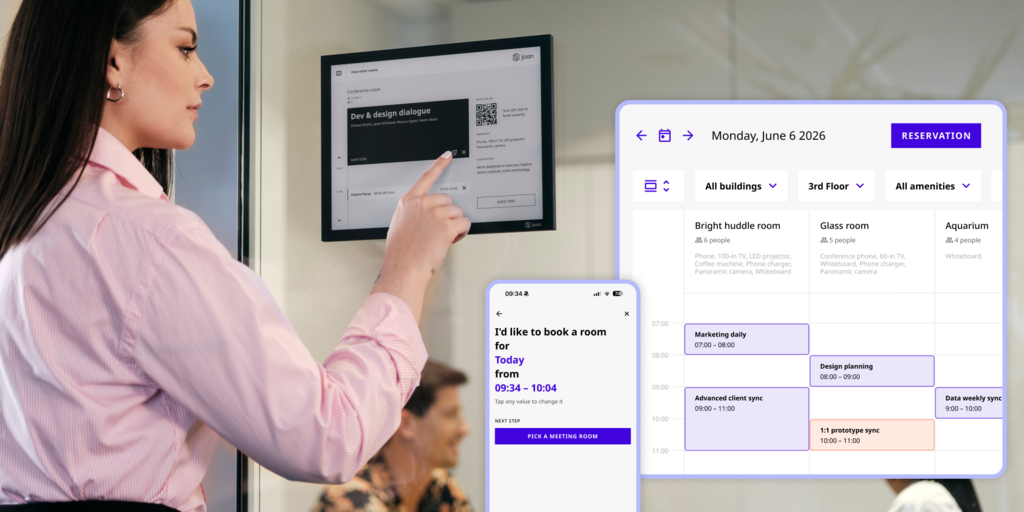
→ Also comparing other tools? See all Joan workspace comparisons:
- Best Robin Alternatives
- Best Skedda Alternatives
- Best Envoy Alternatives
- Best Logitech Alternatives
- Best Microsoft Places Alternatives
Joan vs. Humly: quick comparison
| Joan | Humly | |
|---|---|---|
| Room booking | ✅ | ✅ |
| Desk booking | ✅ | ✅ |
| Physical room displays | ✅ ePaper — Joan 6 RE, Joan 6 Pro, Joan 13 Pro (battery-powered, months per charge) | ✅ LCD — Humly Room Display (8″ IPS, PoE or power adapter required) |
| Desk booking hardware | ✅ Joan ePaper badge (visitor) | ✅ Humly Booking Device (LCD, from $249/unit pack of 5) |
| Display technology | ePaper — readable in any light, no screen burn, no charging | LCD IPS — requires power infrastructure |
| Power requirements | Battery-powered — no cabling needed | PoE (PoE adapter sold separately) or 12V barrel jack |
| Visitor management | ✅ Built-in — includes Joan ePaper badge issued at check-in | ✅ Humly Visitor (debuted ISE 2026) — Standard and Professional tiers |
| Digital signage | ✅ Full CMS for ePaper and LCD displays | ❌ Wayfinding only — no general-purpose CMS |
| Parking & asset reservations | ✅ | ❌ |
| Floor plans / wayfinding | ✅ | ✅ Humly Floor Plan + Wayfinding |
| IoT air quality sensors | ❌ | ✅ Humly Sense (CO₂, temperature, humidity, occupancy) |
| Calendar integrations | Microsoft 365, Google Workspace, Teams, Slack, Exchange | Microsoft 365, Teams, Google Workspace, Exchange, Appspace, Nexudus |
| Analytics | ✅ Built into all plans | ✅ Humly Sense / Control Panel analytics |
| Pricing model | One subscription, all features included; scales by users and devices | Per-module licensing through AV resellers; no public pricing |
| Pricing transparency | ✅ Published at getjoan.com/pricing | ❌ Contact reseller for quote |
| Security certifications | ISO 27001 | ISO 27001, ISO 9001, ISO 14001; Max Security hardware variant available |
Ready to make the switch?
Joan is free to try for 30 days — no commitment, no credit card required, full platform access from day one. If you’ve been waiting on a Humly quote from a reseller, you can have Joan running in your office today.
Start your free Joan trial here.
Frequently asked questions about Humly alternatives
Is there a free Humly alternative?
None of the tools in this comparison offer a permanent free tier for business use. Deskbird and Skedda both offer free trials. Joan offers a 30-day free trial of the full platform with no credit card required. Deskbird has a limited Starter tier (up to 15 users) after the trial period.
How much does Humly cost?
Humly does not publish pricing. The only public price point is the Humly Booking Device package starting from $249 per unit (sold in packs of five), which includes one year of the Humly Access license. Room Display licensing, Visitor, Wayfinding, Sense, and ongoing license renewals are all quoted through authorised AV resellers and partners. Contact humly.com or find a local dealer for a quote.
What is Humly’s biggest limitation?
Two issues come up most consistently. First, the lack of public pricing — the entire ecosystem is sold through resellers, making self-serve budget research difficult and slowing procurement timelines. Second, the Room Display’s power dependency — it runs on PoE or a barrel jack adapter, with no battery option, which means deploying in a building without existing PoE infrastructure at each door requires a cabling or infrastructure project.
Does Humly have physical room displays?
Yes. The Humly Room Display is an 8-inch LCD IPS touchscreen with RGB LED status indicators, RFID/NFC check-in support, air quality and occupancy sensors, and PoE connectivity. It requires Power over Ethernet or a 12V power adapter — there is no battery-powered option. Joan room displays use ePaper technology and run on battery power, making them a direct alternative for teams that want cable-free hardware.
What’s the best Humly alternative for small teams?
For small teams, Joan is the most accessible option that still includes physical displays — the Joan platform starts from €49/month and works with battery-powered ePaper displays that don’t require cabling. Skedda at $99/month is a strong software-only option for teams that don’t need proprietary hardware. Deskbird at €2.75/user/month is the most affordable per-user rate for desk and room booking combined.
Does Humly have visitor management?
Yes, but it is a newer addition. Humly Visitor launched publicly at ISE 2026 with Visitor Standard and Visitor Professional tiers, covering pre-registration, automated host communication, and visitor flow tracking. Teams that adopted Humly before 2026 primarily for room booking will need to add a Visitor license through their reseller. Joan visitor management — including the physical Joan ePaper badge — has been part of the Joan platform for longer and is included in the standard subscription.
Can Humly run on batteries?
No. The Humly Room Display requires Power over Ethernet (PoE IEEE 802.3af or at) or a 12V barrel jack power adapter, which is sold separately. There is no battery-powered option in the Humly hardware lineup. Joan 6 RE, Joan 6 Pro, and Joan 13 Pro all run on batteries for months per charge with no cabling required.
Page last updated: July 2026. Pricing verified from public sources — always confirm live pricing directly with each vendor before purchasing.
About the author
