
Best Yealink RoomPanel alternatives in 2027: Wired, wireless and Teams options compared
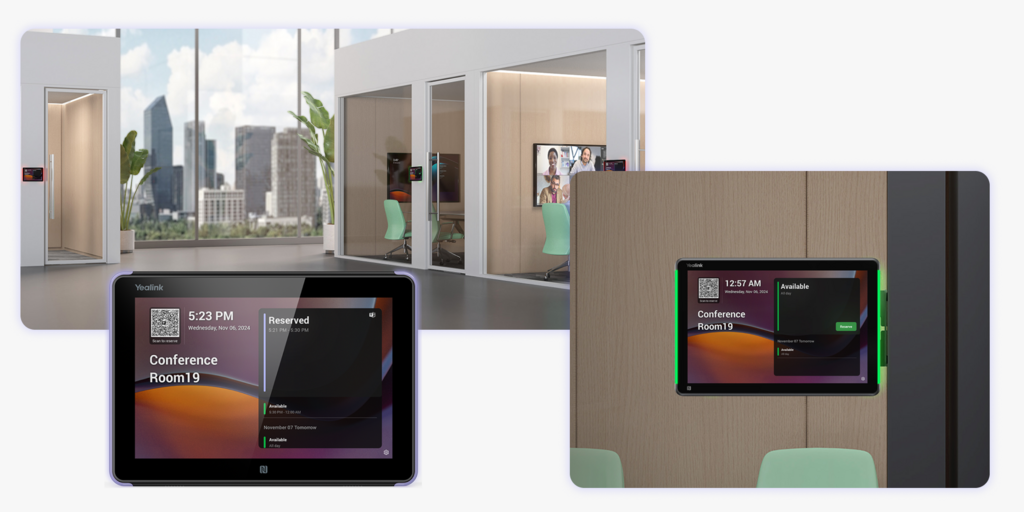
The Yealink RoomPanel is a family of meeting room scheduling panels: the 8-inch RoomPanel and RoomPanel E2, and the 10.1-inch RoomPanel Plus and Plus E2. They mount outside a room, show availability on an LCD touchscreen with an LED light bar, and run Microsoft Teams, Zoom or a third-party booking app. Yealink RoomPanel models appear on Microsoft’s list of certified Teams panels, and they are usually among the lowest-priced certified panels per unit.
Teams look past them for three reasons. Every panel needs a cable at the door, either PoE or a power adapter. In Teams mode each panel needs its own Microsoft license unless the room already has a Teams Rooms system. And the panel only books rooms: desks, visitors and signage need other products.
We compared seven Yealink RoomPanel alternatives on power options, Teams support, screen type, price per room and what each covers beyond the door. If you are also looking at other panel brands, see our Best Logitech alternatives and Best Humly alternatives.
Quickly jump to:
- Why teams start looking for Yealink RoomPanel alternatives
- Quick comparison table
- The 7 best Yealink RoomPanel alternatives in 2027
- How to choose the right Yealink RoomPanel alternative
- Joan vs. Yealink RoomPanel: quick comparison
- Frequently asked questions about Yealink RoomPanel alternatives
Why teams start looking for Yealink RoomPanel alternatives
A cable has to reach every door
Yealink powers the RoomPanel E2 over PoE or with the included power adapter. There is no battery model. Every room means a cable run to the mounting point, which is a quick job in a new fit-out and a harder one on glass walls, in leased space or in older buildings where drilling and new cabling need landlord or facilities approval.
Teams mode adds a license for every panel
Microsoft requires each Teams panel to have a Teams Rooms Pro or Teams Shared Device license. The exception is a room that already has a Teams Rooms system, where the panel signs in with that room account. Rooms without a video system still carry a per-panel license, so the panel price is only part of the cost per room.
It books rooms and nothing else
The RoomPanel is a door display. Desk booking, visitor check-in, digital signage and occupancy analytics come from whichever software runs behind it, or from separate products. Feedback on the panel itself is thin: a commenter on Microsoft’s Tech Community forum who deployed RoomPanels described the feature set as behind more mature panels and the interface as weak. Model churn is worth checking too: Microsoft’s certified panels list shows a certification end date of September 3, 2026 for the RoomPanel Plus.
Quick comparison table
| Tool | Best for | Power options | Screen | Certified Teams panel | Starts at |
|---|---|---|---|---|---|
| Joan | Rooms that need a choice of wired or wireless, plus desks, visitors and signage | Battery or PoE | ePaper | No (Microsoft 365 sync and Joan AI in Teams) | $51/month incl. 2 device licenses; extra devices $10.99/month each, plus one-time hardware |
| Logitech Tap Scheduler | Logitech Rally rooms on Teams or Zoom | PoE | LCD | Yes | $699 per panel + $199/room/year Essential plan |
| Neat Pad | Zoom Rooms estates on Neat hardware | PoE | LCD | Listed; check scheduling status | About $1,090 per panel (reseller) |
| Poly TC10 | Poly Studio X and G7500 rooms | PoE | LCD | Yes | About $1,070 to $1,880 per panel (resellers) |
| Cisco Room Navigator | Webex estates managed in Control Hub | PoE | LCD | Marketed as certified | From $1,195 per panel |
| Evoko Naso | Room panels with their own booking software | PoE or power supply | LCD | Not confirmed | About $875 with a 1-year room license |
| Humly | Panels with built-in air quality sensing | PoE | LCD | Integrates with Teams | Pricing on request |
| Yealink RoomPanel | Low-cost certified panels for Teams or Zoom | PoE or power adapter | LCD | Yes (check model) | About $699 to $769 per panel + license |
Joan pricing from getjoan.com/pricing, November 2026. Hardware prices are vendor or reseller list prices and vary by region; confirm with each vendor before purchasing.
The 7 best Yealink RoomPanel alternatives in 2027
1. Joan: Best for offices that want wired and wireless displays on one platform
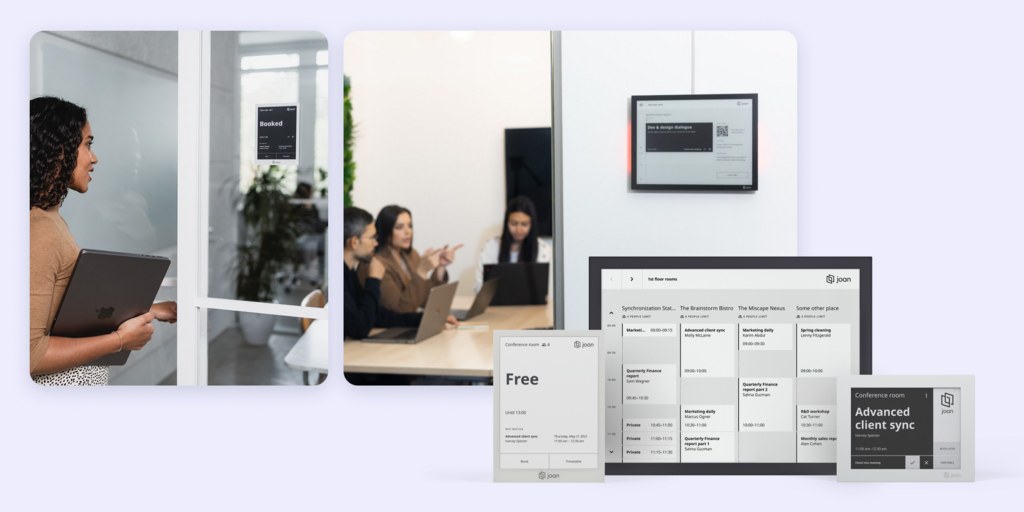
Joan makes its own ePaper meeting room displays and the platform behind them: room booking, desk booking, visitor management, digital signage, parking and asset booking. The difference that matters most against Yealink is power. The Joan 6 Pro and Joan 13 Pro run on battery or on a PoE wall mount with an LED occupancy light, and the Joan 6 RE runs on battery.
That means you choose per room. Wire the panels where IT standards call for PoE, and stick a battery display on a glass wall or in a leased office where nobody will approve a new cable. Both kinds run on the same platform and the same subscription.
What makes Joan stand out
- Wired or wireless, room by room: PoE wall mounts with LED occupancy lights for Joan 6 Pro and Joan 13 Pro, or battery power with no cable at all. The Joan 6 Pro runs up to 3 months per charge.
- No Microsoft Teams panel license: displays sync with Microsoft 365 and Exchange calendars, and Joan AI in Microsoft Teams books rooms and desks, registers visitors and reports which displays are offline or low on battery.
- One platform for the whole office: rooms, desks, visitors, signage, parking and assets, with analytics included.
- ePaper screens: readable in daylight and far lower power draw than an always-on LCD.
Joan pricing
Plans start at $51/month, billed yearly, and include every Joan solution. The entry Team plan already includes 20 users and 2 device licenses. Each additional user is $1.09/month, and each additional device (any room display, signage screen or check-in tablet registered in Joan) is $10.99/month. Displays and PoE wall mounts are a one-time purchase on top. See current Joan pricing.
Joan limitations
- Not a certified Microsoft Teams panel: Joan does not run the native Teams panel app. If every room already has a Teams Rooms system and you want the Teams panel interface at the door, a certified panel fits that requirement better.
- Upfront hardware cost: displays are bought once, on top of the subscription. Joan on any display runs on existing screens if you want to avoid that.
Best for: Any organization that wants room displays without being locked into one cabling standard, from a few rooms to hundreds of locations.
Start your free 30-day Joan trial
2. Logitech Tap Scheduler: Best for Logitech Rally rooms on Teams or Zoom
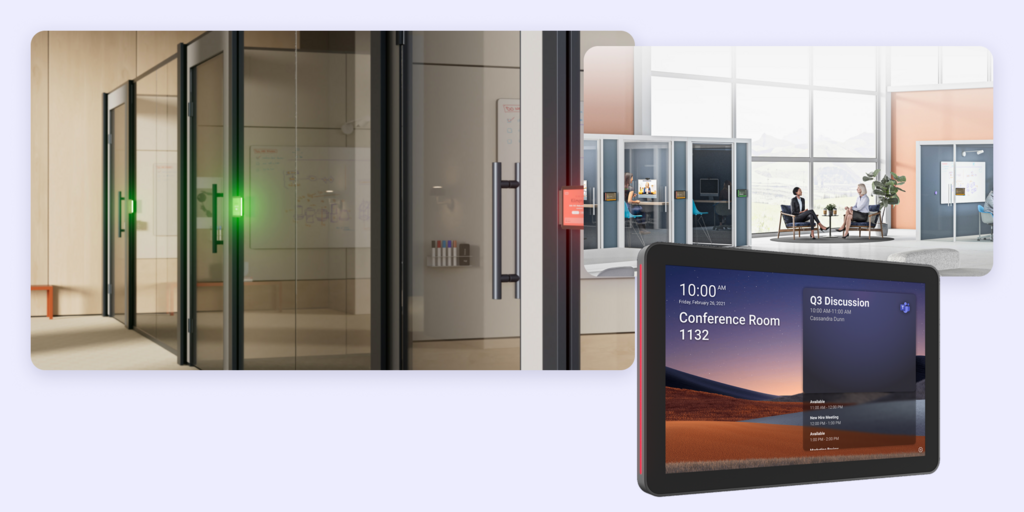
The Logitech Tap Scheduler is a 10.1-inch scheduling panel for Microsoft Teams Rooms and Zoom Rooms, managed alongside Rally Bars and MeetUp cameras in Logitech Sync. It is the closest like-for-like swap for a Yealink RoomPanel in an estate that already runs Logitech video.
Some features, such as smart auto-release based on occupancy, depend on a paired Logitech Rally Bar in the room.
What makes Logitech Tap Scheduler stand out
- Certified Microsoft Teams panel, also supports Zoom Rooms
- Managed in Logitech Sync with the rest of the Logitech room estate
- Wide reseller and IT channel availability
Logitech Tap Scheduler pricing
$699 per panel. Room booking needs Logitech’s Essential service plan at $199 per room per year. Verify current pricing at Logitech’s website before purchasing.
Logitech Tap Scheduler limitations
- PoE only: no battery option, so every door needs a network cable.
- A service plan per room: booking stops working without the Essential plan.
- Rooms only: no desk booking, visitor management or signage.
Best for: Organizations standardizing on Logitech video hardware for Teams Rooms or Zoom Rooms.
Looking for Logitech alternatives instead? See our Best Logitech alternatives or the full Joan vs. Logitech comparison.
3. Neat Pad: Best for Zoom Rooms estates on Neat hardware
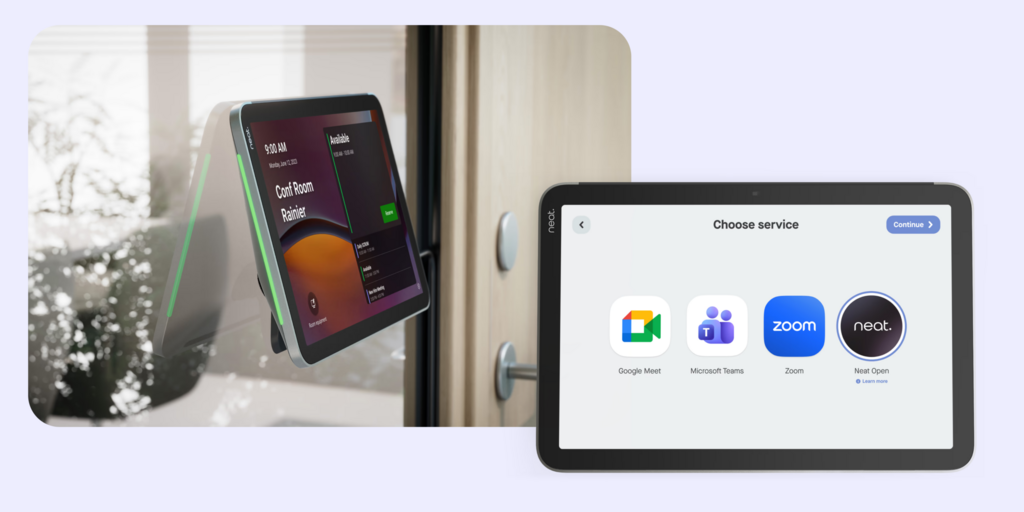
Neat Pad is a touchscreen that works as an in-room controller or a scheduling display outside the room. The Gen 2 model has an 8-inch screen and the Pad Pro a 10-inch one. In Zoom Rooms it handles both control and scheduling natively.
Neat Pad Panel appears on Microsoft’s certified Teams panels list, but resellers report that Teams panel scheduling depends on a platform update Neat listed as coming soon.
What makes Neat Pad stand out
- Native Zoom Rooms controller and scheduler in one device
- Matches Neat Bar and Neat Board hardware in the same room
- Premium industrial design
Neat Pad pricing
About $1,090 for the Neat Pad Gen 2 at US resellers; the Neat Pad Pro lists at $1,290. Verify current pricing at Neat’s website before purchasing.
Neat Pad limitations
- Check Teams scheduling before you buy: confirm with Neat that panel scheduling is live for Teams in your setup.
- PoE power: no battery model.
- Rooms only: no desk booking, visitors or signage, at one of the higher prices per door here.
Best for: Organizations running Zoom Rooms on Neat video hardware.
4. Poly TC10: Best for Poly Studio X and G7500 rooms
The HP Poly TC10 is a 10-inch touch panel that works either as the in-room controller for Poly Studio X and G7500 video systems or as a scheduling panel outside the room. It is certified for Microsoft Teams and Zoom.
One device model covers both jobs, which keeps spares simple for AV teams that run Poly video.

What makes Poly TC10 stand out
- Certified Microsoft Teams panel, also supports Zoom
- Same hardware works as in-room controller or door scheduler
- Fits estates already managed on Poly and HP tools
Poly TC10 pricing
US resellers list it between about $1,070 and $1,880 depending on version and bundled support. Verify current pricing at HP Poly’s website before purchasing.
Poly TC10 limitations
- PoE only: each door needs a network cable.
- Wide price spread between resellers, so budget figures need a formal quote.
- Rooms only: no desk booking, visitors or signage.
Best for: Organizations already running Poly video systems on Teams or Zoom.
5. Cisco Room Navigator: Best for Webex estates managed in Control Hub
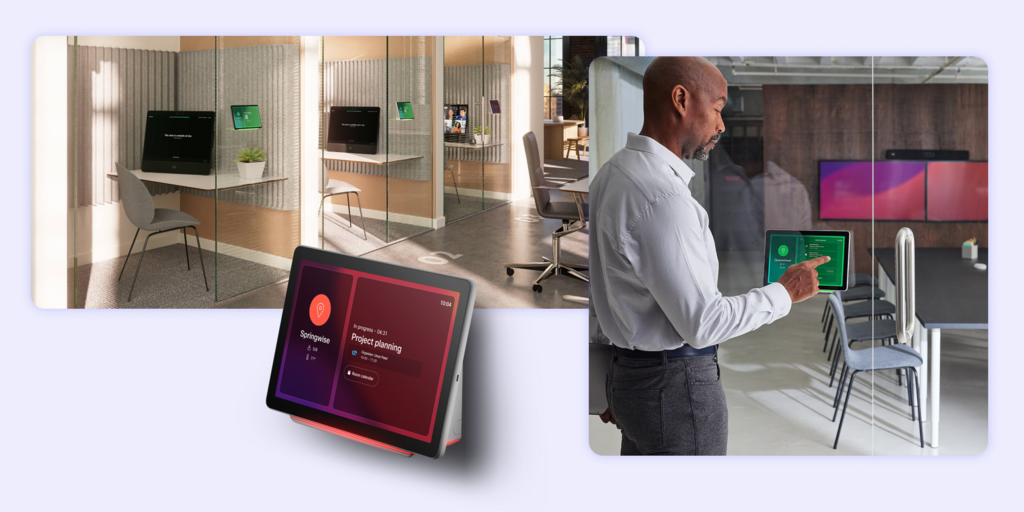
The wall-mount Cisco Room Navigator is a 10.1-inch panel with a 360-degree LED. In booking mode it sits outside the room and takes reservations through Webex Hybrid Calendar, which syncs with Microsoft 365, Google Calendar and Exchange. Cisco also markets it as a certified Microsoft Teams panel.
It reports temperature, humidity and air quality, and IT manages it in Cisco Control Hub with the rest of the Webex devices.
What makes Cisco Room Navigator stand out
- Built-in temperature, humidity and air-quality sensors
- Single Ethernet cable carries power and network
- Central management in Cisco Control Hub
Cisco Room Navigator pricing
From $1,195 per panel according to Cisco. Verify current pricing at Cisco’s website before purchasing.
Cisco Room Navigator limitations
- PoE only: no battery option.
- Best inside the Cisco stack: booking runs through Webex Hybrid Calendar, so it suits Webex customers more than mixed estates.
- Rooms only: desks and visitors need other products.
Best for: Organizations standardized on Webex devices and Cisco Control Hub.
6. Evoko Naso: Best for room panels with their own booking software
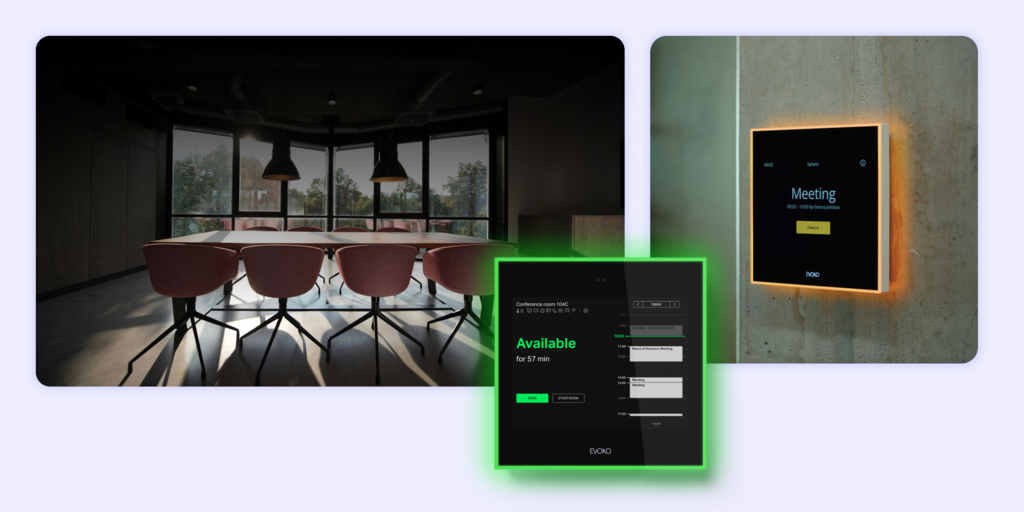
Evoko, now owned by Biamp after an acquisition announced in September 2023, makes the Naso room manager: an 8-inch panel that runs on Evoko’s own workplace software rather than a video platform app. Evoko also sells Kleeo desk managers, so rooms and desks can sit on one vendor.
Naso connects to Microsoft 365 and is managed through Evoko Workplace.
What makes Evoko Naso stand out
- Dedicated booking panel that does not depend on a Teams Rooms or Zoom Rooms license
- Desk hardware from the same vendor
- PoE or a separate power supply
Evoko Naso pricing
About $875 for a Naso with a 1-year room license in Biamp’s store; room licenses are sold per room on 1, 3 or 5-year terms. Verify current pricing at Biamp’s website before purchasing.
Evoko Naso limitations
- Wired at every door: PoE or a mains power supply, no battery model.
- Per-room and per-desk license terms add a renewal line for every device.
- Ownership change: Biamp has announced a new cloud platform, so check the product roadmap before a long rollout.
Best for: Organizations that want dedicated panels and desk hardware from one vendor, independent of their video platform.
7. Humly: Best for panels with built-in air quality sensing
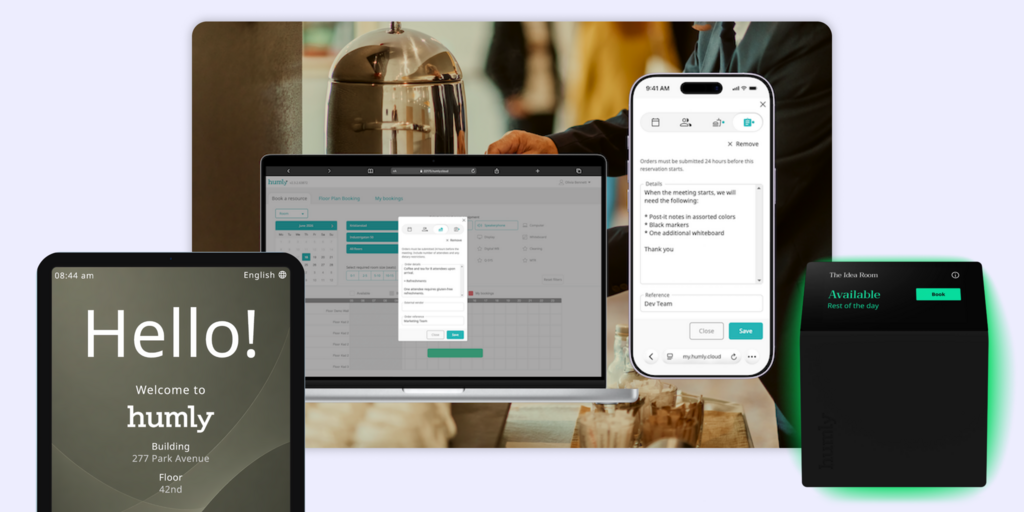
Humly is a Swedish company that makes the Humly Room Display, a door panel with colored LED indicators, plus a desk booking product, Humly Reservations. The displays integrate with Microsoft Teams, Microsoft 365 and Google Workspace.
Humly room displays also track CO2, temperature and humidity.
What makes Humly stand out
- Air quality data from the room display itself
- Desk booking available alongside room panels
- Integrates with Microsoft 365, Google Workspace and Teams
Humly pricing
Pricing on request through Humly or a reseller. Verify current pricing at Humly’s website before purchasing.
Humly limitations
- PoE required: no battery-powered display.
- No public pricing: every comparison needs a sales conversation.
- No visitor management in the room or desk products.
Best for: Offices that want room panels with environmental sensing and desk booking from the same vendor.
Looking for Humly alternatives instead? See our Best Humly alternatives or the full Joan vs. Humly comparison.
How to choose the right Yealink RoomPanel alternative
If your IT team requires PoE
Every option here supports a wired install. Joan is the only one that also gives you a battery option on the same platform, so a PoE policy for most rooms does not rule out a wireless display where a cable cannot reach.
If you cannot run cables to the door
Joan is the only option on this list with battery-powered meeting room displays. The Joan 6 RE, Joan 6 Pro and Joan 13 Pro mount on glass, drywall or furniture without a cable run.
If every room already has a Teams Rooms system
Choose a certified Teams panel that matches your video hardware: Logitech Tap Scheduler for Logitech rooms, Poly TC10 for Poly rooms, Cisco Room Navigator for Webex devices. The panel signs in with the room account, so there is no extra panel license.
If many rooms have no video system
Small rooms, focus rooms and phone booths rarely have a Teams Rooms system, so a certified panel there needs its own Teams license. Joan displays sync with Microsoft 365 calendars directly, so there is no Teams panel license; each display counts as a Joan device in your plan.
Why Joan is usually the best Yealink RoomPanel alternative
Teams leave Yealink RoomPanel over cables, per-panel licensing and a room-only scope. Joan lets you choose wired or wireless for each room, books rooms against Microsoft 365 or Google calendars without a Microsoft Teams panel license, and adds desks, visitors and signage on the same subscription.
Joan vs. Yealink RoomPanel: quick comparison
| Joan | Yealink RoomPanel | |
|---|---|---|
| Power options | ✅ Battery or PoE wall mount | PoE or power adapter |
| Screen | ePaper | LCD |
| LED occupancy light | ✅ with PoE wall mount | ✅ LED light bar |
| Certified Microsoft Teams panel | ❌ | ✅ (check model) |
| Microsoft 365 calendar booking | ✅ native sync | ✅ through Teams or a third-party app |
| Google Workspace calendar booking | ✅ | Through Zoom Rooms or a third-party app |
| Booking assistant in Teams chat | ✅ Joan AI in Teams | ❌ |
| Per-panel Microsoft license | Not required (each display is a Joan device license) | Teams Rooms Pro or Shared Device, unless the room has Teams Rooms |
| Desk booking | ✅ | ❌ |
| Visitor management | ✅ pre-registration, check-in, host alerts; ePaper badges as an add-on | ❌ |
| Digital signage | ✅ | ❌ |
| Public pricing | ✅ | Hardware prices through resellers |
Yealink data from Yealink datasheets and Microsoft’s certified Teams panels list. Confirm current specifications with Yealink before purchasing.
Ready to make the switch?
Joan is free to try for 30 days with no credit card. Start with a battery display on one door and a PoE mount on another, and see which fits your rooms.
Frequently asked questions about Yealink RoomPanel alternatives
Does Yealink RoomPanel need PoE?
The RoomPanel E2 runs on PoE or on the power adapter included in the box. There is no battery-powered RoomPanel, so every installation needs a cable at the door. Joan displays run on battery or on a PoE wall mount, so you can choose per room.
How much does a Yealink RoomPanel cost?
Reseller list prices are about $699 for the original RoomPanel Plus and about $769 for the RoomPanel E2. In Teams mode, each panel also needs a Teams Rooms Pro or Teams Shared Device license unless the room already has a Teams Rooms system.
Is Joan a certified Microsoft Teams panel?
No. Joan displays sync directly with Microsoft 365 and Exchange calendars, and Joan AI in Microsoft Teams lets people book rooms and desks and register visitors from a Teams chat. If you need the native Teams panel interface on the door, choose a certified panel.
Can I mix wired and wireless room displays?
With Joan, yes. The Joan 6 Pro and Joan 13 Pro can sit on a PoE wall mount with an LED occupancy light or run on battery, and the Joan 6 RE runs on battery. All of them use the same platform and subscription.
What is the best Yealink RoomPanel alternative for Microsoft Teams Rooms?
For rooms that already have a Teams Rooms system, a certified panel from the same vendor as your video hardware is the simplest fit: Logitech Tap Scheduler, Poly TC10 or Cisco Room Navigator. For rooms without video, Joan avoids a per-panel Teams license.
Does Yealink RoomPanel support desk booking or visitors?
No. The RoomPanel is a door display for meeting rooms. Desk booking and visitor management need separate software, while Joan includes both on the same platform as its room displays.
Page last updated: November 2026. Pricing verified from public sources; always confirm live pricing directly with each vendor before purchasing.
About the author
