
Best Ronspot (ronspotflexwork.com) alternatives in 2027: hot desk booking software with room displays
Ronspot (ronspotflexwork.com) is a workplace booking platform from Galway, Ireland. It started with parking and now covers desk booking, meeting room booking and workplace analytics in one app. Customers include Allianz, American Express and Novartis, and reviewers on Capterra rate it 4.6 out of 5.
Teams look for Ronspot alternatives for a few reasons. Ronspot is software only, so room displays, sensors and access control come from partners and paid add-ons. Pricing is quote-only, with a 20-space minimum and a setup fee. And visitor management is still listed as coming soon.
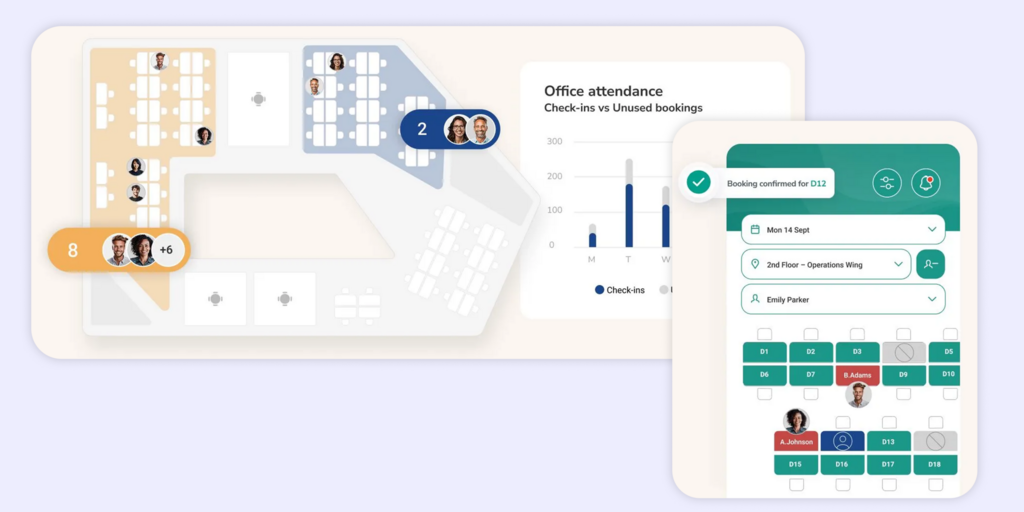
We compared 7 desk booking software tools on desks, rooms, parking, visitors, hardware and pricing. Joan is on the list, and for every tool we say who it really fits. If you’re weighing simple desk booking apps, see our Best Deskbird alternatives →. Or read our Best Officely alternatives if you mainly book desks through Slack or Teams.
Quickly jump to:
- What pushes teams to look beyond Ronspot
- Desk booking software compared at a glance
- 7 Ronspot alternatives for desks, rooms and parking
- Which desk hoteling setup fits your office
- Joan vs. Ronspot: the key differences
- Frequently asked questions about Ronspot alternatives
What pushes teams to look beyond Ronspot
Software only, with hardware through partners
Ronspot doesn’t make or sell hardware. Its Meeting Tablet App turns a tablet into a room display, and booking from Roomz or Android room tablets is part of Ronspot Connect, which is billed on top of the subscription. Sensors, Wi-Fi check-in and access control integrations are Connect add-ons too, and hardware is quoted through partners. Teams that want a screen at every meeting room door end up with a second supplier and a longer bill.
Quote-only pricing with a minimum and a setup fee
Ronspot doesn’t publish prices. It charges per bookable space, not per user, with a minimum of 20 spaces, annual billing and a one-off setup fee. The free trial lasts 7 days and starts with a call, where the Ronspot team sets up a test account with you. Most Capterra reviewers rate its value well, but some call it “too expensive.”
No visitor management yet
Ronspot covers desks, parking and meeting rooms. Visitor management is listed on its site as coming soon, and there is no digital signage. If reception check-in or lobby screens are on your list, you need another tool for now. Reviewers also mention small bugs after new feature launches and admin messages that sometimes don’t reach employees.
Desk booking software compared at a glance
| Tool | Best for | Desk booking | Room displays | Parking | Visitor management | Starts at |
|---|---|---|---|---|---|---|
| Joan | Desks, rooms and visitors with its own ePaper room displays | ✅ | ✅ Own ePaper displays | ✅ | ✅ | $51/month |
| Deskbird | Mobile-first desk booking for hybrid teams | ✅ | ⚠️ Rooms Plus add-on | ✅ | ⚠️ Visitors Plus add-on | $3.75/active user/month |
| Officely | Desk booking inside Slack and Teams | ✅ | ❌ | ⚠️ Parkly, $15/space/month | ❌ | Free (5 users); $2.50/user/month |
| YAROOMS | All-in-one booking with flat plan prices | ✅ | ⚠️ Third-party tablets | ⚠️ Enterprise plan | ⚠️ $99/location/month | $99/month |
| Skedda | Detailed booking rules across many space types | ✅ | ❌ | ✅ | ⚠️ Add-on | $249/month (US, 35 spaces) |
| Robin | Enterprises with 500+ employees | ✅ | ⚠️ Third-party tablets | ✅ | ✅ | Custom quote |
| Kadence | Planning office days around team schedules | ✅ | ❌ | ❌ Not listed | ✅ | Custom quote |
| Ronspot | Parking-heavy offices that also book desks and rooms | ✅ | ⚠️ Tablet app; room tablets via Connect add-on | ✅ | ❌ Coming soon | Quote only, 20-space minimum |
Prices checked October 2026 from public pricing pages. Verify current pricing with each vendor before purchasing.
7 Ronspot alternatives for desks, rooms and parking
1. Joan — Best for desk and room booking with its own ePaper room displays
Joan is a workplace platform for desk booking, room booking, parking and asset booking, visitor management and workplace digital signage. Unlike Ronspot, Joan makes its own hardware, so the booking system and the display at the room door come from one vendor. The Joan 6 RE, Joan 6 Pro and Joan 13 Pro sit outside meeting rooms, and visitors get a Joan ePaper badge on arrival.
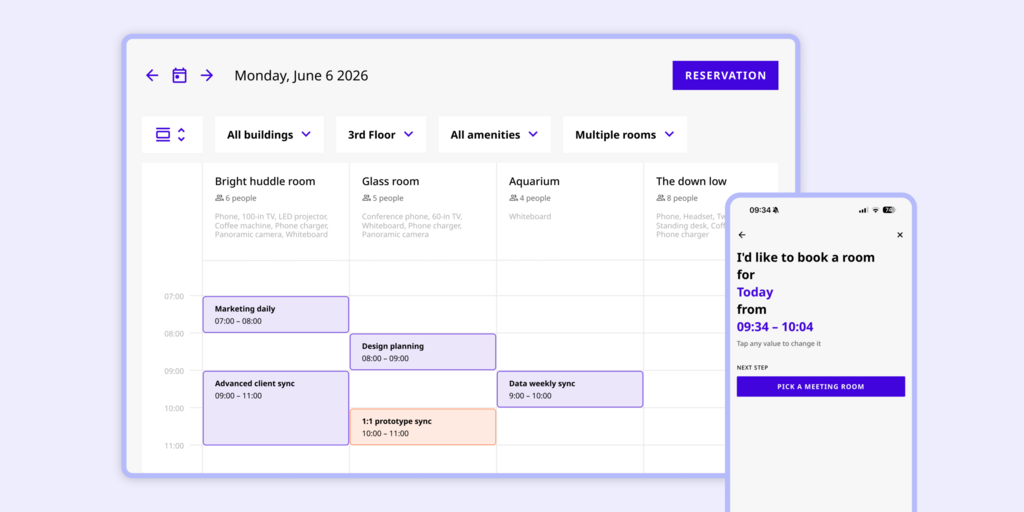
Desks, rooms and parking spaces sit on one floor plan. Employees check in to desks with a QR code or geolocation, and desks without a check-in are released for others. Rooms work the same way at the door: on the touch models, people book on the spot, check in and free up no-show rooms.
What makes Joan stand out
- Its own displays at the door: ePaper room displays run on battery or PoE, so you don’t need a tablet partner.
- Visitor management included: reception check-in and the Joan ePaper badge, available today.
- Everything in one plan: desks, rooms, parking, assets, visitors, signage and analytics, with no add-on tiers.
- Public pricing and a self-serve trial: start a 30-day trial without booking a call.
Joan pricing
Plans start at $51/month. Additional users are $1.09/user/month and additional device licences are $10.99/device/month (annual billing). Employees who book only through Outlook or Google Calendar are not billed. Every feature is included. ePaper hardware is a one-time purchase, separate from the subscription. See current pricing.
Joan limitations
- Simpler parking: Joan books parking spaces on the same floor plan as desks, but Ronspot goes further with parking-specific rules and barrier integration.
- Desk check-in is by phone, not by screen: desks use QR codes or geolocation; the ePaper displays are built for meeting room doors.
Best for: Any organisation managing physical workspaces, from a small team with a few rooms to a global enterprise across hundreds of locations.
2. Deskbird — Best for mobile-first desk booking for hybrid teams
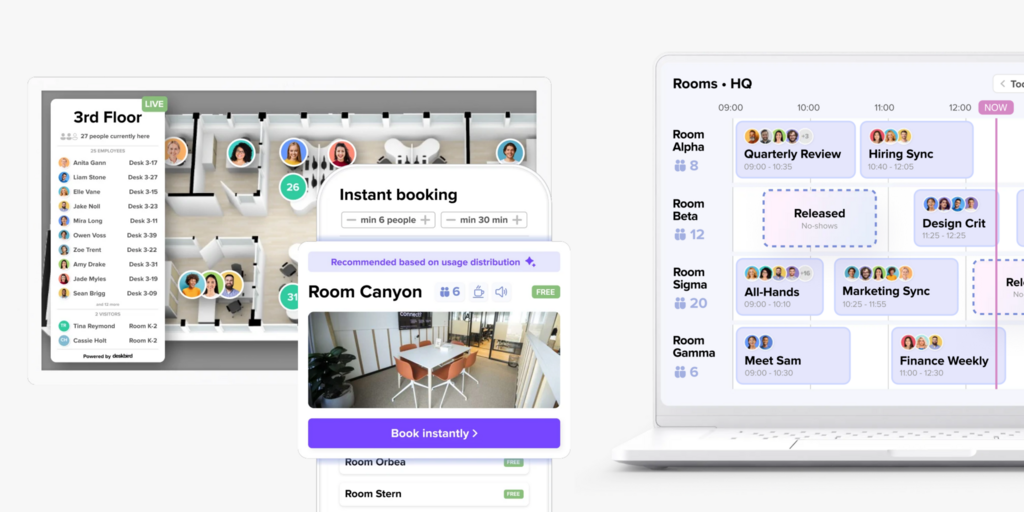
Deskbird is a Swiss hot desk booking app focused on the employee side: who is in the office, where they sit and which desk is free. Parking is part of the Business plan, and it works inside Microsoft Teams and Slack.
What makes Deskbird stand out
- Clean, mobile-first app that employees pick up quickly.
- Public per-user pricing and a free trial without a credit card.
- Desk and parking booking on the same entry plan.
Deskbird pricing
Business costs $3.75/active user/month billed annually ($4.75 monthly). Professional and Enterprise are custom. Rooms Plus (room kiosks and signage), Visitors Plus and User & Data Management Plus are paid add-ons. Verify current pricing at Deskbird’s website before purchasing.
Deskbird limitations
- Add-ons for rooms and visitors: room kiosks, room signage and visitor management all cost extra.
- Per-user billing: every active employee counts, even if they book once a month.
- No hardware of its own: room screens are devices you source yourself.
Best for: Mid-sized hybrid teams that mainly need desk and parking booking.
Looking for Deskbird alternatives instead? See our Best Deskbird alternatives →
3. Officely — Best for desk booking inside Slack and Teams
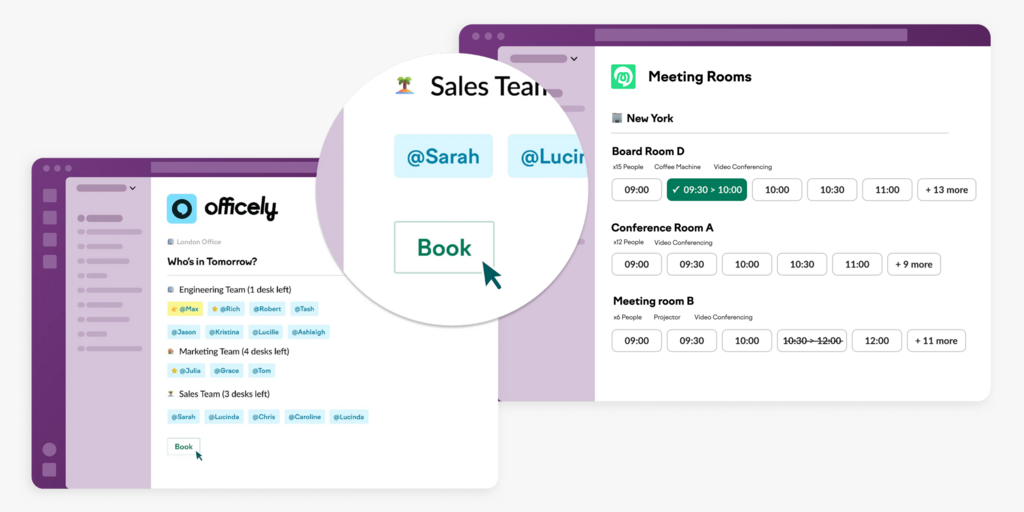
Officely is a desk booking tool that runs inside Slack and Microsoft Teams, so employees book without opening another app. Meeting rooms and parking (Parkly) are sold as separate products.
What makes Officely stand out
- Booking happens where employees already chat.
- A free plan for up to 5 users.
- Low, public per-user pricing.
Officely pricing
Free covers up to 5 users. Basic costs $2.50/user/month and Premium $3.50/user/month, with up to 20% off for annual billing. Meeting rooms cost $12/space/month and Parkly parking $15/space/month on top. Verify current pricing at Officely’s website before purchasing.
Officely limitations
- Rooms and parking cost extra: each is priced per space on top of per-user fees.
- Built around chat apps: teams that don’t live in Slack or Teams lose its main advantage.
- No visitor management or hardware: reception and room doors need other tools.
Best for: Small and mid-sized teams that run on Slack or Teams and mostly book desks.
Looking for Officely alternatives instead? See our Best Officely alternatives →
4. YAROOMS — Best for all-in-one booking with flat plan prices
YAROOMS is a workplace booking platform for desks, meeting rooms and parking, with a visitor management system sold separately. Plans are priced by user bands and locations, not per desk.
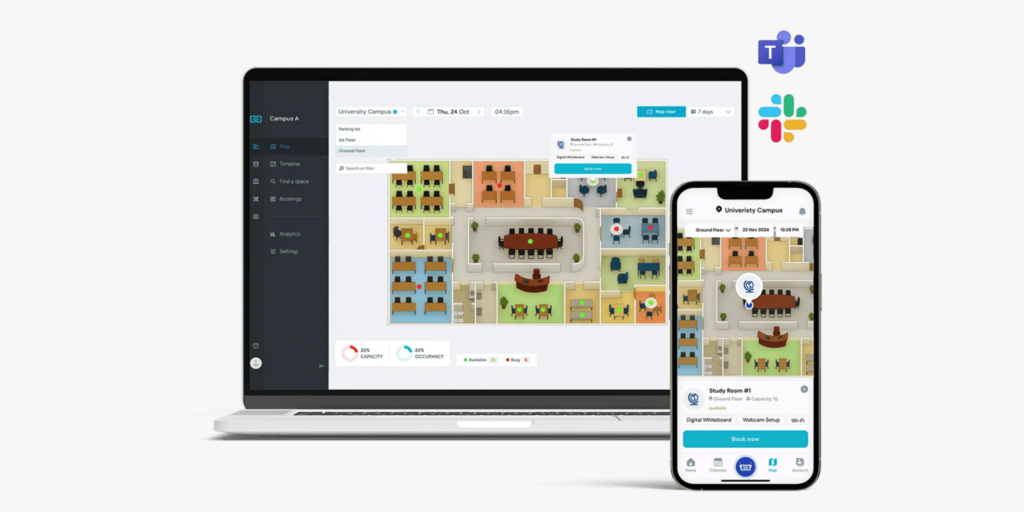
What makes YAROOMS stand out
- Flat monthly plans that are easy to budget.
- Desks, rooms and visitors from one vendor.
- Detailed booking rules and approvals.
YAROOMS pricing
Starter is $99/month (10 or 20 users, 1 location), Business is $399/month (50 to 200 users, 2 locations) and Enterprise is $899/month (300 to 1,000+ users, 5 locations). Yearly billing saves 20%. Visitor management is $99/location/month. Verify current pricing at YAROOMS’ website before purchasing.
YAROOMS limitations
- Parking only on Enterprise: parking management isn’t part of Starter or Business.
- Big jumps between plans: going past 20 users moves you from $99 to $399 a month.
- Tablets at the door: room displays run on third-party tablets.
Best for: Mid-sized offices that want desks, rooms and visitors on predictable monthly plans.
Looking for YAROOMS alternatives instead? See our Best YAROOMS alternatives →
5. Skedda — Best for detailed booking rules across many space types
Skedda is a booking platform for desks, rooms, parking and other shared spaces, used by offices as well as schools, labs and sports venues. Its rules engine controls who can book what, and when.
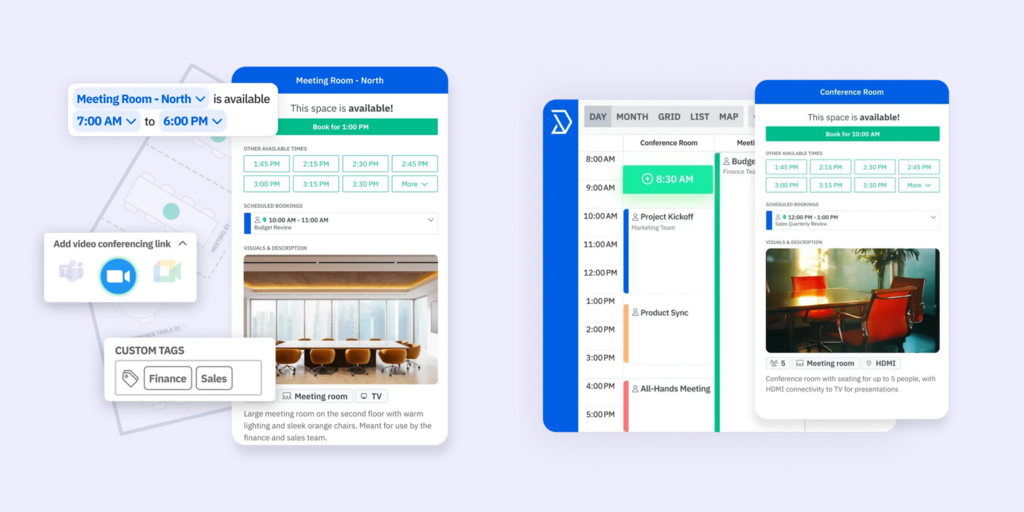
What makes Skedda stand out
- Detailed booking rules and permissions.
- Unlimited users and bookings on every plan.
- A 14-day trial without a payment method.
Skedda pricing
In the US and Canada, Plus starts at $249/month (35 spaces) and Premier at $349/month (45 spaces), billed annually. EMEA and APAC plans start at $99/month (15 spaces). Enterprise is custom. Verify current pricing at Skedda’s website before purchasing.
Skedda limitations
- Priced by space count: plans jump as you add desks, rooms and parking spaces.
- No hardware: there are no room displays of its own.
- Lighter workplace features: visitor management and analytics are less developed than in dedicated workplace platforms.
Best for: Organisations with complex booking rules across many types of shared space.
Looking for Skedda alternatives instead? See our Best Skedda alternatives →
6. Robin — Best for enterprises with 500+ employees
Robin is a hybrid workplace platform covering desk, room, parking and locker booking, visitor management, analytics and wayfinding. Room displays run on third-party tablets.
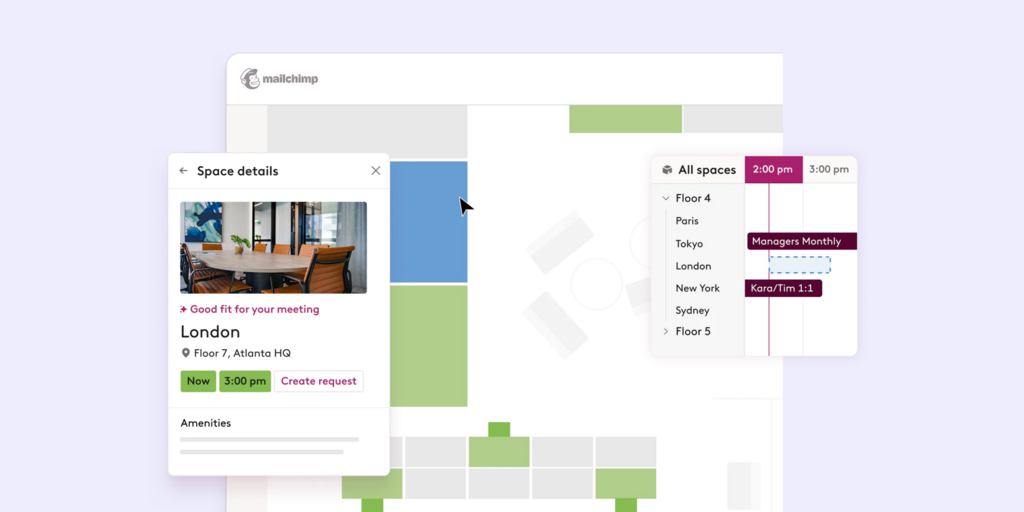
What makes Robin stand out
- Broad platform that replaces several point tools.
- Deep calendar and Microsoft 365 workflows.
- Strong analytics for space planning across buildings.
Robin pricing
No public pricing. Robin sends custom quotes after a sales call, and all subscriptions are billed annually. Verify current pricing at Robin’s website before purchasing.
Robin limitations
- No price until you talk to sales: no public tiers and no free trial.
- Built for large offices: the stated focus on 500+ employees leaves smaller teams with more platform than they need.
- Tablets at the door: room displays rely on third-party tablets that need power and updates.
Best for: Large hybrid enterprises that want one vendor for booking, visitors and analytics, and have budget for an annual contract.
Looking for Robin alternatives instead? See our Best Robin alternatives →
7. Kadence — Best for planning office days around team schedules
Kadence is a hybrid work platform built around coordinating when teams come in. Desk booking, room booking and visitor management sit next to scheduling tools that help people plan office days together.
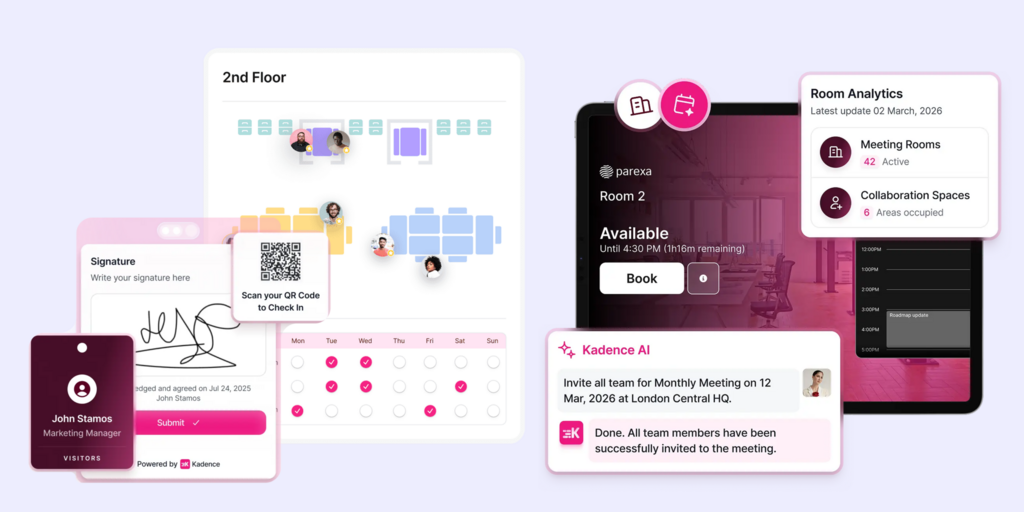
What makes Kadence stand out
- Team scheduling that helps colleagues pick the same office days.
- Desk and room booking with floor plans.
- Analytics on attendance and space use.
Kadence pricing
No public pricing. Kadence quotes WorkOps and SpaceOps plans on request, with a 1-year minimum contract and a $250 setup fee per floor plan. Verify current pricing at Kadence’s website before purchasing.
Kadence limitations
- Quote-only with setup fees: no public prices, and floor plan setup is charged.
- Annual commitment: contracts run for at least a year.
- No parking or hardware: parking booking isn’t listed, and there are no room displays of its own.
Best for: Hybrid companies that care most about getting teams into the office on the same days.
Looking for Kadence alternatives instead? See our Best Kadence alternatives →
Which desk hoteling setup fits your office
If parking is your biggest problem
Ronspot is strong here, with parking-first rules and barrier integration. Joan, Deskbird, Skedda and Robin also book parking alongside desks.
If you want a screen at every meeting room door
Joan makes its own ePaper room displays, so you don’t need a separate tablet supplier. Most other tools on this list run on tablets you buy and manage.
If visitors come in every day
Pick a platform with visitor management today: Joan, Robin and Kadence include it, and YAROOMS and Deskbird sell it as an add-on.
If you want to try before you talk to sales
Joan, Deskbird, Officely and Skedda all have trials you can start yourself. Ronspot’s 7-day trial starts with a call.
Why Joan is usually the best Ronspot alternative
Most teams moving off Ronspot want three things: displays at room doors without a second supplier, visitor management that works today, and a clear price. Joan delivers all three on one subscription, with its own ePaper hardware and public pricing.
Joan vs. Ronspot: the key differences
| Joan | Ronspot | |
|---|---|---|
| Desk booking | ✅ QR and geolocation check-in, auto-release | ✅ |
| Meeting room booking | ✅ | ✅ |
| Own room display hardware | ✅ ePaper displays, battery or PoE | ❌ Tablet app; Roomz/Android room tablets via Connect add-on |
| Parking booking | ✅ On the same floor plan | ✅ Parking-first, with barrier integration (GateLIFT) |
| Visitor management | ✅ Included, with Joan ePaper badge | ❌ Coming soon |
| Digital signage | ✅ | ❌ |
| Pricing model | Per user and per device, all features | Per bookable space, 20-space minimum, setup fee, add-ons billed separately |
| Public pricing | ✅ From $51/month | ❌ Quote only |
| Free trial | ✅ 30 days, self-serve | ⚠️ 7 days, set up on a call |
Based on public information, October 2026.
Ready to make the switch?
Joan is free to try for 30 days, with no commitment. Set up desk booking for one floor and put a display outside your busiest meeting room.
Frequently asked questions about Ronspot alternatives
How much does Ronspot cost?
Ronspot doesn’t publish prices. It charges per bookable space, with a 20-space minimum, annual billing and a one-off setup fee. Add-ons such as sensors, access control and room tablet booking are billed separately under Ronspot Connect.
Does Ronspot have room displays?
Not its own. Ronspot offers a Meeting Tablet App for tablets, and Roomz or Android room tablet booking is a paid add-on. Joan makes its own ePaper room displays that run on battery or PoE.
Does Ronspot offer visitor management?
Not yet. Visitor management is listed on the Ronspot website as coming soon. Joan includes visitor management today, with a Joan ePaper badge for each guest.
Is there a free Ronspot alternative?
Officely is free for up to 5 users, and Deskbird keeps a small Starter plan after its trial. Joan isn’t free long-term but offers a 30-day free trial of the full platform, including desks, rooms, parking, visitors and signage.
What is the best Ronspot alternative for parking?
If parking is your main need, Ronspot itself is hard to beat. For parking plus desks, rooms and visitors on one plan, Joan, Robin and Skedda are good options; Deskbird includes parking on its Business plan.
What is the best hot desk booking software in 2027?
It depends on the office. Joan fits teams that want desks, rooms and visitors with displays at the door; Deskbird and Officely fit teams that mainly need a simple desk booking app.
Page last updated: October 2026. Pricing verified from public sources. Always confirm live pricing directly with each vendor before purchasing.
About the author
