
Best desk booking software
Desk booking software, frequently referred to as hot desk booking software, desk reservation tools, or desk booking systems, enables employees to secure a workspace in advance or upon arriving at the office.
While straightforward in concept, it addresses a major challenge for modern workplaces operating without fixed assigned seating. As return-to-office initiatives gathered momentum, numerous organizations discovered that peak-day attendance exceeded available desk capacity, leading to chaotic desk hunting and employees arriving early simply to claim a workstation. A desk booking system resolves this by delivering real-time visibility into space availability while equipping administrators with flexible tools to manage capacity and booking policies.
To identify the top platforms worth evaluating, we examined the most frequently searched desk booking solutions in 2026, auditing their capabilities against published feature sets and official pricing structures. Solutions with limited scope, sparse user feedback, or a focus outside modern hybrid office workflows were excluded from this lineup.
What you’ll learn:
- What desk booking software does and why offices need it
- Which desk booking tools stand out in 2026, and what sets each one apart
- How the top platforms compare on features, pricing, and hardware
- Why Joan is the strongest overall pick for most hybrid offices
Table of contents
- Quick comparison table
- Top 9 best desk booking software for 2026
- Even more desk booking software options
- Which platform to choose?
- Selecting the best desk booking software for your workplace
- Key features to look for in a desk booking system
- Pricing models offered by desk booking systems
- Quick pricing comparison table
- How does desk booking software work exactly
- Who uses desk booking software and why
- What’s the best overall desk booking software
- Joan vs leading desk booking software
- We ranked the tools based on
- Our review process
- FAQ about best desk booking software
Quick comparison table
Here’s a quick overview of the 9 desk booking platforms we selected for 2026. Compare each option by who it’s best for, its key features, and pricing to get a quick idea of which software may be the right fit for your workplace.
| Platform | Best for | Key features | Pricing |
|---|---|---|---|
| Joan | Desk booking backed by real hardware, plus rooms, parking, and visitors on one platform | Desk & room booking, ePaper displays, parking & asset booking, visitor management, analytics, Microsoft Teams AI agent | From €49/month (Team plan, 2 devices, 20 users) |
| Robin | Large hybrid enterprises wanting workplace analytics | Desk & room booking, workplace analytics, office maps, wayfinding, automation | Custom quote; third-party estimates suggest entry pricing near $5,000/year |
| Skedda | Advanced booking rules and permissions | Desk booking, interactive maps, booking rules, approvals, restrictions, space management | From $99/month (Starter, 15 spaces) |
| Archie | Per-desk pricing and coworking operators | Desk booking, room booking, interactive floor plans, coworker visibility, QR check-ins, visitor management, analytics | From $2.80/desk/month ($159/month minimum) |
| OfficeSpace | Enterprise space planning and real estate teams | Desk booking, move management, space planning, workplace analytics, asset management, AI planning tools | Custom quote; no published pricing |
| Condeco | Microsoft-first, multi-site enterprises | Desk & room booking, Outlook/Teams add-in, visitor management, multi-site policy management | Custom quote; no published pricing |
| Envoy | Visitor management first, desk booking second | Visitor management, desk & room booking, workplace maps, deliveries, compliance features | Envoy Reservations from $5/bookable resource/month plus platform fee |
| Kadence | AI-assisted space planning and team-day coordination | Desk & room booking, visitor management, floor plans, AI-powered space planning, analytics | Custom quote; historically reported near $4/user/month |
| Tactic | Modular, budget-conscious rollouts | Desk booking, room booking, workplace requests, AI assistant, floor plans | Product-based pricing; online estimator available, exact quote via sales |
Top 9 best desk booking software for 2026
Now, let’s take a closer look at the 9 best desk booking software options.
1. Joan: best desk booking software overall, all in one solution platform
Joan desk booking software is our top pick for offices that want desk booking to feel effortless for employees while giving admins real control behind the scenes.
Employees open the app, see live desk availability filtered by floor or neighborhood, and book a spot, often near specific teammates, in a few taps. On arrival, checking in at Joan’s own ePaper desk display confirms the booking; if nobody checks in, the desk releases automatically, so the floor plan stays accurate without anyone chasing it down manually.
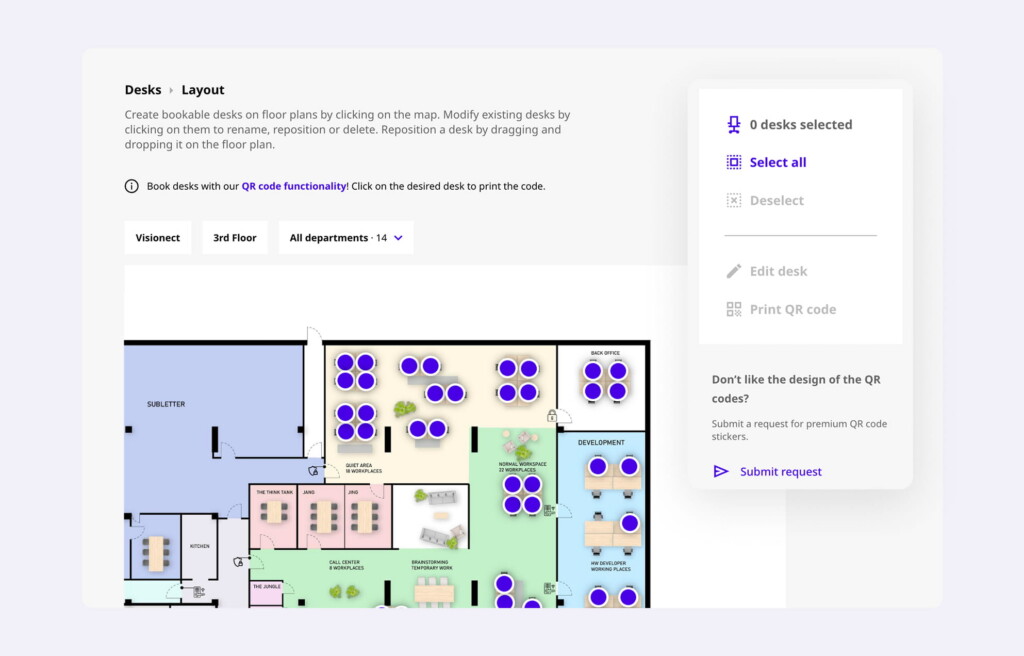
What makes Joan different from most of this list is the hardware. Its ePaper displays are wireless and battery-powered, running for months on a single charge, so there’s no wiring or daily charging to plan around during rollout. Desk booking also sits on the same platform as Joan’s meeting room booking, and companies can add parking, asset booking, and visitor management without switching to a separate vendor for each.
Core desk booking features
- Real-time desk availability. See which desks are free or booked right now, filtered by floor or neighborhood.
- Book from floor plan. Reserve desks, rooms, parking spots, and equipment directly from an interactive office map.
- Mobile and web booking. Book from a phone or browser, whichever is more convenient at the moment.
- ePaper desk and room displays. Wireless, battery-powered E Ink displays confirm bookings and show live status at the desk itself.
- Automatic check-in and release. Desks release automatically if a booking goes unused, keeping availability accurate.
- Neighborhood and team zone booking. Filter by department or area to sit near specific colleagues.
- Meeting room booking on the same platform. Rooms and desks share one dashboard and one set of apps.
- Parking and asset booking. Reserve parking spots or equipment alongside desks, without a separate system.
- Visitor management module. Digital visitor registration and ePaper visitor badges, available as an add-on.
- Workplace analytics. Occupancy insights across desks, rooms, and visitors in one dashboard.
- Joan AI Agent for Microsoft Teams. A chat assistant that can handle booking-related requests directly inside Teams.
- Calendar sync. Integrates with Google Workspace and Microsoft 365.
Pricing overview
Joan bundles a set number of devices and users into flat monthly plans rather than charging strictly per seat:
- Team plan: From €49/month. Covers the core booking experience for small teams getting started.
- Business and Organization plans: Bundle larger device and user counts at a flat monthly rate, scaling with office size.
- Enterprise+: From €999/month, including 20 devices and 200 users, for larger, multi-site rollouts.
The right plan depends on your office size and the ratio of devices to users your company needs. Contact us to discuss your requirements and get an exact quote tailored to your workplace.
Pros and cons based on reviews and common feedback
Pros
Real hardware at the desk, not just an app. Wireless ePaper displays remove the need for cabling or daily charging, which keeps installation simple and infrastructure costs down.
One platform instead of several. Desk booking, room booking, parking, assets, and visitor management all live on the same dashboard, so admins aren’t managing four different vendor relationships.
Automatic no-show handling. Desks release automatically when a booking goes unused, so the floor plan reflects real availability.
Straightforward booking experience. Reviewers consistently mention that employees pick up the app quickly with little to no training.
Cons
Companies wanting the full experience will want the displays. Joan’s software can run on existing tablets or screens without buying Joan hardware, but the wireless, no-cabling advantage that sets Joan apart only comes with its own ePaper displays.
Some admin features sit on paid tiers. The core mobile app covers everyday booking well, but advanced booking rules are reserved for paid business and device tiers.
Best for: Joan is the strongest overall option for hybrid offices that want desk booking with genuine hardware support when they want it, software-only flexibility when they don’t, and the option to add rooms, parking, and visitors on the same platform as the office grows.
Try Joan Workplace Desk Booking Software
2. Robin: best for large enterprise workplaces
Robin is built for bigger companies, typically 500+ employees, that need more than basic desk booking. It started as a room scheduling tool and has grown into a fuller workplace platform covering desk booking, room booking, visitor management, office maps, wayfinding, automation, and analytics.
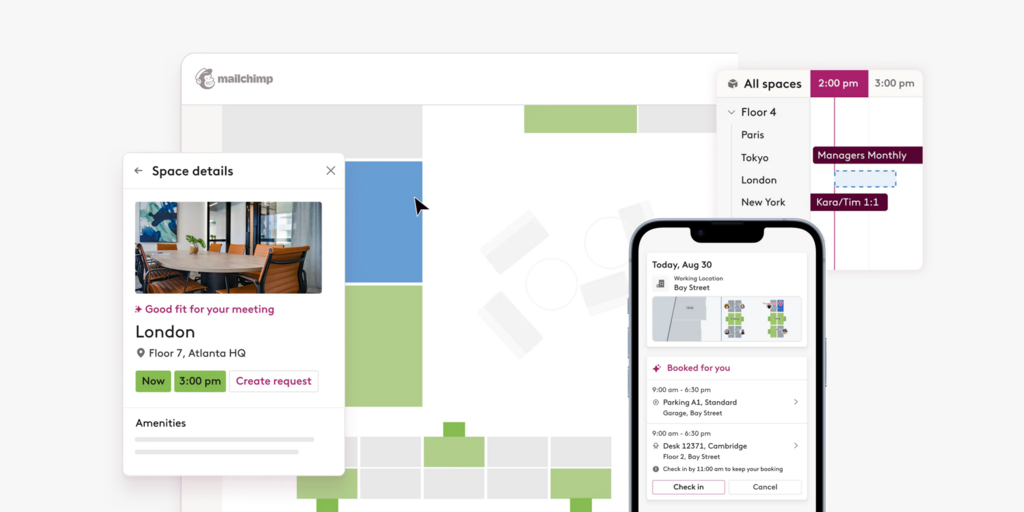
The strongest part of Robin is its analytics. Large workplaces need more than a list of reservations; they need to know which spaces get used, which days run busiest, and whether a hybrid policy is actually working. Robin pulls together booking, access-control, and occupancy data to give workplace teams that bigger picture, and layers automation on top, like auto-booking desks based on preferences and releasing unused meeting rooms when nobody checks in.
That depth comes with more setup. Robin is clearly built for enterprise-style workplaces, so there are more settings, more workflows, and more implementation steps than a lighter tool. Some reviewers also mention that floor plan changes can take longer than expected and may need help from Robin’s team.
Core desk booking features
- Hot desking and assigned desks. Supports both flexible booking and permanent seating in the same office.
- Priority booking. Gives certain teams earlier access to popular desks and areas.
- Automatic booking. Reserves desks automatically based on patterns and who’s expected in.
- AI space suggestions. Recommends desks and other resources based on past booking behavior.
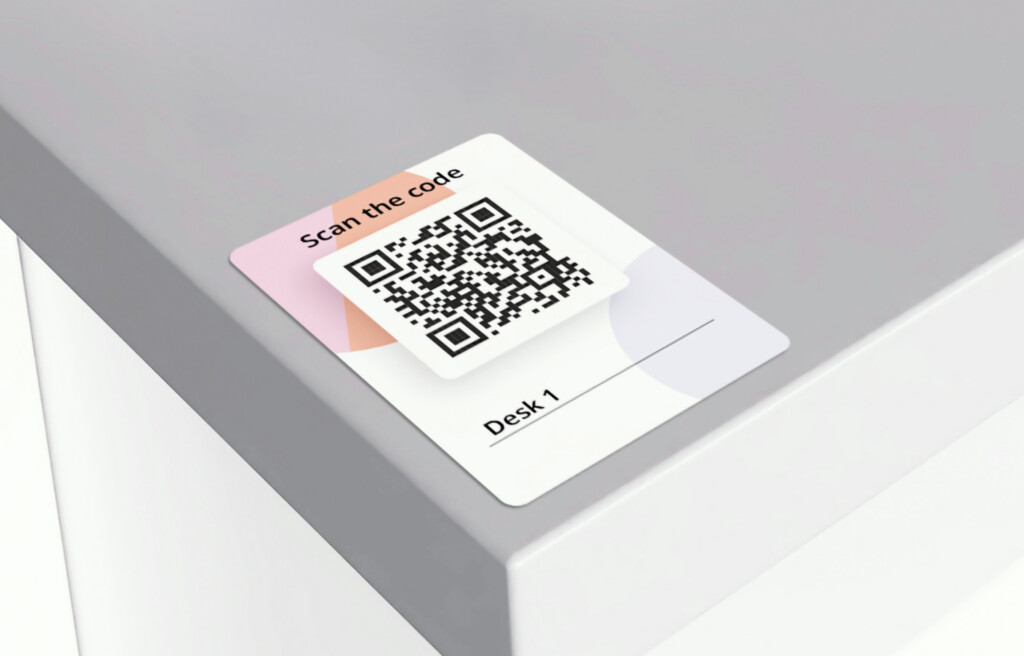
- QR and NFC check-ins. Quick, ad hoc check-ins at desks and shared spaces.
- Wayfinding and digital signage. Helps employees and visitors navigate larger offices.
- Custom reports and data exports. Built for planning and real estate decision-making.
Pricing overview
Robin uses custom, quote-based pricing with no public plans or fixed tiers. Cost depends on company size, number of locations, and which features are included, and third-party research suggests entry pricing often starts near $5,000 per year, rising with per-user licensing and add-ons like advanced analytics. Robin offers a free trial and special pricing for universities.
Pros and cons based on reviews and common feedback
Pros
Enterprise-level feature depth. Desk and room booking, visitor support, and strong admin controls suit larger, more complex offices.
Strong integrations. Connects with Google Workspace, Microsoft 365, Slack, Teams, access-control systems, and sensor partners.
Deep workplace analytics. Combines booking, access-control, and occupancy signals into a fuller picture of space usage.
Cons
Pricing isn’t transparent. Custom, quote-based pricing makes it harder to compare quickly or budget without a sales call.
Steeper learning curve. The breadth of features and settings means admins need more time to configure the system properly.
Best for: Large, IT-heavy organizations that already lean on Outlook or Google Workspace and want desk booking layered on top of a broader workplace analytics push.
3. Skedda: good for booking rules and flexible spaces
Skedda stands out for offices that need more control over how spaces get booked and managed. Its rules engine lets admins set detailed booking policies: who can book which spaces, how far in advance, booking limits, cancellation windows, and access permissions. That flexibility makes it a strong fit for organizations where not everyone has the same access rights, which explains why it’s popular with universities, makerspaces, and shared facilities alongside offices.
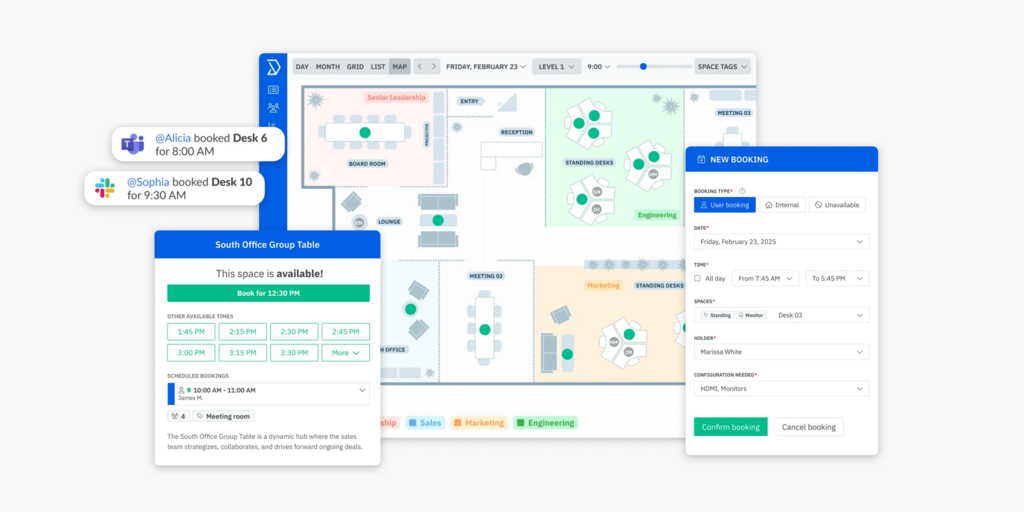
From an employee’s side, booking is straightforward: reserve desks and spaces from interactive floor plans, see live availability, and manage bookings without much friction. Compared to newer, coordination-focused platforms, Skedda feels more oriented toward administration and policy than toward showing employees which teammates are in on a given day.
Core desk booking features
- Interactive floor plans. Visual maps showing desks and who’s sitting where.
- Booking rules engine. Controls booking conditions, windows, access and visibility rules, and cancellation policies.
- Check-in policies and automatic release. Confirms arrival and frees up unused bookings.
- Neighborhoods. Groups desks by team so colleagues can sit together.
- Assigned desks. Set permanent desks alongside bookable ones on the same floor plan.
- Amenity and equipment requests. Captures extra needs during booking.
- Utilization and occupancy insights. Shows which desks and areas get used most.
Pricing overview
Skedda prices per bookable space (desk or resource), with unlimited users on every tier:
- Starter: From $99/month, billed annually, including 15 spaces. Covers interactive floor plans, unlimited users and bookings, and basic rules.
- Plus: From $149/month, billed annually, including 20 spaces, with full analytics and a broader rules engine.
- Premier: From $199/month, billed annually, including 25 spaces, with the complete rules engine and deeper configuration.
Pros and cons based on reviews and common feedback
Pros
Easy to learn and roll out. A clean interface means most teams adopt it quickly with little training.
Flexible rules engine. Strong support for booking windows, buffers, and repeat bookings for common use cases.
Cons
Pricing climbs as you scale. Since every bookable item counts as a “space,” adding parking spots or a few extra desks can push a company into the next tier sooner than expected.
Feature limits on lower tiers. A number of practical day-to-day features sit behind the Plus and Premier tiers.
Best for: Small to mid-sized offices, coworking spaces, and organizations that need detailed booking rules more than deep team-coordination features.
4. Archie: good for coworking operators and per-desk pricing
Archie prices per desk rather than per employee, which makes it a natural fit for offices with far more employees than desks, since cost tracks capacity instead of headcount. Admins can set up team zones, booking rules, recurring bookings, assigned desks, QR code check-ins, no-show protection, and occupancy analytics, all without being tied to a specific hardware vendor.
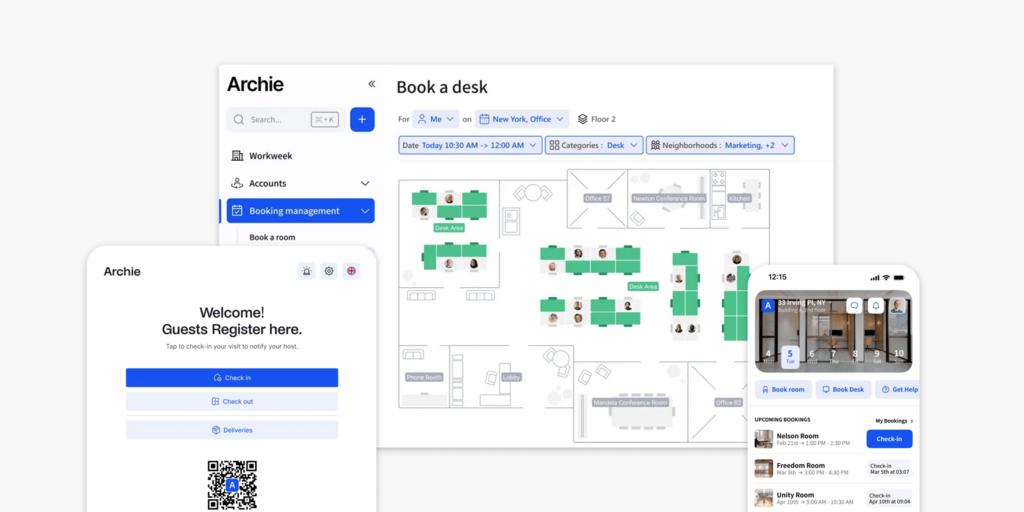
Archie’s Work Week view lets employees see when teammates plan to be in and book a desk nearby, rather than guessing. Its access-control and payment integrations (Kisi, Brivo, Salto, Stripe) also make it a comfortable fit for coworking operators running their own billing and entry systems.
Core desk booking features
- Real-time desk availability. See what’s free right now from a web or mobile app.
- Interactive floor plans. Visual maps for finding a desk and locating teammates.
- Work Week view. See when colleagues plan to come in before booking.
- QR code check-ins and no-show protection. Confirms arrival and frees up unused desks automatically.
- Recurring bookings and assigned desks. Supports both flexible and fixed seating in the same office.
- Native access-control integrations. Works with Kisi, Brivo, and Salto for coworking and secured offices.
- Occupancy analytics. Tracks which desks get used most and when.
Pricing overview
- Starter: From $2.80 per desk/month, with a $159/month minimum, covering one location, web and mobile booking, floor plans, and basic occupancy reporting.
- Pro: From $3.50 per desk/month, with a $249/month minimum, adding multiple locations, Teams and Outlook booking, and SSO/SCIM.
- Enterprise: Custom pricing for larger rollouts with added security and compliance needs.
Pros and cons based on reviews and common feedback
Pros
Predictable, resource-based pricing. Costs track desk count, not employee count, which is easier to budget for as headcount changes.
No proprietary hardware requirement. Works with whatever screens or tablets an office already owns.
Cons
Pricing minimums can feel high for very small offices. The $159/month floor makes more sense once a company is managing a larger set of desks.
Not a unified hardware-and-software vendor. Offices that want purpose-built desk displays need to source them separately.
Best for: Mid-sized to large offices and coworking operators that want flexible booking software with pricing tied to desks rather than headcount.
5. OfficeSpace: best for complex space management
OfficeSpace goes well beyond day-to-day desk booking. It’s better described as a full workplace management platform for large enterprises managing several offices, frequent moves, floor plan changes, and long-term space planning. Alongside desk and room booking, it includes block-and-stack planning, scenario planning, move management, and asset tracking, aimed at facilities and real estate teams rather than just the employee booking a desk for Tuesday.
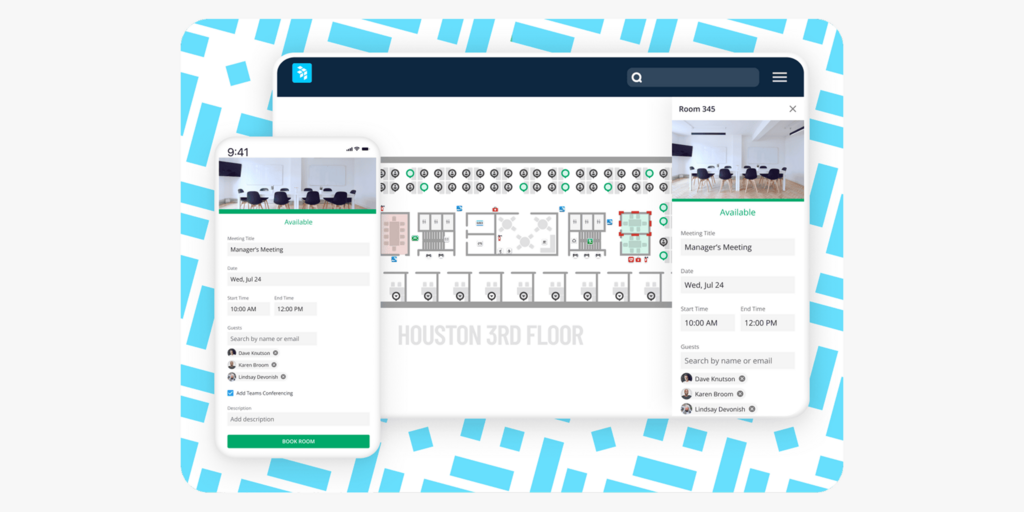
OfficeSpace also connects desk booking to presence data from badges, sensors, and WiFi, which helps confirm whether booked spaces are actually being used rather than just reserved. That’s genuinely useful for large organizations, but it also makes the platform heavier, slower to roll out, and priced for enterprise budgets rather than a simple desk-booking use case.
Core desk booking features
- Hot desking and desk hoteling. Supports both on-the-spot booking and advance reservations.
- Reverse hoteling. Lets fixed-desk employees release their desk when working remotely.
- Interactive floor plans and smart search. Live desk availability with the ability to find where colleagues are sitting.
- Automatic check-ins. Confirms attendance via badges, WiFi, or sensors, and frees up unused desks.
- Utilization analytics and heat maps. Tracks usage patterns across floors and buildings.
- Move management and scenario planning. Models office changes before committing budget.
Pricing overview
OfficeSpace doesn’t publish pricing. Its platform is now split into Essentials Plus and Pro Plus tiers for booking, analytics, and move management, with a separate Essentials/Pro structure for asset management. A quote depends on employee count and modules selected; there’s no free trial, and rollout can take around a month or more.
Pros and cons based on reviews and common feedback
Pros
Strong real-estate and space-planning tools. Scenario planning and move management suit organizations managing frequent office changes.
Sensor and badge integrations. Presence data gives more accurate occupancy figures than self-reported check-ins alone.
Cons
Heavier and slower to implement. The platform’s breadth means a longer rollout than lighter, booking-only tools.
Pricing isn’t transparent. No published rates and no free trial make it harder to budget upfront.
Best for: Large enterprises whose primary problem is long-term space and real estate strategy, with desk booking as part of that bigger picture rather than the whole task.
6. Condeco: good for Microsoft-first enterprises
Condeco, now part of Eptura, is an enterprise room and desk booking platform built for large, Microsoft 365-centric organizations running many sites. Its Outlook and Teams add-in lets people book rooms directly from their normal calendar, and the platform is designed to handle multi-site, multi-floor complexity at real scale.
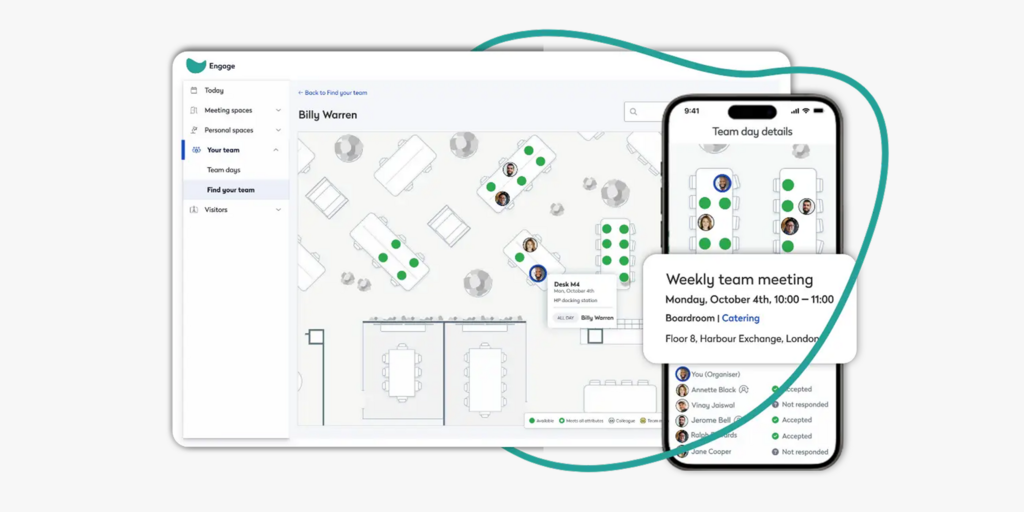
That scale comes with tradeoffs. Smaller organizations tend to get more platform than they need, and some reviewers describe the admin interface as more complex than newer competitors. Condeco’s Capterra rating (3.9/5) is noticeably lower than most others on this list, with complaints centered on reporting quality and reliability of the Outlook integration since the Eptura acquisition.
Core desk booking features
- Outlook and Teams add-in. Books rooms and desks directly from a user’s existing calendar.
- Multi-site policy management. Handles booking rules and permissions across many locations from one admin console.
- Desk and room booking together. Covers both from the same platform.
- Visitor management. Integrated alongside desk and room booking for multi-site organizations.
- Dedicated room display panels. Supported alongside the mobile and web app.
Pricing overview
Condeco doesn’t publish pricing. Getting a number requires a demo and a quote from Eptura’s sales team, with cost depending heavily on site count and contract length.
Pros and cons based on reviews and common feedback
Pros
Deep Microsoft 365 integration. Outlook and Teams booking fits naturally into organizations already living in that ecosystem.
Built for genuine multi-site scale. Handles complexity across many buildings and floors.
Cons
Lower reviewer satisfaction than competitors. A 3.9/5 Capterra rating trails most of this list, with recurring complaints about reporting and reliability.
Slower onboarding. Rollout typically takes longer than self-serve, app-first alternatives.
Best for: Large, complex, Microsoft-centric enterprises with hundreds or thousands of employees across multiple sites, where deep Outlook integration outweighs the added setup complexity.
7. Envoy: solid option when visitor management comes first
Envoy is one of the best-known workplace platforms, and visitor management is still where it feels strongest. Guests can pre-register, check in via QR code or iPad kiosk, sign documents, get badges, and automatically notify their host. For companies that care about front-desk experience, security, and compliance, that part of Envoy is genuinely polished.
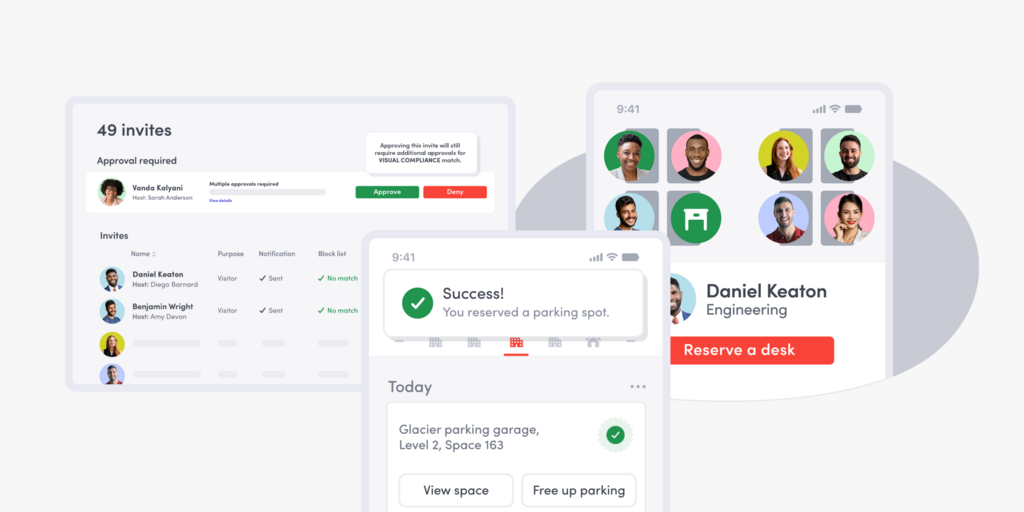
Desk and room booking sit on the same platform as a second product, Envoy Reservations, priced per bookable resource. It covers the basics well: workspace maps, mobile check-in, multi-day scheduling, and desk-preference memory, though it doesn’t offer the same depth of recurring-booking rules that dedicated desk booking tools provide.
Core desk booking features
- Hot desk booking and desk hoteling. Book on arrival or reserve ahead by the hour, day, or week.
- Neighborhoods. Creates team areas so coworkers sit together.
- Workspace maps. Interactive maps for finding a desk.
- Multi-day scheduling. Books several in-office days at once.
- Unused desk protection. Frees up desks that were booked but not used.
- Visitor management (Envoy Visitors). Polished check-in flow, badge printing, and host notifications on the same platform.
Pricing overview
Envoy Reservations, covering desk, room, and parking booking, is priced per bookable resource and billed yearly. The Standard plan costs $5 per bookable resource per month, plus a platform fee, so total cost depends on how many resources and locations a company manages. Envoy Visitors is priced separately, per location.
Pros and cons based on reviews and common feedback
Pros
Best-in-class visitor experience. Check-in, badge printing, and host notifications are consistently well reviewed.
Strong integrations. Works with Outlook, Google Workspace, Slack, Teams, and access-control systems.
Cons
Pricing adds up across modules. Running visitor management and reservations together means paying for each on top of the other, plus a platform fee.
Limited recurring booking logic. No true “book this desk every Tuesday” rule, unlike some dedicated desk booking tools.
Best for: Companies where visitor management, security, and front-desk experience are the top priority, and desk booking is a valuable extra rather than the main event.
8. Kadence: good for AI-assisted coordination
Kadence has shifted from a pure desk booking tool into a broader workplace platform focused on space planning, attendance coordination, and AI. Its SpaceOps tool uses office data to test layout options and plan team neighborhoods, aimed more at workplace leaders than everyday employees.
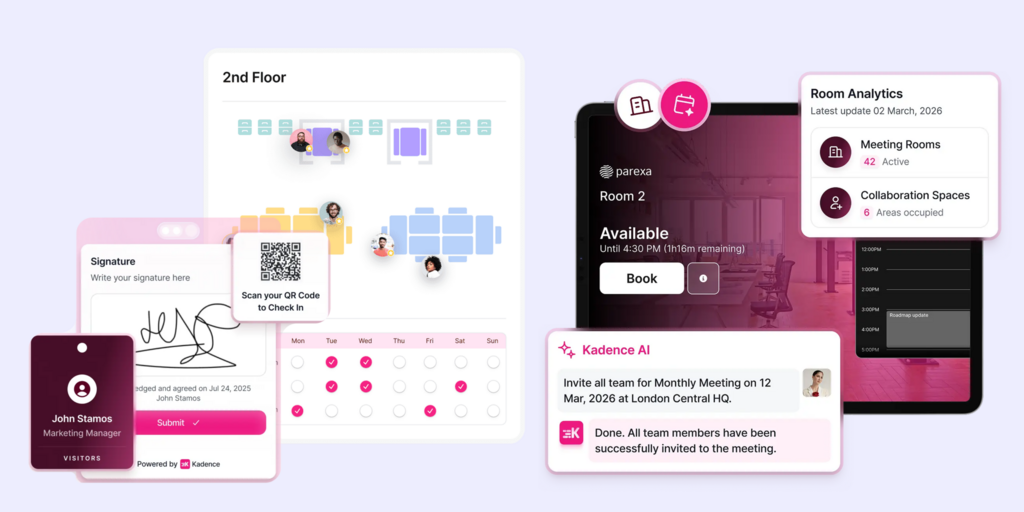
At the employee level, Kadence still covers the basics: booking desks and rooms, seeing where coworkers sit, and getting notified when teammates plan to come in. That team-day visibility, not just an empty desk, is what differentiates Kadence from tools that only show a floor plan.
Core desk booking features
- Interactive floor plans and live availability. Shows desks and rooms on a real-time office map.
- Office neighborhoods. Assigns teams to areas, with the option to change zones by day.
- Smart booking suggestions. Recommends a desk near coworkers based on who’s coming in.
- Notifications for teammate arrivals. Alerts when colleagues are heading to the office.
- AI-powered space planning (SpaceOps). Models layout changes and occupancy scenarios for facilities teams.
- Office analytics. Tracks utilization trends and hybrid-policy effectiveness.
Pricing overview
Kadence now offers two plans, WorkOps (core desk and room booking, visitor management, analytics) and SpaceOps (adds AI-powered space planning). Pricing is no longer published; historically, entry pricing was reported around $4 per user per month, but a current number requires a sales conversation. Kadence bills active users rather than every employee, and floor plan setup is billed separately per floor.
Pros and cons based on reviews and common feedback
Pros
Genuine team-day coordination. Shows who’s coming in and when, not just which desks are open.
Active-user billing. Only charges for people who actually book in a given month, which can be fairer than per-employee pricing.
Cons
Pricing isn’t public anymore. A recent shift to quote-based pricing makes budgeting harder without a sales call.
Can feel like more than smaller teams need. The platform now leans more enterprise-focused than a simple desk booking tool.
Best for: Distributed and hybrid teams whose main problem is coordinating in-office days, not just finding an empty desk.
9. Tactic: good for modular, budget-conscious rollouts
Tactic covers desk booking, room booking, visitor management, and workplace requests, with an AI assistant (Tessa) that can suggest a desk based on what an employee needs, like a standing desk near their team. It supports several check-in methods depending on the plan, including mobile, QR code, Slack, Teams, and WiFi.
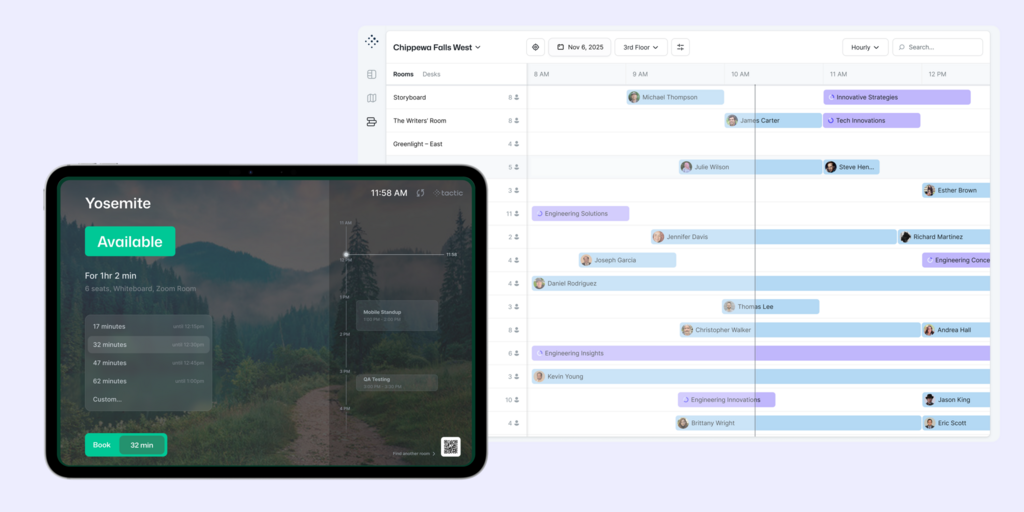
Tactic recently moved away from fixed Core/Pro/Enterprise tiers to a product-based model: companies pick the modules they need (desk booking, room booking, visitor management, workplace requests, space management) and add more later. That flexibility is useful, but it also means pricing takes more work to pin down without contacting sales.
Core desk booking features
- Interactive floor maps. Visual booking with real-time availability.
- Neighborhoods and zones. Groups desks by department.
- Recurring bookings. Reserves the same desk on a repeating schedule.
- Tessa AI assistant. Suggests and books a desk based on a plain-language request.
- Multiple check-in options. Mobile, QR code, Slack, Teams, or WiFi, depending on plan.
- Analytics and reporting. Tracks attendance and desk usage without spreadsheets.
Pricing overview
Tactic now prices by product rather than fixed tier. Companies choose which modules to activate (Desk Booking, Room Booking, Visitor Management, Workplace Requests, Space Management), and cost depends on desks, rooms, locations, and integrations. An online estimator gives a rough annual cost, but an exact quote requires contacting sales.
Pros and cons based on reviews and common feedback
Pros
Modular by design. Start with desk booking and add other modules only when needed.
AI-assisted booking. Tessa can shortcut the search for a specific type of desk.
Cons
Performance can be inconsistent. Some reviewers report slow load times or availability glitches during busy periods.
Pricing takes more work to pin down. The move away from fixed tiers means budgeting requires the online estimator or a sales conversation.
Best for: Budget-conscious mid-market teams that want to start with desk booking and add rooms or visitors as separate modules later.
Even more desk booking software options
A handful of other tools show up regularly in desk booking searches but weren’t reviewed in depth here: deskbird, Officely, Dibsido, elia, Eden, YAROOMS, DeskFlex, HubStar Connect, UnSpot, Clearooms, Tribeloo, Othership, Hybo, Matrix Booking, WorkInSync, Nibol, Whatspot, OfficeRnD, Zynq, AgilQuest, Meetio, GoBright, MyDesk, Zapfloor, Spacewell, Spaceti, Deskfound, Flydesk, Ronspot, Cloudbooking, Mapiq, Tidaro, and Desk.ly. Most cover the same basic ground (booking, floor plans, check-ins), with differences showing up mainly in pricing model, hardware support, and how deep the analytics go.
Which platform to choose
- Top all-in-one platform and overall top desk booking software: Joan. Best fit for offices that want desk booking backed by real hardware at the desk, plus rooms, parking, and visitors on the same platform. Pricing bundles devices and users into flat monthly plans.
- Best for large enterprise workplaces: Robin. Built for hybrid organizations with 500+ employees that want workplace analytics and deep IT integrations. Pricing is custom and quote-based.
- Good for booking rules and flexible spaces: Skedda. A strong pick for offices, universities, and shared facilities that need granular scheduling rules. Priced per bookable space in fixed tiers.
- Good for coworking operators and per-desk pricing: Archie. Predictable per-desk pricing that tracks office capacity instead of headcount. A solid fit for coworking operators and mid-sized offices.
- Best for complex space management: OfficeSpace. More a real estate and space-planning platform than a booking tool. Best for enterprises managing multiple sites and frequent office changes.
- Good for Microsoft-first enterprises: Condeco. Deep Outlook and Teams integration for large, Microsoft 365-centric organizations running many sites.
- Solid when visitor management comes first: Envoy. Started as a visitor sign-in tool; desk and room booking are add-ons on the same platform.
- Good for AI-assisted coordination: Kadence. Focuses on team-day visibility and AI-powered space planning rather than just desk-finding.
- Good for modular, budget-conscious rollouts: Tactic. Lets teams start with desk booking and add rooms or visitors as separate modules later.
Selecting the best desk booking software for your workplace
At first glance, desk reservation platforms often seem nearly identical. Standard capabilities typically include floor plan mapping, self-service bookings, check-in options, and usage reporting. However, meaningful distinctions become apparent through daily workplace usage rather than product demonstrations.
1. Identify core workplace priorities
Start by clarifying the primary challenges to solve. Determine whether the organization only needs workspace reservations or requires broader capabilities such as room scheduling, visitor registration, parking management, or comprehensive office analytics. Standalone tools excel at focused tasks, whereas unified platforms support wider workplace operations. Avoid overpaying for unused platform features when simple desk booking suffices, but ensure the chosen solution can scale alongside future growth.
2. Evaluate hardware integration and deployment timelines
Implementation requirements differ significantly across providers. Joan Workplace solutions integrate proprietary display hardware directly with their software, whereas hardware-agnostic platforms rely on existing tablets or displays. Deployment schedules range from quick multi-day setups to extensive onboarding processes involving custom floor plans and live demonstrations. Assess which setup style fits your organization’s infrastructure and operational needs.
3. Understand pricing structures and transparency
Review how subscription costs are calculated. Per-user plans charge for every employee regardless of office attendance, whereas per-desk or per-resource models charge based on total bookable workstations. Resource-based pricing often provides better cost control for hybrid environments with high staff-to-desk ratios. Additionally, favor vendors with published pricing over quote-based models to streamline comparative evaluation.
4. Focus on practical employee adoption
Prioritize user experience over feature quantity. A successful platform allows staff to quickly secure spaces, locate teammates, and check in with minimal effort via mobile applications, communication tools (like Slack or Teams), or calendar platforms. Long-term success depends on whether employees consistently use the system after initial implementation.
5. Consult authentic customer feedback
While marketing materials highlight optimal capabilities, verified user reviews on platforms like G2 and Capterra offer realistic insights into daily performance. Isolated complaints are typical, but recurring issues noted across multiple reviews signal potential drawbacks.
Final checklist
Before choosing a desk booking tool, it’s worth confirming:
- Can employees book a desk quickly without training?
- Does it work well on mobile?
- Does it support the booking styles needed: daily, weekly, recurring, or on-demand?
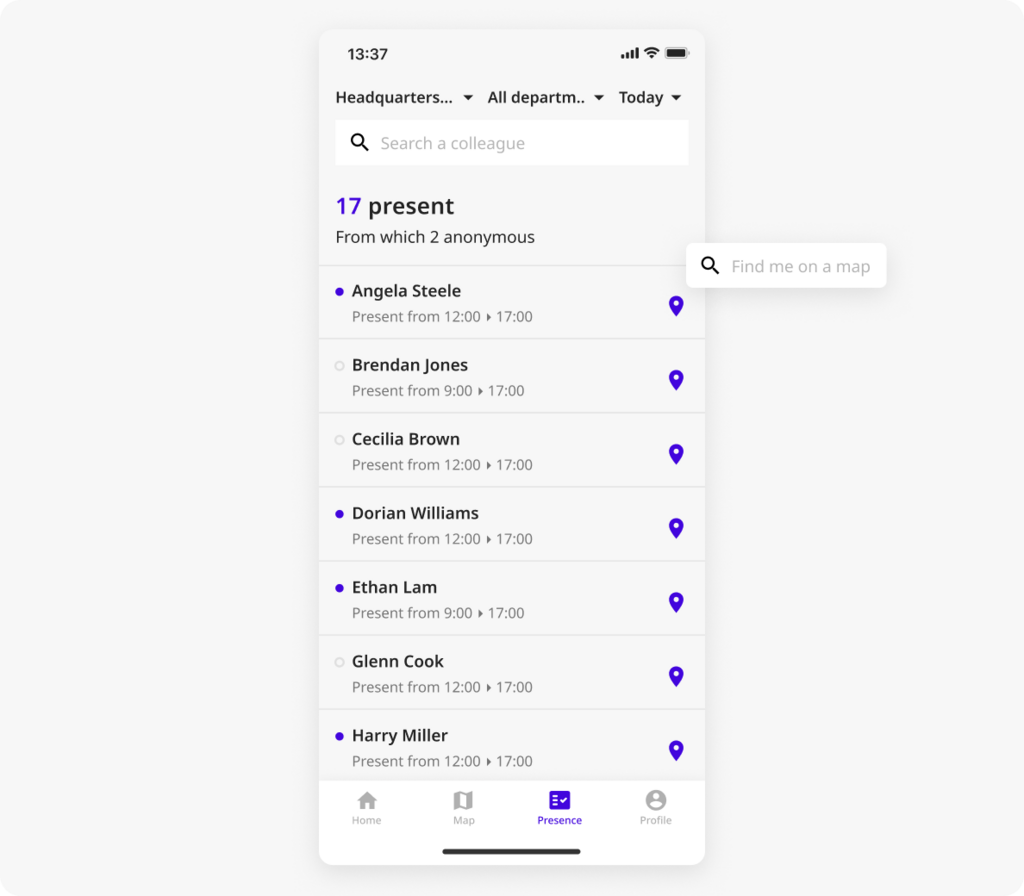
- Can people see who’s in the office and where coworkers are sitting?
- Are floor plans easy to use and updated in real time?
- Does it include check-ins and auto-release for no-shows?
- Can admins set booking rules, zones, permissions, and custom policies?
- Does it integrate with existing tools like Slack, Teams, Outlook, or Google Calendar?
- Does it provide the analytics needed to understand space usage?
- Is pricing clear, scalable, and aligned with how the office is actually used?
- Can the platform grow if the company adds desks, locations, or features?
- Does it meet the company’s security and privacy requirements?
- How long will setup and onboarding realistically take?
- Do real users mention strong support and reliable performance?
Key features to look for in a desk booking system
Beyond having multiple booking options, the strongest desk booking software tends to share a few things in common:
Easy desk reservations
Employees should be able to book a desk in a few clicks, from a phone, a computer, or a synced calendar. A good system shows which desks are free in real time and lets people choose from a map or a list, filtered by location, date, or what they need (a quiet corner, a standing desk). Bookings update instantly, so there’s no double-booking, and everything stays synced with Google or Outlook calendars.
Recurring bookings and rules
If someone comes in on the same days every week, a recurring booking removes the need to reserve the same desk repeatedly. Admins should be able to set rules too: how far in advance desks can be booked, who can book certain areas, and what happens if someone doesn’t show up. The best systems release desks automatically when nobody checks in.
Finding colleagues easily
Many platforms include a way to see who’s in the office and where they’re sitting, so employees can book near their team rather than guessing. Some send alerts when specific teammates plan to come in.
Reporting and office analytics
Occupancy reports show which desks are the most popular, which days run busiest, and which spaces sit underused. Being able to export that data matters for anyone making a real estate or layout decision based on it.
Third-party integrations
Desk booking software that connects to tools a team already uses, like Google Calendar, Slack, Microsoft Teams, or Outlook, removes the friction of switching between apps just to book a desk. Single sign-on support also makes logging in faster and more secure.
Pricing models offered by desk booking systems
There are three common approaches:
- Per desk or per space pricing (resource-based). Cost is based on the number of bookable desks (and sometimes rooms), not the number of employees who might log in. This is usually the easiest model to budget for in hybrid offices, since headcount can change without changing the number of desks actually managed. Archie starts at $2.80 per desk/month with a $159/month minimum; Skedda prices by space in tiers from $99 to $199/month.
- Per user pricing. Cost is based on each employee or active user on the platform. This can be affordable for small teams but tends to get expensive as a company grows, especially with many occasional office users who still need access.
- Quote-based, enterprise pricing. Some tools don’t publish pricing at all. Getting a number means booking a demo and receiving a custom quote based on company size, locations, and modules. This is common for enterprise platforms like Robin, OfficeSpace, and Condeco, but it makes side-by-side comparison harder and usually means a longer buying process.
What usually changes the price, regardless of vendor
- Locations and floors. Multi-site support often pushes a plan into a higher tier.
- Integrations. SSO, SCIM, directory sync, and deeper Teams or Slack workflows sometimes sit behind higher plans.
- Admin controls. Roles, approvals, and advanced booking rules are often paid upgrades.
- Analytics. Basic usage data is usually included; deeper dashboards or longer history can cost extra.
- Add-on modules. Several platforms charge separately for visitors, parking, or AI features.
Quick pricing comparison table
For a hypothetical office with 100 bookable desks and 200 employees, here’s roughly how the pricing models compare on a monthly basis:
| Platform | Pricing basis | Approx. monthly cost for 100 desks / 200 employees |
|---|---|---|
| Joan | Bundled devices + users | Depends on device-to-user ratio; best estimated with Joan’s pricing calculator |
| Archie | Per desk ($2.80–$3.50) | Roughly $280–$350/month at Starter, more at Pro |
| Skedda | Per space, tiered | Would likely require the Premier tier (25+ spaces) at $199+/month |
| Robin, OfficeSpace, Condeco, Kadence | Custom quote | Not publicly calculable; typically requires a sales conversation |
| Envoy | Per bookable resource ($5) + platform fee | Roughly $500/month for 100 resources, plus platform fee |
| Tactic | Product-based, custom | Best estimated with Tactic’s online pricing estimator |
How does desk booking software work exactly
As an employee, the process usually starts with opening an app or website and picking an available desk from a calendar or an interactive floor plan. Many tools let a person choose a specific desk type, like a sit-stand desk or a spot in their team’s zone, book ahead for a few hours or the full day, and set up a recurring booking if they come in on the same days each week. Most platforms also show who else is coming in, and make it easy to cancel, change, or confirm a booking.
As an admin or manager, there’s more control available: setting rules for how far in advance desks can be booked, policies around maximum duration and cancellation limits, restricting certain areas to certain teams, and deciding what happens if someone doesn’t show up. Admins can typically also book on behalf of their team for group office days.
Behind the scenes, the software updates desk availability instantly to avoid double bookings, while quietly building a usage log. That log is what turns into occupancy rates, booking frequency, and a clear picture of which desks rarely get used, the exact data that’s hard to get from a spreadsheet or a sign-up sheet.
Who uses desk booking software and why
Desk booking software serves a range of teams, but they tend to share the same basic problem: more people than desks, with no clear way to manage it.
Hybrid and flexible teams. When employees come in on different days, nobody knows in advance who will be in the office or whether a desk will be free. Desk booking removes the guessing, and the awkward habit of arriving early just to claim a spot.
Growing companies. As headcount increases, fixed seating stops making sense. Booking software lets a company use its space more efficiently without constantly rearranging the office or adding more desks than it actually needs.
Companies downsizing their office. Many businesses reduced their footprint after shifting to hybrid work. Desk booking helps a smaller office keep working even on busy days, by spreading demand instead of letting it collide.
Offices with shared resources. Some desks have specific setups, dual monitors, standing desks, accessibility features, and booking software lets employees filter for what they actually need instead of settling for whatever’s free.
Managers and workplace teams. Facilities and workplace teams use desk booking data to see who’s coming in, reduce no-shows and wasted space, understand which desks actually get used, and plan layouts and policies based on real numbers instead of guesswork.
Employees. From an employee’s side, it’s simple: knowing there will be a desk on arrival, being able to sit near the team, and not wasting time hunting for space.
What’s the best overall desk booking software
For most hybrid offices, Joan is the strongest overall pick. A few reasons why:
- Real hardware, not just an app. Joan’s ePaper displays are wireless and battery-powered, so there’s no cabling or daily charging to plan around, something none of the software-only tools on this list offer.
- One platform instead of several vendor relationships. Desks, rooms, parking, assets, and visitors all live on the same dashboard, which keeps admin overhead down compared to running separate tools for each.
- Bundled, predictable pricing. Flat monthly plans that combine devices and users make it straightforward to budget for a specific office size using Joan’s pricing calculator.
- Strong reviewer feedback. A 4.8/5 Capterra rating across 77 reviews reflects consistently positive feedback on ease of use and setup.
Joan vs Leading Desk Booking Software
Robin vs Joan
Robin is built for large enterprises and adds deep workplace analytics, but pricing is high and quote-based. Joan is faster to set up, includes its own hardware, and publishes transparent, bundled pricing.
Skedda vs Joan
Skedda’s rules engine is strong for organizations with complex access policies, but it’s software-only and prices by space, which climbs quickly as an office adds bookable items. Joan bundles devices and users into flat plans and includes purpose-built hardware.
Archie vs Joan
Archie’s per-desk pricing is predictable and works well for coworking operators, but it doesn’t ship its own hardware. Joan pairs booking software with wireless ePaper displays, so there’s no separate hardware vendor to manage.
OfficeSpace vs Joan
OfficeSpace is built for enterprise real estate planning, with move management and scenario modeling most offices don’t need. Joan is faster to roll out and priced for a much wider range of office sizes.
Condeco vs Joan
Condeco’s Outlook and Teams integration is deep, but it’s built for very large, Microsoft-centric organizations and carries a lower reviewer satisfaction score (3.9/5 on Capterra vs Joan’s 4.8/5). Joan is simpler to deploy and consistently better reviewed.
Envoy vs Joan
Envoy leads with visitor management and treats desk booking as a secondary product with limited recurring-booking rules. Joan treats desk booking as core to the platform, with rooms, parking, and visitors built around it rather than bolted on.
Kadence vs Joan
Kadence’s AI-powered space planning is aimed at facilities leaders more than everyday employees, and pricing is no longer public. Joan keeps pricing transparent and its core booking experience simple for both employees and admins.
Joan vs Tactic
Tactic’s modular, product-based pricing offers flexibility but takes more work to pin down without an estimator or sales call. Joan’s bundled plans are easier to price upfront for a specific office size.
We ranked the tools based on
Each platform was scored across five weighted categories:
Ease of use (20%): How easy is it for employees to book a desk, find coworkers, check in, and manage bookings from a phone? We also weighed the admin side, since workplace teams spend real time on floor plans, booking policies, and reporting.
Desk booking features (25%): Interactive floor plans, recurring bookings, no-show protection, coworker visibility, neighborhood seating, and occupancy analytics, and how well those features actually work rather than just whether they’re listed on a marketing page.
Pricing and value (20%): Whether a tool charges per employee, per desk, or per module changes the total cost significantly, especially for hybrid offices where several employees share one desk. We weighed pricing transparency, starting cost, and how the model scales.
Flexibility and scalability (15%): Multi-location support, booking rules and permissions, integrations, and reporting depth as an office grows.
Customer support and reliability (20%): Onboarding experience, response times, platform reliability, and how often reviewers mention bugs or syncing issues.
Our review process
To evaluate each platform, we focused on two key practical questions: is the software intuitive for employees, and is it straightforward for administrators to manage?
Our evaluation combined multiple reference points: user feedback from G2 and Capterra, thorough analysis of vendor documentation and pricing details, and direct feature verification against official technical documentation rather than marketing material.
Because software features and pricing updates occur regularly, we recommend reviewing each vendor’s site directly prior to finalizing a selection.
FAQ about best desk booking software
What’s the difference between desk booking software and hot desking software?
They’re generally in the same category. Hot desking describes the practice of unassigned, first-come or reservation-based seating; desk booking software is the tool that manages it.
Is desk booking software fully app-based, or does it require hardware?
Both models exist. Joan pairs its software with battery-powered ePaper displays for desks and rooms; most competitors on this list are software-only and work with whatever screens, tablets, or nothing at all, an office already has.
Is there a good office desk booking app, or just desktop software?
Every tool on this list has a mobile app, since most desk booking happens the morning of, or the night before, from a phone. The web dashboard is usually reserved for admins setting up floor plans and rules.
Can I use a “booking desk” tool for meeting rooms too, or just desks?
Most platforms in this category, including Joan, Robin, Skedda, Archie, and Envoy, cover both. A tool that only handles desks and not rooms is increasingly rare.
How much does desk booking software typically cost?
Published starting prices range from roughly $3 to $5 per user, per desk, or per resource per month for small deployments, up to flat monthly platform fees in the low hundreds. Several vendors, including Robin, OfficeSpace, Condeco, and Kadence, don’t publish pricing and quote based on company size and modules.
Can desk booking software integrate with Outlook or Google Calendar?
Yes. Every tool covered here supports Google Workspace and/or Microsoft 365 calendar sync in some form, though the depth of that integration, especially Outlook and Teams add-ins, varies, with Condeco and Robin generally offering the deepest Microsoft integration.
About the author
