
Best OfficeSpace alternatives in 2026
OfficeSpace Software (officespace.com) is a workplace management platform built around floor plan management, desk booking, room scheduling, space utilization analytics, and move management. It targets mid-to-large enterprises — particularly facilities managers and IT teams — who need to visualize occupancy, manage seating assignments, and track how physical space gets used across complex office environments. For organizations that outgrew basic booking tools and need genuine space intelligence, OfficeSpace has historically been one of the few purpose-built options.
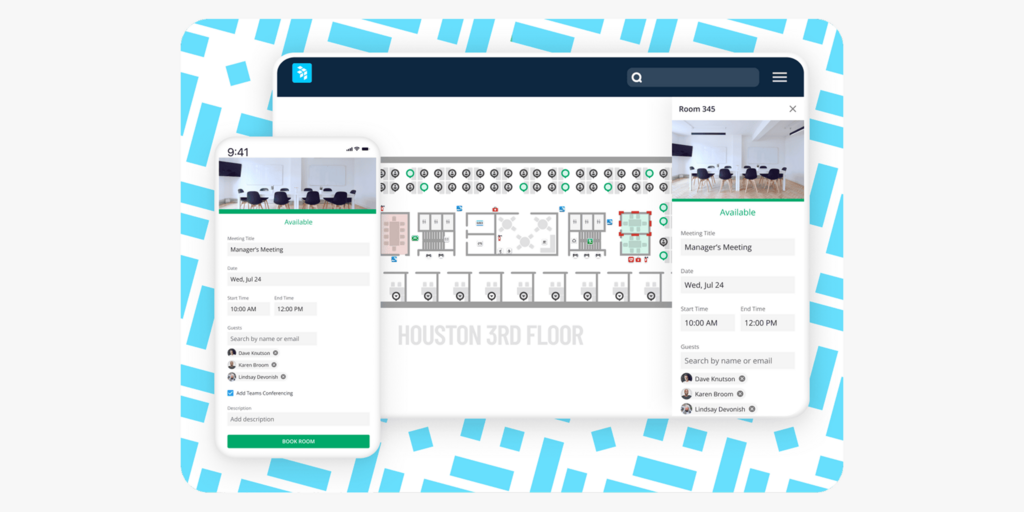
But several recurring patterns push facilities managers and IT leaders to look for OfficeSpace Software alternatives. Pricing is opaque — Vendr’s 2026 benchmark puts the average annual contract at $22,000, with some implementations reaching $96,000, and there’s no public pricing page and no free trial. The per-user billing model means hybrid teams pay for every employee, even the ones who rarely come in. And floor plan changes — a core function for facilities teams — require going back to OfficeSpace’s own team rather than editing them yourself. These aren’t edge cases; they appear consistently across G2, Capterra, and enterprise IT forums.
We’ve compared 8 OfficeSpace Software alternatives across pricing, setup speed, Microsoft integration quality, self-serve floor plan control, and platform breadth. Joan is included and positioned specifically against OfficeSpace. We explain which tool fits which type of organization — including when OfficeSpace’s depth still makes sense.
→ Also evaluating other tools? See our comparisons for Eptura alternatives, Robin Powered alternatives, Condeco alternatives, and Skedda Alternatives.
Quickly jump to:
- Why teams start looking for OfficeSpace alternatives
- Quick comparison table
- The best 8 OfficeSpace alternatives in 2026
- How to choose the right OfficeSpace alternative
- Joan vs. OfficeSpace: Quick comparison
- Frequently asked questions about OfficeSpace alternatives
OfficeSpace software Reviews: Why teams start looking for alternatives
The price only appears after you’ve sat through the sales process
There’s no public pricing for OfficeSpace Software — not even a range. You’ll get a number after a demo and custom quote process. Vendr’s 2026 buyer guide puts the average annual contract at $22,000, with enterprise deployments reaching $96,000 when implementation, onboarding, and multi-floor licensing stack up. For a facilities manager trying to benchmark options before a vendor conversation, this is a problem: there’s no trial, no self-serve sandbox, and no way to test the platform before committing to a quote cycle. Joan publishes pricing from the first click — plans start at $51/month with a 30-day free trial and no sales call required to get started.
Floor plan changes go back to OfficeSpace’s team, not yours
For a platform built around space management, the floor plan is owned by the vendor more than by the customer. Multiple G2 reviewers flag that significant floor plan changes — reorganizing neighborhoods, updating seating after a move, reflecting a refurbished floor — require going back to OfficeSpace’s team rather than editing them yourself. One reviewer: “Updating floor plans can be a lengthy process.” For facilities managers who handle seating changes regularly, this creates an operational bottleneck at exactly the moment they need control. Joan floor plans are fully self-serve — admins add, edit, and reorganize spaces directly in the portal, with no support ticket required and no waiting period.
Per-user billing in a hybrid office is paying for the people who aren’t coming in
OfficeSpace charges per employee, not per active user. CBRE’s 2026 Global Workplace Insights puts average office utilization at 54% while target utilization sits at 79%. For a 300-person company where 40% of staff work remotely on any given day, you’re billing 100% of headcount while 40-60% of that workforce never touches the platform. The per-user model made sense when everyone was in the office. It doesn’t match how hybrid organizations actually work in 2026. Joan billing is based on the users and devices you activate — employees who book via Outlook or Google Calendar directly without a Joan account aren’t billed.
Quick comparison table
| Tool | Best for | Room booking | Desk booking | Physical displays | Starts at | Free trial |
|---|---|---|---|---|---|---|
| Joan | Any office wanting ePaper displays + full platform at a published price | ✅ | ✅ | ✅ ePaper | $51/month | ✅ 30 days |
| Robin | Large enterprises needing hybrid scheduling + complex floor integration | ✅ | ✅ | ❌ | On request | ❌ |
| Deskbird | Microsoft-first teams wanting transparent per-user pricing | ✅ | ✅ | ❌ | $3.75/user/month | ✅ |
| YAROOMS | Mid-market teams needing published all-in-one pricing + AI booking | ✅ | ✅ | ✅ Room panels | €99/month | ✅ |
| Tactic | Teams wanting per-resource pricing with space analytics built in | ✅ | ✅ | ❌ (any screen) | $2.25/desk/month | ✅ |
| Archie | Mid-market teams wanting per-desk pricing + visitor management | ✅ | ✅ | ❌ (Android + iPad) | $2.80/desk/month | ✅ |
| Kadence | Hybrid teams prioritising colleague presence and schedule coordination | ✅ | ✅ | ❌ | ~$4/user/month | ✅ |
| Tribeloo | Teams wanting per-resource pricing with unlimited users | ✅ | ✅ | ❌ | €2.50/resource/month | ✅ |
| OfficeSpace Software | Large enterprises needing floor plan management + move management | ✅ | ✅ | ❌ | ~$22,000/year (Vendr) | ❌ |
The 8 best OfficeSpace alternatives in 2026
1. Joan — Best for teams that want physical ePaper displays, transparent pricing, and a fully self-serve setup
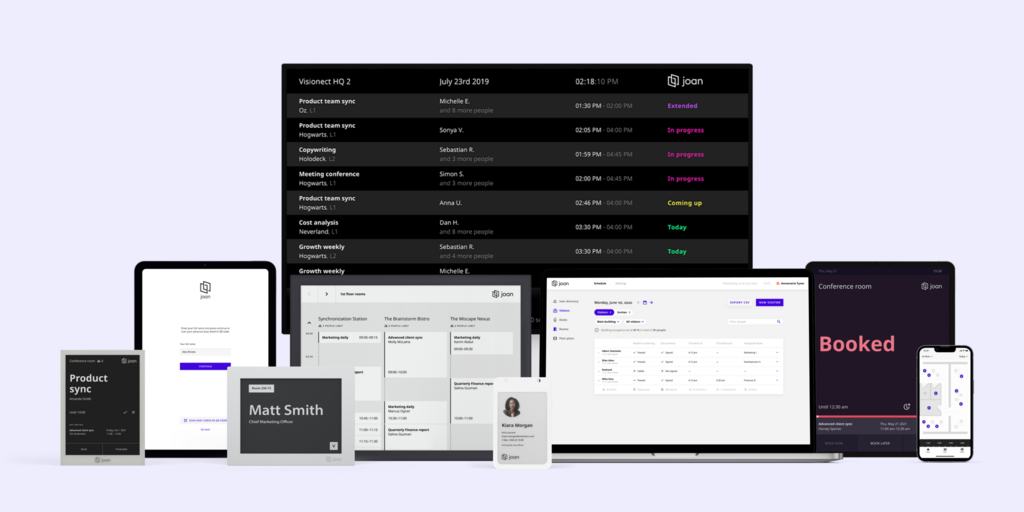
Joan is a workplace management platform that combines cloud software with purpose-built ePaper hardware. The displays — Joan 6 RE, Joan 6 Pro, Joan 13 Pro show live room and desk availability at the door without anyone opening an app, without a plugin, and without a charging cable. For facilities managers moving away from OfficeSpace because floor plans require vendor involvement, Joan’s physical display layer removes the dependency on any software integration: room status is always on the wall, regardless of what the booking system is doing. The software covers room booking, desk booking, visitor management, digital signage, parking reservations, asset reservations, and space analytics — all under one subscription. Floor plans are self-serve, setup takes hours rather than weeks, and pricing is published from the first click.
What makes Joan stand out
- ePaper displays give rooms and desks a permanent source of truth — battery-powered, cable-free, always on; no screen burn, no charging schedule, and visible to anyone walking past without opening an app
- Floor plans are fully self-serve via the Joan portal — add, edit, reorganize spaces without involving Joan’s team; no implementation timeline, no vendor dependency
- Full platform (rooms, desks, visitors, signage, parking, assets, analytics) under one subscription with published pricing — no custom quote required to know your cost
Joan pricing
Plans start at $51/month. Additional users: $1.09/user/month; additional device licences: $10.99/device/month. Hardware (Joan 6 RE, Joan 6 Pro, Joan 13 Pro, Joan ePaper badge) is a one-time purchase. Free 30-day trial available with no credit card required. See current pricing at getjoan.com/pricing.
Joan limitations
- The full Joan experience involves purchasing ePaper displays — a one-time hardware investment that creates higher upfront cost than a software-only subscription. Joan on any display (running Joan software on existing screens) reduces this.
- Joan is a booking and presence platform — it does not cover IWMS functions like maintenance ticketing, lease management, or full CAD-based floor plan editing for large campus environments.
Best for: Any organisation managing physical workspaces — from a small team with a few rooms to a global enterprise across multiple locations.
Start your free Joan trial here.
2. Robin — Best for large enterprises that need hybrid scheduling and complex floor integration
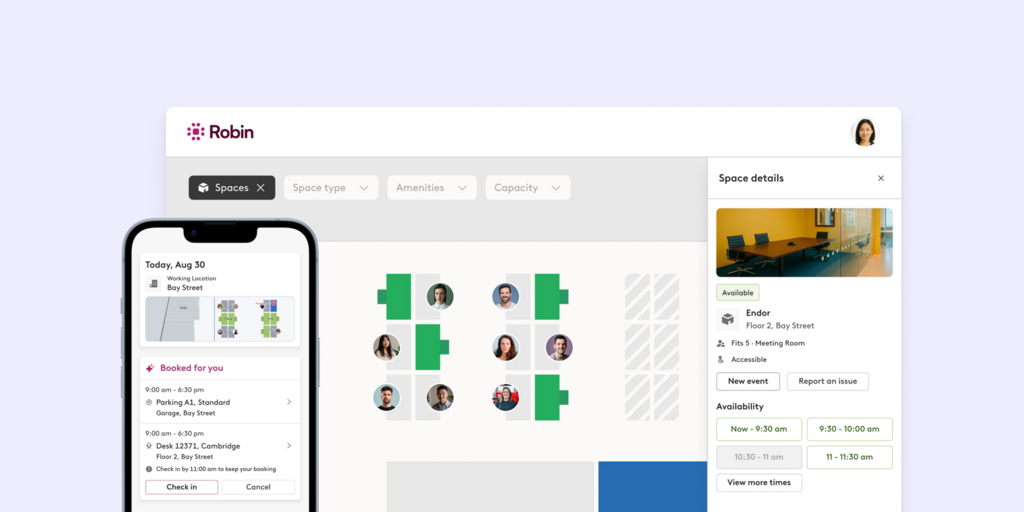
Robin is a workplace management platform covering desk booking, room scheduling, visitor management, and team schedule visibility. It’s particularly strong in large, multi-floor environments where employees need to find colleagues, book neighborhoods, and plan which days to come in alongside their team. For facilities managers who need the coordination depth of OfficeSpace but want a platform more focused on the employee experience layer, Robin offers a comparable enterprise feature set — though with the same pricing opacity: no public tiers, quotes for companies with 500+ employees only.
What makes Robin stand out
- Team presence visibility built into booking — employees see who’s coming in before deciding, reducing the “empty office” problem that plagues hybrid scheduling
- Interactive floor plans with wayfinding — employees navigate complex, multi-floor environments to find available spaces and specific colleagues
- Strong integration ecosystem — Microsoft 365, Google Workspace, Slack, and a range of access control and HRIS platforms
Robin pricing
Pricing on request — no public tiers. Robin targets organizations with 500+ employees and a minimum threshold of regular office users. Third-party estimates put enterprise contracts at approximately $35,000/year for a 100-user organisation including licensing, implementation, and onboarding.
Robin limitations
- Pricing opacity matches OfficeSpace: no public tiers, no free trial, and a 500-employee minimum means the same sales cycle friction you were trying to escape
- Multiple G2 and Capterra reviewers flag friction in Microsoft environments — “a great tool if you don’t use Microsoft at your company” — a significant concern for enterprise buyers running Outlook and Exchange
- Floor plan changes also require Robin team involvement for major edits — the same dependency that pushes people away from OfficeSpace exists here too
Best for: Large enterprises (500+ employees) that need team scheduling coordination and wayfinding alongside desk and room booking, and are prepared for a full sales cycle.
→ Looking for Robin alternatives instead? See the list for the best Robin Powered Alternatives here.
3. Deskbird — Best for Microsoft-first teams that want transparent per-user pricing
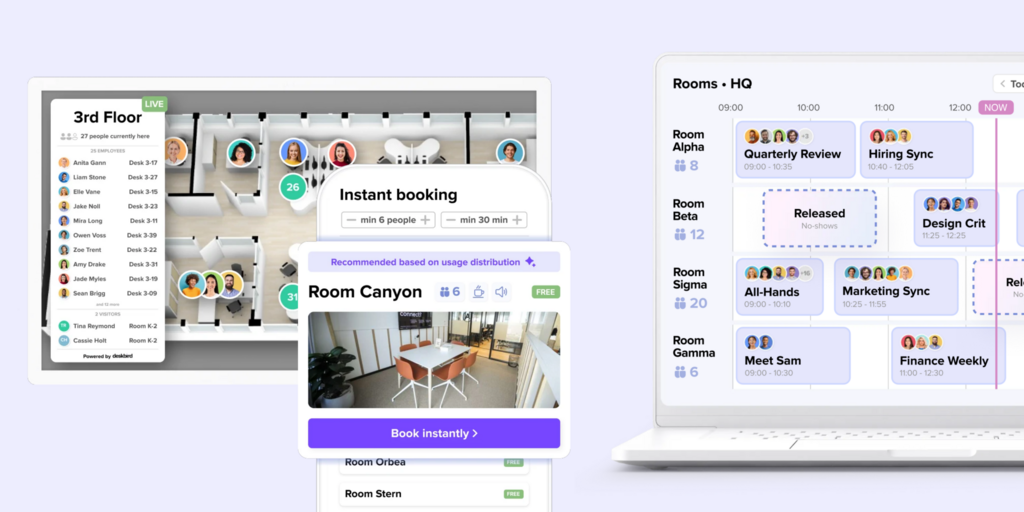
Deskbird is a workplace management platform built for hybrid teams running on Microsoft 365. Desk booking, room booking, parking, visitor management, and hybrid scheduling are all available — with a native Microsoft Teams integration that lets employees book without leaving the app. Unlike OfficeSpace, Deskbird publishes its pricing: the Business plan starts at $3.75/user/month billed annually (€2.75/user/month for European billing), covering desk booking, room booking, mobile apps, and interactive floor plans. For facilities managers who need a published number before entering a procurement process, that matters.
What makes DeskBird stand out
- Native Microsoft Teams, Outlook, Slack, and Google Calendar integration — booking and scheduling happen inside the tools employees already use, not in a separate platform they have to remember to open
- Transparent per-user pricing published from the first click — no demo required to see a number
- ISO 27001 and SOC 2 Type 2 certified — important for enterprise compliance requirements
DeskBird pricing
Business: $3.75/user/month, billed annually. Room booking and desk booking are both included in Business. Visitor management (“Visitors Plus”), advanced room panel features (“Rooms Plus”), and SCIM/SAML provisioning (“User & Data Management Plus”) are sold as add-ons — pricing on request. Professional and Enterprise tiers add advanced analytics, AI floor plans, and custom reporting; pricing on request.
DeskBird limitations
- The key add-ons — full visitor management, room panel kiosk mode, SAML/SCIM provisioning — are not included in Business and require separate pricing conversations, partially recreating the opacity you’re trying to leave behind
- Advanced analytics and custom reporting are gated behind Professional and Enterprise — the Business tier gives basic space utilization data, not the depth OfficeSpace provides
- No purpose-built hardware; Deskbird runs on existing screens, which means managing a separate device lifecycle and no permanently visible room status at the door
Best for: Mid-market teams (50–1,000 employees) running Microsoft 365 who want transparent desk and room booking pricing and a native Teams experience.
→ Looking for DeskBird alternatives instead? See the list for the best DeskBird Alternatives here.
4. YAROOMS — Best for mid-market teams that want published all-in-one pricing with an AI booking assistant
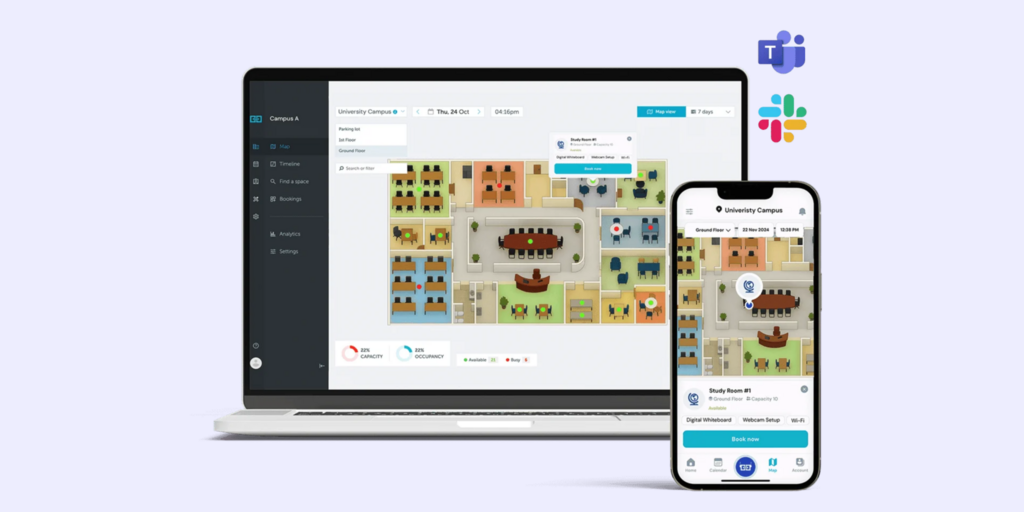
YAROOMS is a workplace management platform covering desk booking, room booking, hybrid work scheduling, visitor management, and workplace analytics — with all plans and prices on their website, no demo required. It includes Yarvis, an AI assistant that handles natural-language booking from Teams, Slack, or web. For facilities managers leaving OfficeSpace because pricing is a black box, YAROOMS gives a real number from the first click and includes analytics across all plans.
What makes Yarooms stand out
- Full published pricing across all tiers — from Starter at €99/month through Enterprise at €899/month, with no features unlocked by negotiation alone
- Yarvis AI assistant built into Business and Enterprise plans — employees book rooms and desks in natural language from their existing tools
- Room panels and lobby displays available as hardware options — useful for teams wanting a physical presence layer without committing to a full ePaper display fleet
Yarooms pricing
Starter: €99/month (1 location, up to 10 users). Business: €399/month (2 locations, 50–200 users). Enterprise: €899/month (5+ locations, 300–1,000+ users). Visitor management is a €99/location/month add-on on all plans.
Yarooms limitations
- Visitor management is not included in any base plan — at €99/location/month on top, a 3-location deployment adds €297/month before a single visitor checks in
- The Business plan caps at 2 locations — teams with 3 offices must jump to Enterprise at €899/month, with no intermediate tier
- Room display hardware is YAROOMS-branded only; existing third-party display fleets can’t run YAROOMS software
Best for: Mid-market teams (50–300 users) needing transparent subscription pricing across rooms, desks, and hybrid scheduling — without a custom quote to get started.
5. Tactic — Best for teams that want per-desk/room pricing and space analytics built in
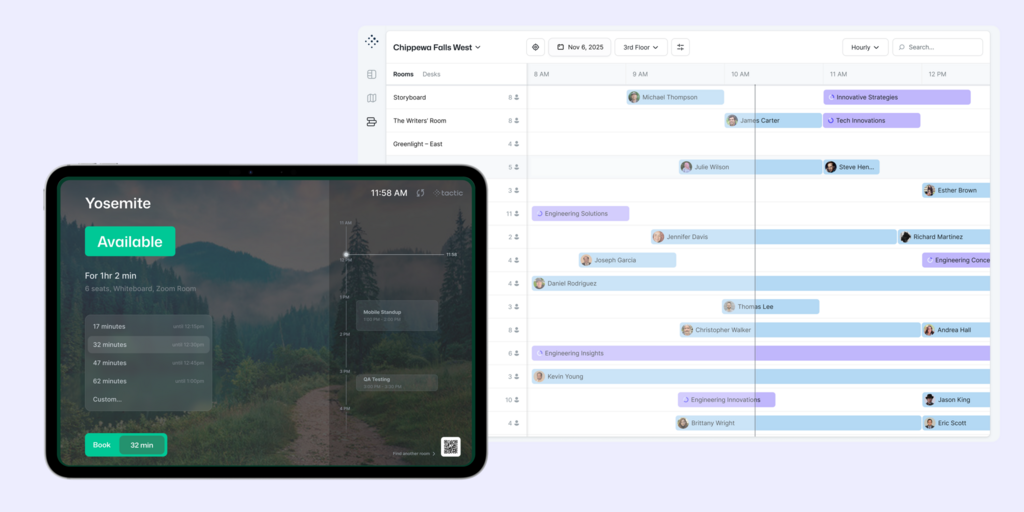
Tactic is a workplace management platform priced per bookable resource — desk, room, or office — rather than per employee. A 200-person hybrid company with 80 desks and 10 meeting rooms pays for 80 desks and 10 rooms, not 200 employees. This directly addresses OfficeSpace’s per-user pricing problem. Tactic covers desk hoteling, room booking, visitor management, interactive floor plans, and space utilization analytics, with integrations for Microsoft 365, Google Workspace, Slack, and Teams. It appears as the G2 top-ranked alternative to OfficeSpace Software in 2026.
What makes Tactic stand out
- Per-resource pricing — bill tracks the physical inventory you manage, not total headcount; costs don’t spike when you hire
- Space utilization analytics included — occupancy data, heatmaps, and attendance trends are built into the platform rather than sold as add-ons
- Interactive floor plans with self-serve management — facilities teams update seating and neighborhoods without contacting Tactic’s team
Tactic pricing
Desk booking: from $2.25/desk/month. Room booking: from $5.00/room/month. Visitor management: from $99/office/month. Free trial available. Enterprise pricing available for multi-office organizations.
OfficeSpace software limitations
- Per-resource pricing can compound on large deployments — a 500-desk, 50-room enterprise office pays more than the headline rates suggest once all modules are added across multiple locations
- Analytics depth is less than OfficeSpace for true space planning and move management — Tactic covers utilization data well but doesn’t replace a full IWMS floor planning suite
- Visitor management is priced separately per office — multi-location deployments need to add $99/office on top of desk and room costs
Best for: Mid-market teams (100–500 employees) that want to escape per-user billing and get space analytics without paying enterprise prices.
6. Archie — Best for mid-market teams wanting per-desk pricing with visitor management in one platform
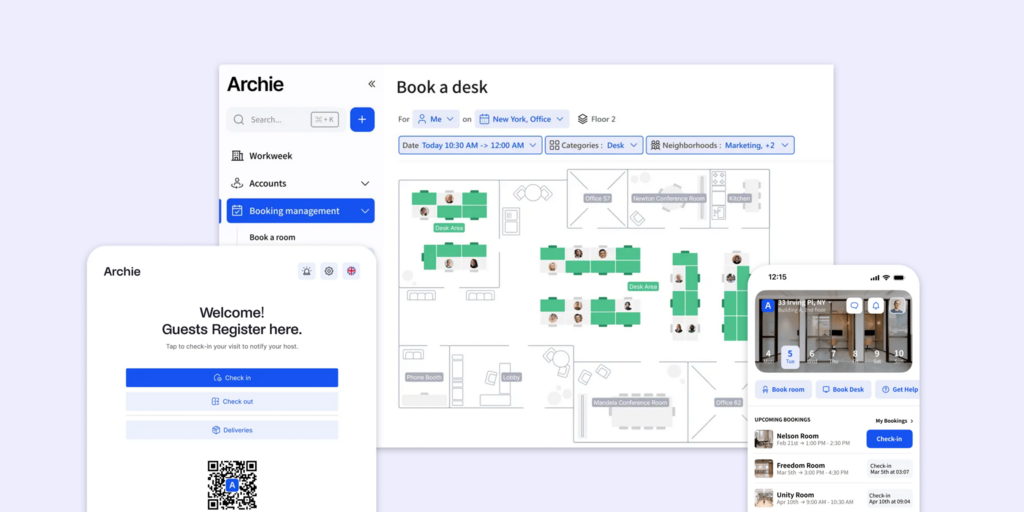
Archie is a workplace management platform covering desk booking, room scheduling, visitor management, and coworking management — priced per bookable resource rather than per user. It integrates with Microsoft Teams, Outlook, and Slack, and runs on Android and iPad tablets. For facilities managers leaving OfficeSpace who want a per-desk billing model and want visitor management included without a separate sales conversation, Archie is a reasonable option.
What makes Archie stand out
- Per-desk pricing — a 300-person hybrid company with 100 desks pays for 100 desks, not 300 employees
- Desk booking, room scheduling, and visitor management available as separate modules or combined — you pay only for what you need
- Microsoft Teams and Outlook booking available on the Pro tier
Archie pricing
Desk booking: Starter from $2.80/desk/month (min. $159/month); Pro from $3.50/desk/month (min. $249/month). Room booking is a separate module — pricing not published. Enterprise: custom. 14-day trial available after demo.
Archie limitations
- Room booking pricing is not published — getting a combined desk + room + visitor quote requires a sales call, reintroducing the pricing opacity you’re moving away from
- The $159/month minimum on Starter means small offices with fewer than ~57 desks pay above the advertised per-desk rate; the floor makes it less attractive for smaller teams
- No purpose-built hardware — Archie runs on Android tablets and iPads, which means managing a charging schedule, screen burn risk, and a separate device lifecycle; room status is only visible when someone looks at a screen
Best for: Mid-market teams (50–500 employees) wanting per-desk pricing and the option to add visitor management as a single module.
7. Kadence — Best for hybrid teams where colleague coordination is as important as space booking
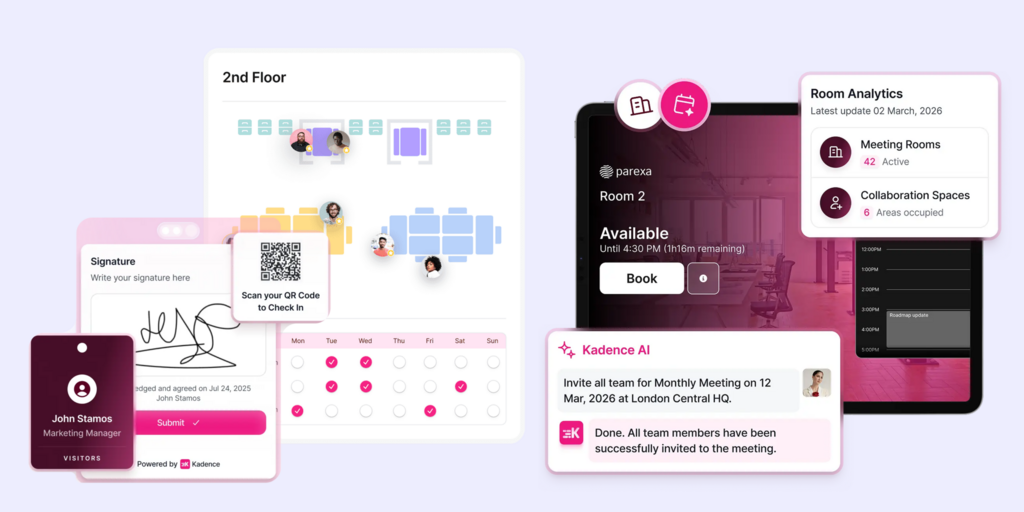
Kadence is a hybrid work coordination platform built around the “who’s in the office” problem. Employees see which colleagues are planning to come in before they decide to book, coordinate team office days, and book desks and rooms in the same flow. It covers desk booking, room booking, visitor management, and hybrid policy enforcement, with native Teams and Slack integration. For OfficeSpace leavers who valued the presence data and occupancy visibility but want the coordination layer to be more employee-facing rather than just admin-facing, Kadence fills that gap.
What makes Kadence stand out
- Team presence visibility drives booking — employees see colleague schedules before deciding to come in, reducing the empty-office problem that undermines hybrid adoption
- Hybrid policy enforcement configurable by team or department — set minimum in-office days, track compliance, and surface exceptions without manual reporting
- Native Teams and Slack integration for scheduling and booking without switching apps
Kadence pricing
Standard: approximately $4/user/month billed annually. Enterprise: custom pricing. Floor plan setup: $250/floor.
Kadence limitations
- Analytics and space utilization reporting is lighter than OfficeSpace or Tactic — Kadence gives attendance and scheduling data well, but heat maps and utilization metrics for real-estate decisions are less developed
- No purpose-built hardware — room and desk status relies on third-party screens, Teams, or the Kadence app; no equivalent to an ePaper display showing live availability at the door
- Kadence recently revised pricing upward — G2 reviewers note the per-user model feels expensive for organizations with large populations of infrequent office users who book rarely
Best for: Mid-market hybrid teams (100–500 employees) where driving team coordination and scheduling alignment is the primary problem, not space planning depth.
8. Tribeloo — Best for teams that want per-resource pricing with unlimited users and no headcount penalty
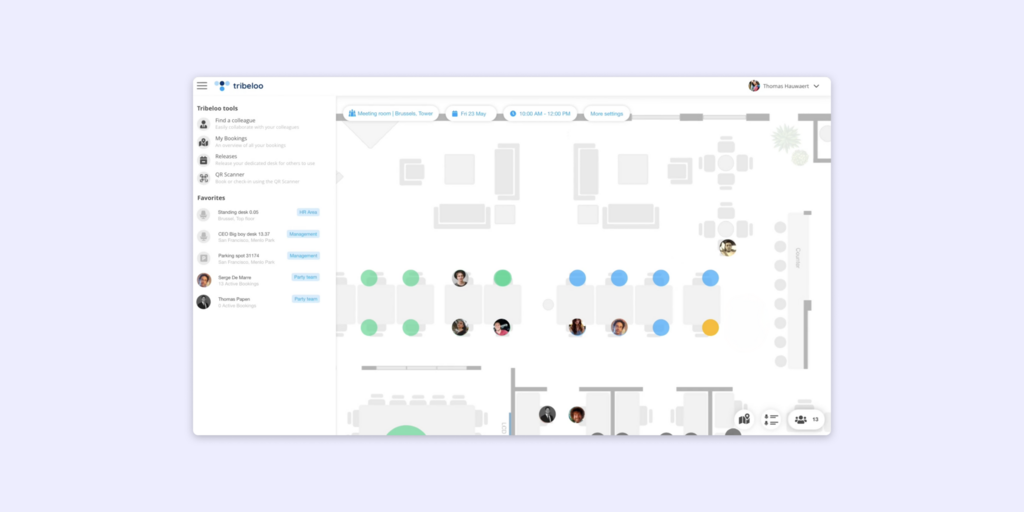
Tribeloo is a desk and room booking platform priced per bookable resource, with unlimited users included on every plan. A 400-person company with 80 desks pays for 80 bookable resources — headcount growth doesn’t change the bill. It covers desk hoteling, room booking, interactive floor plans, Microsoft 365 and Google Workspace sync, and hybrid scheduling. For facilities managers who want to escape OfficeSpace’s per-user billing model entirely, Tribeloo resets the cost logic without requiring a sales call.
What makes Tribeloo stand out
- Per-resource pricing with unlimited users — costs track the physical inventory you manage, not how many people are in your HRIS
- Microsoft 365 and Google Workspace two-way calendar sync included on Standard and Premium plans — book from Outlook or Google Calendar without a separate app
- Interactive floor plans on all paid plans, with Azure AD integration and SSO on Premium
Tribeloo pricing
Basic: €2.50/resource/month. Standard: €3.25/resource/month. Premium: €3.50/resource/month. All billed annually; monthly billing costs 20% more. Free trial available.
Tribeloo limitations
- Recurring desk bookings from Outlook don’t sync — Tribeloo doesn’t pick up the ‘recurring’ flag from calendar invites; you have to build the series inside Tribeloo’s interface, creating a split workflow for facilities teams managing hot-desk policies through Outlook
- No visitor management on any plan — if visitor tracking is part of the facilities scope, Tribeloo doesn’t cover it; you’ll need a separate system
- Analytics depth is limited — utilization data and occupancy tracking is basic compared to OfficeSpace; it’s sufficient for booking management but won’t support real-estate decisions or floor-level heat maps
Best for: Teams managing a defined set of bookable spaces who want per-resource pricing and unlimited users — and don’t need visitor management or deep space analytics.
How to choose the right OfficeSpace alternative
If pricing transparency is what drove you here
Every tool on this list except Robin publishes at least a starting price — something OfficeSpace doesn’t. Joan ($51/month), Deskbird ($3.75/user/month), YAROOMS (€99/month), Tactic ($2.25/desk/month), Archie ($2.80/desk/month), Tribeloo (€2.50/resource/month), and Kadence (~$4/user/month) all let you build a cost model before talking to anyone. Joan also publishes a free trial — no sales call required.
If the per-user model was the specific problem
Tactic, Archie, and Tribeloo all charge per bookable resource rather than per employee. A 300-person hybrid company with 80 desks pays for 80 desks, not 300 people. Joan’s billing also only counts users who actively log into the Joan app — employees booking via Outlook or Google Calendar directly aren’t billed.
If self-serve floor plans are critical
This is where Joan and Tactic both stand out explicitly. Joan floor plans are fully self-serve via the portal with no vendor involvement. Tactic also allows facilities managers to update seating arrangements and neighborhoods without contacting support. OfficeSpace and Robin both require vendor involvement for major floor plan edits — if that’s what you’re escaping, verify explicitly with any vendor before signing.
If this is a desk booking software alternative problem, not a space planning problem
If OfficeSpace was an overcomplicated solution for what’s essentially a desk and room booking requirement, Deskbird or Kadence are the cleanest swaps — Microsoft-native, published pricing, fast setup. Joan covers the same use cases and adds ePaper hardware for a permanent physical presence at each space.
If you’re a facilities manager at a large enterprise with genuine space planning needs
Be honest about this category. Joan, Deskbird, Kadence, and Tribeloo are booking and scheduling platforms. They cover space utilization analytics but not full IWMS functions like lease management, maintenance ticketing, or CAD-based floor plan engineering. If you genuinely need a facility management software alternative at enterprise IWMS depth, OfficeSpace, Robin, or purpose-built IWMS platforms like Archibus or Planon are the realistic options — and Joan can complement them on the booking and display layer.
Why Joan is usually the best OfficeSpace Software alternative
Most OfficeSpace leavers have the same three complaints: pricing that requires a sales cycle, floor plan changes that require vendor involvement, and a per-user model that doesn’t match hybrid reality. Joan addresses all three. Pricing is published and starts at $51/month with a 30-day free trial. Floor plans are fully self-serve. And billing only counts active platform users — not total headcount. The ePaper displays add something structural that no other platform on this list offers: room and desk status visible at the door, permanently, without any integration that can break. For most facilities managers coming off OfficeSpace, that combination solves the actual problem rather than swapping one complex system for another.
→ Also comparing other tools? See all our workspace software comparisons:
Joan vs. OfficeSpace: Quick Comparison
| Joan | OfficeSpace Software | |
|---|---|---|
| Room booking | ✅ | ✅ |
| Desk booking | ✅ | ✅ |
| Physical displays | ✅ ePaper (Joan 6 RE, Joan 6 Pro, Joan 13 Pro, Joan ePaper badge) | ❌ (third-party tablets only) |
| Digital signage | ✅ | ❌ |
| Visitor management | ✅ built-in | ✅ |
| Parking & asset reservations | ✅ | ✅ |
| Calendar integrations | Microsoft 365, Exchange, Google Workspace, Teams, Slack | Microsoft 365, Google Workspace |
| Floor plan editing | ✅ self-serve via portal | ⚠️ major edits require OfficeSpace team |
| Space utilization analytics | ✅ built into all plans | ✅ (core differentiator) |
| Move management / IWMS depth | ❌ (booking and presence platform) | ✅ |
| Pricing model | Published, starts at $51/month | Custom quote — ~$22,000/year average |
| Free trial | ✅ 30 days | ❌ |
| Setup time | Hours to days | Weeks (officially 35 days, closer to 60 in practice) |
Ready to make the switch?
If OfficeSpace Software’s pricing model, vendor-dependent floor plans, or implementation timeline pushed you to look elsewhere — Joan is free to try with no sales call and no commitment. Start with the full platform on your existing screens, or add Joan ePaper displays to any room or desk.
Frequently asked questions about OfficeSpace alternatives
Is there a free OfficeSpace Software alternative?
OfficeSpace Software does not offer a free plan or a free trial — accessing the platform requires completing a demo and custom quote. Among the alternatives on this page, Tactic, Deskbird, and Tribeloo all offer free trials. Joan offers a 30-day free trial of the full platform with no credit card required. None of these are free long-term at scale, but all are significantly more accessible to evaluate than OfficeSpace.
What is OfficeSpace Software pricing?
OfficeSpace Software does not publish pricing. Quotes are customized per organization, based on employee count, module selection, and number of locations. Vendr’s 2026 buyer benchmark puts the average annual contract at $22,000, with enterprise implementations reaching $96,000 when implementation services and multi-floor licensing are included. OfficeSpace software cost is difficult to estimate without a full sales conversation — there is no published tier, no per-user rate, and no trial to test the platform before committing. For comparison: Joan starts at $51/month with published pricing; Deskbird starts at $3.75/user/month; YAROOMS starts at €99/month.
OfficeSpace Software reviews: what do users say?
OfficeSpace generally receives positive reviews for its space planning depth, interactive floor plans, and utilization analytics. The recurring complaints in G2 and Capterra reviews are: pricing opacity (no number without a full sales cycle and no trial), floor plan edits that require going back to OfficeSpace’s team rather than self-serve, long implementation timelines (officially 35 days; multiple reviewers report closer to 60), and a feature set that feels complex for organizations that just need booking and presence tracking without full IWMS depth. Support is consistently praised as responsive once you’re a customer.
Who are OfficeSpace Software’s main competitors?
OfficeSpace Software’s main competitors as a facility management software alternative are Joan, Robin, Deskbird, YAROOMS, Tactic, Archie, Kadence, and Tribeloo. Joan is the strongest hardware-first alternative — ePaper displays replace the software integration as the source of truth for room status, and pricing is published. Tactic and Archie are the closest like-for-like alternatives on pricing model, both charging per bookable resource rather than per employee. Robin competes on enterprise depth. Deskbird and Kadence compete on Microsoft integration and hybrid scheduling.
What is the best OfficeSpace Software alternative for facilities managers?
Facilities managers specifically should evaluate on three criteria: self-serve floor plan control, space utilization analytics, and implementation speed. Joan and Tactic both offer self-serve floor plan management without vendor involvement. Joan adds ePaper displays that give a permanent physical source of truth at each space. Tactic and YAROOMS include space analytics built into base plans. If IWMS depth (maintenance ticketing, lease management, CAD floor plans) is genuinely required, OfficeSpace or a dedicated IWMS platform remains more appropriate than a booking platform.
What is the best desk booking software alternative to OfficeSpace?
If desk booking is the primary requirement — rather than full space planning — Deskbird, Joan, Tribeloo, and Tactic are the strongest desk booking software alternatives to OfficeSpace. All four publish pricing, offer free trials, and deploy in days rather than weeks. Deskbird is the best fit for Microsoft-first teams. Joan is the best fit for teams that want a physical display at each desk showing live availability. Tribeloo and Tactic are the best fit if you want per-resource pricing that doesn’t scale with headcount.
Page last updated: June 2026. Pricing verified from public sources — always confirm live pricing directly with each vendor before purchasing.
About the author
