
Best Flexopus alternatives in 2027: Desk and room booking tools compared
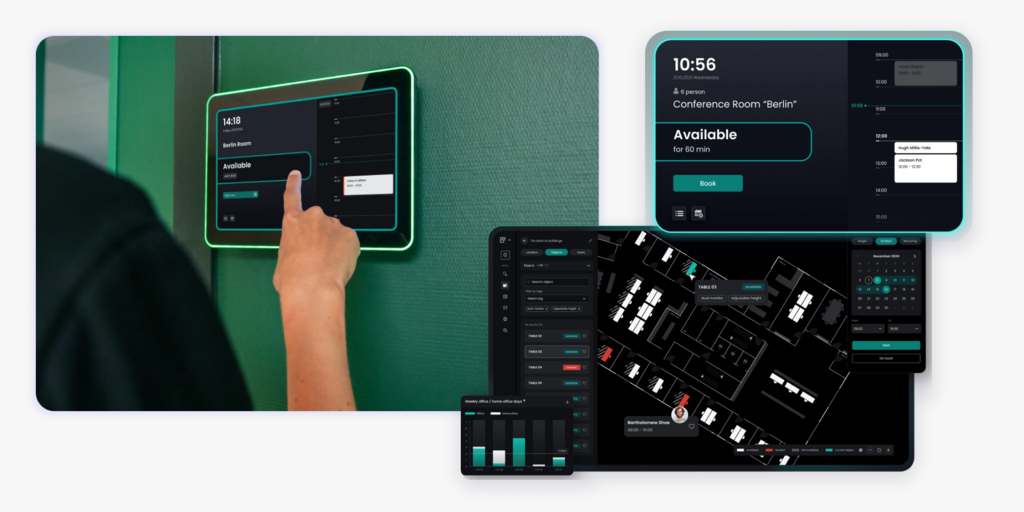
Flexopus (flexopus.com) is a German desk sharing and workplace booking platform. Employees book desks, meeting rooms and parking spaces from an interactive floor plan, the web app, a Microsoft Teams app or synced Microsoft and Google calendars. Flexopus also offers visitor registration and room door signs that show occupancy and accept ad-hoc bookings. It is priced per bookable resource with unlimited users, and G2 reviewers rate it 4.9 out of 5 across 28 reviews.
Flexopus is well liked, so teams that look elsewhere usually have a specific gap: Flexopus does not make its own displays, several useful features are add-ons or sit in the higher tier, and reviewers ask for more polish on the admin side and more control over display layouts.
We compared seven Flexopus alternatives on pricing model, hardware, room and desk coverage and limitations. If you are comparing other European booking tools, see our Best Deskbird alternatives and Best Awaio alternatives.
Quickly jump to:
- Why teams start looking for Flexopus alternatives
- Quick comparison table
- The 7 best Flexopus alternatives in 2027
- How to choose the right Flexopus alternative
- Joan vs. Flexopus: quick comparison
- Frequently asked questions about Flexopus alternatives
Why teams start looking for Flexopus alternatives
The displays come from someone else
Flexopus room signs run on partner hardware, such as tablets from display makers like ProDVX. You source, mount, power and support the screens, and Flexopus supports the software on them. G2’s comparison data lists device compatibility as the most cited con, and reviewers ask for more control over display layout and branding.
Add-ons and tier gates on top of the per-resource price
Third-party listings put Flexopus Starter at €1.59 per resource per month and Business at €2.99 on annual billing. On top of that, published add-ons include floor plans at €250 one-time per 50 resources and asset management at €50 per month, and SSO with SAML2 and SCIM sits in the Business plan. The headline per-desk price is not the full bill once floor plans, assets and SSO are in scope.
The admin side is less polished than the booking side
Flexopus reviews praise the employee booking experience. The criticism concentrates on administration: one G2 reviewer notes the admin dashboard is not consistent with the user interface, and a Capterra reviewer asks to book a desk directly from the live floor plan view. Office managers spend more time in the admin tools than employees do, so these gaps matter during a trial.
Quick comparison table
| Tool | Best for | Pricing model | Own room display hardware | Visitor management | Starts at |
|---|---|---|---|---|---|
| Joan | Booking software plus its own ePaper displays, wired or wireless | Per plan, users and devices | ✅ ePaper, battery or PoE | ✅ | €49/month incl. 20 users and 2 device licenses |
| Deskbird | Desk-first hybrid offices | Per user | ❌ | Not the focus | See vendor website |
| Tribeloo | Per-resource pricing, closest to Flexopus | Per resource | ❌ | ✅ | From €3/resource/month |
| YAROOMS | Multi-module scheduling with published tiers | Tiered plans | ❌ | ✅ | See vendor website |
| Skedda | Space booking with detailed booking rules | Per space | ❌ | Limited | See vendor website |
| Robin | Enterprise hybrid scheduling in Microsoft 365 | Custom | ❌ | ✅ | Pricing on request |
| Kadence | Coordinating which days teams come in | Per user | ❌ | ✅ | See vendor website |
| Flexopus | Floor-plan desk sharing with unlimited users | Per resource | ❌ partner displays | ✅ | From €1.59/resource/month (third-party listings) |
Joan pricing from getjoan.com/pricing, November 2026. Other prices from public sources; confirm with each vendor before purchasing.
The 7 best Flexopus alternatives in 2027
1. Joan: Best for teams that want booking software and their own displays from one vendor
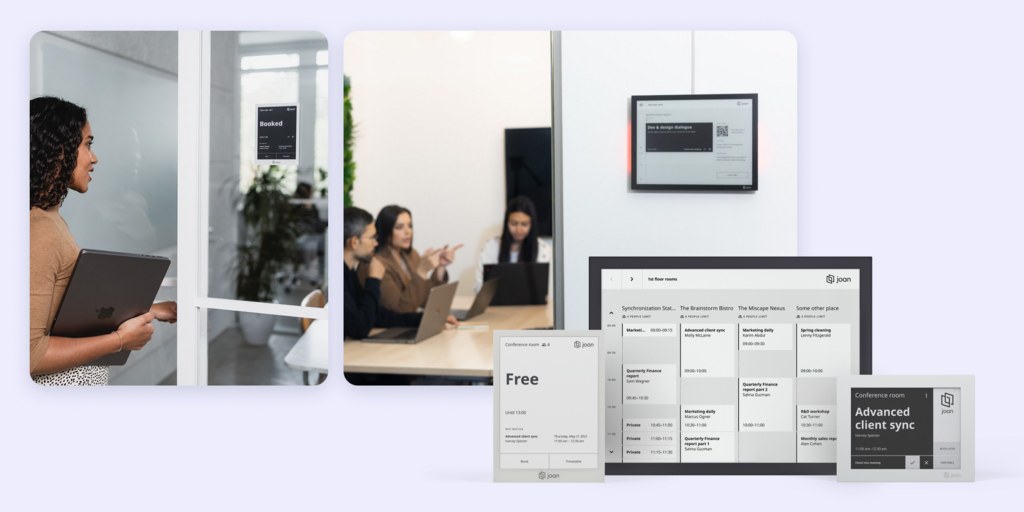
Joan covers the same ground as Flexopus, desk booking, room booking, parking, visitor management and floor plans, and adds digital signage and asset reservations. The difference is hardware: Joan designs and supports its own ePaper room displays.
The Joan 6 Pro and Joan 13 Pro run on battery or on a PoE wall mount with an LED occupancy light, and the Joan 6 RE runs on battery. There is no tablet to source, no charger at the door and one vendor to call when a display stops syncing.
What makes Joan stand out
- Displays and software from one vendor: purpose-built ePaper panels instead of third-party tablets.
- Wired or wireless, room by room: PoE wall mounts with LED occupancy lights, or battery power with no cable. The Joan 6 Pro runs up to 3 months per charge.
- Every feature in every plan: no add-on for floor plans, analytics or signage.
- Booking where people already work: Outlook, Google Calendar, Slack and Joan AI in Microsoft Teams.
Joan pricing
Plans start at €49/month, billed yearly, and include every Joan solution. The entry Team plan already includes 20 users and 2 device licenses. Each additional user is €0.99/month, and each additional device (any room display, signage screen or check-in tablet registered in Joan) is €9.99/month. Displays and PoE wall mounts are a one-time purchase on top. People who only book rooms through Outlook or Google Calendar do not count as users. See current Joan pricing.
Joan limitations
- Priced by users and devices, not per desk: Flexopus includes unlimited users. Large teams who book desks in the Joan app add user licenses beyond the 20 in the Team plan.
- Upfront hardware cost if you choose Joan displays. Joan on any display runs on existing screens if you want to avoid that.
Best for: Any organization that wants desk and room booking plus reliable displays at the door, from a small office to hundreds of locations.
Start your free 30-day Joan trial
2. Deskbird: Best for desk-first hybrid offices
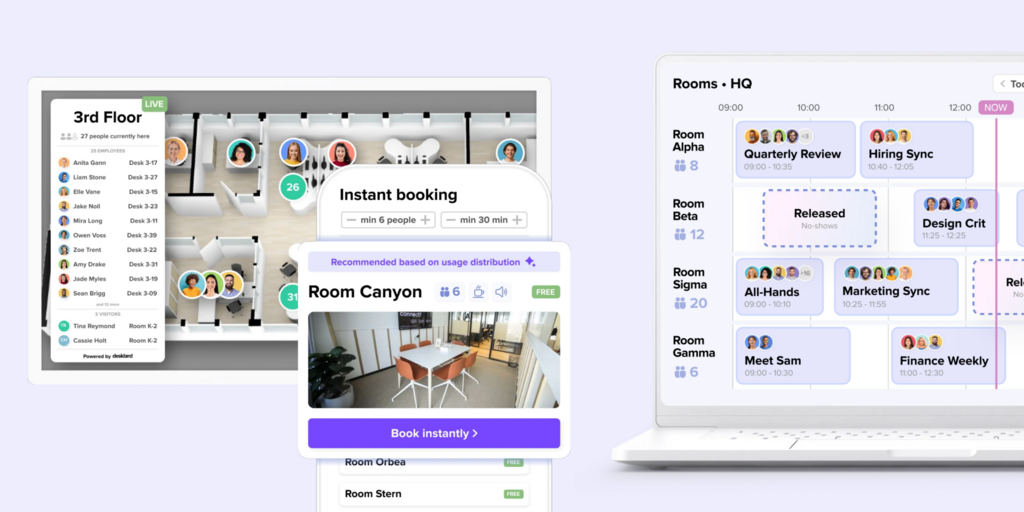
Deskbird is a desk booking and hybrid planning app from Switzerland. Employees book desks, see which colleagues are in and plan office days, mostly from the mobile app. Meeting room booking is available but plays a smaller role.
It is the closest like-for-like alternative to Flexopus for teams whose main problem is desks.
What makes Deskbird stand out
- Mobile app built for booking a desk in a few taps
- Office-day planning that shows which teammates are in
- Per-user pricing that does not grow with each desk you add
Deskbird pricing
Per-user plans. Verify current pricing at Deskbird’s website before purchasing.
Deskbird limitations
- Room booking comes second: heavy meeting room schedulers may find it thin.
- No hardware of its own: door panels mean a separate vendor.
- Per-user pricing costs more than Flexopus for large teams sharing a few desks.
Best for: Offices where desk booking is the main problem and rooms are booked occasionally.
Looking for Deskbird alternatives instead? See our Best Deskbird alternatives or the full Joan vs. Deskbird comparison.
3. Tribeloo: Best for per-resource pricing like Flexopus
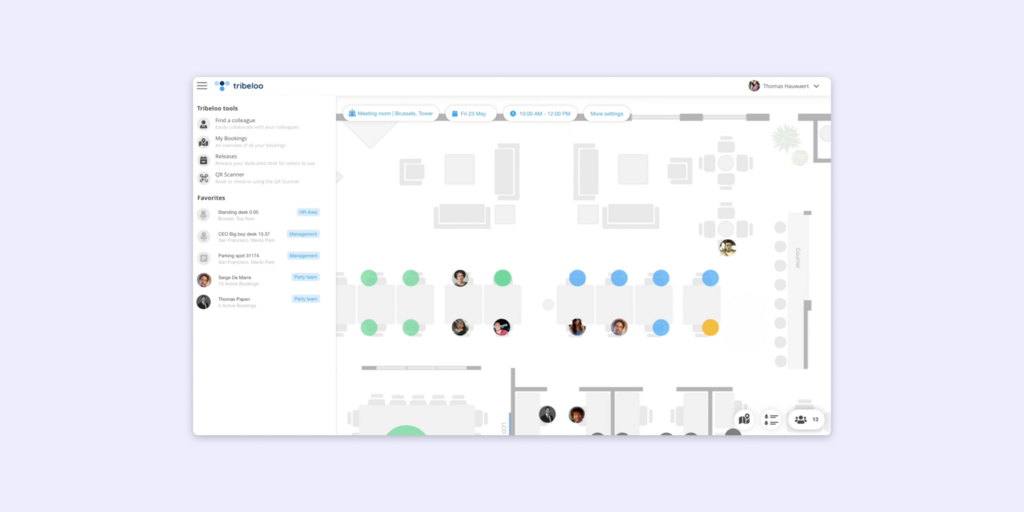
Tribeloo is a European desk and meeting room booking platform with a color-coded floor plan, team zones and visitor management. Like Flexopus, it is priced per resource, so the bill follows the desks and rooms you manage.
For Flexopus buyers who like resource-based pricing, it is the closest pricing match on this list.
What makes Tribeloo stand out
- Per-resource pricing for small footprints
- Floor plans with team zones for neighborhood seating
- Booking from Outlook and Microsoft Teams
Tribeloo pricing
From €3/resource/month. Verify current pricing at Tribeloo’s website before purchasing.
Tribeloo limitations
- Recurring desk bookings from Outlook do not sync: series have to be built inside Tribeloo.
- No hardware of its own: door panels mean a separate vendor.
- Lighter analytics than enterprise platforms.
Best for: European offices that want resource-based pricing and a clean floor plan view.
4. YAROOMS: Best for multi-module scheduling with published tiers
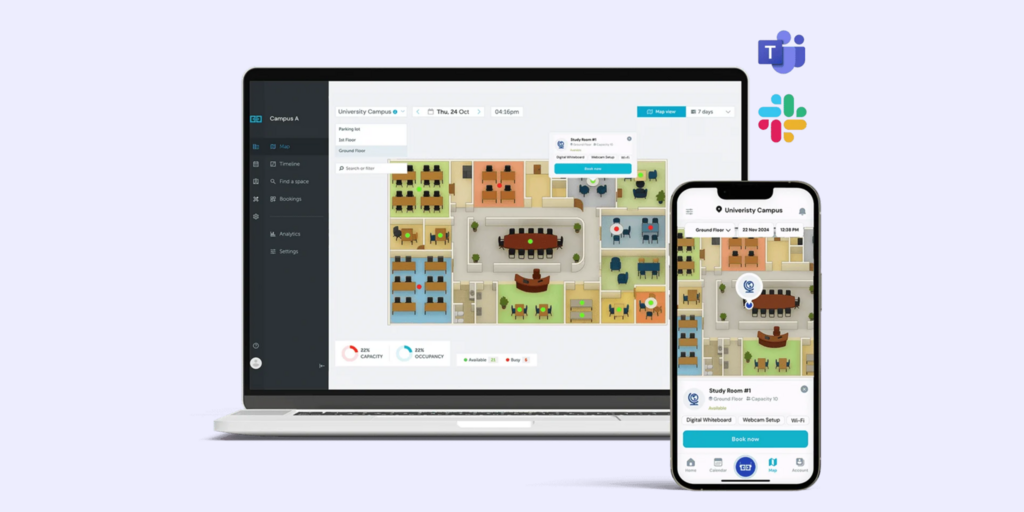
YAROOMS covers room booking, desk booking, hybrid scheduling and visitor management in one platform, with published pricing tiers.
Its scope is close to Flexopus, and finance teams can model costs before a demo.
What makes YAROOMS stand out
- Published pricing tiers
- Rooms, desks, hybrid schedules and visitors in one admin console
- Microsoft Teams and Slack integrations
YAROOMS pricing
Tiered plans published on its website. Verify current pricing at YAROOMS’ website before purchasing.
YAROOMS limitations
- No hardware of its own: room panels run on third-party tablets.
- Dense admin interface with a longer setup than lighter tools.
- No physical visitor badge: check-in is a screen workflow only.
Best for: Organizations that want a broad software platform with transparent tier pricing.
Looking for YAROOMS alternatives instead? See our Best YAROOMS alternatives.
5. Skedda: Best for space booking with detailed booking rules
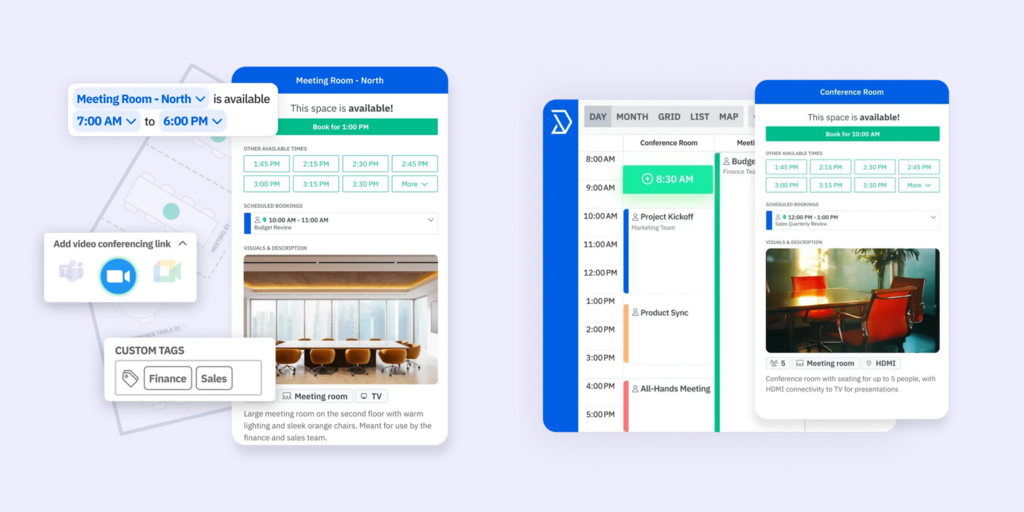
Skedda is a space booking tool for meeting rooms, desks and shared spaces. Employees book from an interactive floor map, and admins set detailed rules per space: time limits, buffers and approval steps.
It suits offices that need tight control over who can book what and when.
What makes Skedda stand out
- Interactive floor map for booking
- Detailed booking rules and approvals per space
- Self-serve setup
Skedda pricing
Tiered plans published on its website. Verify current pricing at Skedda’s website before purchasing.
Skedda limitations
- No hardware of its own: room panels mean third-party tablets.
- Visitor management is limited compared with front-desk platforms.
- Basic analytics on lower tiers.
Best for: Offices that need straightforward booking with tight booking rules.
Looking for Skedda alternatives instead? See our Best Skedda alternatives or the full Joan vs. Skedda comparison.
6. Robin: Best for enterprise hybrid scheduling in Microsoft 365
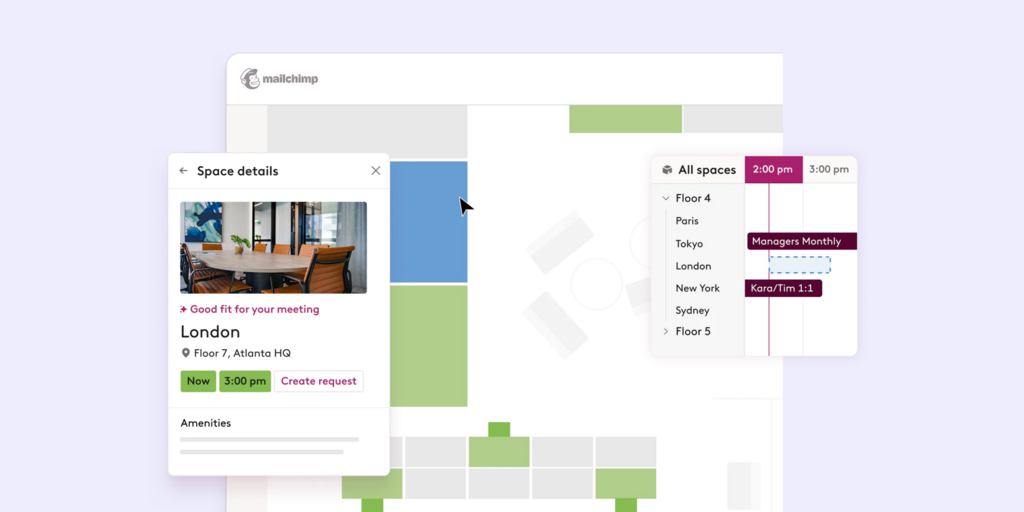
Robin is a hybrid workplace platform for room booking, desk booking, visitor management and space analytics, with deep Outlook integration and team presence views.
It is a step up in scope and price from Flexopus, aimed at larger organizations.
What makes Robin stand out
- Room booking from Outlook with two-way sync
- Team presence views that show who is coming in
- Space analytics on attendance, peak days and no-shows
Robin pricing
Pricing on request. Robin does not publish plan prices.
Robin limitations
- No public pricing: cost modeling needs a sales call.
- Auto-release cancels unchecked bookings, so late arrivals can lose their desk or room.
- No hardware of its own: room displays run on third-party tablets.
Best for: Larger organizations where hybrid scheduling and Microsoft 365 depth are core requirements.
Looking for Robin alternatives instead? See our Best Robin alternatives or the full Joan vs. Robin comparison.
7. Kadence: Best for coordinating which days teams come in
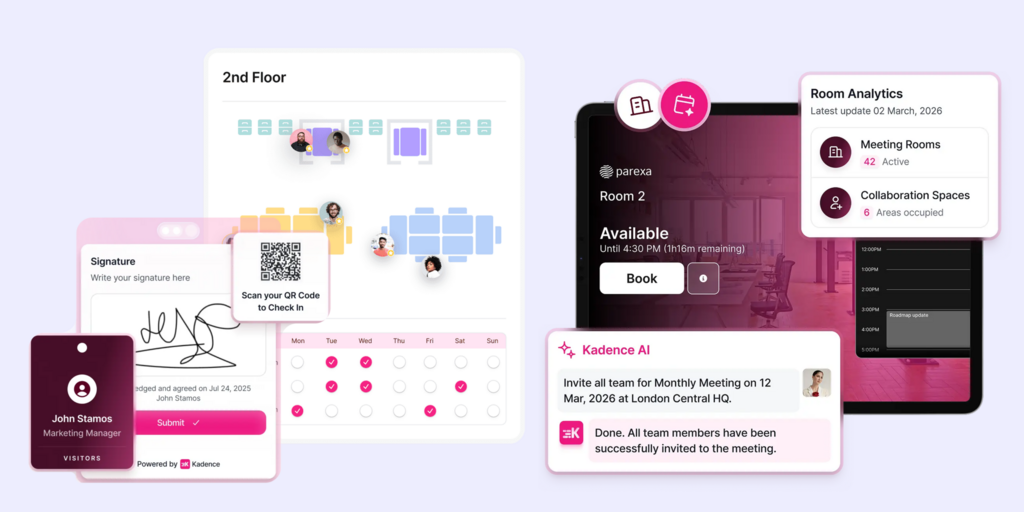
Kadence is a hybrid work coordination platform. Its core job is helping teams agree which days to be in the office, with desk and room booking built around that plan.
It integrates with Slack and Microsoft Teams, so office planning happens where employees already chat.
What makes Kadence stand out
- Team-level attendance planning
- Slack and Microsoft Teams integrations
- Desk, room and visitor features in one app
Kadence pricing
Verify current pricing at Kadence’s website before purchasing.
Kadence limitations
- Software-only: no room displays of its own.
- Coordination comes first: teams that mainly need resource control, such as parking or floor plan rules, get less depth.
Best for: Hybrid teams whose main problem is coordinating office days.
Looking for Kadence alternatives instead? See our Best Kadence alternatives.
How to choose the right Flexopus alternative
If you want displays from the same vendor as the software
Joan is the only option here that makes its own meeting room displays. Every other tool, Flexopus included, runs room panels on third-party tablets.
If you want per-resource pricing
Tribeloo prices per resource like Flexopus. Joan prices by plan, users and devices instead, and people who only book through Outlook or Google Calendar do not count as users.
If desk booking is the whole job
Deskbird is built around desks and the mobile app. Kadence fits if the real problem is agreeing which days teams come in.
If you need detailed booking rules
Skedda has the most granular rules per space on this list. Robin fits larger Microsoft 365 organizations that want analytics and team presence.
Why Joan is usually the best Flexopus alternative
Flexopus does desk sharing well, and leaves the door displays to someone else. Joan covers desks, rooms, parking and visitors and ships its own wired or wireless ePaper displays, with every feature included in the plan rather than sold as an add-on.
Joan vs. Flexopus: quick comparison
| Joan | Flexopus | |
|---|---|---|
| Desk booking | ✅ | ✅ |
| Room booking | ✅ | ✅ |
| Parking | ✅ | ✅ |
| Interactive floor plan | ✅ | ✅ (€250 one-time per 50 resources) |
| Visitor management | ✅ pre-registration, check-in, host alerts; ePaper badges as an add-on | ✅ |
| Digital signage | ✅ | ❌ |
| Own room display hardware | ✅ ePaper, battery or PoE | ❌ partner displays |
| Microsoft Teams | ✅ Joan AI in Teams | ✅ Teams app |
| Calendar sync | Microsoft 365, Exchange, Google Workspace | Microsoft 365, Google |
| SSO | ✅ | Business plan |
| Pricing model | Plan with 20 users and 2 devices; extra users €0.99/month, extra devices €9.99/month | Per resource, unlimited users; Starter €1.59, Business €2.99 per resource/month |
| Free trial | ✅ 30 days | Check with Flexopus |
Flexopus data from third-party pricing listings, G2 and Flexopus product pages. Confirm current details with Flexopus before purchasing.
Want to compare more than Flexopus alternatives? Our list of the best desk booking software ranks 11 tools by price, features and who each one suits.
Ready to make the switch?
Joan is free to try for 30 days with no credit card. Set up desks, rooms and one ePaper display and compare it with your Flexopus setup.
Frequently asked questions about Flexopus alternatives
How much does Flexopus cost?
Third-party listings put Flexopus Starter at €1.59 per resource per month and Business at €2.99 per resource per month on annual billing, with unlimited users. Floor plans (€250 one-time per 50 resources) and asset management (€50 per month) are listed as add-ons. Confirm current prices with Flexopus.
Does Flexopus have its own room displays?
No. Flexopus room door signs run on partner hardware, such as tablets from display makers. Joan designs its own ePaper displays that run on battery or on a PoE wall mount.
What is Flexopus’s biggest limitation?
Reviewers rate Flexopus highly. The most common criticisms concern device compatibility, display layout and branding options, and an admin dashboard that does not match the user interface.
Is Joan cheaper than Flexopus?
It depends on headcount and resources. Flexopus charges per desk, room or parking space with unlimited users. Joan starts at €49/month with 20 users and 2 device licenses included, and people who only book through Outlook or Google Calendar do not count as users. Model both with your own numbers.
Does Flexopus support Microsoft Teams?
Yes. Flexopus offers a Microsoft Teams app and syncs room bookings with Microsoft and Google calendars. Joan offers Joan AI in Microsoft Teams for booking rooms and desks and registering visitors from a chat.
What’s the best Flexopus alternative for room displays?
Joan, because it is the only alternative here that makes its own displays. The others, like Flexopus, run room panels on third-party tablets.
Page last updated: November 2026. Pricing verified from public sources; always confirm live pricing directly with each vendor before purchasing.
About the author
