
Workspace management software in 2026
Workspace management software exists to make that chaos predictable: it turns rooms, desks, parking, assets, and visitors into things people can see, book, and rely on, and gives the people who run the office the data to make it all smaller, cheaper, and better.
This guide cuts through it. We review ten of the best workspace management platforms in 2026: what each one is actually good at, who it’s built for, where it falls short, and how its pricing tends to work. We’ve added a practical buyer’s guide so you can match a tool to your situation instead of the other way around.
This guide is published by the team behind Joan workplace. We’ve ranked Joan first because we genuinely believe it’s the most complete all-in-one workplace platform for hybrid teams, especially those who want polished hardware in the office, not just an app. But this only works as a resource if it’s honest, so we’ve reviewed every other tool on its real strengths and real weaknesses, and we’re upfront about where Joan isn’t the right fit. Use the comparison to decide for yourself.
Quickly jump to:
- Workspace management software comparison table
- What is workspace management software
- What to look for in workspace management software
- The 10 best workspace management platforms in 2026
- Finding the right workspace management software
- Decision Checklist
- How workspace management software is priced
- Trends in workspace management software for 2026
- Frequently asked questions regarding workspace software
- Our research process
TL;DR: The Shortlist
- Best all-in-one workplace platform (software + hardware): Joan covers rooms, desks, visitors, assets, parking, and digital signage in one place, with award-winning low-power ePaper displays for the office.
- Best for mature workplace analytics: Robin
- Best for simple, highly configurable booking: Skedda
- Best for space planning & move management: OfficeSpace Software
- Best for visitor management + front desk: Envoy
- Best for desk booking inside Teams/Slack: deskbird
- Best for enterprise room booking at global scale: Eptura (Condeco)
- Best for fast, calendar-native rollout: Tactic
- Best for coordinating in-office days: Kadence
- Best for hybrid + coworking/flex spaces: Archie
Workspace management software comparison table
| Platform | Best for | Core focus | In-office hardware | Typical pricing model |
|---|---|---|---|---|
| Joan | All-in-one hybrid workplace | Rooms, desks, visitors, assets, parking, signage | Yes: ePaper room & desk displays, visitor badges | Software subscription + optional hardware; free trial |
| Robin | Analytics-led hybrid offices | Desk & room booking, workplace analytics | Room displays / greeter kiosks | Per-user/seat, tiered; enterprise quotes |
| Skedda | Simple, flexible self-serve booking | Desk & space booking | Limited (app / kiosk-style) | Per-space/tiered; low entry point |
| OfficeSpace Software | Space planning & moves | Floor plans, stacking, move management, booking | Third-party displays | Quote-based / enterprise |
| Envoy | Visitor management + workplace | Visitors, desks, rooms, deliveries | iPad check-in kiosks | Per-location tiers; free visitor starter |
| deskbird | Desk booking in Teams/Slack | Desk booking, hybrid scheduling | Add-on displays / kiosk | Per-user/month, tiered |
| Eptura (Condeco) | Enterprise room booking at scale | Rooms, desks, visitors, IWMS | Room screens / kiosks | Enterprise quote-based |
| Tactic | Fast, calendar-native rollout | Desk & room booking, wayfinding | Room displays / kiosk | Per-user/month; low entry |
| Kadence | Coordinating in-office days | People scheduling, desk & room booking | Add-on displays | Per-user/month, tiered |
| Archie | Hybrid + coworking/flex spaces | Desk & room booking, visitors, member billing | Room displays / kiosk | Per-resource/user tiers |
What is workspace management software
Workspace management software is a system for booking, managing, and optimizing the physical resources of an office (meeting rooms, desks, parking spots, shared equipment) and for handling the people flowing through it, including employees and visitors. At its best, it does three jobs at once:
- It lets employees self-serve. Anyone can see what’s free and book a room or desk in seconds, from their phone, calendar, or a display in the hallway, without emailing an office manager or playing musical chairs.
- It gives the office a source of truth. No more double-booked rooms, “ghost” reservations that nobody shows up for, or desks assigned to people who left last year.
- It generates utilization data. Leadership can see which rooms are overbooked, which desks are never touched, and which days are busiest: the numbers you need to resize your footprint or redesign the floor.
- Room & desk booking tools focus on reservations and the day-to-day experience of finding a place to work or meet. This is where most hybrid teams start.
- Workplace experience platforms add visitors, deliveries, wayfinding, announcements, and the “coming into the office” journey.
- IWMS / space management (facilities-grade) tools add CAD-accurate floor plans, move/add/change management, lease and asset tracking, and portfolio-level real-estate planning. These are built for facilities and corporate real-estate teams, not everyday employees.
It’s worth separating three overlapping categories that often get lumped together:
Most organizations don’t need the heavyweight facilities suite. They need something employees will actually use every day, that covers rooms and desks (and increasingly visitors), and that produces clean data. That’s the sweet spot this guide focuses on, while still flagging the enterprise space-planning options for teams that genuinely need them.
What to look for in workspace management software
Before you compare vendors, get clear on which of these capabilities you actually need. The best workspace management software for a 40-person startup is not the same as the best for a 5,000-seat global enterprise.
- Meeting room booking: Real-time availability, calendar sync, recurring meetings, and the ability to auto-release no-show reservations so “ghost meetings” free themselves up.
- Desk booking & hot-desking: Interactive floor-plan maps, favorite desks, team neighborhoods, check-in confirmation, and rules for who can book what and how far ahead.
- Visitor management: Pre-registration, host notifications, digital sign-in, NDAs, and badges: increasingly a security and compliance requirement, not a nice-to-have.
- Parking & asset booking: The ability to reserve limited resources beyond desks and rooms, from EV chargers and parking to AV kit and shared equipment.
- Calendar & collaboration integration: Deep, two-way sync with Microsoft 365/Outlook and Google Workspace, plus booking inside Microsoft Teams and Slack, so people never have to leave their workflow.
- In-office hardware: Room displays outside meeting rooms, desk indicators, and reception kiosks turn the software into something visible and trusted in the physical space. Look closely at power, cabling, and maintenance: this is where many rollouts stall.
- Analytics & occupancy insights: Utilization dashboards, peak-day analysis, and (optionally) sensor-based occupancy detection so you can right-size your real estate with evidence.
- Administration, security & governance: SSO/SAML, SCIM provisioning, granular permissions, audit logs, and data-residency options for IT and compliance.
- Mobile experience: A genuinely good app matters, because most bookings happen on the way to the office, not at a desk.
- Sustainability: Increasingly relevant for ESG reporting: low-power hardware, reduced e-waste, and data that lets you shrink underused space (and its energy footprint).
The 10 best workspace management platforms in 2026
The best choice depends on your team’s needs, the features you’re looking for, and your budget. Below, we’ve rounded up 10 workspace management platforms worth considering in 2026, along with what each one does best.
1. Joan: Best All-in-One Workplace Platform
Best for: Hybrid teams and offices that want one platform for meeting room booking, desks booking solution, visitor management system, assets, and signage, and want elegant, low-maintenance hardware in the office, not just a phone app.
Joan is an all-in-one workplace management platform that covers the full set of office resources (meeting rooms, desks, parking, assets, and visitors) alongside workplace digital signage and analytics, all managed from a single system. What sets Joan apart from software-only competitors is its hardware heritage: Joan is built by Visionect, a pioneer in low-power ePaper (e-ink) displays. That means Joan pairs its software with the “world’s most elegant and awarded meeting room scheduler”: wireless, battery-powered ePaper screens that mount outside rooms without cabling or construction, sip power, and are readable and calm rather than another glowing LCD.
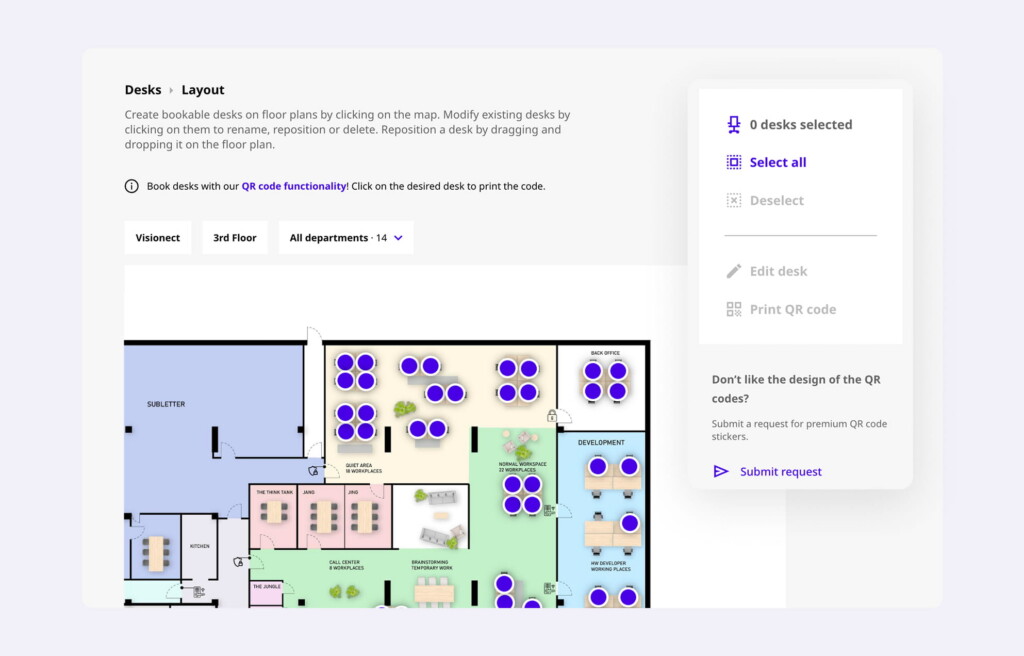
For a workplace manager, that combination is the point. The software handles booking, rules, and reporting; the ePaper displays make availability visible in the hallway and at the desk, which is what actually drives adoption. And because the displays are cable-free and battery-powered, you avoid the electrician quotes and drywall work that make traditional room-panel projects expensive and slow.
Key features:
- Meeting room booking with real-time availability, calendar sync, and no-show auto-release
- Desk booking with interactive maps, mobile booking, and hybrid-work support
- Visitor management with digital registration, check-in, and customizable ePaper visitor badges
- Parking & asset booking for any limited company resource
- Workplace digital signage: a single CMS for both ePaper and LCD displays
- Analytics for utilization insights and data-driven space decisions
- Award-winning ePaper hardware: Joan 6 Pro, Joan 6 RE, and the larger Joan 13 Pro, plus support for existing Crestron, ProDVX, Apple, and Android tablets
- Joan AI Agent for Microsoft Teams to book rooms and get space recommendations from chat
Integrations: Microsoft 365 / Outlook / Exchange and Google Workspace calendar sync, plus Microsoft Teams (including the Joan AI Agent).
Pricing: Joan uses a modular model: a software subscription (scaled to the resources and modules you use) plus optional ePaper hardware bought per room or desk. There’s a free trial, and larger deployments can be quoted. See the current Joan pricing page for details.
Pros:
- True all-in-one: rooms, desks, visitors, assets, parking, and signage in one platform, so you manage fewer vendors
- Best-in-class ePaper hardware that installs without cabling and is genuinely sustainable (low power, long battery life, less e-waste)
- Elegant, design-led displays that reflect well on the office and require little maintenance
- Clean calendar and Teams integration, including an AI agent for natural-language booking
- Strong fit for organizations with sustainability/ESG goals
Cons:
- If you only ever need a bare-bones room-booking app with no hardware, an all-in-one platform may be more than you need
- Not a facilities-grade IWMS: teams needing CAD-accurate space planning, lease administration, and portfolio move management should look at OfficeSpace or Eptura
- Getting the most value means adopting the hardware, which is an added (though optional) upfront cost
2. Robin: Best for workplace analytics
Best for: Mid-to-large hybrid offices that want mature desk and room booking backed by strong workplace analytics.
Robin is one of the most established names in workplace management, with a polished desk- and room-booking experience and analytics that many teams consider a benchmark. It’s designed around the hybrid office: employees book desks and rooms from the app or calendar, teams sit together using neighborhoods, and workplace leaders get dashboards showing utilization, attendance, and trends over time.
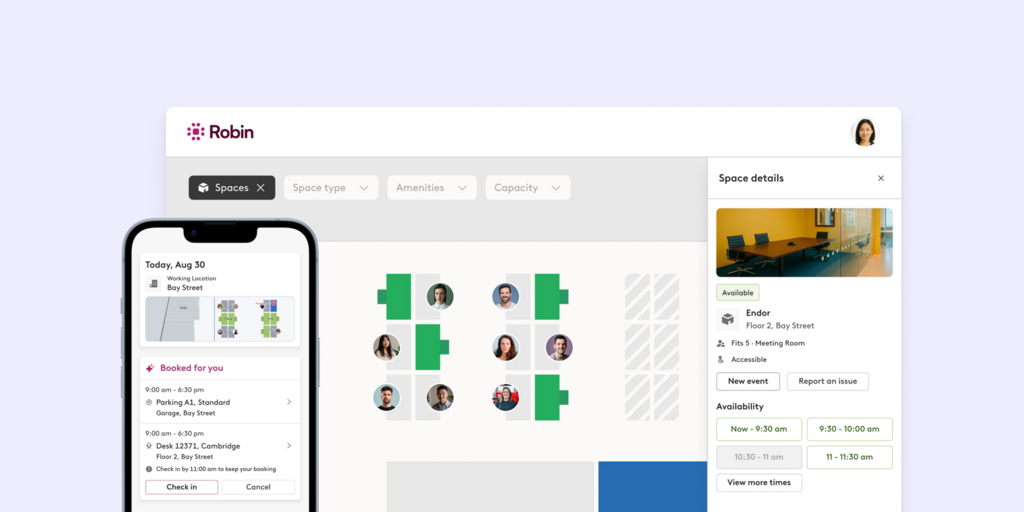
Key features: desk booking with interactive maps and neighborhoods; meeting room booking with room displays; workplace analytics and occupancy reporting; visitor features; deep calendar integration.
Integrations: Microsoft 365 and Google Workspace, Slack, Teams, and common SSO providers.
Pricing: subscription priced per seat/user in tiers, with enterprise quotes for larger deployments. Confirm current pricing on Robin’s site.
Pros: refined, well-liked UX; strong analytics; mature integrations; good fit for growing hybrid teams.
Cons: can get expensive as you scale seats; hardware relies on standard displays rather than purpose-built low-power screens; more than small teams need if you only want simple booking.
Bottom line: A safe, capable choice when analytics and a proven desk/room experience are your priority. If you also want distinctive, cable-free hardware and visitor/asset/signage in the same platform, compare it directly against Joan.
3. Skedda: Best for simple, flexible booking
Best for: Teams that want highly configurable self-serve booking of desks and spaces without heavy administration.
Skedda has built a strong reputation as a clean, flexible booking platform. Its strength is configurability: complex booking rules, permissions, and space setups can be expressed without much fuss, and employees get an intuitive self-serve experience. It’s a favorite of organizations that want to hand booking to employees and step back.
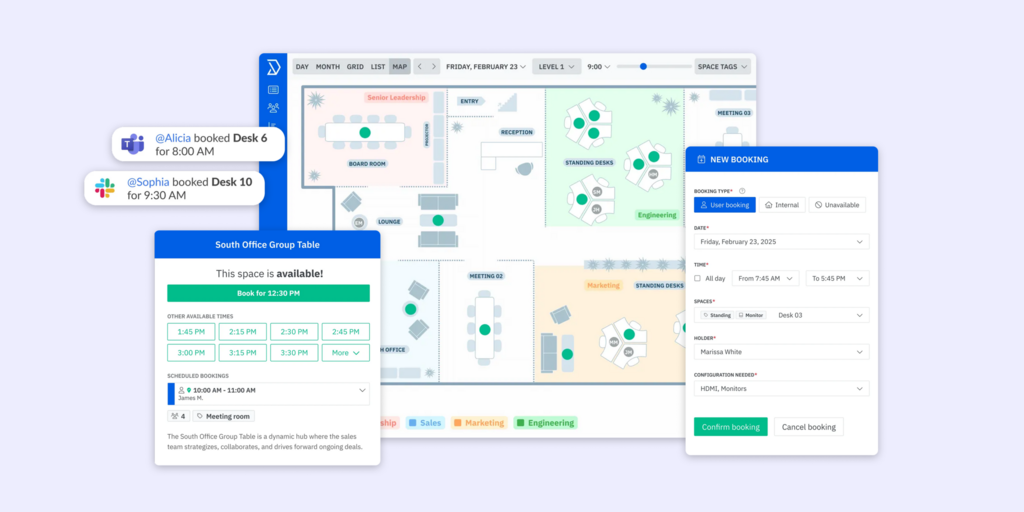
Key features: desk and space booking, interactive floor plans, granular booking rules and permissions, self-serve scheduling, and calendar integration.
Integrations: Microsoft 365 and Google calendars, SSO, and common workplace tools.
Pricing: tiered subscription with a relatively accessible entry point, typically scaling by the number of spaces/desks. Check Skedda’s site for current tiers.
Pros: genuinely easy to use; excellent rule/permission flexibility; quick to stand up; fair entry pricing.
Cons: lighter on native visitor management, purpose-built hardware, and the broader workplace-experience layer; primarily a booking tool rather than an all-in-one platform.
Bottom line: An excellent pick if booking is the whole job and you value configurability and simplicity. If you need visitors, assets, signage, and office hardware unified, you’ll outgrow a booking-only tool.
4. OfficeSpace Software: Best for space planning and moves
Best for: Facilities and corporate real-estate teams that need floor-plan-driven space planning and move management, not just booking.
OfficeSpace sits closer to the IWMS end of the category. Its core strength is space management in the facilities sense: detailed, data-rich floor plans, scenario planning, stacking and move/add/change management, and the ability to manage a real-estate portfolio, alongside desk and room booking. If your challenge is planning and reorganizing space at scale, this is the kind of tool built for it.
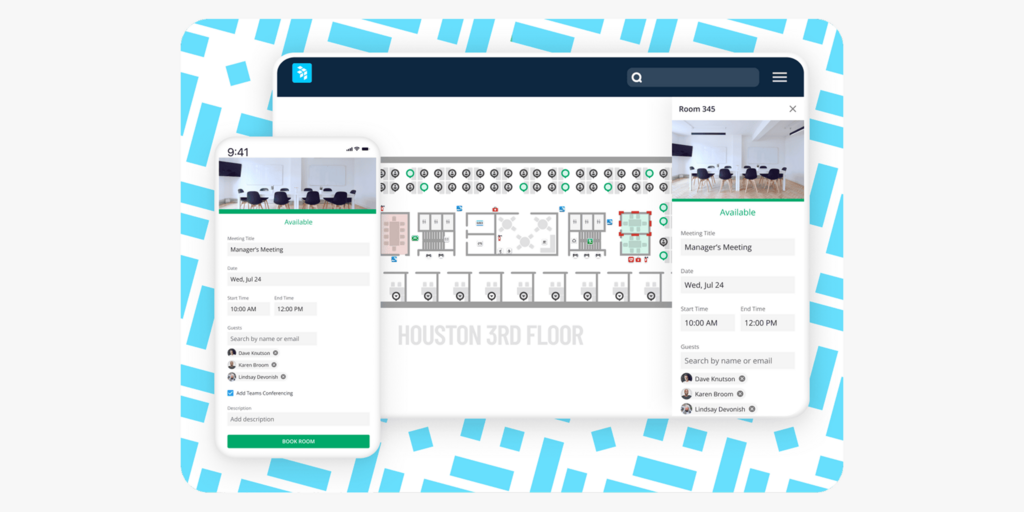
Key features: interactive floor plans, move management, scenario planning, desk and room booking, requests/ticketing, and reporting.
Integrations: Microsoft and Google calendars, HR systems, SSO, and common facilities integrations.
Pricing: quote-based/enterprise; expect a sales conversation rather than a public price.
Pros: powerful for space planning and moves; strong floor-plan tooling; built for facilities professionals.
Cons: heavier and more expensive than everyday hybrid teams need; the day-to-day employee booking experience is not the primary focus; implementation is a project.
Bottom line: The right tool when space planning, not just booking, is the problem. For most hybrid offices that mainly need rooms, desks, and visitors handled well, it’s overkill.
5. Envoy: Best for visitor management + workplace
Best for: Security-conscious offices and busy front desks that want best-in-class visitor management with workplace features layered on.
Envoy made its name in visitor management (the iPad sign-in kiosk many people picture when they think “digital front desk”) and has expanded into a broader workplace platform covering desks, rooms, and deliveries. If the visitor and lobby experience is your priority (compliance, security, a professional first impression), Envoy is a category leader.
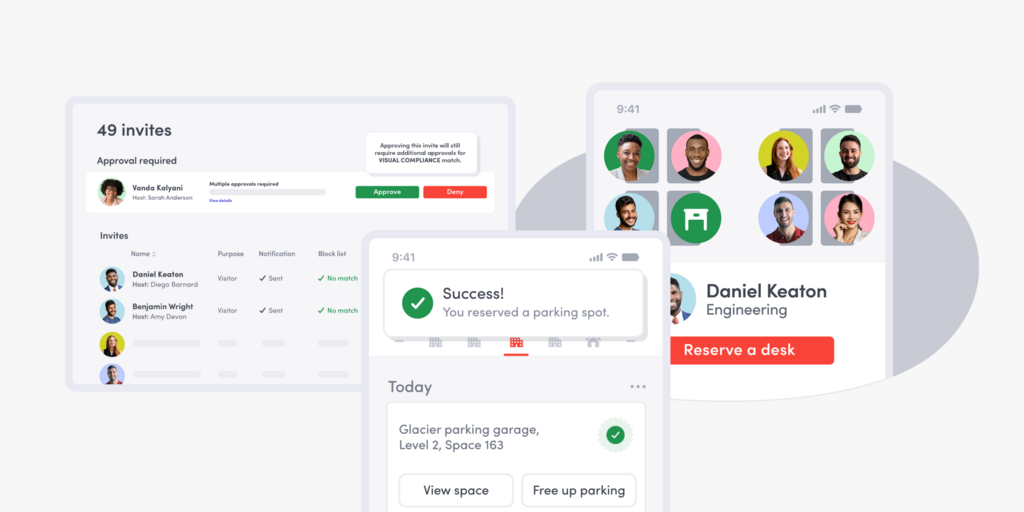
Key features: visitor registration and check-in, host notifications, NDAs and watchlists, deliveries, desk and room booking, and analytics.
Integrations: Microsoft 365, Google Workspace, Slack, access-control systems, and many workplace tools.
Pricing: per-location tiers, with a free starter tier for basic visitor management and paid tiers for workplace features. Verify current pricing on Envoy’s site.
Pros: outstanding visitor experience; strong security/compliance features; broad integration ecosystem.
Cons: desk/room booking is capable but not always as deep as booking-first tools; costs add up as you enable modules and locations; hardware centers on iPad kiosks rather than low-power room displays.
Bottom line: Hard to beat if visitors and the front desk are your top concern. For teams whose center of gravity is rooms and desks (with visitors as one piece), an all-in-one like Joan may be a better overall fit.
6. deskbird: Best for desk booking inside teams & slack
Best for: Hybrid teams that live in Microsoft Teams or Slack and want frictionless desk booking and week-planning where they already work.
deskbird focuses on the employee experience of hybrid work: booking a desk, seeing who’s in on which days, and planning the week, with particularly smooth Microsoft Teams and Slack integration. It’s designed to make coming into the office easy to coordinate, which drives the kind of consistent attendance hybrid offices are chasing.
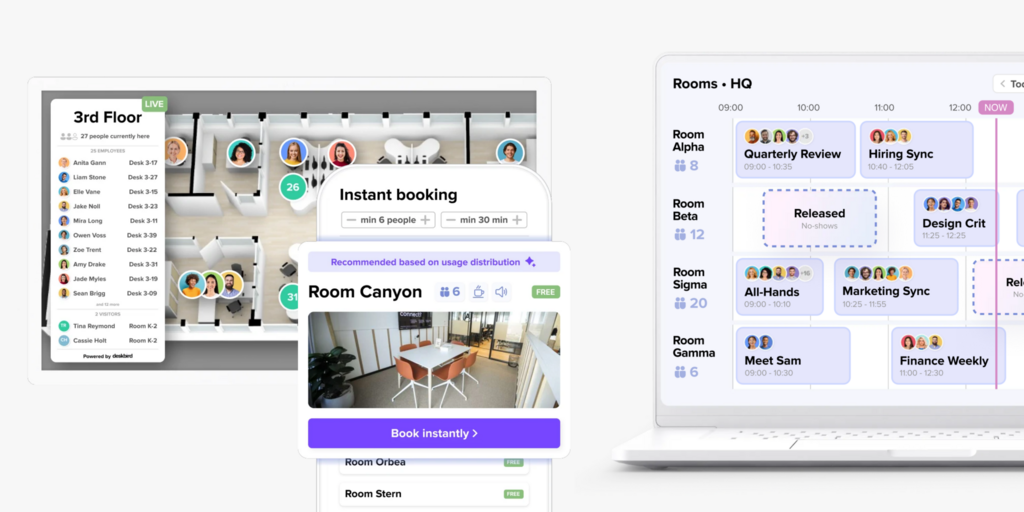
Key features: desk booking with floor plans, week planning and team scheduling, “who’s in” visibility, room booking, and analytics.
Integrations: Microsoft Teams and 365, Google Workspace, Slack, HRIS, and SSO.
Pricing: per-user/month in tiers; check deskbird’s site for current rates.
Pros: excellent Teams/Slack experience; easy adoption; strong for hybrid scheduling and week planning.
Cons: lighter on visitor management, assets, and purpose-built hardware; primarily desk-experience-led rather than a full workplace platform.
Bottom line: A great desk-booking and hybrid-coordination tool, especially for Teams-centric companies. Pair with other tools (or choose an all-in-one) if you also need visitors, assets, and office displays.
7. Eptura (Condeco): Best for enterprise room booking at scale
Best for: Large, global organizations that need enterprise-grade room and desk booking and broader IWMS capabilities.
Condeco, now part of Eptura, is a long-standing enterprise player known for meeting room booking at scale: the kind of deployment with thousands of rooms across many offices and countries, complex approval workflows, and integration into corporate IT. Eptura combines this with worktech and asset/facilities management for a broader IWMS footprint.
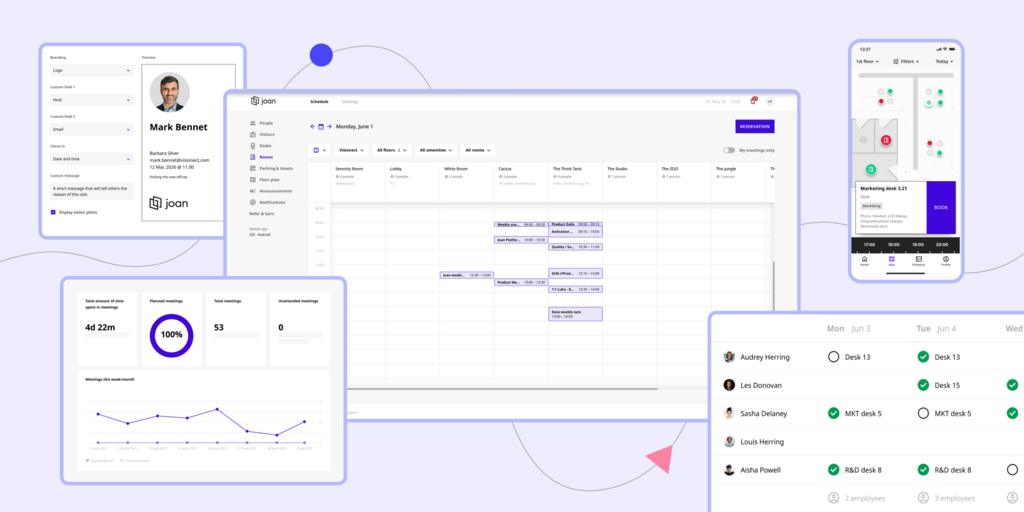
Key features: enterprise room booking, desk booking, visitor management, room panels/screens, workspace and asset management, and reporting.
Integrations: Microsoft 365/Exchange, Google, enterprise SSO, and facilities systems.
Pricing: enterprise quote-based; expect a procurement process.
Pros: proven at large scale; deep room-booking governance and workflows; broad enterprise/IWMS capabilities.
Cons: heavier and costlier; implementation is a project; more than mid-market teams typically need; UX is enterprise-first rather than consumer-simple.
Bottom line: A strong fit for large enterprises with complex, multi-site room-booking needs. Smaller and mid-sized teams will usually find a more nimble, faster-to-deploy platform a better match.
8. Tactic: Best for fast, calendar-native rollout
Best for: Small and mid-sized teams that want to be booking desks and rooms within a day, tightly tied to Google or Microsoft.
Tactic emphasizes speed and simplicity, with strong Google Workspace and Microsoft 365 integration and features like wayfinding and visitor check-in. It’s aimed at teams that want a quick, clean rollout without a heavy implementation.
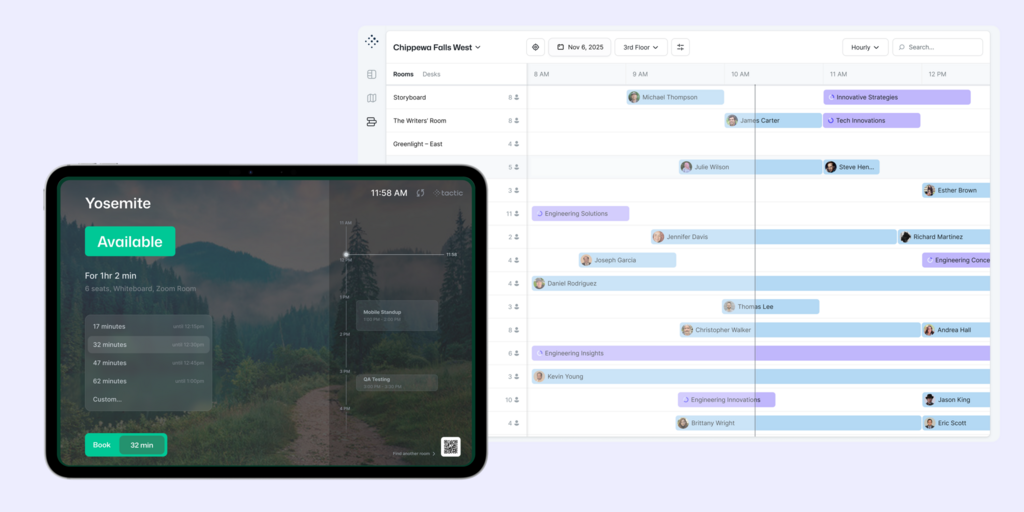
Key features: desk and room booking, interactive maps and wayfinding, visitor check-in, and analytics.
Integrations: Google Workspace, Microsoft 365, Slack, and SSO.
Pricing: per-user/month with an accessible entry point; confirm current tiers on Tactic’s site.
Pros: fast to deploy; calendar-native; easy for employees; approachable pricing.
Cons: less depth for large/complex enterprises; hardware and advanced governance are lighter than enterprise tools.
Bottom line: A pragmatic choice for smaller teams that value speed and calendar-native simplicity over enterprise depth.
9. Kadence: Best for coordinating In-Office days
Best for: Hybrid teams whose main challenge is getting the right people in on the right days, with booking attached.
Kadence is people-first: it starts from coordinating who is coming in and when, then layers desk and room booking on top. For organizations struggling less with “where do I sit” and more with “how do we make in-office days actually worth it,” that framing resonates.
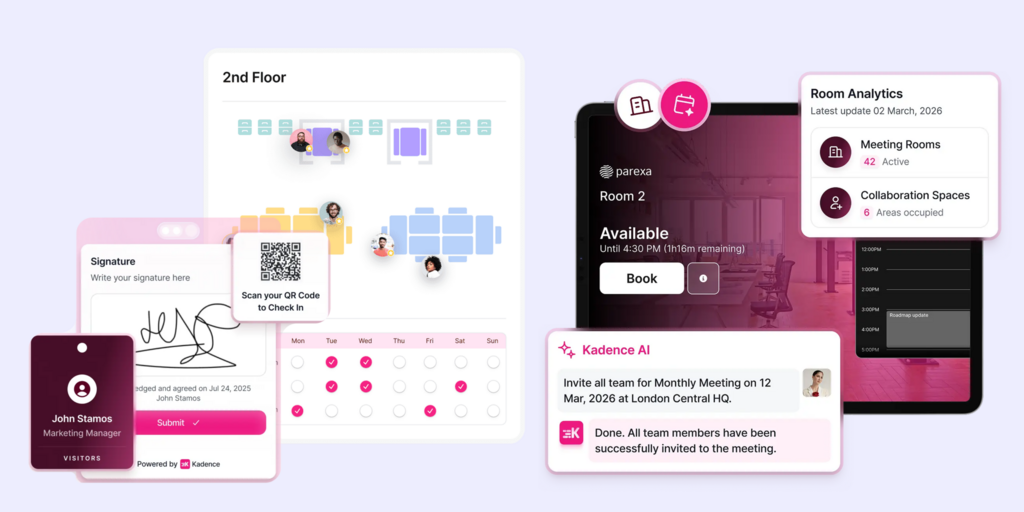
Key features: team scheduling and coordination, desk and room booking, “who’s in” visibility, and analytics.
Integrations: Microsoft 365, Google Workspace, Slack, Teams, and SSO.
Pricing: per-user/month in tiers; verify on Kadence’s site.
Pros: strong for hybrid coordination and attendance; clean UX; good scheduling-first approach.
Cons: lighter on visitors, assets, and purpose-built hardware; booking depth may trail booking-first tools for complex setups.
Bottom line: A good match when your priority is orchestrating in-office days and team overlap, with booking as a supporting act.
10. Archie: Best for hybrid + coworking / flex spaces
Best for: Hybrid offices and coworking/flex operators that also need member management and billing.
Archie serves both hybrid offices and coworking spaces, combining desk and room booking and visitor management with member-facing features and billing that coworking operators need. That dual focus makes it flexible for spaces that blur the line between a corporate office and a managed workspace.
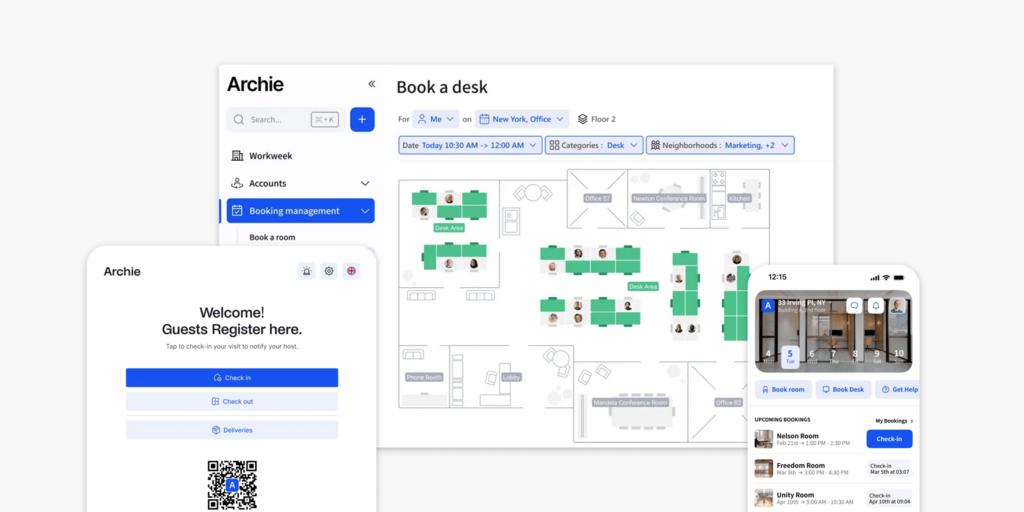
Key features: desk and room booking, visitor management, member portal and billing (for coworking), analytics, and integrations.
Integrations: Microsoft 365, Google Workspace, Slack, and payment/billing tools.
Pricing: tiered by resources/users; coworking billing features may sit in higher tiers. Check Archie’s site.
Pros: flexible across office and coworking use cases; billing/member features; modern UX.
Cons: the coworking features are wasted spend for a pure corporate office; purpose-built low-power hardware isn’t its focus.
Bottom line: A smart choice if you run a flex/coworking space or a hybrid office with membership-style needs. Pure corporate offices may prefer a workplace-first all-in-one.
Also worth considering
The ten above cover most needs, but depending on your situation these are worth a look too:
- FM:Systems and Spacewell / MRI are facilities-grade IWMS for enterprise real-estate and space planning.
- Nexudus and OfficeRnD are coworking-first platforms with deep member and billing tooling.
- WorkInSync and Tribeloo offer desk/room booking with hybrid scheduling, popular in mid-market.
- Officely is a lightweight, Slack/Teams-native desk-booking option.
- Wayleadr handles specialist parking and mobility management if parking is your bottleneck.
- Mapiq focuses on workplace experience and space optimization for larger enterprises.
Finding the right workspace management software
Cut the shortlist to the right tool with four quick steps.
1. Define the resources you actually manage
List what you need to book and control today, and in 12 months. Just rooms? Rooms and desks? Add visitors, parking, and assets? The more resources you need in one place, the more an all-in-one platform saves you in vendor sprawl and integration headaches. If you truly only need one thing, a focused tool can be cheaper.
2. Decide whether you want in-office hardware
Software alone lives on phones and calendars. Displays outside rooms, indicators at desks, and a reception kiosk are what make the system visible and trusted in the physical office, and they dramatically improve adoption. If you want hardware, scrutinize the practical details: does it need cabling and an electrician, how is it powered, how often is it maintained? Low-power ePaper (Joan’s specialty) avoids the construction and power overhead that stalls traditional room-panel projects.
3. Map your integrations and governance needs
Confirm deep, two-way calendar sync with your stack (Microsoft 365/Outlook or Google Workspace) and booking inside Teams or Slack if that’s where your people live. For IT and security, check SSO/SAML, SCIM provisioning, audit logs, and data-residency options early, because retrofitting governance later is painful.
4. Weigh total cost and rollout effort
Look past the per-user sticker price to the total: modules/add-ons, hardware, implementation, and admin time. A cheap tool that nobody adopts is the most expensive option there is. Favor platforms with a free trial or pilot so you can prove adoption before you commit.
Decision checklist
| Checkpoint | Ask yourself |
|---|---|
| Resource coverage | Does it handle every resource we manage (rooms, desks, visitors, parking, assets), or will we need multiple tools? |
| Calendar sync | Is there deep two-way sync with our calendar (Microsoft 365 / Google)? |
| Where people work | Can people book inside Teams / Slack and on mobile without training? |
| Hardware | Do we want room/desk displays and kiosks, and can they be installed without cabling and construction? |
| Analytics | Will it give us utilization data good enough to right-size our space? |
| Visitor & compliance | Do we need digital visitor sign-in, host alerts, NDAs, and badges? |
| Security | SSO/SAML, SCIM, audit logs, data residency: are they all included? |
| Rollout | Can we pilot it, and how long until employees are actually using it? |
| Pricing transparency | Is pricing clear and predictable, or an opaque enterprise quote? |
| Sustainability | Does the hardware and data support our ESG goals (low power, less e-waste, smaller footprint)? |
How workspace management software is priced
Pricing in this category generally follows one of a few models, and most vendors mix them:
- Per user / per seat, per month: common for desk-booking and hybrid-experience tools. Predictable, but costs climb with headcount, so it can get expensive at scale.
- Per resource / per space: you pay for the number of desks, rooms, or spaces managed. Often kinder to large-headcount teams with fewer resources.
- Per location, tiered: common for visitor-led platforms; a free or low starter tier plus paid tiers for more features and sites.
- Enterprise quote-based: typical for IWMS and large room-booking deployments; expect a sales and procurement process.
- Hardware, separately: room displays, desk indicators, and kiosks are usually bought per unit on top of software. This is where ePaper’s economics stand out: no cabling or electrical work, and low ongoing power/maintenance cost.
Two pieces of advice. First, budget for total cost of ownership (software plus add-on modules, hardware, installation, and admin time), not just the headline per-user rate. Second, insist on a trial or pilot: adoption is the real measure of value, and it’s the one thing a quote can’t tell you.
Trends in workspace management software for 2026
- Conversational AI replaces traditional dashboards. AI assistants are transforming workspace reservation by enabling users to reserve rooms, identify ideal desks near colleagues, or locate unused areas via simple chat interactions. Joan’s AI Agent for Microsoft Teams highlights this transition toward direct conversational booking.
- Single-platform consolidation over standalone tools. Organizations are moving away from fragmented setups that require separate tools for desk booking, visitor check-in, and signage. Integrated, all-in-one solutions that combine room, desk, visitor, asset, and signage management offer lower costs and simpler administration.
- Real-estate decisions driven by usage metrics. As hybrid work models stabilize, executives rely heavily on precise booking and occupancy analytics to optimize, repurpose, or reduce physical floor space, positioning analytics as a core strategic requirement.
- Elevating the workplace experience. Because office attendance is increasingly voluntary and coordinated, features like clear wayfinding, unobtrusive displays, and seamless arrival workflows are essential to make working on-site worthwhile for employees.
- Sustainability as a key purchasing benchmark. Growing ESG accountability is steering organizations toward energy-efficient hardware, reduced electronic waste, and data-driven insights to curb utility consumption across underutilized areas.
Our research process
We didn’t rank these tools by who has the biggest marketing budget. Every platform here was assessed against the same six criteria, the things that actually determine whether workspace software succeeds or quietly gets abandoned after three months:
- Breadth of use cases: Does it handle one resource (say, just meeting rooms) or the whole workplace (rooms, desks, visitors, assets, parking)?
- Ease of adoption: How quickly can employees book without training, and does it live where they already work (Outlook, Google Calendar, Teams, Slack, mobile)?
- Analytics & optimization: Can it tell you what’s actually being used, so you can right-size your space and justify the spend?
- Hardware & in-office presence: Room displays, desk signage, and check-in kiosks matter for real-world usage, not just the app.
- Administration & governance: Booking rules, permissions, SSO/SCIM, and the controls IT and facilities need.
- Pricing clarity & total cost: Transparent, predictable pricing versus opaque enterprise quotes.
Pricing across this category changes often and depends heavily on headcount, number of resources, and contract length, so we describe how each vendor’s pricing model works rather than quoting figures that would be out of date by the time you read them. Always confirm current numbers on the vendor’s own pricing page or in a quote.
Key takeaway
There’s no single “best” workspace management software. There’s the best one for your resources, your stack, and how your people actually use the office. If you mainly need configurable booking, Skedda is excellent. If visitors are your priority, look at Envoy. If you’re a global enterprise with thousands of rooms, Eptura. If you need facilities-grade space planning, OfficeSpace.
But if you want the widest coverage in a single platform (rooms, desks, visitors, assets, parking, and signage) combined with award-winning ePaper hardware that installs without cabling and supports your sustainability goals, Joan is the most complete choice on this list, and the reason it’s our number one.
See it for yourself: explore Joan meeting room booking, desk booking, and pricing, or start a free trial and put it in front of your team.
Frequently asked questions regarding workspace software
What is the difference between workspace management software and facilities (IWMS) software?
Workspace management software focuses on the everyday experience of booking and using the office (rooms, desks, visitors, assets) and the utilization data that comes from it. Facilities-grade IWMS software (e.g., OfficeSpace, Eptura, FM:Systems) adds CAD-accurate floor plans, move/add/change management, and lease and portfolio administration for corporate real-estate teams. Many organizations need the former; only larger or real-estate-heavy ones need the latter.
Do I need separate software for desks and meeting rooms?
No, and you shouldn’t. The best platforms handle rooms, desks, and often visitors and parking in one system, which is cheaper and far simpler for both employees and admins than running multiple tools. An all-in-one like Joan is built precisely to avoid that fragmentation.
What’s the most cost-effective pricing model for a hybrid office?
It depends on your ratio of people to resources. High-headcount teams with relatively few desks or rooms often do better with per-resource pricing; smaller teams may find per-user pricing simplest. Whatever the model, budget for total cost of ownership, including hardware and add-ons, and pilot before committing.
Is in-office hardware worth it, or is an app enough?
An app is enough to enable booking, but hardware is often what makes it stick. Displays outside rooms and at desks make availability visible and settle disputes, which drives adoption and trust. Low-power ePaper displays (Joan’s specialty) deliver that presence without the cabling, construction, and power costs of traditional LCD panels.
How do I evaluate vendors that don’t publish pricing?
Ask for a written quote that itemizes software, each module, hardware, implementation, and support, then compare it against transparent, published options on a total-cost basis. Push for a pilot so you can measure adoption before signing a multi-year contract.
What analytics should workspace management software provide at a minimum?
At minimum: room and desk utilization over time, peak-day and peak-hour patterns, no-show rates, and booking-versus-actual-use. That’s enough to spot waste and right-size space. Sensor-based occupancy detection is a useful add-on if you need ground-truth occupancy rather than booking data alone.
Which is the best workspace management software overall?
For hybrid teams that want one platform covering rooms, desks, visitors, assets, and signage, plus elegant, low-power hardware in the office, we recommend Joan. If your need is narrower (just booking, just visitors, or facilities-grade space planning), the tool that fits that specific job may serve you better, which is why we’ve compared them all above.
About the author
