25 Nov 2026
Expiring visitor badges and the reusable alternative
A visitor signs in at 9:00, leaves at 11:30 and forgets to hand back the badge. The next morning, that same badge could walk back through your front door on someone else’s jacket. Expiring visitor badges were made for exactly this. After a set time they change color or show the word VOID, so anyone can see the visit is over.
They’re simple and common in schools, hospitals and offices. But the color change runs on chemistry, not on your visitor log, and every visitor leaves with a badge that ends up in the bin.
This guide explains how self-expiring visitor badges work, which types exist and where they fall short. Then it shows how Joan ePaper visitor badges do the same job the other way round: the badge fills in at check-in and is wiped when the visitor checks out.
Quickly jump to:
- What are expiring visitor badges?
- How self-expiring visitor badges work
- Types of expiring visitor badges
- Pros and limits of expiring visitor badges
- Joan ePaper visitor badges: the reusable alternative
- Expiring badges vs Joan ePaper visitor badges
- How to choose temporary visitor badges for your site
- Swap the timer for a badge that clears at check-out
- Frequently asked questions
TL;DR
- Expiring visitor badges are temporary visitor badges with a time-sensitive layer. Once you activate them, red bars, a red dot or the word VOID appear after a set time, so an old badge can’t pass as a valid one.
- Expiry options range from about 4 hours to 30 days. Half-day and one-day badges are the most common for office visits.
- Heat speeds up the color change and cold slows it down, so the timing is an estimate, not a deadline.
- They’re single-use. Every visitor needs a new badge, and none of them tells you whether the visitor actually checked out.
- Joan ePaper visitor badges are the reusable alternative. The visitor’s details go to the badge at check-in, and the screen is wiped at check-out, so validity follows your visitor log instead of a timer.
What are expiring visitor badges?
Expiring visitor badges, also called self-expiring or time-expiring visitor badges, are disposable badges that change their look after a set period. Before expiry, they look like a normal visitor badge with a name, a host and a date. After it, a visible signal appears: red stripes, a red dot, a color change across the whole badge, or the word VOID.
The point is visual security. A receptionist, guard or employee can tell from a distance whether a badge is still valid, without checking a list. And because the badge can’t be reused, visitors don’t need to return it. That’s why they’re popular in schools, hospitals, factories and offices with a steady flow of contractors and guests.
They belong to the same family as other temporary visitor badges, such as paper stickers and plastic cards marked VISITOR. The difference is the built-in timer. Many sites combine them with color coding, which we cover in our guide to colored visitor badges.
How self-expiring visitor badges work
Most expiring badges have two parts: a front you print or write on, and a backing layer that starts the timer. The two layers stay apart until you hand the badge to a visitor.
Activation
When you issue the badge, you press the front and back together, fold over a tab, or stick a VOID backing onto a printed label, depending on the product. That starts a slow chemical reaction. Ink from the backing moves through the front layer until the expiry pattern shows. One supplier says a pale pattern starts to appear after about four to six hours, and the badge is fully expired by the next day.
How long expiring badges last
You choose the expiry time when you buy them. Suppliers list options from about 4 hours up to 30 days, with half-day, one-day, one-week and one-month badges the most common. A one-day badge fits a typical meeting or interview. Multi-day badges suit contractors on a short project or a week-long audit.
Heat, sunlight and other surprises
Because expiry is chemical, the room changes the timing. Warm rooms and body heat make a badge expire faster, and cool rooms slow it down. A badge worn close to the body on a hot day can turn before the visit ends, while one left in an air-conditioned office may still look half-valid the next morning. Some badges also react to sunlight and turn blue as soon as the visitor steps outside, so they can’t leave and walk back in on the same badge.
Keep this in mind when you plan. An expiring badge tells you roughly when a visit should have ended, not when it actually did.
Types of expiring visitor badges
Expiring badges differ in how you fill them in, how they attach and how they show expiry. Here are the main types you’ll find in supplier catalogs.
Expiring visitor badge types compared
Common formats sold by ID and badge suppliers, checked 25 November 2026.
| Type | How it works | Best for |
|---|---|---|
| Printable thermal labels | Printed at check-in on a label printer such as Brother QL, DYMO LabelWriter or Zebra, then activated with a backing or tab | Offices that use visitor management software with a badge printer |
| Hand-written badges | Pre-printed with VISITOR, CONTRACTOR or SUBSTITUTE; staff write the name and fold to activate | Small sites with a paper sign-in book |
| Full-color change | The whole badge changes color overnight | Sites where guards need to spot expired badges from far away |
| Dot or stripe indicator | A red dot or stripes appear in one corner or across the face | Badges that need to stay readable after expiry |
| Expiry indicator stickers | A small sticker that turns any badge into a timed one | Adding a timer to plastic badges you already have |
| Clip-on PVC cards | A card for a lanyard or clip instead of an adhesive label | Visitors who shouldn’t stick labels on their clothes |
Pros and limits of expiring visitor badges
Where expiring badges work well
- Visible at a glance. Anyone can spot an expired badge without checking a system.
- No returns needed. Visitors can throw the badge away, so reception doesn’t chase people at the door.
- Easy to start. Hand-written badges need no hardware, and printable ones work with common label printers.
- Hard to reuse. Once the pattern shows, the badge can’t pass as valid tomorrow.
Where they fall short
- Timing is approximate. Heat, body warmth and sunlight shift the expiry, so a badge can turn too early or still look valid after the visitor has left.
- It’s a visual cue, not a record. The badge doesn’t know whether the visitor checked out. Your visitor log still has to answer who’s in the building, which matters most in an evacuation.
- Constant restocking. Every visitor uses at least one badge, every day, and someone has to reorder before you run out.
- They end up in the bin. Single-use labels, backings and liners add up to steady waste, which is hard to explain in a sustainability report.
- Mistakes mean reprints. A typo in a name or a change of host means a new badge, and the old one goes in the bin.
If these limits sound familiar, look at the badge material as well as the process. Our article on durable visitor badges compares paper, PVC and ePaper badges in more detail.
Joan ePaper visitor badges: the reusable alternative
Joan ePaper visitor badges handle the same problem from the other side. Instead of a timer in the paper, the visit’s status lives in Joan Visitor management. The badge shows a visitor’s details while they’re checked in, and the screen is wiped when they check out. One badge serves visitor after visitor, with no printing, peeling or waste.
How it works at reception
- The visitor registers on the reception tablet, or checks in with a QR code if they were invited in advance. If you need it, they sign documents such as an NDA first.
- Joan Visitor management sends their details to an available badge over Bluetooth. Nobody prints or types anything.
- The host gets a message by email, Slack or Microsoft Teams that their visitor has arrived.
- At the end of the visit, the visitor hands the badge back. Reception checks them out, and the badge is wiped and ready for the next guest.
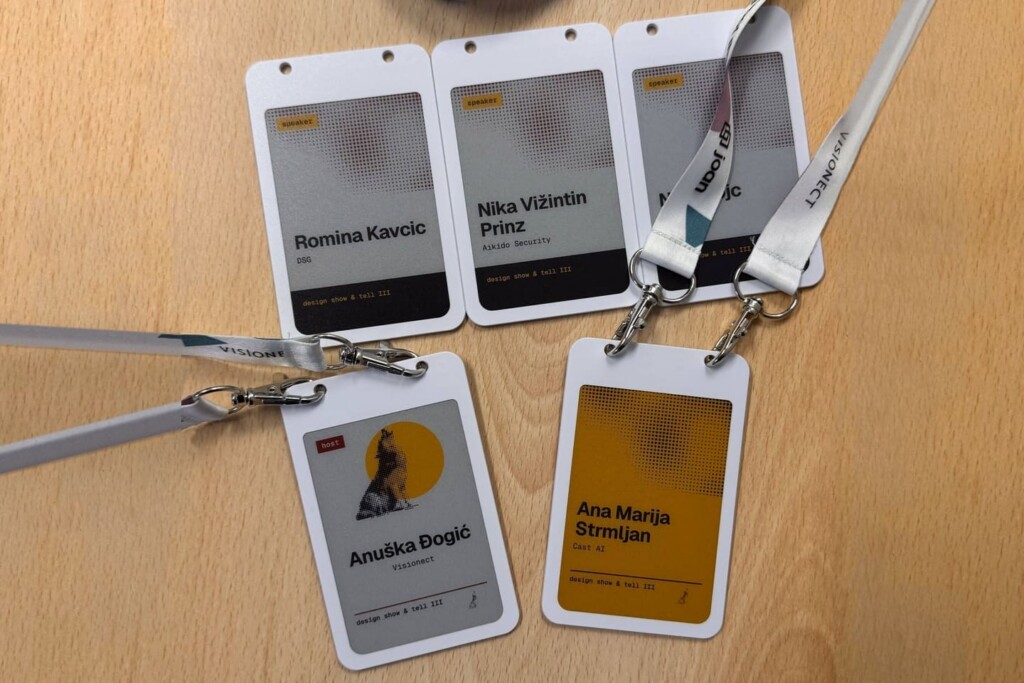
What the badge can show
You decide what goes on the badge. Besides the visitor’s name, it can show their company, a photo taken at check-in, the check-in time, the host’s name, emergency contacts and your logo. The high-resolution ePaper screen shows black, white, red and yellow, so you can use color to tell visitor types apart at a glance.
Why it works well as a visitor badge
- Validity follows your visitor log. Each badge is tied to a real-time visitor log, so only checked-in guests carry a badge with their details.
- Privacy at check-out. The screen is cleared when the visitor leaves, so their name doesn’t sit on a badge in a drawer.
- Readable all day. ePaper is easy to read in any light and uses power only when the content changes.
- Long battery life. About 700 updates per charge. You can check battery status in the Joan Portal and recharge on a standard Qi wireless pad.
- Fixes in seconds. If a name is wrong or the host changes, update the details and the badge refreshes over Bluetooth.
Expiring badges vs Joan ePaper visitor badges
Here’s how the two approaches compare day to day at a front desk.
Expiring paper badges vs reusable ePaper visitor badges
What changes when you replace single-use expiring badges with Joan ePaper visitor badges.
| Expiring visitor badges | Joan ePaper visitor badges | |
|---|---|---|
| What shows the visit is over | A color change after a set time | Check-out in your visitor log; the badge is wiped |
| Timing | Approximate, affected by heat and sunlight | Exact, set by the check-out |
| Record of who’s on site | Only if you keep a separate visitor log | Built in, from check-in to check-out |
| What the badge shows | Details printed or written once | Name, company, photo, host and logo, editable at any time |
| Fixing a typo | Print and activate a new badge | Update the details and the badge refreshes |
| Waste | One badge, backing and liner per visitor | One badge for thousands of visitors |
| Badge returns | Not needed | Needed; visitors hand the badge back at reception |
| Power | None | Qi wireless charging, about 700 updates per charge |
One thing to plan for: an ePaper badge doesn’t change color on its own. If a visitor walks out with it, it still shows their name until it’s reset. So set up a clear return point at reception, and treat your check-out list as the source of truth for who’s in the building. Our guide to reusable visitor badges covers that setup.
How to choose temporary visitor badges for your site
There’s no single right badge for every site. Run through these five questions before you reorder.
How many visitors do you get
A handful a week, with a paper sign-in book? Expiring badges do the job. A steady stream every day? You’ll go through thousands of single-use badges a year, and a reusable badge that resets at check-out takes the restocking off your desk.
Do you need to know who’s on site right now
If you need an accurate list for fire drills, audits or compliance, the badge alone won’t give you one. You need a visitor log with check-out. Our explainer on the digital visitor log shows what it should record.
How exact does expiry need to be
If a visitor who leaves at 11:00 should stop being valid at 11:00, chemistry won’t get you there. Expiry tied to check-out will.
Who checks the badges
Expiring badges rely on people noticing the color. If guards or staff check badges, a full-color change is the easiest to spot. If nobody checks, choose a system that tracks visits for you.
Do you already use visitor management software
Most visitor management tools can print on expiring labels, and some can send visitor details to reusable badges instead. Compare the options in our roundup of the best visitor management software, or see how a visitor badge kiosk handles check-in without a receptionist.
Swap the timer for a badge that clears at check-out
Expiring visitor badges do one job well: they make an old badge look old. If you have few visitors and a sign-in book, they’re a sensible choice.
If your front desk is busy, you go through thousands of badges a year, throw them all away, and still check a separate log to know who’s on site. Joan ePaper visitor badges fill in at check-in, clear at check-out and are ready for the next visitor straight away. Joan Visitor management keeps the record, so a visit ends when your visitor log says so, not when the room temperature does.
Getting started takes three steps: order the badges, activate your Joan Visitor management subscription and set up your check-in flow. You can try the badges for 30 days, with a full refund if they aren’t right for your office.
Frequently asked questions
How do expiring visitor badges work?
They have a printable front and a backing that starts a slow chemical reaction when the two are combined at check-in. Over the next hours, ink moves through the front until red bars, a dot or the word VOID appear. Once the pattern shows, the badge can’t pass as valid.
How long do expiring visitor badges last?
It depends on the badge you buy. Options run from about 4 hours to 30 days, and one-day badges are the most common for office visits. Room temperature and body heat can make a badge expire sooner or later than its label says.
Can you reuse an expiring visitor badge?
No. Once activated, the reaction can’t be reversed, which is the whole point. If you want a badge you can reuse, look at ePaper visitor badges, which are wiped at check-out and given to the next visitor.
Do expiring visitor badges work with badge printers?
Printable versions do. Suppliers sell expiring labels for common thermal label printers, including Brother QL, DYMO LabelWriter and Zebra models, and some visitor management vendors sell kits for their own printers. Check that the label size matches your printer and badge template before you order in bulk.
Are expiring badges the same as temporary visitor badges?
Expiring badges are one type of temporary visitor badge. Others include plain paper stickers, plastic cards marked VISITOR that you collect at the end of the day, and reusable ePaper badges. Only expiring badges change their look on their own.
What happens to a Joan visitor badge when the visitor leaves?
The visitor hands the badge back at reception and an admin checks them out in Joan Visitor management. The badge screen is then wiped, so the visitor’s details don’t stay on it, and the badge is ready for the next guest.
What should a temporary visitor badge show?
At minimum, the visitor’s name, the host they’re visiting and the date. Many sites add the visitor’s company, a photo or a color for the visitor type. For layout ideas, see our guide to custom visitor badges.