
Best Microsoft Places alternatives in 2026
If your organization runs on Microsoft 365, Microsoft Places is probably already available to you. As of April 2026, Microsoft moved the core coordination features — desk and room pool booking, work plans, colleague visibility, interactive floor maps — into the standard M365 license. For millions of Teams and Outlook users, Places just appeared, no procurement required.
Getting Microsoft Places to do what a standalone workplace platform does out of the box requires stacking several additional costs on top of your existing M365 spend. Individual desk booking needs a Teams Shared Space license ($8.55/month covering 4 desks). Visitor management isn’t included at any tier — that’s a third-party integration, typically $200–$329/location/month. Floor maps need an IMDF specialist, with one common vendor charging $200/map/month. Physical room panels aren’t made by Microsoft — you’re buying Logitech, Crestron, or Yealink hardware with PoE installation at every door. AI booking features require a Microsoft 365 Copilot license at $30/user/month.
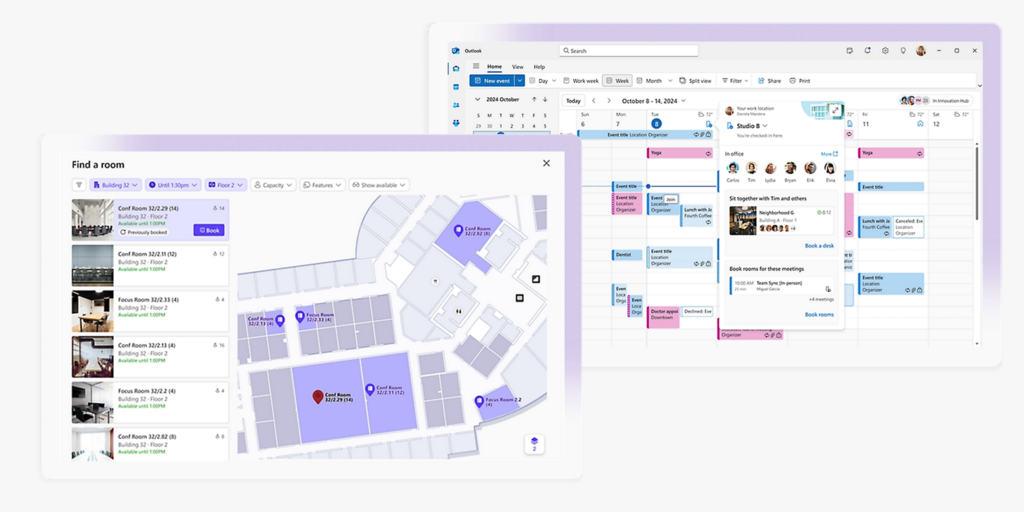
A realistic Places setup for a 200-person office with 50 bookable desks, 10 meeting rooms, floor maps, visitor management, and room panels can add $600–$900/month in incremental costs — before hardware — on top of the M365 licenses you’re already paying for. That’s the number that rarely appears in the “it’s included with M365” framing.
This page covers 7 alternatives that include most or all of these capabilities in a single flat subscription. We’ve compared pricing, setup complexity, and real-world fit — so you can see what you’re actually comparing before committing to the piecemeal Microsoft approach.
Already comparing specific tools? See our best Robin alternatives, best Skedda alternatives, and best Deskbird alternatives.
Quickly jump to:
- Why teams start looking for Microsoft Places alternatives
- Quick comparison table
- The 7 best Microsoft Places alternatives in 2026
- How to choose the right Microsoft Places alternative
- Joan vs. Microsoft Places: Side by side
- Frequently asked questions about Microsoft Places
Why teams start looking for Microsoft Places alternatives
Understanding Places’ limits is worth doing carefully, because the product is genuinely good at a specific set of things. The gaps aren’t bugs — they’re design decisions that reflect what Microsoft built it for.
The real cost stack: what it takes to reach feature parity
The “included with M365” framing is accurate for basic coordination. What it doesn’t tell you is what you need to add to get to the feature set that dedicated workplace platforms include by default.
Here’s what a 200-person office with 50 bookable desks, 10 meeting rooms, one site, and standard visitor management would need on top of their existing M365 licenses:
| What you need | How Places handles it | Additional monthly cost |
|---|---|---|
| Individual desk booking (50 desks) | Teams Shared Space license — $8.55/license per 4 desks | ~$111/month (13 licenses) |
| Room booking + auto-release (10 rooms) | Teams Shared Space license — 1 room per license | ~$86/month (10 licenses) |
| Floor maps | IMDF format — requires specialist partner | ~$200/month (e.g. Mappedin) |
| Visitor management | Not included — third-party Teams marketplace app required | $200–$329/month (e.g. Envoy) |
| Physical room panels (10 rooms) | Third-party OEM hardware (e.g. Logitech Tap Scheduler $699/room + PoE install) | ~$200/month amortized + ~$5,000 one-time install |
| AI booking (Copilot room recommendations) | Microsoft 365 Copilot license — $30/user/month | $6,000/month (200 users) — optional |
| Total incremental (without Copilot) | ~$800–$930/month + one-time hardware |
Compare that to Joan at €49/month flat — room booking, desk booking, visitor management, digital signage, and analytics all included, with battery-powered ePaper panels purchased once.
Configuration lives in IT, not with your workplace team
Places is built on Exchange Online. Every room, desk, and floor in the system is an Exchange calendar resource, which means booking policies, floor plan uploads, and space management all run through Exchange admin and PowerShell. Adding a floor map requires converting CAD drawings into IMDF format (a geo-coordinate standard originally built for mapping airport interiors) and uploading via PowerShell or a specialist partner — one common vendor charges $200 per map per month for this service. Assigning a desk license can take 24–48 hours to propagate.
The result: any time your HR or facilities team needs to change booking rules, create a quiet zone, restrict a section to a specific department, or add a new floor, that’s an IT ticket. Other platforms give workplace teams a self-service admin panel where this takes five minutes. Places doesn’t.
On-premises Exchange users can’t use it at all
In hybrid Microsoft environments — organizations that haven’t fully moved mailboxes to Exchange Online — users with on-premises mailboxes can’t access the Places app, Places Finder, or work plans. They’re limited to the older Room Finder experience. For any organization mid-migration from on-premises Exchange, Places is functionally unavailable to a portion of the workforce until mailbox migration is complete.
Visitor management requires a third party
Microsoft Places has no native visitor check-in, pre-registration, host notification, NDA signing, or visitor log. Guest management requires integrating a third-party app from the Teams marketplace. That’s an additional tool, an additional contract, and an additional integration to maintain — on top of the M365 licensing stack already in place.
No physical room display hardware
Places doesn’t include any branded room panels. Meeting room displays run on third-party Teams Panels (from OEMs like Crestron, Logitech, or Yealink), which require PoE cabling and their own device licensing. There’s no battery-powered option, no cable-free installation, and no panel that installs in minutes without IT. For organizations that want a physical display outside every meeting room, the hardware decision sits entirely outside the Microsoft ecosystem.
Analytics have a 10-desk minimum — and small floors disappear
For privacy reasons, Microsoft Places excludes any desk pool with fewer than 10 desks from utilization analytics. A small breakout area, a boutique floor, or a compact satellite office returns no space data at all. This isn’t a bug that will be patched — it’s a deliberate privacy design. Organizations managing mixed-size spaces frequently find that the floors they most want data on are exactly the ones that fall below the threshold.
Google Workspace organizations are excluded entirely
Places depends on Exchange Online for everything — booking, presence, floor maps, work plans. Organizations using Google Workspace get nothing from Places. This includes mixed environments where some teams use Google and others use Microsoft: the Google-side users are excluded from the system. If your calendar stack is even partially non-Microsoft, Places doesn’t scale to it.
Quick comparison table
| Tool | Works without M365 | Visitor management | Physical room panels | Self-service admin (no IT) | Starts at |
|---|---|---|---|---|---|
| Joan | ✅ Google & Exchange | ✅ Built in + ePaper badge | ✅ Battery-powered ePaper | ✅ | From €49/month |
| Microsoft Places | ❌ Exchange Online only | ❌ Third-party only | ❌ Third-party OEM hardware | ❌ Exchange / PowerShell | Included with most M365 |
| Yoffix | ✅ (M365 optimized) | ✅ Add-on | ❌ Partner integration | ✅ | From €1.50/user/month |
| Robin | ✅ | ✅ Basic | ✅ Third-party displays | ✅ | On request |
| Deskbird | ✅ | ✅ Add-on | ✅ Partner displays | ✅ | From ~€2.50/user/month* |
| Skedda | ✅ | ⚠️ Add-on ($99/month) | ❌ Tablet only | ✅ | From $99/month |
| Envoy | ✅ | ✅ Core strength | ✅ iPad-based | ✅ | On request |
| YAROOMS | ✅ | ⚠️ Add-on ($99/location) | ❌ Tablet only | ✅ | From $99/month |
The 7 best Microsoft Places alternatives in 2026
1. Joan — Best for teams that want to extend Microsoft Teams with physical hardware and visitor management
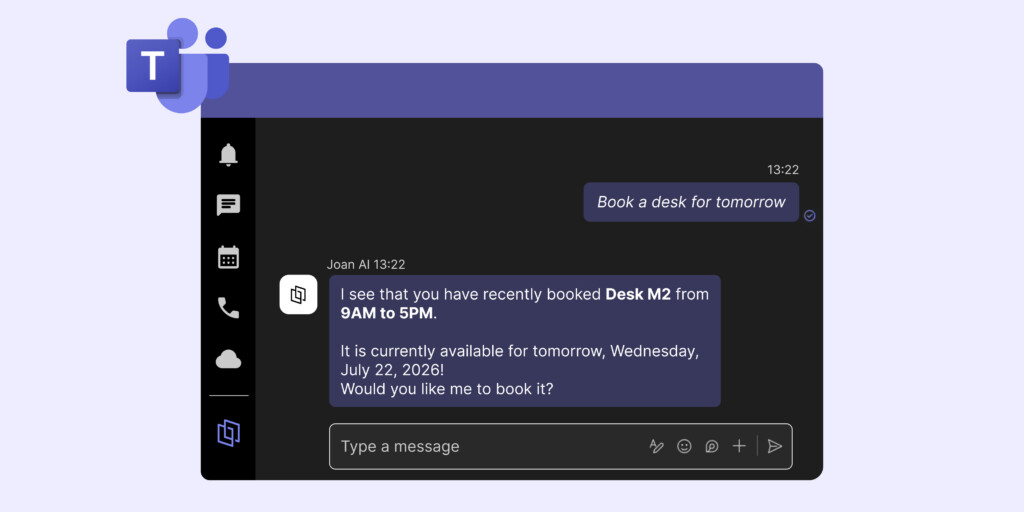
Joan’s positioning on this page is different from every other tool listed: it’s not a replacement for Microsoft Places, it’s an extension of what Places can’t do. The Joan AI Agent for Microsoft Teams lets employees book rooms and desks directly inside a Teams conversation — the same channel where they’re already working — without switching to a browser or a separate app. That’s the same interaction model as Places, but with Joan’s full platform behind it.
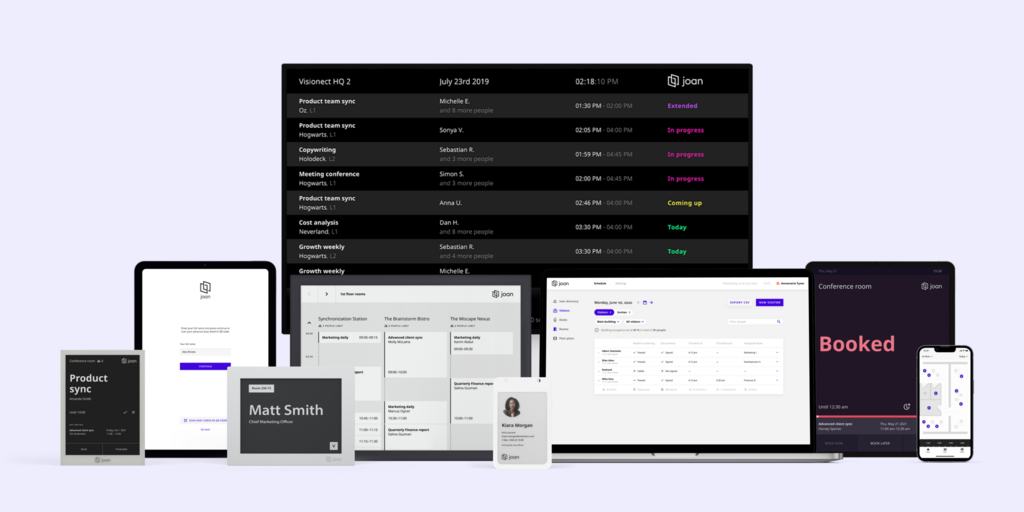
What Joan adds on top: battery-powered ePaper room panels that install at any door without cabling or PoE infrastructure, a physical Joan ePaper badge issued to visitors at check-in (the only product of its kind in this category), and a complete visitor management system — pre-registration, NDA signing, compliance logging, host notification — that Places can’t do natively at any license tier.
Joan also works for organizations not on M365. Google Workspace, on-premises Exchange, hybrid environments — Joan supports all of them. That makes it the only tool on this list that covers both Microsoft-first companies and everyone else.
What makes Joan stand out
- Joan AI Agent for Microsoft Teams books rooms and desks from inside a Teams conversation — no portal, no browser, no context-switching; naturally extends the Microsoft experience rather than replacing it
- Joan ePaper badge — a physical battery-powered visitor badge issued at reception on check-in, used throughout the visit; no equivalent exists in the Microsoft ecosystem or from any competitor on this page
- Battery-powered ePaper room panels install without cabling — Joan 6 RE, Joan 6 Pro, and Joan 13 Pro mount on any surface, run for months without charging, and require no PoE infrastructure, no electrician, no IT ticket per room
- Full visitor management built in — pre-registration, NDA signing, compliance logging, host notification, and the ePaper badge; all included, no third-party integration needed
- One subscription covers room booking, desk booking (software — floor plans, portal, mobile app), visitor management, parking, digital signage, and analytics — nothing is a separate service plan; see the full platform →
- Works on Google Workspace, Exchange Online, and on-premises Exchange — no M365 dependency; also runs on existing tablets and screens via Joan on any display
Joan pricing
Plans start at €49/month for the full platform — all features included, no add-ons. Additional users: €0.99/user/month (annual). Device licenses: €9.99/device/month (annual). Hardware is a one-time purchase. 30-day free trial, no credit card required. See getjoan.com/pricing.
Joan limitations
Joan’s hardware covers room booking panels and visitor badges — desk booking runs through software (web portal, floor plans, mobile app) rather than physical desk displays. Teams that need a full conference room AV system (camera, speaker, codec) will manage that separately; Joan handles the space management layer. And organizations that want to stay 100% within native Microsoft tools — no third-party platform at all — will find Places the tidier architectural choice, even with its gaps.
Best for: Any organization that wants the Microsoft Teams booking experience plus physical room panels, visitor badges, and visitor management that Places can’t provide — whether they’re fully on M365, on Google Workspace, or somewhere in between.
2. Yoffix — Best pure Microsoft Places alternative for M365-committed companies
Yoffix is built specifically for the gap that Places leaves: true desk sharing with booking zones, team office day policies, capacity rules by department, and HR/workplace-owned admin — all without requiring IT or Exchange configuration for every change. Where Places keeps configuration with the Exchange admin, Yoffix gives workplace and HR teams a self-service panel they can manage themselves.
It’s also the most direct cost comparison with Places. The Teams Shared Space license charges per space; Yoffix charges per user starting at €1.50/month for desk sharing — and for organizations with many employees but fewer desks, Yoffix’s model often comes out cheaper as headcount grows.
What makes Yoffix stand out
- True desk sharing logic — zones, booking priorities, team access rules, time limits, quiet zones; Microsoft Places can’t configure these without complex Exchange scripting
- Self-service HR/workplace admin — no IT ticket for policy changes; workplace teams own booking rules entirely
- Native Microsoft Teams app with Outlook calendar sync; no Teams Premium license required
- Modular pricing — add room booking (€10/room/month), visitor management (€80/location/month), parking, or resource booking as modules rather than bundling everything at once
- EU data hosting, GDPR compliant, ISO 27001 certified — important for European organizations with data residency requirements
- Fast rollout — from 1 day to under a week for most companies; no IMDF floor maps or PowerShell configuration
Yoffix pricing
Desk Sharing: from €1.50/user/month. Room Booking: from €10/room/month. Visitor Management: from €80/location/month. Modular — pay only for what you deploy.
Yoffix limitations
- No physical room display hardware — room displays run via partner integration; no battery-powered ePaper panels
- Visitor management is a separate add-on module — €80/location/month is not cheap for small organizations; it’s not built into the base plan
- Optimized for Microsoft 365 — Google Workspace integration exists but M365 is the native environment; non-Microsoft organizations get less value from the Teams-native design
- Less established outside Europe — most customers are EU-based; US orgs may find support and community resources thinner than larger US-headquartered vendors
Best for: Mid-sized European companies (200–2,000 employees) that run Microsoft 365 and need real desk sharing policy control without replacing their Teams environment or handing every change to IT.
3. Robin — Best for enterprise organizations where meeting room management is the primary need
Robin built its reputation on meeting room scheduling and has grown into a full workplace platform covering rooms, desks, visitor management, and analytics. It supports third-party room displays, integrates with Teams and Outlook, and explicitly targets organizations with 500+ employees. Where Places is a coordination layer, Robin is an operational platform — more structure, more configuration, and more depth for teams that need it.
What makes Robin stand out
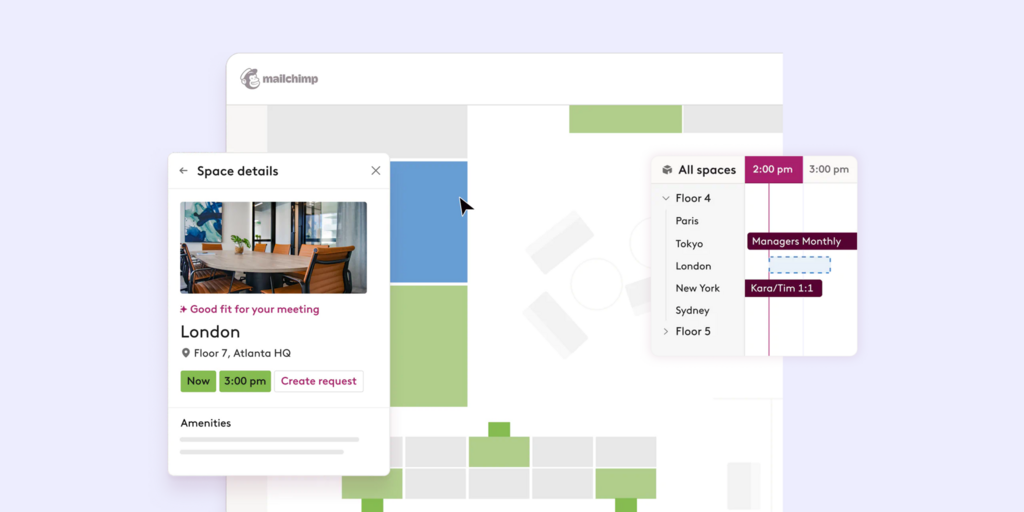
- Strong interactive floor plans with team neighborhood support and AI-assisted desk suggestions based on team schedules
- Advanced room booking — conflict detection, ghost meeting release, configurable booking rules; more capable than Places’ Exchange-based room management
- Visitor management included at higher tiers; not a third-party integration
- Room display support through certified third-party hardware partners
- Well-established at enterprise scale — Shopify, Harvard, Sanofi, KAYAK among listed customers
Robin pricing
Pricing on request — requires a demo. Designed for 500+ employee organizations; smaller teams may find the contract size and implementation timeline disproportionate.
Robin limitations
- Desk sharing and hybrid policies are secondary — Robin’s core strength is rooms; complex desk zone rules and team-day policies aren’t as mature as specialized desk booking platforms
- No native room display hardware — room panels are third-party OEM tablets, not battery-powered ePaper
- No published pricing; enterprise-only sales process — every evaluation starts with a call; no self-serve trial
- G2 reviewers consistently flag complex Microsoft 365 setup — multi-week implementation is common for large tenants
Best for: Enterprises with 500+ employees where meeting room chaos is the primary driver and IT resources exist to manage a structured platform rollout.
→ Looking for Robin alternatives instead? See the full list.
4. Deskbird — Best for EU-hosted hybrid workplace management with Microsoft 365 integration
Deskbird is a Swiss-based workplace platform covering desk booking, room booking, hybrid scheduling, visitor management (add-on), and analytics. It integrates with Microsoft Teams and Google Workspace and stores data in EU-based infrastructure — a meaningful differentiator for organizations in regulated European industries where data residency matters.
Unlike Microsoft Places, Deskbird’s admin panel is designed for workplace and HR teams, not IT. Configuration happens in the browser, not in PowerShell. And unlike Places, it works equally well for Google Workspace organizations.
What makes Deskbird stand out
- EU data hosting — Swiss infrastructure, GDPR compliant; important for German, French, Dutch, and Scandinavian organizations with data residency obligations
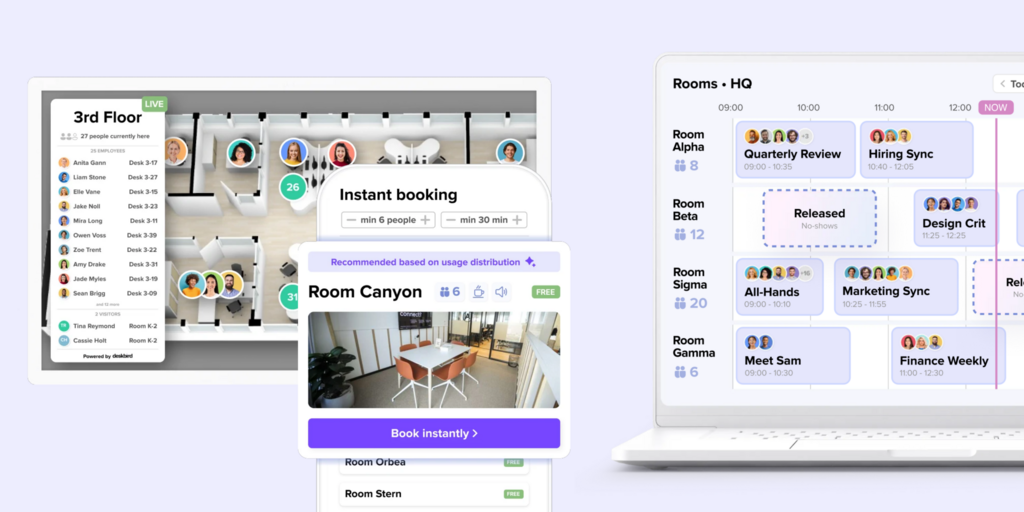
- Hybrid scheduling — employees plan office days, managers see team attendance, facilities teams see capacity; more structured hybrid policy support than Places
- Microsoft Teams and Google Workspace integration — not M365-only; works for mixed calendar environments
- Self-service admin — workplace teams configure floor plans and booking rules without IT involvement
Deskbird pricing
From approximately €2.50/user/month (annual) — verify current pricing at deskbird.com/pricing before publishing. Visitor management and advanced analytics are add-ons on higher plans.
Deskbird limitations
- Visitor management and room displays are add-ons, not included in base plans; cost compounds as features are added
- No physical ePaper room display hardware — room panels run on existing tablets or third-party partner displays
- Advanced analytics locked to higher plan tiers — base plan analytics are limited; space utilization data requires upgrade
- No ePaper visitor badge or physical visitor identification beyond digital check-in
Best for: European organizations — especially in regulated industries — that want EU-hosted hybrid scheduling and desk/room booking with self-service admin and support for both M365 and Google Workspace.
→ See how Deskbird compares in detail: best Deskbird alternatives.
5. Skedda — Best for organizations with complex booking policies and per-space predictable cost
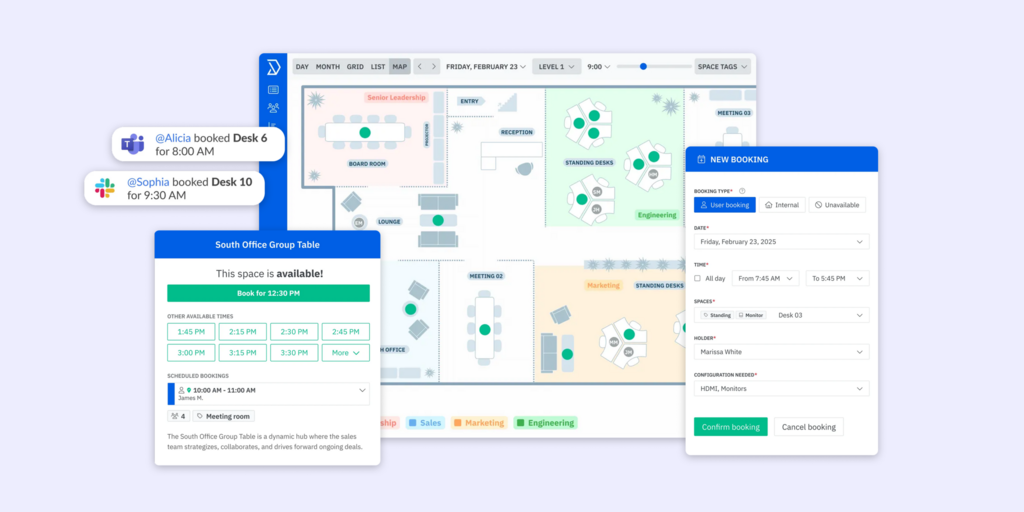
Skedda is a space booking platform built around a highly configurable rules engine: who can book which spaces, how far in advance, with what approval chain, during which hours. It’s software-only — room displays run on existing tablets — and uses per-space pricing, meaning headcount growth doesn’t change the monthly cost.
Where Microsoft Places keeps booking rules in Exchange (requiring IT for changes), Skedda gives booking managers a visual rules interface they configure themselves. For organizations with nuanced policy requirements, this is the practical difference between a five-minute settings change and a two-day IT ticket.
What makes Skedda stand out
- Highly configurable booking rules — booking windows, quotas by group, approval workflows, buffer times, all configured without developer involvement
- Per-space pricing, unlimited users — cost doesn’t scale with headcount; predictable regardless of organizational growth
- Interactive floor plans included from the base plan
- Microsoft Teams and Slack booking apps; works with Google Workspace equally well as M365
Skedda pricing
Starter: from $99/month (15 spaces, annual). Plus: from $149/month (20 spaces). Premier: from $199/month (25 spaces). Visitor management: $99/month add-on. See skedda.com/pricing.
Skedda limitations
- Visitor management is a paid add-on on every plan tier; not included
- No physical room display hardware — tablet-based only; no battery-powered ePaper option
- Analytics data limited on Starter — 30-day retention; too short for strategic space planning decisions
- No hybrid scheduling or team-day coordination — Skedda handles space booking; it doesn’t coordinate who comes in when
Best for: Organizations with complex booking policies that want per-space predictable pricing, self-service admin, and Google/Microsoft-neutral software — without adding hardware procurement.
→ Looking for Skedda alternatives instead? See the full list.
6. Envoy — Best for visitor-heavy organizations that need compliance-grade guest management
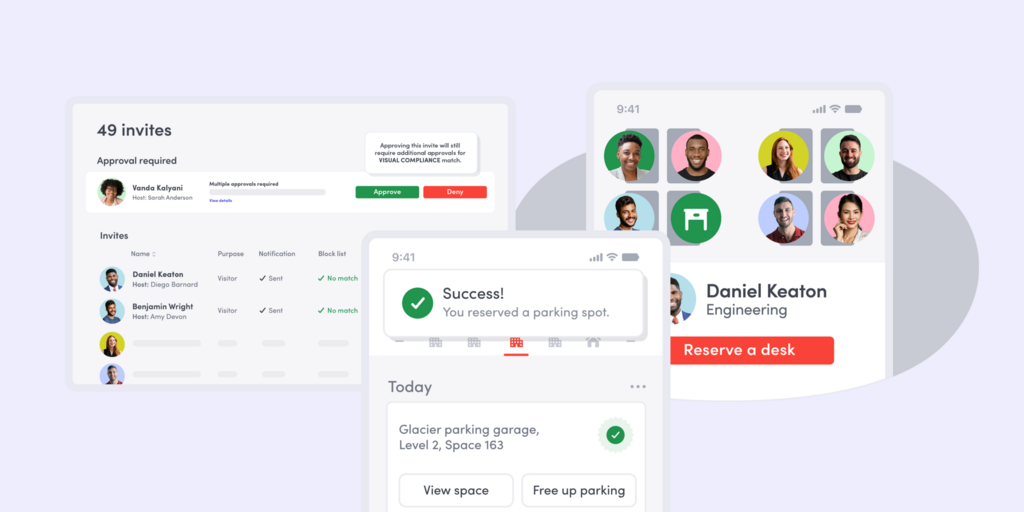
Envoy is a workplace platform that started with visitor management and expanded into desk and room booking. Its strength is the visitor layer: pre-registration, NDA signing, health screening, host notification, delivery management, compliance logs, and badge printing — a more developed visitor workflow than any other tool on this page. Room and desk booking connects to this visitor context through iPad-based displays.
For organizations where Microsoft Places’ lack of native visitor management is the dealbreaker, Envoy is the most direct solution.
What makes Envoy stand out
- Visitor management is the core product, not an add-on — pre-registration, legal document signing, host notification, visitor logs with timestamps; more developed than any alternative on this page
- Strong compliance tooling for regulated industries — HIPAA, SOC 2, detailed audit trails
- iPad room displays integrate visitor check-in with room booking in one physical experience at reception
- Delivery management and contractor workflows — often overlooked features that large offices genuinely need
Envoy pricing
Pricing by plan — contact envoy.com for current details. See also the best Envoy alternatives →.
Envoy limitations
- iPad-only hardware — requires charging infrastructure and device management; no cable-free or ePaper option
- Room and desk booking are secondary — booking functionality is less configurable than dedicated booking platforms; complex rules require workarounds
- Per-location pricing scales steeply for multi-site organizations
- Pricing not published — every evaluation starts with a sales conversation
Best for: Organizations where visitor management and compliance logging are the primary driver — especially regulated industries, professional services firms, or any office receiving significant numbers of external guests.
7. YAROOMS — Best for a full-scope platform at a flat monthly price
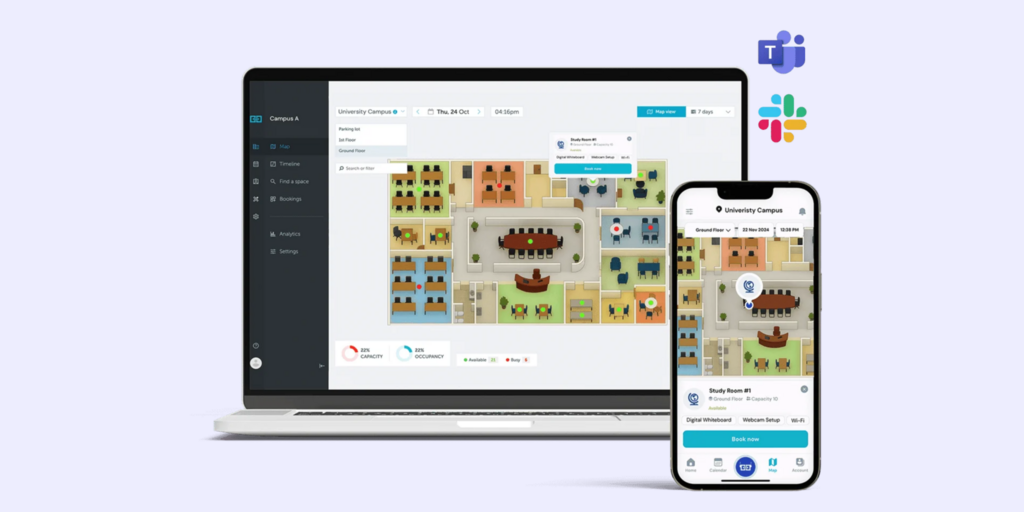
YAROOMS covers room booking, desk booking, hybrid scheduling, visitor management (add-on), and analytics in one subscription. It’s software-only — room displays run on tablets — but it’s the broadest scope at the lowest published starting price on this list. For organizations evaluating Microsoft Places that discover they need rooms, desks, and basic visitor management without a per-user or per-space fee structure, YAROOMS is worth comparing.
What makes YAROOMS stand out
- Unlimited users on all plans — no per-seat cost; flat monthly pricing regardless of headcount growth
- Broader scope than Places in a single platform: rooms, desks, hybrid scheduling, visitor management, and analytics
- Interactive floor plans included on all plans
- Microsoft 365 and Google Workspace integration — not Microsoft-only
YAROOMS pricing
Starter: from $99/month (annual, unlimited users). Visitor management: $99/location/month add-on. Advanced analytics on Business plan. See yarooms.com/pricing.
YAROOMS limitations
- Visitor management is still a paid per-location add-on — not included at any base tier; for multi-site organizations the cost adds up
- No physical room display hardware — tablet-based panels only; no ePaper option
- Analytics data retention limited on Starter; strategic space planning requires upgrade
- Less established market presence than Robin or Envoy; fewer published customer references at enterprise scale
Best for: Mid-size offices that want room booking, desk booking, and a path to visitor management in one platform with flat, unlimited-user pricing — and prefer a tablet-based approach over dedicated hardware at every door.
→ Looking for YAROOMS alternatives instead? See the full list.
How to choose the right Microsoft Places alternative
If Microsoft 365 is your whole stack and basic coordination is enough
Keep Places. For organizations with simple desk and room booking needs, a full Exchange Online migration, and IT resources willing to manage the configuration — Places is already in your license and does the job. The tools on this list make sense when Places’ gaps actually bite you.
If you want to keep Teams but add physical room panels and visitor management
Joan. The Joan AI Agent works inside Teams so employees don’t change how they book; Joan adds the hardware layer (ePaper room panels) and visitor layer (management + ePaper badge) that Places can’t provide. It’s the additive choice, not the replacement choice.
If your organization is M365-committed but needs real desk sharing policy control
Yoffix. It’s built exactly for this: Microsoft-native experience, self-service HR admin, zone-based desk sharing rules, modular pricing. The gap it fills is precisely the gap Places leaves for operational hybrid teams.
If you use Google Workspace or a mixed calendar environment
Places doesn’t work for you. Joan, Yoffix, Deskbird, Skedda, Envoy, and YAROOMS all work with Google Workspace. Joan is the only one that also brings physical room display hardware. Deskbird is strongest on EU data hosting if that matters.
If visitor management is the primary gap
Joan has it built in, including the ePaper badge. Envoy is the deepest visitor management specialist on this list. Both are better than any Microsoft-native solution because Microsoft doesn’t offer one.
If you’re an enterprise and rooms are the main headache
Robin. It’s designed for 500+ organizations, has the deepest room booking feature set, and supports the kind of implementation that large enterprises expect — structured rollout, dedicated support, long-term contract.
If cost predictability matters more than feature depth
Skedda ($99/month, per-space, unlimited users) or YAROOMS ($99/month, unlimited users) give the flattest cost curve. Joan at €49/month flat is even flatter — every feature included, unlimited users, no per-space fee structure.
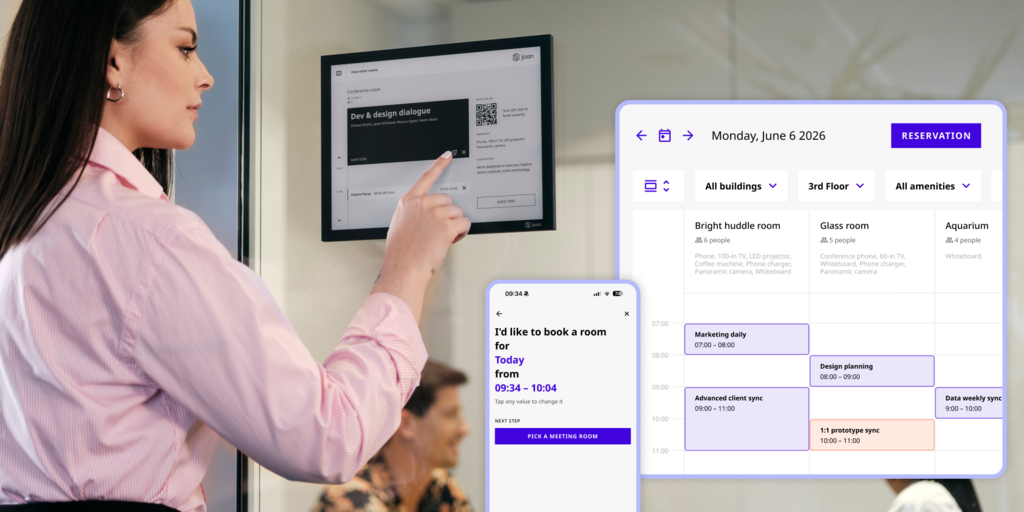
Joan vs. Microsoft Places: Side by side
| Joan | Microsoft Places | |
|---|---|---|
| Included with M365 | No (€49/month) | ✅ Core features |
| Works with Google Workspace | ✅ | ❌ |
| Works with on-premises Exchange | ✅ | ❌ |
| Room booking | ✅ | ✅ Pool booking free; named desk needs Shared Space license |
| Desk booking | ✅ Software (floor plans, portal, app) | ✅ Named desks: $8.55/license/4 desks |
| Visitor management | ✅ Built in, all plans | ❌ Third-party only |
| Joan ePaper badge | ✅ Physical visitor badge | ❌ Nothing comparable |
| Physical room display panels | ✅ Battery-powered ePaper, cable-free | ❌ Third-party OEM hardware (PoE required) |
| Joan AI Agent for Microsoft Teams | ✅ Book rooms/desks inside Teams | ❌ |
| Self-service admin (no IT) | ✅ | ❌ Exchange / PowerShell |
| Setup time | Minutes | Weeks–months (IMDF maps, Exchange config) |
| Desk analytics minimum | No minimum | 10 desks per pool (floors below 10 excluded) |
| On-premises Exchange support | ✅ | ❌ Exchange Online only |
| Digital signage | ✅ workplace digital signage | ❌ |
| Occupancy sensors (built-in) | ❌ (third-party sensor support) | ❌ (third-party sensor support) |
| Free trial | ✅ 30 days, no credit card | ✅ Included in M365 trial |
Ready to make the switch?
Joan is free to try for 30 days — no credit card, no sales call. The platform is fully accessible from day one; hardware ships separately and mounts in minutes.
Start your free Joan trial here.
Frequently asked questions about Microsoft Places
Is Microsoft Places free?
The core coordination features — Places Finder, Places Explorer, room pool and desk pool booking, work plans, and colleague visibility — are included with most Microsoft 365 licenses as of April 2026, including M365 Business Basic through E5 and Exchange Online plans. Individual named desk booking, auto-release, and occupancy analytics require the Teams Shared Space license at $8.55/month per license (covering 4 desks + 1 extra space). AI-powered features like Copilot room recommendations require a Microsoft 365 Copilot license ($30/user/month Enterprise). Floor map setup typically requires a specialist partner at additional cost.
What does Microsoft Places not include?
Microsoft Places has no native visitor management, no physical room display hardware, no support for on-premises Exchange mailboxes, no Google Workspace support, no zone-based booking policies for desk sections, and no analytics for desk pools smaller than 10 desks. Visitor management, room panels, and occupancy sensors all require third-party integrations.
Can I use Joan alongside Microsoft Places rather than instead of it?
Yes — that’s actually one of the most common setups. Organizations keep Places for the coordination and desk pool booking features already included in M365, and add Joan for the hardware layer (ePaper room panels) and the visitor layer (management + ePaper badge). The Joan AI Agent for Microsoft Teams lets employees book through the same Teams interface regardless of which backend is handling the booking.
What’s the best Microsoft Places alternative for Google Workspace organizations?
Microsoft Places only works with Exchange Online — Google Workspace organizations get no benefit from it. Joan, Yoffix (M365-optimized but Google Workspace compatible), Deskbird, Skedda, and YAROOMS all work with Google Workspace. Joan is the only one that also provides physical ePaper room panels and visitor management hardware.
Why can’t on-premises Exchange users access Microsoft Places?
Places depends entirely on Exchange Online and Microsoft Graph. Users whose mailboxes still live on-premises (in a hybrid Microsoft environment) can’t access the Places app, Places Finder, or work plans — they’re limited to the older Room Finder experience. This affects organizations mid-migration to Exchange Online and any organization that has chosen to keep on-premises mailboxes for compliance or cost reasons.
How long does Microsoft Places take to set up?
Basic coordination features activate quickly once an admin enables Places in the Microsoft 365 admin center. Floor maps require converting CAD drawings to IMDF format and uploading via PowerShell or a specialist partner — typically a weeks-long IT project for a multi-floor office. Individual desk booking requires assigning Teams Shared Space licenses, which take 24–48 hours to propagate per space. Full setup including floor plans, desk licensing, and booking policy configuration typically takes weeks to months for a real office.
What is the cheapest Microsoft Places alternative?
Joan starts at €49/month flat for the full platform regardless of headcount — room booking, desk booking, visitor management, digital signage, and analytics all included. Skedda and YAROOMS start at $99/month (unlimited users). Yoffix starts at €1.50/user/month for desk sharing, with room booking and visitor management as additional modules. For small teams, Yoffix’s per-user pricing is often the lowest starting point; for larger organizations, Joan’s flat pricing delivers the best value per feature.
Page last updated: August 2026. Pricing verified from public sources — always confirm live pricing directly with each vendor before purchasing.