
Best Neat Pad (neat.no) alternatives in 2027: Room scheduling panels compared
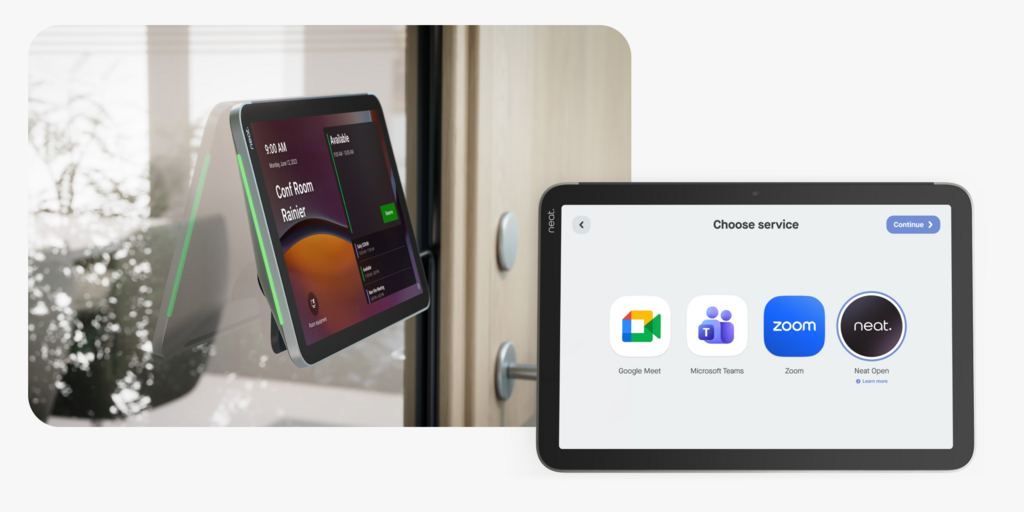
Neat (neat.no) is a Norwegian maker of video conferencing hardware for Zoom Rooms and Microsoft Teams Rooms. Its Neat Pad is a touchscreen that works either as the controller inside a meeting room or as a scheduling display outside it, with an LED light that shows availability from down the corridor. The 8-inch Neat Pad has been joined by the 10-inch Neat Pad Pro, announced for Q2 2026. This page is about Neat the video hardware company, not The Neat Company, which makes document scanners.
Neat Pad is a strong choice inside a Neat video room. As a door panel for the rest of the office it has three drawbacks: it needs a PoE cable at every door, Teams scheduling needs a Microsoft license per panel, and it books rooms only at one of the higher prices per door.
We compared seven Neat Pad alternatives on power options, Teams support, price per room and what each covers beyond the door. Neat is also one of the alternatives on our Best Logitech alternatives page, and if you are weighing Nordic panel makers, see our Best Humly alternatives.
Quickly jump to:
- Why teams start looking for Neat Pad alternatives
- Quick comparison table
- The 7 best Neat Pad alternatives in 2027
- How to choose the right Neat Pad alternative
- Joan vs. Neat Pad: quick comparison
- Frequently asked questions about Neat Pad alternatives
Why teams start looking for Neat Pad alternatives
A PoE cable at every door
Neat Pad is powered over Ethernet and has no battery model. Every scheduling panel means a network cable run to the door, which is routine in a new fit-out and slow in glass-walled rooms, older buildings or leased floors where new cabling needs approval.
A Microsoft license for every Teams panel
Neat’s own support documentation says a Teams Rooms Pro license is needed to add a scheduling panel to a Teams room account, and a stand-alone panel needs a Teams Shared Device license. Focus rooms and phone booths without a video system still carry a license per door, on top of the hardware.
Priced and built for video rooms
Neat Pad Gen 2 sells for about $1,090 at US resellers and the Neat Pad Pro lists at $1,290, more per door than a Yealink RoomPanel or a Logitech Tap Scheduler. The panel books rooms and nothing else: desks, visitors and signage need other products, and Google Meet scheduling runs only through Neat partner apps.
Quick comparison table
| Tool | Best for | Power options | Screen | Certified Teams panel | Starts at |
|---|---|---|---|---|---|
| Joan | Wired or wireless displays plus desks, visitors and signage | Battery or PoE | ePaper | No (Microsoft 365 sync and Joan AI in Teams) | $51/month incl. 2 device licenses; extra devices $10.99/month each, plus one-time hardware |
| Logitech Tap Scheduler | Logitech Rally rooms on Teams or Zoom | PoE | LCD | Yes | $699 per panel + $199/room/year |
| Yealink RoomPanel | Lowest-cost certified Teams or Zoom panels | PoE or power adapter | LCD | Yes (check model) | About $699 to $769 per panel |
| Poly TC10 | Poly Studio X and G7500 rooms | PoE | LCD | Yes | About $1,070 to $1,880 per panel (resellers) |
| Cisco Room Navigator | Webex estates managed in Control Hub | PoE | LCD | Marketed as certified | From $1,195 per panel |
| Humly | Nordic panels with air quality sensing | PoE | LCD | Integrates with Teams | Pricing on request |
| Evoko Naso | Room panels on their own booking software | PoE or power supply | LCD | Not confirmed | About $875 with a 1-year room license |
| Neat Pad | Zoom Rooms and Teams Rooms on Neat hardware | PoE | LCD | Yes | About $1,090 per panel; Pad Pro $1,290 |
Joan pricing from getjoan.com/pricing, November 2026. Hardware prices are vendor or reseller list prices and vary by region; confirm with each vendor before purchasing.
The 7 best Neat Pad alternatives in 2027
1. Joan: Best for offices that want wired and wireless displays on one platform
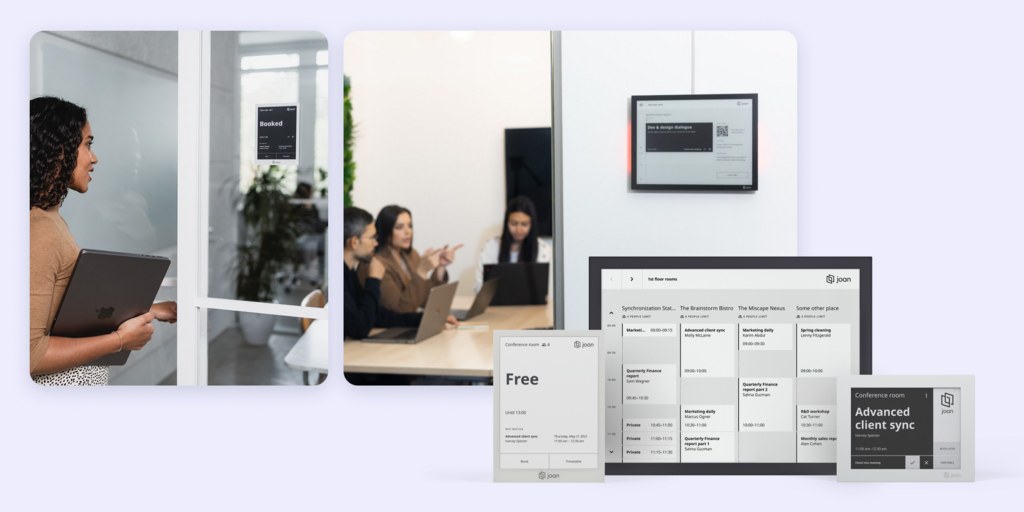
Joan makes its own ePaper meeting room displays and the platform behind them: room booking, desk booking, visitor management, digital signage, parking and asset booking. Where Neat Pad needs PoE, the Joan 6 Pro and Joan 13 Pro run on battery or on a PoE wall mount with an LED occupancy light, and the Joan 6 RE runs on battery.
Keep a Neat Pad inside the video room if you like it as a controller, and put Joan on the doors. Rooms without video, focus rooms and phone booths get a display that books against Microsoft 365 or Google calendars without a Teams panel license.
What makes Joan stand out
- Wired or wireless, room by room: PoE wall mounts with LED occupancy lights, or battery power with no cable. The Joan 6 Pro runs up to 3 months per charge.
- No Microsoft Teams panel license: displays sync with Microsoft 365 and Exchange, and Joan AI in Microsoft Teams books rooms and desks and registers visitors from a chat.
- Google Workspace supported natively, with no partner app needed.
- One platform for the whole office: rooms, desks, visitors, signage, parking and assets, with analytics included.
Joan pricing
Plans start at $51/month, billed yearly, and include every Joan solution. The entry Team plan already includes 20 users and 2 device licenses. Each additional user is $1.09/month, and each additional device (any room display, signage screen or check-in tablet registered in Joan) is $10.99/month. Displays and PoE wall mounts are a one-time purchase on top. See current Joan pricing.
Joan limitations
- Not a certified Microsoft Teams panel and not a room controller: Joan does not run the Teams or Zoom panel app, and it does not control the video call inside the room.
- Upfront hardware cost: displays are bought once, on top of the subscription. Joan on any display runs on existing screens if you want to avoid that.
Best for: Any organization that wants room displays on every door, video room or not, from a few rooms to hundreds of locations.
Start your free 30-day Joan trial
2. Logitech Tap Scheduler: Best for Logitech Rally rooms on Teams or Zoom
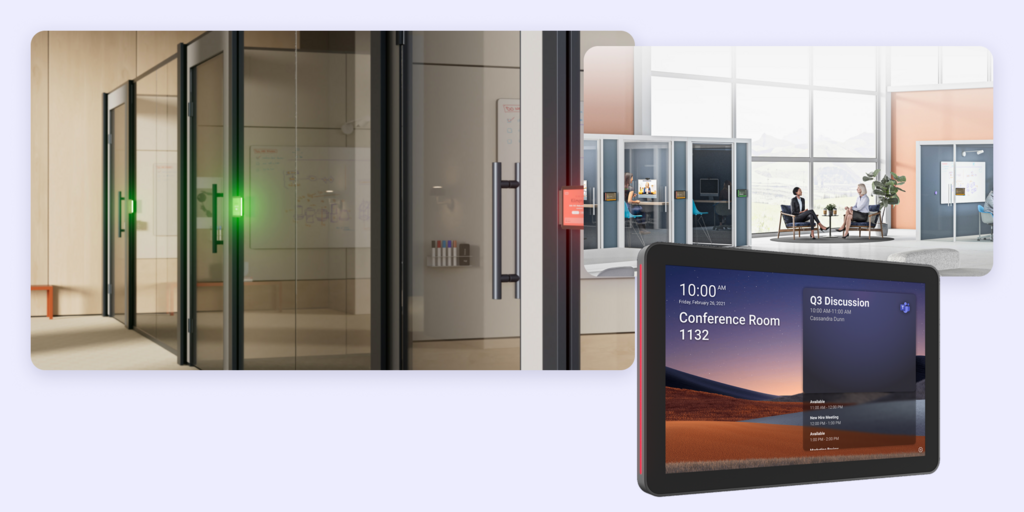
The Logitech Tap Scheduler is a 10.1-inch scheduling panel for Microsoft Teams Rooms and Zoom Rooms, managed with Rally Bars and MeetUp cameras in Logitech Sync. It is the direct swap for Neat Pad in an estate that runs Logitech video instead of Neat.
Smart auto-release based on occupancy depends on a paired Logitech Rally Bar.
What makes Logitech Tap Scheduler stand out
- Certified Microsoft Teams panel, also supports Zoom Rooms
- Lower hardware price per door than Neat Pad
- Managed in Logitech Sync with the rest of the Logitech estate
Logitech Tap Scheduler pricing
$699 per panel. Room booking needs Logitech’s Essential service plan at $199 per room per year. Verify current pricing at Logitech’s website before purchasing.
Logitech Tap Scheduler limitations
- PoE only: every door needs a network cable.
- A service plan per room: booking stops without the Essential plan.
- Rooms only: no desk booking, visitors or signage.
Best for: Organizations standardizing on Logitech video hardware.
Looking for Logitech alternatives instead? See our Best Logitech alternatives or the full Joan vs. Logitech comparison.
3. Yealink RoomPanel: Best for the lowest-cost certified Teams or Zoom panel
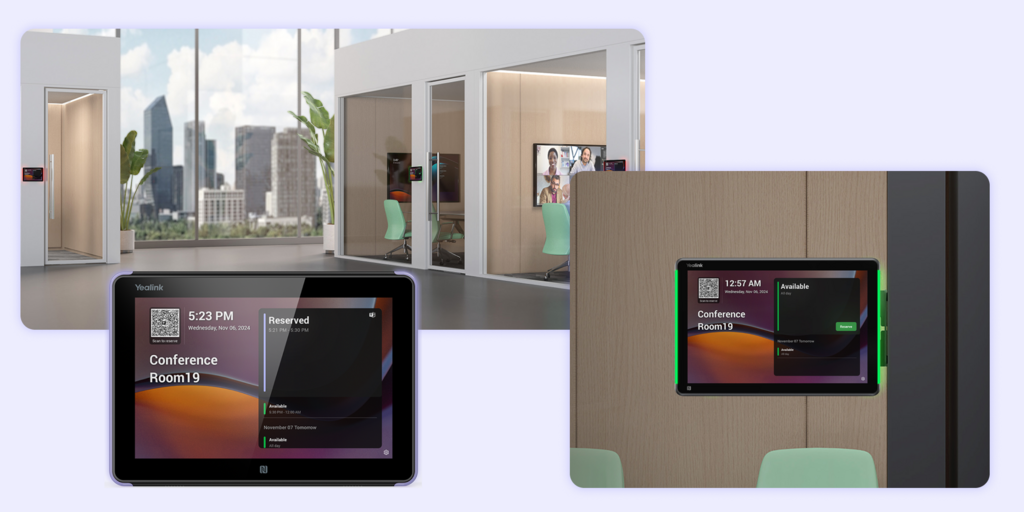
The Yealink RoomPanel family covers 8-inch and 10.1-inch scheduling panels with an RGB LED light bar. They run Microsoft Teams, Zoom or third-party booking apps, and cost less per panel than Neat Pad.
Like Neat Pad, each Teams panel needs a Teams Rooms Pro or Shared Device license unless the room already has a Teams Rooms system.
What makes Yealink RoomPanel stand out
- Low price per panel among certified Teams panels
- Runs Teams, Zoom or a third-party booking app
- LED light bar visible down the corridor
Yealink RoomPanel pricing
Reseller list prices of about $699 for the RoomPanel Plus and $769 for the RoomPanel E2. Verify current pricing at Yealink’s website before purchasing.
Yealink RoomPanel limitations
- Wired: PoE or a power adapter, no battery model.
- Per-panel Teams license in rooms without a Teams Rooms system.
- Rooms only: desks and visitors need other products.
Best for: Teams or Zoom estates that want a certified panel at the lowest hardware price.
4. Poly TC10: Best for Poly Studio X and G7500 rooms
The HP Poly TC10 is a 10-inch touch panel that, like Neat Pad, works either as the in-room controller or as a scheduling panel outside the room. It pairs with Poly Studio X and G7500 video systems and is certified for Microsoft Teams and Zoom.
It is the natural replacement for Neat Pad in rooms built on Poly video.

What makes Poly TC10 stand out
- Certified Microsoft Teams panel, also supports Zoom
- Same hardware as in-room controller or door scheduler
- Fits estates managed on Poly and HP tools
Poly TC10 pricing
US resellers list it between about $1,070 and $1,880 depending on version and bundled support. Verify current pricing at HP Poly’s website before purchasing.
Poly TC10 limitations
- PoE only: each door needs a network cable.
- Wide price spread between resellers, so budgets need a formal quote.
- Rooms only: no desk booking, visitors or signage.
Best for: Organizations running Poly video systems on Teams or Zoom.
5. Cisco Room Navigator: Best for Webex estates managed in Control Hub
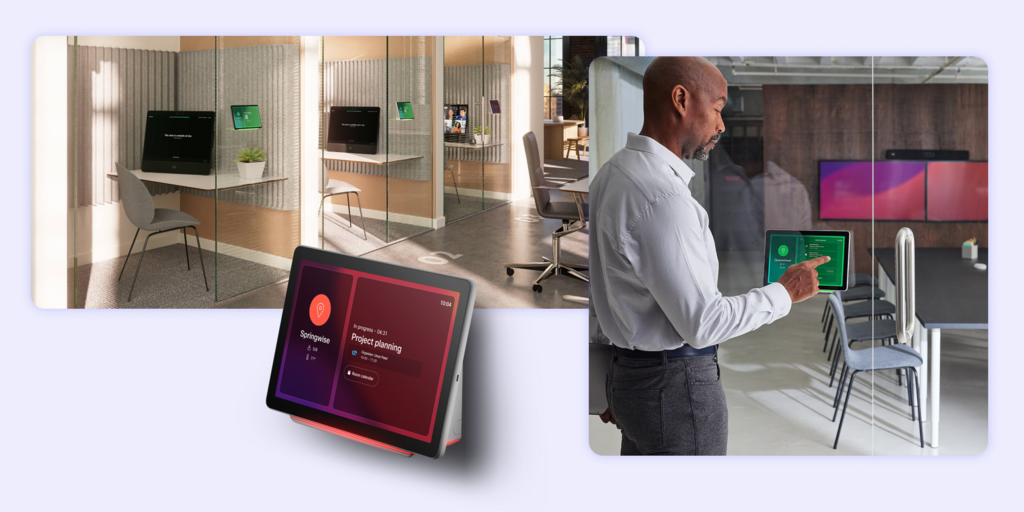
The wall-mount Cisco Room Navigator is a 10.1-inch panel with a 360-degree LED. In booking mode it takes reservations through Webex Hybrid Calendar, which syncs with Microsoft 365, Google Calendar and Exchange, and Cisco markets it as a certified Microsoft Teams panel.
It also reports temperature, humidity and air quality, and IT manages it in Cisco Control Hub.
What makes Cisco Room Navigator stand out
- Built-in temperature, humidity and air-quality sensors
- Google Calendar support through Webex Hybrid Calendar
- Central management in Cisco Control Hub
Cisco Room Navigator pricing
From $1,195 per panel according to Cisco. Verify current pricing at Cisco’s website before purchasing.
Cisco Room Navigator limitations
- PoE only: no battery option.
- Best inside the Cisco stack: booking runs through Webex Hybrid Calendar.
- Rooms only: desks and visitors need other products.
Best for: Organizations standardized on Webex devices and Cisco Control Hub.
6. Humly: Best for Nordic panels with air quality sensing
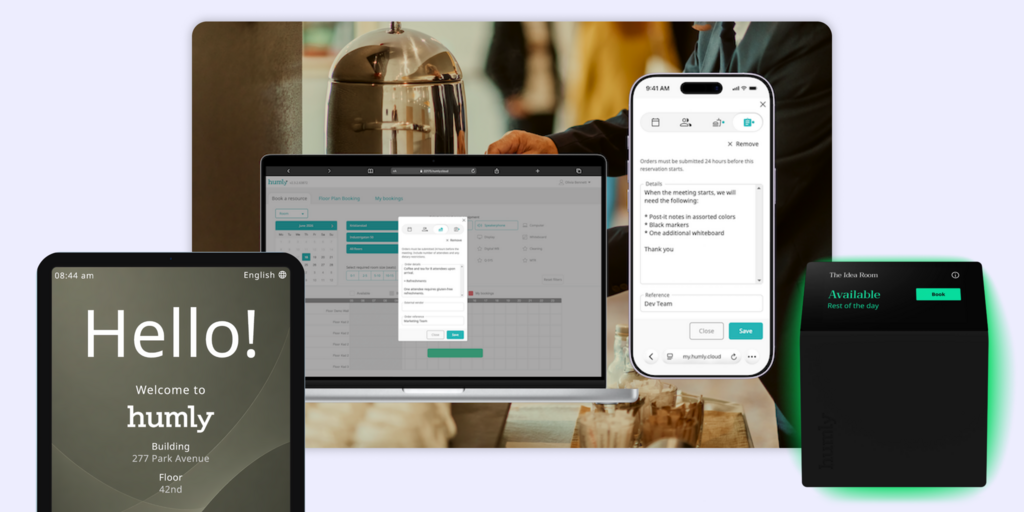
Humly is a Swedish company that makes the Humly Room Display, a door panel with colored LED indicators, plus a desk booking product, Humly Reservations. The displays integrate with Microsoft Teams, Microsoft 365 and Google Workspace, so they do not depend on a video platform app.
Humly room displays also track CO2, temperature and humidity.
What makes Humly stand out
- Air quality data from the room display itself
- Room panels and desk booking from one vendor
- Microsoft 365, Google Workspace and Teams integrations
Humly pricing
Pricing on request through Humly or a reseller. Verify current pricing at Humly’s website before purchasing.
Humly limitations
- PoE required: no battery-powered display.
- No public pricing: every comparison needs a sales conversation.
- No visitor management in the room or desk products.
Best for: Offices that want Nordic room panels with environmental sensing and desk booking from one vendor.
Looking for Humly alternatives instead? See our Best Humly alternatives or the full Joan vs. Humly comparison.
7. Evoko Naso: Best for room panels on their own booking software
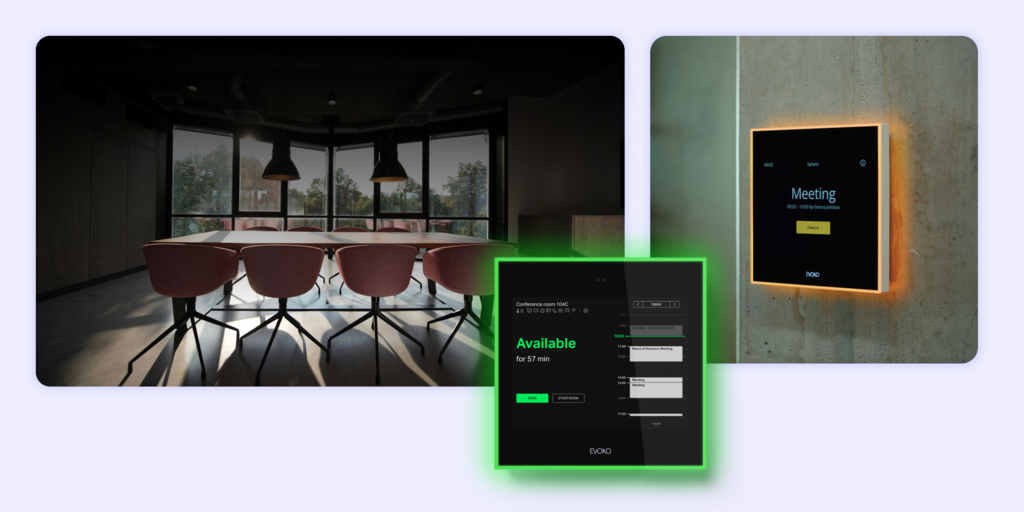
Evoko, now owned by Biamp, makes the Naso room manager: an 8-inch panel that runs on Evoko’s own booking software rather than a video platform app. Kleeo desk managers add desk hardware from the same vendor.
Evoko’s software is being brought into Biamp Workplace, which also covers AV device management.
What makes Evoko Naso stand out
- Dedicated booking panel that does not need a Teams Rooms or Zoom Rooms license
- Desk hardware from the same vendor
- Choice of PoE or a separate power supply
Evoko Naso pricing
About $875 for a Naso with a 1-year room license in Biamp’s store; licenses renew per room on 1, 3 or 5-year terms. Verify current pricing at Biamp’s website before purchasing.
Evoko Naso limitations
- Wired at every door: PoE or a mains power supply, no battery model.
- Per-room and per-desk licenses add a renewal for every device.
- Platform in transition: check the Biamp Workplace roadmap before a long rollout.
Best for: Organizations that want dedicated panels and desk hardware from one vendor, independent of their video platform.
How to choose the right Neat Pad alternative
If you cannot run cables to the door
Joan is the only option here with battery-powered meeting room displays. Every other panel on this list needs PoE or a power supply.
If your IT team requires PoE
All seven options support wired installs. Joan 6 Pro and Joan 13 Pro sit on a PoE wall mount with an LED occupancy light, and you can still put battery displays where a cable will not reach, on the same platform.
If you want a Teams or Zoom panel that matches your video hardware
Match the panel to the room system: Logitech Tap Scheduler for Logitech, Poly TC10 for Poly, Cisco Room Navigator for Webex devices, Yealink RoomPanel where hardware price matters most.
If most of your rooms have no video system
A certified Teams panel in a room without Teams Rooms needs its own Shared Device license. Joan, Humly and Evoko book against calendars directly, and Joan adds desks, visitors and signage on the same subscription.
Why Joan is usually the best Neat Pad alternative
Neat Pad is built for Neat video rooms. Joan is built for every door in the office: wired or wireless, Microsoft 365 or Google, with no per-panel Teams license, and with desks, visitors and signage on one platform.
Joan vs. Neat Pad: quick comparison
| Joan | Neat Pad | |
|---|---|---|
| Power options | ✅ Battery or PoE wall mount | PoE |
| Screen | ePaper | LCD (8-inch; Pad Pro 10-inch) |
| LED availability light | ✅ with PoE wall mount | ✅ |
| Certified Microsoft Teams panel | ❌ | ✅ |
| In-room video controller | ❌ | ✅ |
| Zoom Rooms scheduling | ❌ | ✅ native |
| Google Workspace calendar | ✅ native | Through Neat partner apps |
| Per-panel Microsoft license | Not required (each display is a Joan device license) | Teams Rooms Pro or Shared Device |
| Desk booking | ✅ | ❌ |
| Visitor management | ✅ pre-registration, check-in, host alerts; ePaper badges as an add-on | ❌ |
| Digital signage | ✅ | ❌ |
| Public pricing | ✅ | Hardware through resellers |
Neat data from Neat support documentation and reseller listings. Confirm current specifications with Neat before purchasing.
Ready to make the switch?
Joan is free to try for 30 days with no credit card. Put a Joan display on one door next to your Neat rooms and compare.
Frequently asked questions about Neat Pad alternatives
Is Neat the same as The Neat Company?
No. Neat (neat.no) is a Norwegian company that makes video conferencing devices such as Neat Bar, Neat Board and Neat Pad for Zoom Rooms and Microsoft Teams Rooms. The Neat Company is a separate business that makes document scanners and receipt software.
Does Neat Pad need PoE?
Yes. Neat Pad is powered over Ethernet and has no battery model, so each scheduling panel needs a network cable at the door. Joan displays run on battery or on a PoE wall mount, so you can choose per room.
Do I need a Microsoft license for Neat Pad as a Teams panel?
Yes. Neat’s support documentation says a Teams Rooms Pro license is needed to add a scheduling panel to a Teams room account, and a stand-alone panel needs a Teams Shared Device license. Joan displays sync with Microsoft 365 calendars without a Teams panel license.
How much does Neat Pad cost?
US resellers list the Neat Pad Gen 2 at about $1,090, and the 10-inch Neat Pad Pro has an MSRP of $1,290. Microsoft or Zoom licensing comes on top, depending on how the panel is used.
Is Joan a certified Microsoft Teams panel?
No. Joan does not run the native Teams panel app. Joan displays sync directly with Microsoft 365 and Exchange, and Joan AI in Microsoft Teams lets people book rooms and desks and register visitors from a chat.
Can I use Neat Pad and Joan together?
Yes. You can keep Neat hardware in your video rooms and use Joan displays on the doors of rooms without video, plus Joan for desks and visitors. Both can book against the same Microsoft 365 room calendars.
Page last updated: November 2026. Pricing verified from public sources; always confirm live pricing directly with each vendor before purchasing.
About the author
