22 Sep 2026
Questions and answers about visitor management and ePaper Badge
Whenever an organization welcomes guests, contractors, or job applicants, it faces a fundamental operational challenge: how to track who is inside, protect facility safety, and deliver a welcoming experience, all without burdening front-desk staff with manual logs. Modern workplaces address this challenge through digital visitor management, where reusable ePaper badges are rapidly proving to be an essential tool. Designed to address key industry questions, this guide explores the core principles of visitor management and highlights how Joan ePaper badges optimize the check-in experience, drawing on independent research and industry reference data.
First, the fundamentals that every buyer starts with regarding visitor management basics
What is visitor management?
Visitor management is the process an organization uses to greet, register, track and check out everyone who comes on site who is not a permanent employee: guests, clients, contractors, couriers and interview candidates. In practice it replaces the paper sign-in book with a defined workflow, usually supported by software, that records who arrived, who they came to see, and when they left. The goal is a workplace that is secure, welcoming, and able to account for everyone on site at any moment.
What is a visitor management system?
A visitor management system is the software, and often the hardware, that runs that process. It usually includes a self-service check-in point at reception, automatic host notifications, a digital log of every visit, and increasingly a badge that identifies the visitor while they are on site. Instead of a receptionist writing names by hand, the visitor checks themselves in and the system does the rest.
How does a visitor management system work?
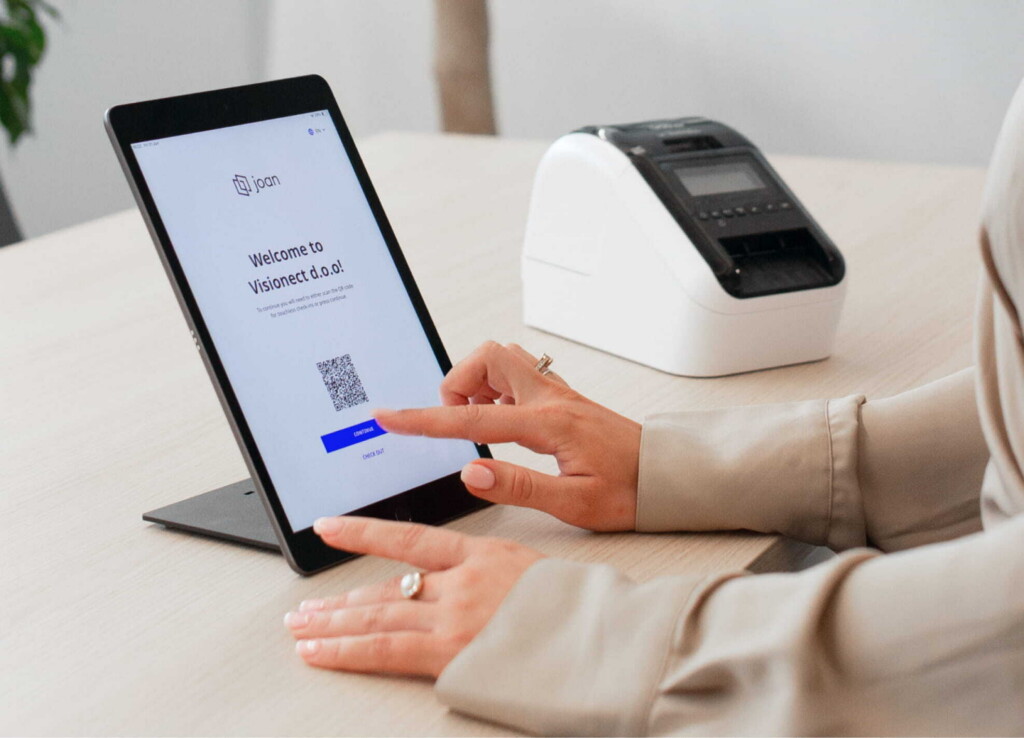
A typical flow looks like this, using Joan visitor management as the example. Before the visit, a host invites the guest straight from their calendar (Google, Office 365 or Exchange) or through the Joan Portal, and the visitor can receive an email link to pre-register and complete any documents at home. On arrival, the visitor checks in by scanning a QR code or using a self-service kiosk on an Android or Apple tablet at the front desk, and an unplanned visitor can request a meeting the same way. The host and receptionist are notified instantly by email or text. A badge is issued, and at the end of the visit the person checks out, which timestamps their departure. Every visit is written to a searchable digital log.
Why is visitor management important for organizations?
Three reasons stand out. Security and safety, because you always know who is on site, which matters for access control and for evacuations. Compliance, because a clean, timestamped record supports data-protection, health-and-safety and audit requirements. Experience and efficiency, because a smooth, professional check-in makes a strong first impression, reduces waiting and congestion at reception, and frees front-desk staff from manual paperwork.
Choosing and running a system
What should organizations look for in a visitor management system?
Look for fast self-service check-in, pre-registration and calendar invites, automatic host notifications, a searchable visit log, and the ability to handle pre-check-in documents, health or screening questions, and access levels. Consider how well it integrates with the tools you already use, such as your calendar, email and SMS, and whether it runs on the tablets you have. Check how it handles visitor data and privacy, whether the visitor badge is single-use or reusable, and how easily it can be customized to your brand.
What is an electronic or digital visitor management system?
It is simply a visitor management system that replaces manual, paper-based sign-in with digital check-in, digital records and, often, digital badges. The term is used to contrast with a paper logbook. The advantages are accuracy, speed, searchability and better privacy, because a digital log does not leave every visitor’s details on display for the next person to read.
How do you set up a visitor management system?
Most systems follow the same path. Place a check-in tablet or kiosk at reception (Joan supports both Android and Apple tablets), connect it to your calendar so hosts can send invites, set up your sign-in steps such as pre-check-in documents and a health screening questionnaire, choose how hosts are notified (email or text), decide how badges are issued, and customize the look to your brand. Test the full arrival-to-checkout flow before going live. Cloud-based systems can usually be running within a day.
Do visitor management systems improve security?
Yes, in several ways. They verify and record who enters, replace easily altered handwritten logs with timestamped digital records, and notify hosts so visitors are not left unescorted. The digital visitor log can be limited to the admin team, security team and specific employees, and it supports historical queries by day, month or year for compliance and security reviews. Colour-coded or zoned badges make access levels visible at a glance, and checkout closes the record so the on-site list stays accurate.
Different workplaces, different needs
How do offices handle guest check-in and visitor logs?
In a typical office, the priority is a warm, fast welcome and a tidy visitor log. Guests can be invited ahead of time from the host’s calendar, then check themselves in at a tablet by scanning a QR code, which notifies the host automatically and issues a badge. The visit is written to a digital log that reception or security can search later. The manual guest book, which exposes every previous visitor’s name, is retired.
How do high-security or regulated sites manage visitors and contractors?
Manufacturing plants, laboratories, hospitals and other regulated sites usually need more: pre-check-in paperwork, health or safety screening, clear visual identification of who is allowed where, and a solid audit trail. Joan supports pre-check-in documents and a customizable health screening questionnaire, colour-coded badges that let staff tell a visitor from a contractor from an escorted guest at a glance, and a searchable visit log that supports the record-keeping these environments require.
Where ePaper badges come in
What is an ePaper visitor badge?
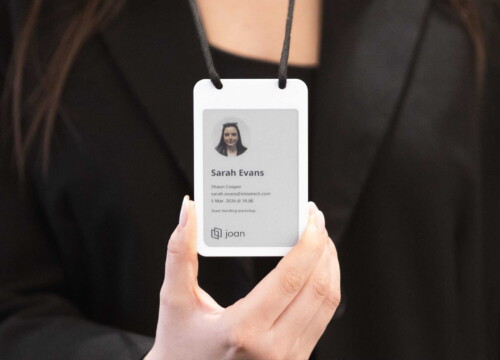
An ePaper visitor badge is a small, reusable electronic badge that shows a visitor’s details on an electronic-paper (e-ink) screen instead of a printed sticker. It is worn like an ordinary name badge, but the information is written to it wirelessly at check-in and cleared at checkout, so the same device is reused again and again.
What does the Joan ePaper badge look like, and what can it show?
The Joan ePaper badge is a slim, lightweight badge in a white PVC and PET housing, about the size of a conventional ID card holder at 66 by 104 mm and 2.8 mm thick, weighing 29.4 g, so it sits comfortably on a lanyard. Its 4-inch four-colour e-ink screen (black, white, red and yellow, at 528 by 768 pixels and 236 PPI) looks like crisp ink on paper and stays readable from any angle, even in bright light (E Ink). It can show a visitor’s photo, name and company, the person they are visiting, the check-in time, emergency contact details, an access level or zone (colour-coded so it reads at a glance), and your company logo. Its main features:
- 4-inch four-colour e-ink display (black, white, red, yellow), 528 by 768 pixels, 236 PPI, glare-free and readable from any angle.
- Slim, light hardware: 66.25 by 104 by 2.8 mm, 29.4 g, in a white PVC and PET housing.
- Wireless updates over Bluetooth 5.1, refreshed in seconds at check-in, with NFC also supported.
- 100 mAh rechargeable battery rated for about 700 updates per charge, with a red LED that lights while charging.
- Wireless Qi charging, so badges top up on a pad with no cables.
- Shows photo, name, company, host, check-in time, emergency contact, access level, and logo, with the guest photo captured during check-in.
- Works with Joan Visitor Management and a reception check-in tablet or kiosk, and requires an active Joan Visitor Management subscription.
- Clears automatically at checkout, so no visitor data stays on the badge.
- Reusable thousands of times, replacing single-use printed badges, with an optional branded lanyard.
How do ePaper badges help with visitor management specifically?
They close the loop between the software and the physical badge. When a visitor checks in, their details and photo are pushed to the badge automatically, so there is nothing to print and no misspelled sticker. Colour-coded access levels make it easy to see who belongs where, and emergency contact details can be shown right on the badge. At checkout the badge wipes itself and returns to the pool. The result is faster check-in, a more professional look, tighter security, and far less waste.
Are ePaper visitor badges more sustainable and cost-effective than printed badges?
Generally, yes. Printed visitor badges and their plastic holders are used once and thrown away, and only about 9% of the world’s plastic waste is actually recycled, according to the OECD’s Global Plastics Outlook (OECD, 2022). A reusable ePaper badge replaces hundreds of disposables with one device. Each badge is a one-time purchase rather than a recurring print cost, and Joan puts the break-even point at roughly ten visits a month, after which the badge keeps saving on paper, ink, labels and printer upkeep.
Are ePaper visitor badges good for data protection?
They fit well with core privacy principles. GDPR asks organizations to collect only the data they need, known as data minimisation, and to keep it no longer than necessary, known as storage limitation (ICO; Article 5, GDPR). Because a Joan visitor badge clears its information at checkout and the visit log lives in the system rather than in an open paper book (and can be limited to the admin and security teams), personal details are not left on display or on the device after the visit ends.
Modern visitor management has evolved far beyond manual reception logbooks. Contemporary digital solutions oversee the complete guest experience, from sending pre-arrival calendar invitations to capturing timestamped checkouts. These systems maintain robust workplace security and regulatory compliance while delivering an inviting experience, ensuring visitor identities are managed swiftly, accurately, and privately.
Integrating software with reusable ePaper badges bridges the digital and physical check-in workflow. Within seconds, these e-ink displays update to show a guest’s photo, name, and assigned permissions. Upon departure, the badge automatically resets for the next user. By replacing disposable adhesive labels, a single reusable badge achieves cost neutrality in roughly ten uses per month. Pairing a digital management workflow with reusable badges offers organizations an efficient strategy to strengthen security, elevate guest impressions, and minimize operational waste and expenditure.
Still have questions about visitor management or the Joan ePaper badge? Contact us and our team will be glad to help you find the right setup for your workplace.