
What is hot desking? Meaning, pros and cons, and how to make it work
Hot desking means nobody has their own desk. You come in, take a free one, and leave it clear when you go. It’s now common in hybrid offices, and it’s also one of the most argued-about office policies online.
The idea is simple. Making it work for the people who sit at those desks every day is the hard part. This guide covers what hot desking is, how it compares with hoteling and dedicated desks, the real pros and cons, and what makes it work.
Quickly jump to:
- What is hot desking?
- How does hot desking work?
- Hot desking vs hoteling vs desk sharing
- Hot desk vs dedicated desk
- Benefits of hot desking
- Disadvantages of hot desking
- Is hot desking still a thing?
- Is hot desking right for your team?
- How to make hot desking work
- Hot desking software: what to look for
- Frequently asked questions
TL;DR
- Hot desking means there are no assigned desks. People use any free desk, first come, first served, or book one in an app before they arrive.
- The name is often traced to “hot racking” on navy ships, where sailors on different shifts shared the same bunk.
- It saves space when not everyone is in on the same day. In CBRE’s 2026 data, 69% of companies have more than 40% of their people sharing desks.
- The downsides are real: hunting for a desk, no personal space, noise, hygiene, and teams that end up sitting apart.
- It works when people can book ahead, check in, sit near their team and keep their things in a locker. Joan Desk booking handles the booking and check-in part.
What is hot desking?
Hot desking is a way of running an office where no one has an assigned desk. Anyone can use any free desk, either first come, first served or after booking it. When you leave, the desk goes back into the pool for the next person.
The name is often traced to “hot racking” on navy ships, where sailors on different shifts slept in the same bunk, so it was still warm when the next person got in.
You’ll also see “hot desk” in coworking spaces, where it means renting any free seat by the day or month instead of a fixed desk. This guide is about hot desking in your own office. If you want the short version, see hot desking in our workplace glossary.
In business phone systems like RingCentral or Zoom Phone, “hot desking” means something else again: you log in to any shared desk phone and it picks up your own number and settings. This guide is about desks, not phones.
How does hot desking work?
There are two ways to run it, and most offices end up using both.
- Walk-up. You arrive, look for a free desk and sit down. There’s no booking, so on busy days you may not find one.
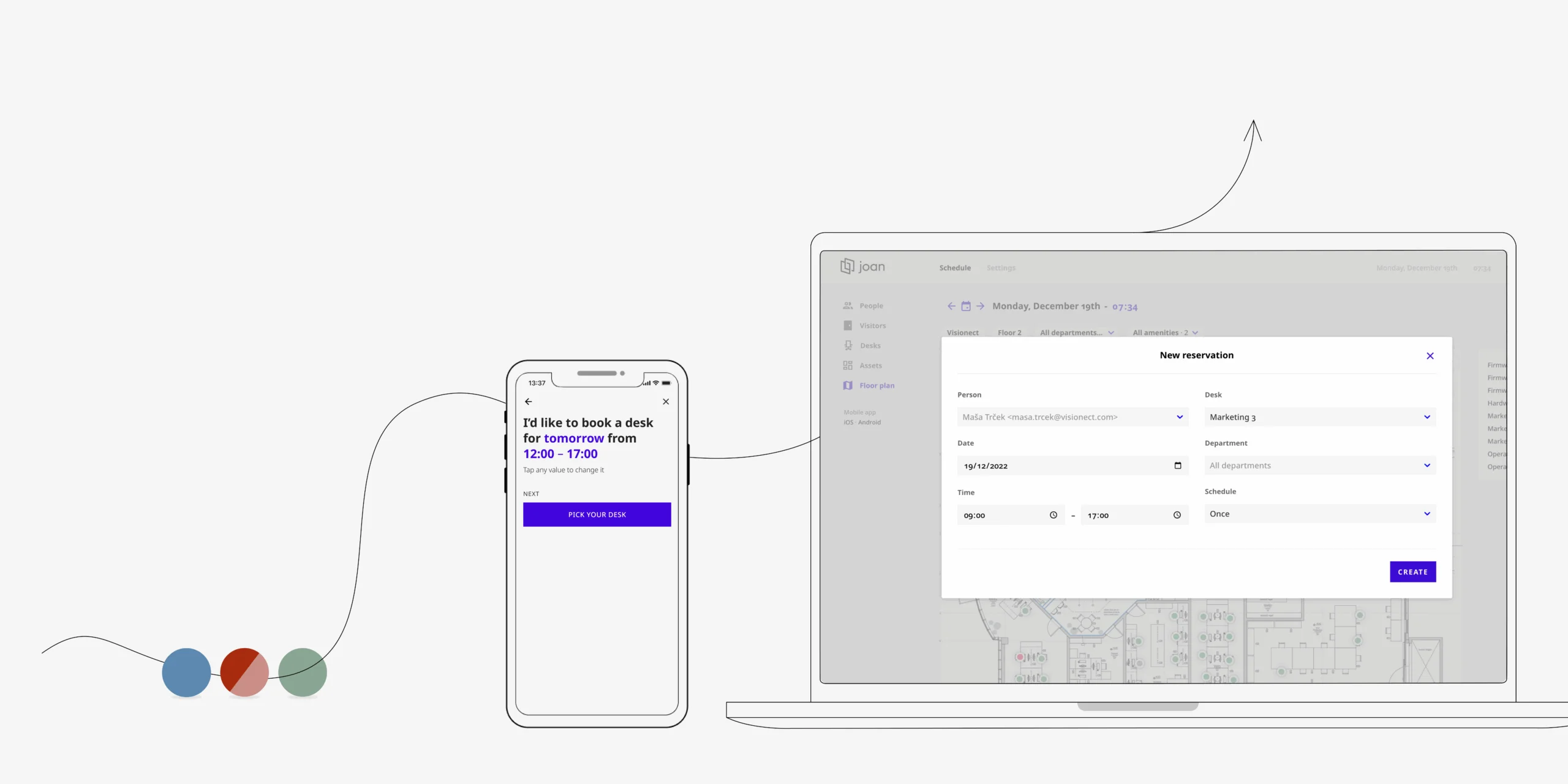
- Booked. You reserve a desk in an app, on the web or in Microsoft Teams or Outlook before you come in. This booked version is often called desk hoteling.
A hot desk usually has a monitor, a docking station or charger, power and a chair. Nothing personal stays there overnight. People keep their things in a locker and clear the desk when they leave. With a booking system, you also check in when you arrive. If nobody checks in, the desk goes back into the pool so someone else can use it.
You’ll also see a few variations:
- Neighborhoods. Each team gets its own zone of shared desks, so people still sit near their team.
- Rotating desks. Teams share one set of desks on different days, for example sales on Monday and Tuesday, marketing on Wednesday and Thursday.
- Activity-based working. Instead of rows of identical desks, the office has spaces for different kinds of work: quiet rooms for focus, open tables for teamwork, booths for calls. People move between them during the day.
Hot desking vs hoteling vs desk sharing
The three terms get mixed up a lot. Here’s how they differ:
| Hot desking | Desk hoteling | Desk sharing | |
|---|---|---|---|
| How you get a desk | Take any free desk when you arrive | Book a specific desk ahead | Any setup where people share a pool of desks |
| Desk guaranteed? | No | Yes, once booked | Depends on the setup |
| Best for | Offices with low or unpredictable attendance | Hybrid teams with set office days | The umbrella term for both |
In practice, most offices mix them: a few walk-up desks, with most desks bookable. More on the booked model in our guide to office hoteling software, and on ratios and policy in desk sharing at work.
Hot desk vs dedicated desk
A dedicated desk belongs to one person. A hot desk belongs to whoever sits there that day.
| Hot desk | Dedicated desk | |
|---|---|---|
| Who sits there | Anyone, day to day | One person, every day |
| Personal items | Cleared daily, kept in a locker | Stay at the desk |
| Space needed | Fewer desks than people | One desk per person |
| Best for | People in one to three days a week, or often on the road | People in every day, or who need a specific setup |
Most offices keep some dedicated desks. They go to people who are in every day, and to anyone who needs an adapted workstation, like a special chair, a raised desk or extra equipment.
Benefits of hot desking
Fewer empty desks
In most hybrid offices, a lot of desks sit empty on any given day. CBRE’s 2026 benchmarking puts average office use at 53%. With hot desking, you plan desks for the people who actually come in, not for everyone on the payroll.
Lower office costs
Fewer desks means less space, furniture and power to pay for. Companies use the savings to cut floor space, or to turn empty desk rows into meeting rooms and quiet spaces people actually want.
A better fit for hybrid schedules
Attendance changes through the week. 73% of companies in CBRE’s 2026 report say Tuesday is their busiest day, and almost none say Monday or Friday. Shared desks can follow that pattern; assigned desks can’t.
More contact across teams
When people don’t sit in the same spot every day, they end up next to colleagues from other teams. That’s useful for new joiners and for work that crosses departments.
Clear data on how space is used
With a booking system, you see which desks get used, on which days, and by which teams. That tells you whether you have too many desks, too few, or the wrong kind.
Disadvantages of hot desking
Search “hot desking” and you’ll find long Reddit threads from people who hate it. Most of the complaints come down to the same few things:
- Hunting for a desk. Without booking, people come in early to get a good spot, or walk around looking for one.
- No personal space. No photos, no plants, no setup you can count on. Every morning starts with adjusting a chair and a monitor.
- Teams end up apart. If desks go to whoever arrives first, people who work together sit on different floors.
- Noise and focus. Shared desks are usually in open areas, which makes focused work harder without quiet rooms nearby.
- Hygiene. Shared keyboards, mice and desk surfaces need cleaning between users.
- It doesn’t suit everyone. A different desk every day is harder for people who rely on a fixed routine or an adapted workstation.
None of these mean hot desking can’t work. They mean it fails when it’s only a way to cut desks, with nothing in place for the people using them.
Is hot desking still a thing?
Yes. In CBRE’s 2026 Global Workplace & Occupancy Insights, 69% of companies have more than 40% of their people sharing desks, and none of them aim for one desk per person anymore.
What’s changing is how far companies take it. More of them now ask people to be in the office on set days, so sharing ratios are more modest than in 2024. 48% aim for 1.01 to 1.49 people per desk, and only 33% go above 1.5, down from 62% in 2024.
Is hot desking right for your team?
Hot desking fits some teams better than others. It usually works when:
- People are in one to three days a week, so not everyone needs a desk at the same time.
- Most work happens on a laptop and doesn’t need special equipment.
- Attendance is uneven, with clear busy and quiet days.
- Some roles are often away from the office, like sales, consultants or field teams.
It’s a harder fit when:
- Most people are in every day.
- The work needs fixed equipment, like several screens, a drawing tablet or specialist tools.
- People need a predictable spot, for example because of an adapted workstation, or because a new desk every day is hard for them.
Most offices end up in between: shared desks for most people, and fixed desks for the few who need them.
How to make hot desking work
Let people book ahead and check in
Booking takes away the morning desk hunt. Check-in and automatic release stop people from holding desks they don’t use.
Keep teams together
Group desks into neighborhoods for each team, so people who work together can sit together on the days they’re in.
Decide who keeps a dedicated desk
Give fixed desks to people who are in every day and to anyone who needs a specific setup. Everyone else books from the shared pool.
Get the essentials right
Every desk needs a monitor, a docking station or charger, and power. Give people a locker for their things. Many teams also hand out personal keyboards, mice or headsets, so no one has to share them.
Write a few simple rules
Keep the hot desking policy short. It usually covers:
- Booking. How far ahead people can book, and for how long.
- Check-in. When a desk goes back into the pool if nobody shows up.
- Clean desk. Clear everything at the end of the day and wipe the desk down.
- Personal items. What goes in a locker, and what can’t stay overnight.
- Fixed desks. Who keeps one, and why.
- Calls and noise. Where to take calls and video meetings.
Our desk sharing etiquette guide has more detail, and the hybrid work policy guide covers the bigger picture.
Plan for your busiest day, then pilot
Count how many people come in on your busiest day and plan desks for that, not for the average. Start with one team or floor, fix what doesn’t work, then roll it out.
Hot desking software: what to look for
Hot desking software (also called desk booking software) lets people find and book a desk before they come in. Look for:
- Booking from a phone, the web, a floor plan, Microsoft Teams or Outlook
- Check-in and automatic release of no-shows
- Neighborhoods and a way to see where colleagues sit
- Occupancy reports, so you can see if you have the right number of desks
- A display at the desk, so people can see if it’s free and check in on the spot
We compare 11 tools on price and features in our list of the best hot desking software.
Joan Desk booking covers all of these. Its wireless ePaper displays sit on the desk, run on batteries and show if the desk is free, and you can book a desk by asking the Joan AI agent in Microsoft Teams. Plans start at €49/month (Team plan, 2 devices, 20 users), and you can try Joan free for 30 days.
Make hot desking work for the people at the desks
Hot desking saves space, but people judge it by their mornings: can they find a desk, sit near their team, and get to work without a fuss? Get that right and most of the complaints go away.
See how Joan Desk booking works, check pricing, start a free trial or talk to our team.
Frequently asked questions
What is the purpose of hot desking?
Hot desking makes better use of office space when not everyone comes in on the same day. Instead of one desk per person, companies keep fewer desks and share them. That cuts the cost of empty desks and frees space for meeting rooms and quiet areas.
Why is it called hot desking?
The name is often traced to “hot racking” on navy ships, where sailors on different shifts shared one bunk. It was still warm when the next sailor got in. A hot desk works the same way: one desk, used by different people at different times.
What are the disadvantages of hot desking?
The main ones are hunting for a desk, no personal space, teams ending up apart, noise, and shared equipment that needs cleaning. It’s also harder for people who need a fixed routine or an adapted workstation. Booking, neighborhoods, lockers and a few dedicated desks deal with most of these.
Is hot desking good for mental health?
It depends on how it’s run. A daily hunt for a desk, no personal space and sitting away from your team can be stressful. Being able to book ahead, sit with your team, keep your things in a locker and have a fixed desk when you need one removes most of that stress.
Is hot desking still a thing?
Yes. CBRE’s 2026 data shows 69% of companies have more than 40% of their people sharing desks, and none aim for one desk per person. What’s changed is that ratios are more modest, because more companies ask people to be in on set days.
What’s the difference between hot desking and hoteling?
With hot desking, you take any free desk when you arrive. With hoteling, you book a specific desk before you come in, so it’s guaranteed. Many offices use both: a few walk-up desks, and most desks bookable.
Does hot desking save money?
It can. CBRE’s 2026 data puts average office use at 53%, so many companies pay for desks that sit empty about half the time. Sharing desks lets you plan for the people who actually come in, as long as you plan for your busiest day, not the average.
Does hot desking improve productivity?
Not on its own. A daily hunt for a desk, setting up from scratch every morning and a noisy open floor can make focused work harder. Hot desking holds up when people can book a desk near their team, have quiet rooms for focused work, and keep their own keyboard and headset so they can start working right away.
Does hot desking work for neurodivergent or disabled employees?
It can, with adjustments. A different desk every day and a noisy open floor can be hard for some neurodivergent people, and anyone with an adapted workstation needs a desk that fits them. The usual fix is a fixed desk, or the same bookable desk every time, plus quiet spaces. In the UK, employers must assess the workstations of people who use screens daily for an hour or more at a time, including any special requirements such as a disability.
About the author
