23 Oct 2026
Employee Badge Elements
Every employee carries one, glances at a dozen a day, and rarely thinks about what is actually on it. The employee badge is one of the most-used credentials in any building, yet often the least examined.
This guide breaks down each badge element: what it is, why it matters, what to include, and which common mistakes to avoid. We will explore the visible elements employees read, the machine-readable elements used for access, the physical components that affect durability, and the accessibility features often overlooked.
We will also compare traditional printed badges with ePaper badges, showing how their elements differ and how ePaper technology makes employee badges more flexible and dynamic. For guidance on layout, typography, and color, see our separate employee badge design guide.
TL;DR
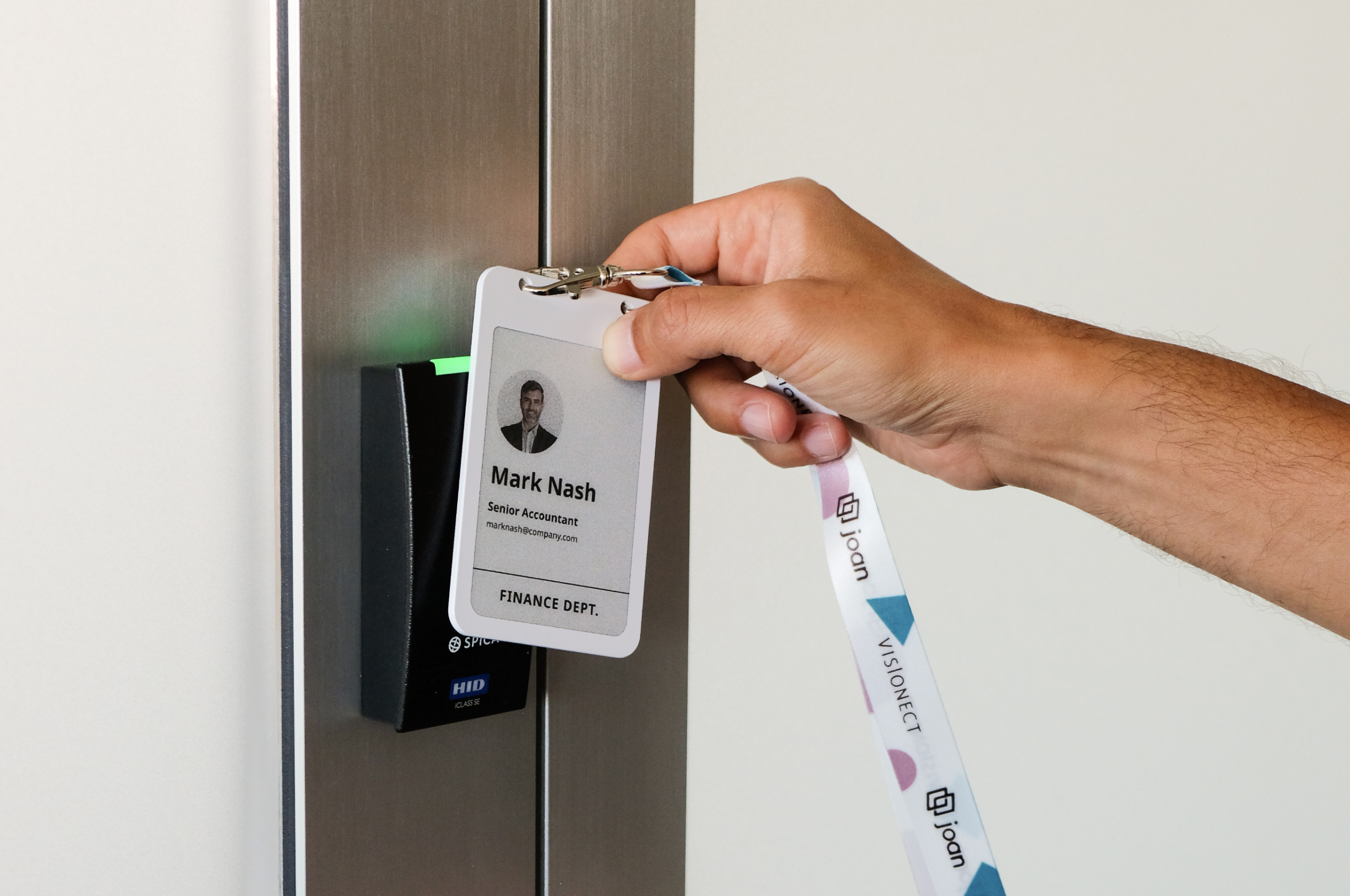
A traditional printed badge carries a fairly standard set of elements, a photo, a name, a job title or department, the company logo, a unique ID number, usually an access-level color, and an embedded RFID or NFC chip or QR code for doors and check-in. That list is a sensible default, but on a printed card every one of those elements is fixed the moment it comes off the printer. Joan ePaper badge makes the content dynamic instead: you choose exactly what information each badge shows, and update it wirelessly whenever something changes, with no reprint.
Quickly jump to
- What are employee badge elements
- Traditional badge vs dynamic ePaper badge elements
- The core visible elements: what to put on an employee ID badge
- Elements you cannot see
- Physical elements: size, material, and how the badge is worn
- How the elements change on a dynamic ePaper badge and how Joan improves it
- Employee badge design: arranging the elements well
- What to leave off: elements that do more harm than good
- One set of elements, three jobs: employees, visitors, and events
- Employee badge elements checklist
- Final thoughts
- Frequently asked questions
What are employee badge elements
Employee badge elements are the information, technology, and physical components that make up an ID badge. They fall into three main categories:
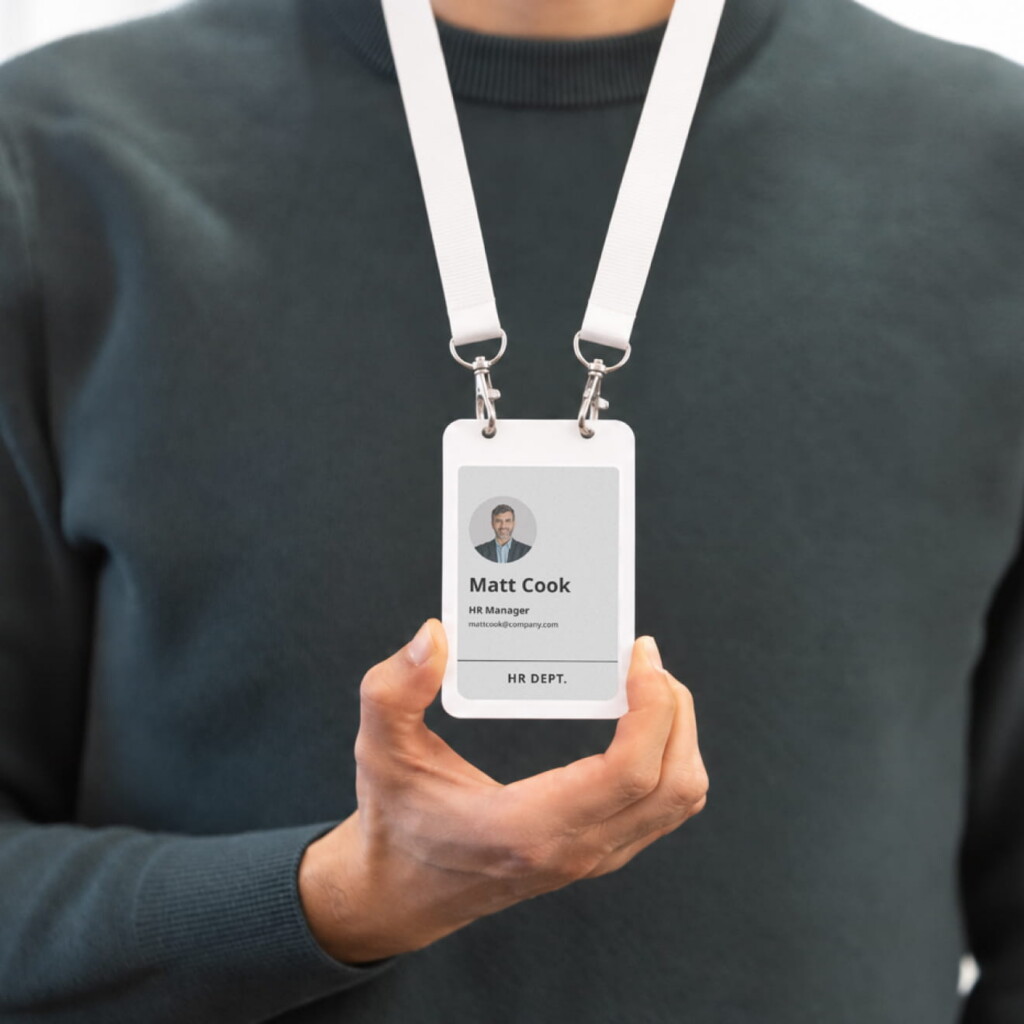
Visual elements: Photo, name, job title, company logo, and employee ID.
Technology elements: RFID or NFC chips, QR codes, barcodes, or magnetic stripes used for access and identification.
Physical elements: The card or screen, its material and size, and accessories like lanyards, clips, or holders.
A good employee badge combines all three to ensure it is easy to identify, functional, durable, and comfortable to wear.
The same elements can live on a traditional printed card or on a dynamic ePaper badge, but they behave very differently:
Traditional badge vs dynamic ePaper badge elements
| Element | On a printed badge | On a Joan ePaper badge |
|---|---|---|
| Photo | Fixed at print; a new photo means a reprint | Update it anytime, no reprint |
| Name | Permanent once printed | Edit instantly, e.g. a name change |
| Job title / department | Reprint needed after a promotion or move | Re-synced the moment it changes |
| Company logo / branding | Locked in; a rebrand means new cards | Pushed to every badge at once |
| Access level / role | Fixed color or label | Change the role, the badge updates |
| Content shown | One fixed face | Up to six screens you choose and edit |
The core visible elements: what to put on an employee ID badge
Start with the elements an employee and a security guard actually look at. For most organizations, five do the real work, and a sixth is situational.
The photo
A current, recognizable headshot is the most important element on an ID badge because it is the only one that lets someone verify the badge belongs to the bearer. An employee badge with a picture turns a card from a claim into a check. The element itself is simple; the discipline around it is not. The face should be large enough to read across a lobby, shot against a consistent background under consistent lighting, and most programs get this wrong, keeping it current. A photo from three roles and one haircut ago verifies nothing. The deeper photo standards (framing, how much of the card the face should fill, scheduled photo sessions versus self-submitted snapshots) sit in our design guide; as an element, the rule is: real photo, recent photo, readable photo.
The full name
The name is the element people use to address each other, so it should be the most legible text on the badge, typically the largest type after the photo. Decide deliberately whether you show a preferred first name, a full legal name, or both, because the badge is often the first thing a new colleague or a visitor reads off a person. For many workplaces the warmer, larger first name plus a smaller surname is the right call.
Job title or department
This element supplies organizational context: it tells a colleague whether they are talking to someone in finance or facilities, and it tells a visitor whether the person in front of them can actually help. Titles change often, which is worth remembering now and critical later when we get to how badges update. Departments change less often and are sometimes the more useful element to show.
Company name and logo
Branding is not vanity here; it is a trust signal. A badge carrying a clear company logo is instantly harder to fake with a home printer and instantly more legitimate to a visitor or a client on site. The logo also ties a loose population of contractors, part-timers, and full-time staff into one visibly coherent workforce. Keep it an identifying element, not a decorative one, a legible mark, not a full-bleed splash that crowds out the photo and name.
The employee ID number
A unique identifier ties the physical badge back to a record in your HR or access-control system. It is what makes a badge auditable: a number to deactivate the moment a badge is lost, a number that links a door event to a person. Whether it is printed as human-readable text, encoded in a barcode, or both is a design choice; that the element exists is close to non-negotiable for any program above a handful of people.
The role or access indicator
Many organizations add a visual element that signals access level or employee type at a glance, a colored header, a stripe, a word like “Staff,” “Contractor,” or “Visitor.” This is the element that lets a guard enforce a boundary without scanning anything: a red-banded visitor badge in a staff-only corridor is wrong on sight. Color-coded access tiers are one of the highest-value elements a badge can carry and one of the most underused.

Elements you cannot see
The visible elements identify a person to other people. The encoded elements identify the badge to machines, and they are where a modern badge earns most of its keep. They are also the elements the design conversation tends to skip, so they are worth spelling out.
The RFID or NFC chip
An embedded chip is what turns an ID card into a key. Passive RFID chips power themselves from the reader’s field and are the workhorse of door access and turnstiles. NFC is a short-range, more secure cousin of RFID, the same technology in contactless payments, well suited to taps against a reader and to phones. The chip is a physically invisible element, buried in the card body, under the printed design layer, but it is often the element the badge exists for. The important specification question is whether the chip supports modern, encrypted credentials rather than easily cloned legacy formats, because a badge that opens doors is only as trustworthy as the chip inside it.
The QR code or barcode
A machine-readable code is a cheap, flexible data element. A 2D QR code can hold more than a 1D barcode and can be scanned by an ordinary phone camera, which makes it useful for time-and-attendance, event check-in, equipment loans, or linking to a verification page. Two decisions define this element: what it encodes, an opaque ID that means nothing without your system, which is the safe default, versus readable data you would not want a stranger to copy, and whether it has been scan-tested at the size and on the surface you are actually printing. A QR code that will not scan under lobby lighting is not an element, it is a decoration.
The magnetic stripe (and why it is fading)
Legacy swipe stripes still appear on badges tied to older access or payment systems. As an element it is worth knowing about mostly so you can decide to leave it off: stripes wear, demagnetize, and carry weak security, and most new programs replace them with a chip.
The guiding principle for the whole data layer is to separate what you print from what you encode. Sensitive or system-specific data belongs in the chip or a coded identifier, not in plain text on the card face. The printed elements should identify a person to other people; the encoded elements should identify the badge to your systems. Blur the two and you either clutter the card or leak data.
Physical elements: size, material, and how the badge is worn
The elements an employee never consciously notices are the ones that decide whether the badge is still usable next year.
Size
The near-universal standard for an employee ID card is the CR80 / ID-1 format defined by ISO/IEC 7810 – 85.6 by 54 millimetres, or about 3.375 by 2.125 inches, the exact footprint of a credit card. Standardizing on it means off-the-shelf holders, lanyards, slot punches, and printers all fit, which is why “how big is an employee badge” has, in practice, one answer. Deviate from it only for a deliberate reason, such as a larger ePaper screen meant to be read from further away.
Material
The substrate is an element in its own right because it sets the badge’s lifespan. Standard badges are PVC, usually with an over-laminate that protects the print from abrasion and the daily punishment of being tapped, dropped, and shoved in a pocket. The alternative, increasingly, is electronic paper: instead of ink fixed onto plastic, the identifying elements are rendered on a low-power screen that can be rewritten. That one change, from a frozen surface to an updatable one, cascades through every other element, which is the subject of the next section.
How it is worn
The holder, lanyard, or clip is the element that gets the badge onto a body and keeps it there. Orientation matters: a vertical badge on a lanyard reads differently than a horizontal badge on a belt clip, and a slot or clip in the wrong place forces the card to hang face-in, hiding every element you carefully placed on it. It is a small thing that quietly defeats the whole exercise if ignored.
How the elements change on a dynamic ePaper badge and how Joan improves it
On a printed badge, every element is frozen the moment the card comes off the printer. A promotion, a new last name, a department move, a lost badge, or a rebrand each means a reprint, a cost, and a window where the badge on someone’s chest is quietly wrong.
This is the experience Joan set out to fix. On the Joan ePaper employee badge, the elements are not printed, they are data on a four-inch electronic-paper screen, updated wirelessly over Bluetooth from your employee directory. Every visible element becomes a field you edit once, centrally, and the badge updates itself, no reprint or reissue.
The screen also lifts the old constraint of space: a Joan badge holds up to six screens the wearer cycles through with a button, so identity, a QR code, a booking, or emergency info each get a clean layout instead of fighting for one crowded face. And each badge carries an NFC chip (NXP MIFARE DESFire EV3) that your access-control system can key, so the same badge both identifies a person and opens their doors.
You can also watch our video to see how easy it is to set up ePaper badges for new employees in just a few taps
Because it is reusable and reassignable, a lost or departing-employee badge is simply cleared and reissued. You can see the hardware behind all of this on Joan smart badge technology page.
Employee badge design: arranging the elements well
Knowing the elements is half the job; the other half is employee badge design, deciding how those elements sit together so the badge reads instantly and reflects the company. Design is where the elements become a hierarchy: the photo and name dominant, the title and department supporting, the logo and ID present but quiet, the access color unmistakable. It is where typography, margins, orientation, and color turn a list of fields into a card a guard can read in half a second. Good employee badge design is mostly restraint, showing the elements that earn their place and resisting the ones that do not.
Because that craft deserves its own treatment, we have kept it separate. If your next question is how to lay these elements out, which fonts and sizes to use, how to handle the back of the card, and what makes a badge look sharp rather than busy, the employee badge design guide is the companion to this one. Think of this article as what goes on the badge and that one as how to arrange it.
What to leave off: elements that do more harm than good
Choosing elements is also choosing what to exclude, and a surprising amount of harm comes from over-stuffing a badge. Leave off anything genuinely sensitive: a home address, a personal phone number, a national ID or social-security number, or a date of birth has no business on a card that can be photographed across a room or found on a train seat. Resist the urge to print every system’s data on the face when a chip or a coded ID can carry it invisibly. Avoid decorative elements that compete with the photo and name for attention, because every non-essential element you add makes the essential ones harder to read. And be cautious with elements that date quickly, a specific desk number, a project name, unless the badge can update them, in which case they stop being a liability and become a feature. The test for any element is simple: does a person or a machine need to read this off the badge to do something? If not, it probably does not belong on it.
One set of elements, three jobs: employees, visitors, and events
The elements that make a good employee badge are largely the same ones that make a good visitor or event badge, a photo or name, a role indicator, an access credential, a clean layout, which is why it is wasteful to run three separate badge systems to produce them. Joan reusable ePaper hardware handles all three on one platform. The same badge model that carries an employee’s identity from your directory also writes itself at a reception desk for a visitor badge, and pools into a reusable set of event badges for a conference or company day. What changes between them is the data source and the operating model, not the hardware or the admin tooling.
Final thoughts
An employee badge is a small object carrying a surprising number of decisions. Get the elements right, the visible ones that let people trust it, the encoded ones that let machines act on it, the physical ones that let it survive, and the badge disappears into the background, which is exactly what a good credential should do. Get them wrong, and the badge becomes a steady source of friction: reprints, failed door taps, cards hanging face-in, data where it should not be.
The quiet shift underneath all of it is that elements no longer have to be permanent. When a badge is a rewritable screen rather than a printed card, every element becomes something you edit once and the badge keeps current on its own — which turns the hardest part of badge management, keeping the information true, into a non-event. If that is the direction your workplace is heading, take a look at Joan employee badges, explore the shared badge platform behind employees, visitors, and events, order a badge to try the elements for yourself, or talk to the Joan team about a program for your building.
Frequently asked questions
What should you put on an employee ID badge?
At minimum, a recent photo, the employee’s name, their job title or department, the company name or logo, and a unique employee ID number. Many organizations add a color or label indicating access level or employee type, and an encoded element — an NFC chip or QR code — for door access and time tracking. Leave off anything sensitive, such as a home address or a national ID number, and move system-specific data into the chip rather than printing it on the face.
What are the main elements of an employee badge?
They fall into three layers: visible elements a person reads (photo, name, title, logo, ID number, access indicator), data elements a machine reads (RFID/NFC chip, QR code or barcode), and physical elements that carry it all (the card or screen, its size and material, and the lanyard or clip). A well-planned badge is deliberate about all three rather than treating the printed face as the whole job.
How big is an employee badge?
The standard employee ID card is the CR80 / ID-1 size defined by ISO/IEC 7810: 85.6 by 54 millimetres, roughly 3.375 by 2.125 inches — the same footprint as a credit card. Sticking to it means standard holders, lanyards, and printers all fit. Some ePaper badges use a slightly larger screen so the elements can be read from further away.
Can an employee badge have a picture?
Yes, and for identity verification it should. A photo is the element that lets a person confirm the badge belongs to its bearer. The key is keeping it current, an outdated photo verifies nothing. On a printed badge a new photo means a reprint; on a Joan ePaper badge the photo is a field you update centrally and the badge refreshes itself.
What is the difference between employee badge elements and employee badge design?
Elements are what goes on and in the badge, the inventory of information, data, and physical components covered in this article. Design is how those elements are arranged so the badge reads instantly and looks right: layout, hierarchy, typography, and color. The two are companions; once you have chosen your elements, our employee badge design guide covers arranging them.
How can I create an employee badge?
Decide the elements first, using the checklist above, then choose a format. For printed PVC cards you design a template, set up a card printer with the right consumables, and reprint whenever an element changes. For a dynamic program, a platform like Joan pulls the elements from your employee directory and renders them onto reusable ePaper badges that update over the air — no template to reprint each time someone’s details change. The right path depends on how often your badge elements need to change and how many people you are badging.
Should employee badges show access level?
For any site with mixed populations — staff, contractors, visitors — a visible access or role indicator is one of the most valuable elements you can add, because it lets security enforce a boundary on sight without scanning anything. Use a color plus a word rather than color alone, so the element works for people with color-vision deficiency.
Can the same badge work for employees, visitors, and events?
Yes. The Joan ePaper badge is one piece of reusable hardware, on one platform, that serves as an employee badge, a visitor badge, and an event badge. The elements are similar across all three; what changes is where the data comes from and whether the badge belongs to the employee, the front desk, or the event organizer.