
Best Teem alternatives in 2026: Ranked for hybrid workplaces
Teem by Eptura is a room and desk booking platform built around tablet-based room displays. Originally launched as EventBoard and later acquired by iOFFICE and then Eptura, it connects conference room panels to your calendar — Microsoft 365 or Google Workspace — and adds desk booking and visitor management through a unified portal. For teams that need visible room scheduling at the door, it’s been a well-known option for years.
The problem is that since Eptura’s acquisition, reviews have shifted sharply. A string of 2022–2025 Capterra reviews describe collapsed support, a near-two-month service outage, and cancellation terms that left customers billed for software they couldn’t use. Teams evaluating room booking software who hear this feedback start looking elsewhere — often for something with the same physical display presence, but without the baggage.
We compared seven alternatives across pricing, features, setup experience, and real user feedback. Joan is included and listed first — and we’ll be honest about where each tool fits and where it doesn’t. If you’re also comparing Kadence, see our Best Kadence Alternatives →, or check our Best Smartway2 Alternatives if you’re evaluating the broader field.
Quickly jump to:
- Why teams start looking for Teem alternatives
- Quick comparison table
- The best 7 Teem alternatives in 2026
- How to choose the right Teem alternative
- Joan vs. Teem: quick comparison
- Frequently asked questions about Teem alternatives
Why teams start looking for Teem alternatives
Customer service collapsed after the Eptura acquisition
Teem had a good support reputation before it changed hands. Since the Eptura acquisition, that’s no longer the case. “Technical support and customer service is terrible, especially since Eptura took over,” wrote one VP of IT at a medical device company in a July 2025 Capterra review. The same review describes a complete service outage in late 2024 that lasted nearly two months — the result of a platform update that took eight weeks to fix. Multiple other reviewers echo the sentiment: the only contact from Teem comes when a payment is due.
Contract terms trap customers who want to leave
Teem’s standard agreement includes a 60-day cancellation notice requirement — buried in a link to the terms rather than on the contract itself. Multiple Capterra reviewers discovered this the hard way: they tried to cancel, stopped receiving the service or features they’d paid for, and still received invoices for another full year. “Yet another example of a business with terms and conditions designed to extort money from their customers,” wrote the same VP of IT in 2025. A CEO of a 200-person software company described being “refused to allow us to cancel” in a 2022 review. These aren’t edge cases — they’re a recurring pattern across years of reviews.
Desk booking is underdeveloped and key features sit behind the top tier
Teem’s desk booking module draws consistent criticism. “Desk app sucks,” wrote one IT specialist in a 2022 Capterra review. SSO and advanced analytics — features that competing platforms include as standard — require Teem’s Enterprise tier, the most expensive option. For teams that need desk booking and want analytics without an enterprise negotiation, paying more to unlock basics is a consistent frustration.
Quick comparison table
| Tool | Best for | Room booking | Desk booking | Starts at | Hardware? |
|---|---|---|---|---|---|
| Joan | Any office wanting purpose-built ePaper displays + full workplace platform | ✅ | ✅ | $51/month | ✅ ePaper displays |
| Robin | Enterprise hybrid scheduling with Microsoft 365 depth | ✅ | ✅ | On request | ❌ |
| Envoy Workplace | Visitor management + desk/room booking in one platform | ✅ | ✅ | $5/resource/month | ❌ |
| Tactic | Modular workplace software built incrementally | ✅ | ✅ | On request | ❌ |
| Deskbird | Per-user desk booking with transparent pricing | ✅ | ✅ | €2.75/user/month | ❌ |
| Skedda | Simple self-serve booking without enterprise overhead | ✅ | ✅ | $99/month | ❌ |
| Archie | Highly rated desk and room booking with strong G2 credentials | ✅ | ✅ | $159/month | ❌ |
| Teem | Tablet-based room displays with calendar sync | ✅ | ⚠️ limited | From ~$150/room/year | ⚠️ iPad/tablet (separate cost) |
The 7 best Teem alternatives in 2026
1. Joan — Best for teams that want purpose-built ePaper displays and an all-in-one platform
Joan is the most direct functional answer to Teem: a room booking platform that centres on physical displays. The difference is that Joan builds its own hardware — battery-powered ePaper panels that mount without cables and run months per charge — rather than relying on iPads or Android tablets that need power runs, kiosk software, and manual updates. Alongside room booking, Joan covers desk booking, visitor management, digital signage, parking, and asset reservations — all on one subscription, with pricing published on the website.
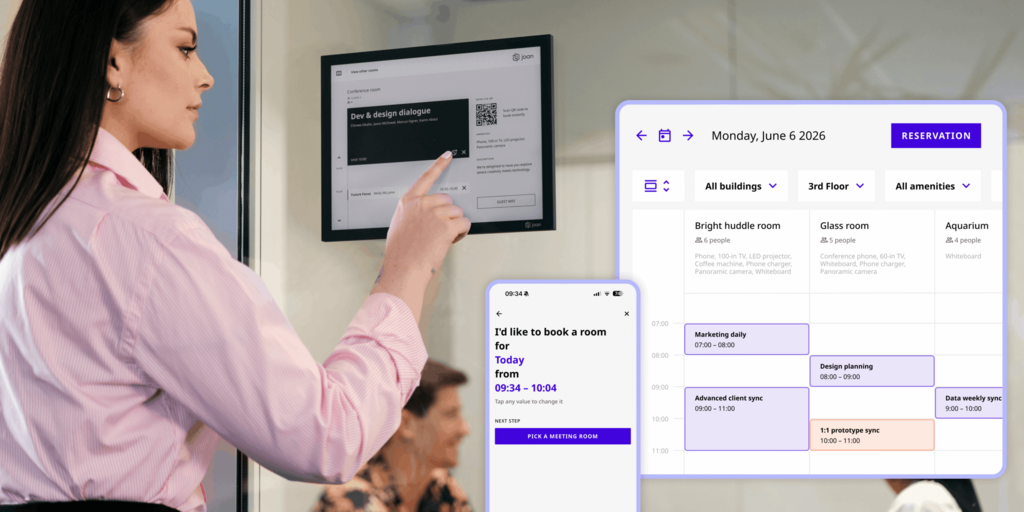
For teams that left Teem because of support failures or contract terms: Joan’s pricing is publicly listed, trials run 30 days with no commitment, and there’s no buried 60-day cancellation clause.
What makes Joan stand out
- Purpose-built ePaper panels, not tablets: Joan 6 RE, Joan 6 Pro, and Joan 13 Pro are designed specifically for room and desk display. They don’t need power cables at the wall, won’t show iOS update prompts mid-meeting, and can’t be walked off by an employee who thinks they’re shared iPads.
- All features included at every plan level: Analytics, recurring bookings, visitor management, digital signage — all available without an enterprise upgrade. No equivalent of Teem’s SSO/analytics paywall.
- Joan AI Agent for Microsoft Teams: Books rooms and desks directly from a Teams conversation. For organisations already committed to the Microsoft stack, this removes the need for a separate app or portal.
- Visitor management with the Joan ePaper badge: Physical, battery-powered visitor badges that display the visitor’s name and host — purpose-built for the role, not a tablet propped on a table.
Joan pricing
Plans start at $51/month. Additional users are $1.09/user/month; additional device licenses are $10.99/device/month (annual billing). All platform features included — no tier gates. ePaper hardware is a one-time purchase, separate from the subscription. See current pricing.
Joan limitations
- Joan is a booking and workplace experience platform, not a full IWMS. Maintenance ticketing, lease management, or capital planning require a separate tool.
- The ePaper display advantage is most relevant for offices managing physical meeting rooms. For fully remote teams with no fixed room inventory, the hardware angle is less relevant.
Best for: Any organisation managing physical meeting rooms — from a small office with three rooms to an enterprise across hundreds of locations.
Read our full Joan vs. Eptura Teem comparison.
2. Robin — Best for enterprise hybrid scheduling with Microsoft 365 depth
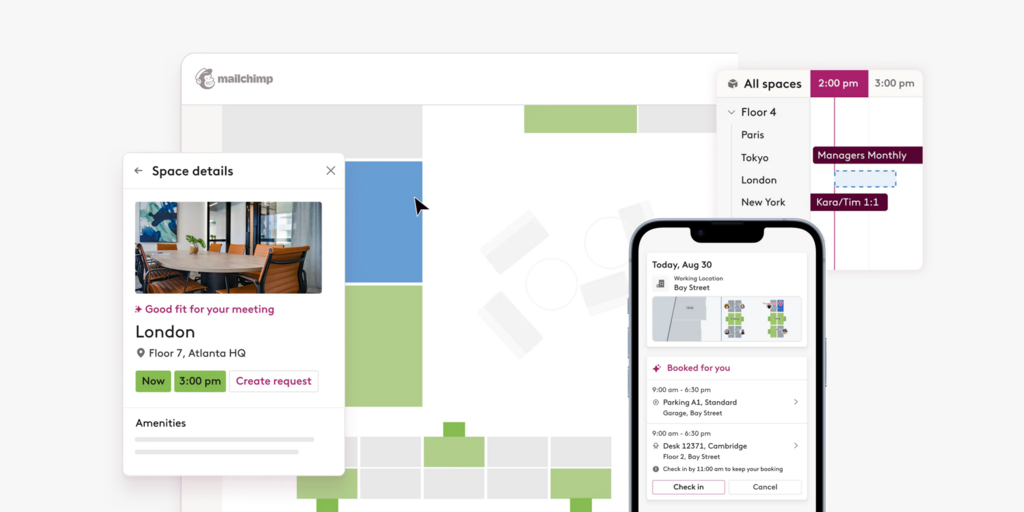
Robin is an enterprise hybrid workplace platform with a strong reputation for its Microsoft 365 integration. Teams that book from Outlook, coordinate presence in Teams, and need floor plan management for large, multi-floor offices use Robin because it meets them where they already work. Unlike Teem, Robin doesn’t depend on a single vendor’s acquisition history — it’s focused specifically on the workplace scheduling layer.
What makes Robin stand out
- Employees can book rooms and desks directly from Outlook or Teams without ever opening the Robin app — reducing the adoption friction that plagues many booking platforms
- Neighbourhood and zone management for large floorplates — routing teams to designated areas by role or schedule
- Strong utilisation analytics designed for facilities reporting, not just individual booking records
Robin pricing
Pricing is on request. No public rates are listed; deployments go through a sales conversation. Robin serves mid-market and enterprise, and pricing reflects that.
Robin limitations
- Seat-based billing covers all employees, not just active bookers — companies report total costs rising faster than expected as headcount grows
- No hardware: Robin is software-only; room displays require separate tablet hardware, mounting, and kiosk software — the same category of complexity Teem users already experienced
- Onboarding and configuration are substantial; smaller teams often find the platform overbuilt for their actual needs
Best for: Large enterprises deeply embedded in Microsoft 365 that need robust hybrid scheduling without changing employee workflows.
Looking for Robin alternatives instead? See our Best Robin Alternatives.
3. Envoy Workplace — Best for offices that prioritise visitor management alongside booking
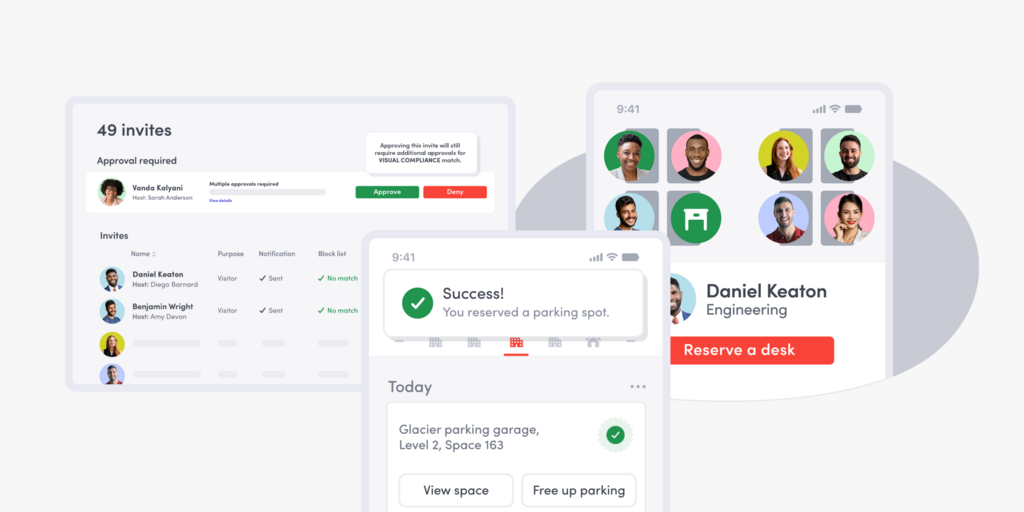
Envoy built its name in visitor management and expanded into desk and room booking — making it a logical choice for teams whose primary frustration with Teem is the weak visitor experience. The platform ties check-in, badge printing, host notifications, safety compliance, and space booking together in one system. For organisations managing a physical reception layer with high visitor volume, this integration is genuine, not bolted on.
What makes Envoy stand out
- Visitor management is a core product, not an afterthought — NDAs, pre-registration, custom badge printing, and emergency evacuations are all native
- Per-resource pricing for desk and room booking gives teams visibility into cost as they add spaces
- Strong hardware ecosystem for visitor check-in kiosks: Envoy’s own hardware works out of the box, no third-party kiosk software needed
Envoy pricing
Workplace Premium (desk + room booking, analytics, and policy tracking): $5/bookable resource/month, billed annually. Visitor management is a separate subscription at $362/location/month (annual). Room displays (Screens product): $12/device/month extra.
Envoy limitations
- Visitor management costs compound fast: $362/location/month means a two-location office is paying over $8,600/year just for visitor check-in, before desk or room booking
- Per-resource billing counts every bookable desk and room separately — large floor plans can push monthly costs significantly higher than they appear in early estimates
- Room displays (the Screens product) are sold as a separate add-on; the main platform doesn’t include hardware
Best for: Mid-market offices with high visitor volume and a need to manage reception, check-in, and space booking from a single platform.
Looking for Envoy alternatives instead? See our Best Envoy Alternatives.
4. Tactic — Best for modular hybrid workplace software you can build incrementally
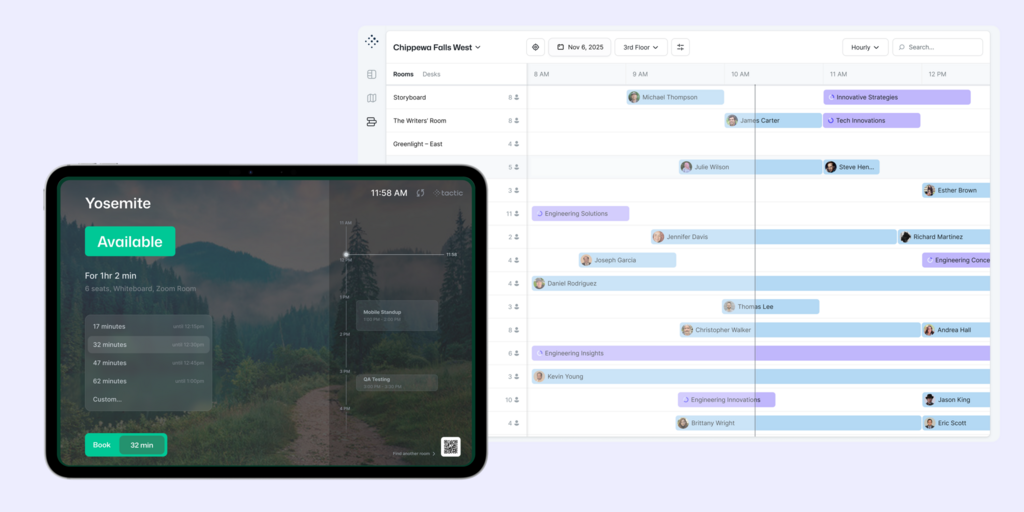
Tactic is a modular workplace platform — you buy the products you actually need (desk booking, room booking, visitor management, space analytics, move management) and add more as requirements grow. It’s positioned as an alternative to platforms that force you to buy everything upfront. G2 reviewers rate it 4.7 out of 5 across 550+ reviews, consistently praising the interface quality and support responsiveness — a meaningful contrast to Teem’s recent support history.
What makes Tactic stand out
- Modular product architecture: buy desk booking alone, add room booking later, layer in space analytics when needed — no forced bundling
- Tessa AI: an AI assistant for booking rooms, desks, and finding spaces based on natural language queries
- High-rated support team: G2 reviewers consistently flag responsiveness as a differentiator, directly relevant for teams leaving Teem over support failures
Tactic pricing
Modular, on request. The on-site pricing estimator suggests a basic Engage setup (desk booking, 1 location, ~100 desks) runs roughly $3,600–$4,800/year (~$300–$400/month). Final pricing depends on products, locations, integrations, and rollout scope. See estimator →
Tactic limitations
- No published pricing: even with the estimator, exact costs require a sales call — ironic for teams leaving Teem specifically because of pricing opacity
- G2 reviewers flag Tactic as “more expensive than most competitors” in the space, and floor plan navigation in the booking interface has drawn some usability criticism
- Setup with complex integrations can involve teething issues; teams without IT resources to manage the rollout may hit friction
Best for: Mid-size companies that want to start with one or two features and expand over time, and are willing to negotiate a custom deal for the flexibility.
5. Deskbird — Best for transparent per-user desk booking
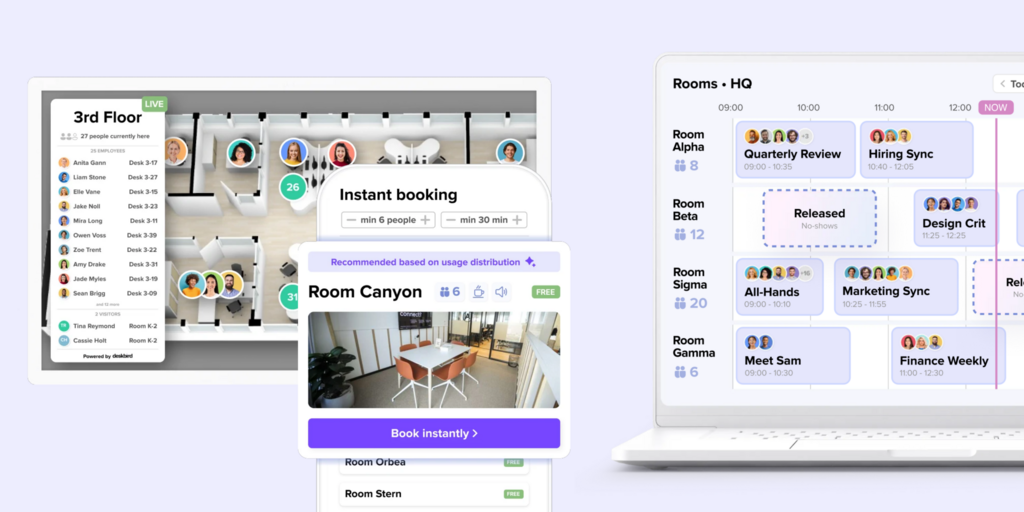
Deskbird is a desk-first booking platform with a clean UI, a strong mobile app, and per-user pricing published directly on its website. For teams leaving Teem’s desk booking module — frequently described as underwhelming — Deskbird is a purpose-built replacement. It doesn’t try to be an IWMS or a visitor management suite; it focuses on making desk booking work well.
What makes Deskbird stand out
- Transparent per-user pricing with no sales call required to understand costs — a significant contrast to Teem’s per-room per-year model
- Interactive floor plan booking: employees pick a desk near teammates on a live office map, see who’s in that day, and check in from mobile
- Microsoft Teams and Slack integrations let employees book without leaving their communication tool
Deskbird pricing
From €2.75/user/month + add-ons (annual billing).
Deskbird limitations
- Room booking exists but is clearly secondary to desk booking — organisations with complex room scheduling requirements (multi-resource bookings, recurring meetings, display hardware) typically find it underdeveloped
- No hardware: purely software; room displays require separately sourced and configured tablets
- Visitor management is minimal; it doesn’t handle the full visitor journey that dedicated tools offer
Best for: Hybrid teams whose primary need is desk booking with straightforward per-user pricing and a strong mobile experience.
Looking for Deskbird alternatives instead? See our Best Deskbird Alternatives.
6. Skedda — Best for simple self-serve booking with no implementation overhead
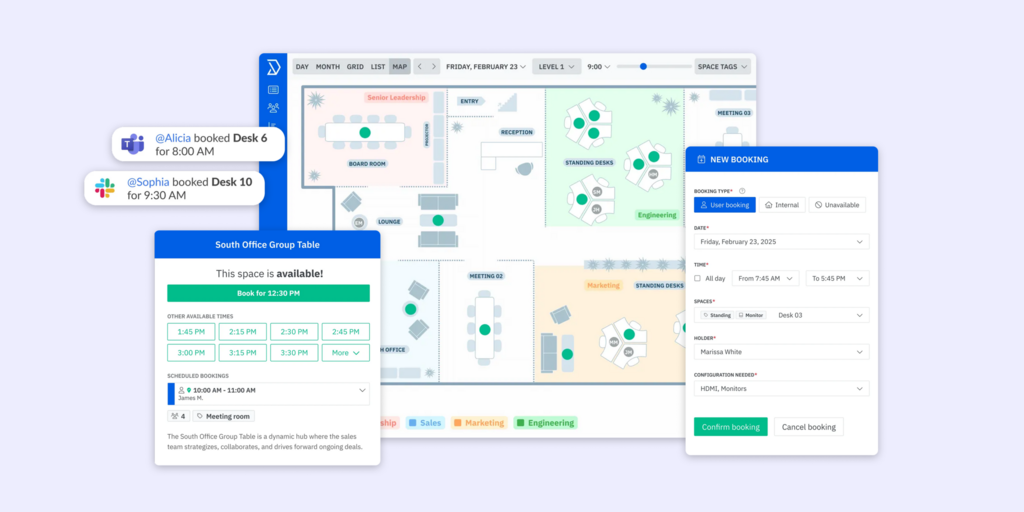
Skedda is a focused booking platform: rooms, desks, and spaces — managed cleanly and predictably. It’s what teams reach for when they’ve had enough of enterprise platforms with complicated implementations, opaque contracts, and support escalation chains. Most teams are live within hours of signing up. Compared to Teem’s per-room per-year pricing structure and the associated hardware procurement, Skedda is as close to plug-and-play as booking software gets.
What makes Skedda stand out
- Self-serve setup: no implementation consultant, no floor-plan setup fee, no procurement of tablet hardware before you can go live
- Space-based pricing: a fixed, known cost based on the number of bookable spaces, not headcount fluctuations
- Trusted by well-known organisations: IBM, Mercedes-Benz, and Harvard University use Skedda for space management at scale
Skedda pricing
Skedda limitations
- Per-space billing: every bookable desk, room, and parking space counts toward your plan limit — large floor plans push costs up faster than a per-user model
- Analytics and visitor management are lighter than full-platform alternatives; teams that need detailed utilisation reporting or a complete visitor check-in flow will hit limitations
- No hardware: software-only; physical room display panels need to be sourced and configured separately
Best for: Smaller offices and teams that need booking to work immediately, with predictable monthly costs and no implementation project.
Looking for Skedda alternatives instead? See our Best Skedda Alternatives.
7. Archie — Best for highly rated desk and room booking with strong G2 credentials
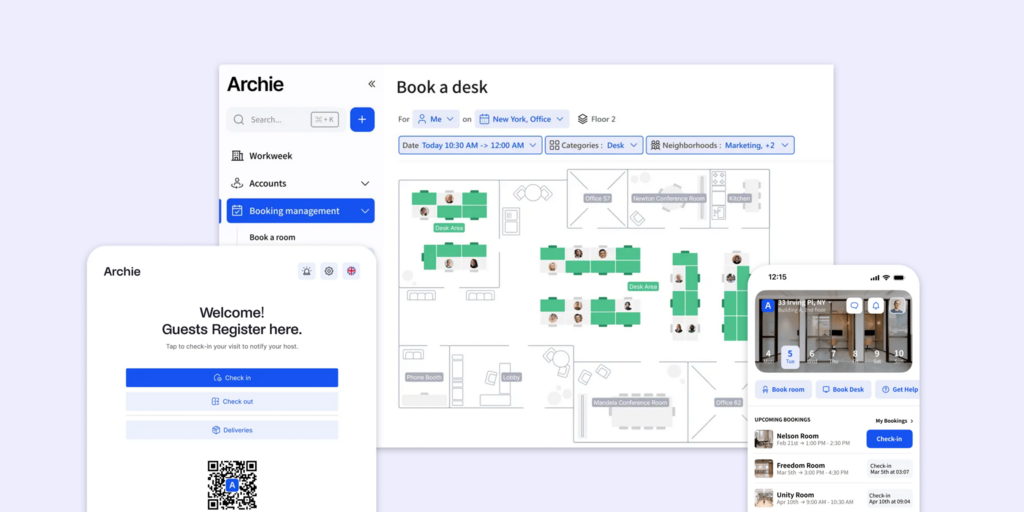
Archie is a workspace management platform covering desk booking, room scheduling, visitor management, and coworking — with one of the strongest review profiles in the space. It holds a 4.9/5 on G2 across 227 reviews and has received G2 badges for Best ROI, Best Usability, and Most Implementable. For teams leaving Teem specifically over support quality, Archie’s reputation for responsive onboarding and consistent support is a direct contrast. Customers include Amazon, L’Oréal, Deloitte, BBC, Shopify, and the NHS.
What makes Archie stand out
- Consistently top-rated for ease of use and implementation speed — teams report going live quickly without a heavy configuration project
- Microsoft Teams, Outlook, and Slack integrations (Pro plan and above) let employees book directly from the tools they already use
- Strong visitor management baked into the platform alongside desk and room booking — a genuine alternative for teams that need all three
Archie pricing
Desk Booking Starter: from $159/month (1 location). Desk Booking Pro: from $249/month (multiple locations, Teams/Outlook/Slack, SSO/SCIM). Room scheduling and visitor management are separate product tiers — costs increase when combining multiple modules.
Archie limitations
- Pricing climbs fast when combining desk booking, room scheduling, and visitor management — reviewers note that “the prices are a bit expensive” relative to single-module headline rates; get a full multi-product quote before committing
- Large floor plans become unwieldy: users report that very large offices require breaking floor maps into sections, which adds filter complexity at booking time
- No hardware: Archie is software-only; room display panels require separately configured tablet hardware
Best for: Teams that prioritise a well-reviewed, highly usable platform and want the confidence of an independently strong G2 track record — particularly those replacing Teem over support quality concerns.
Looking for Archie alternatives instead? See our Best Archie Alternatives.
How to choose the right Teem alternative
If the primary reason you’re leaving is support quality or contract terms
Joan and Skedda are the cleanest break. Joan publishes pricing, offers a 30-day trial with no commitment, and has no buried cancellation clauses. Skedda is month-to-month transparent from the start. Tactic’s G2 reviews specifically highlight support responsiveness as a differentiator — relevant if you’re coming from an environment where support has become unusable.
If you need physical room display hardware
Joan is the only purpose-built option. Where Teem relies on iPads — which need power cables, kiosk software, and regular OS update management — Joan 6 RE, Joan 6 Pro, and Joan 13 Pro mount without cables and run months per charge. They’re designed for exactly this use case, not adapted from a consumer device.
If visitor management is a core requirement
Envoy built its product around visitor check-in and expanded into space booking — the combination is genuine. Just factor in the per-location visitor management cost ($362/location/month) before committing. Joan also covers visitors natively, including the Joan ePaper badge, under the standard subscription with no add-on required.
If you need modular software you can start small with
Tactic lets you buy desk booking alone and add room booking, visitor management, or space analytics later. It’s one of the few platforms that doesn’t force a full-platform purchase to get started — though you’ll pay more per feature than all-in-one alternatives as you expand.
Why Joan is usually the best Teem alternative
Teem’s core appeal is physical room displays. Joan does that — and does it better with purpose-built ePaper hardware that doesn’t require cable runs, tablet management, or kiosk software. Everything Teem makes frustrating — opaque pricing, locked analytics, support that goes dark — Joan handles the opposite way: pricing is public, analytics are built into every plan, and a 30-day trial starts without a sales conversation. For teams specifically replacing Teem, Joan is the most direct upgrade.
Also comparing other tools? See all our workspace software comparisons:
Joan vs. Teem: quick comparison
| Joan | Teem by Eptura | |
|---|---|---|
| Room booking | ✅ | ✅ |
| Desk booking | ✅ | ⚠️ limited (consistently flagged in reviews) |
| Visitor management | ✅ included | ✅ LobbyConnect (separate module) |
| Physical displays | ✅ purpose-built ePaper (Joan 6 RE, Joan 6 Pro, Joan 13 Pro, Joan ePaper badge) | ⚠️ iPad/Android tablet (separate hardware cost + kiosk software) |
| Digital signage | ✅ | ❌ |
| Analytics | ✅ built into all plans | ❌ Enterprise tier only |
| SSO | ✅ | ❌ Enterprise tier only |
| Recurring room bookings | ✅ native | ✅ |
| Public pricing | ✅ | ❌ (per-room/year via third-party sources only) |
| Cancellation terms | ✅ 30-day free trial, no lock-in | ⚠️ 60-day notice required; multiple reviews of billing after cancellation attempt |
| Calendar integrations | Microsoft 365, Google Workspace, Teams, Slack | Microsoft 365, Google Workspace |
Read our full Joan vs. Eptura Teem comparison.
Ready to make the switch?
Joan is free to try for 30 days — no credit card, no 60-day notice, no sales call required to start. If you’ve been dealing with Teem’s support queue or trying to untangle a renewal you didn’t authorise, the setup takes hours.
Or read our full Joan vs. Eptura Teem comparison to compare directly.
Frequently asked questions about Teem alternatives
Is there a free Teem alternative?
No tool on this list offers a free permanent plan for workspace booking. Joan, Skedda, and Deskbird all offer free trials — Joan’s runs 30 days and covers the full platform with no credit card required. Tactic also offers demo access. None are free long-term, but most are more transparent about pricing than Teem.
How much does Teem by Eptura cost?
Teem doesn’t publish pricing on its website. Based on third-party reported figures: Room Booking Basic runs approximately $150/room/year; Room Booking Professional approximately $250/room/year; Desk Booking approximately $80/room/year; visitor management (LobbyConnect) approximately $1,000/room/year. Hardware — iPads or Android tablets for room panels — costs extra at $350–$1,200 per device. These figures are not confirmed by Eptura directly; contact their sales team for a current quote.
What is Teem’s biggest limitation?
The two most consistent complaints in 2022–2025 reviews are customer support quality and contract terms. Since the Eptura acquisition, multiple reviewers describe support as unreachable, including a verified 2-month service outage with no resolution for eight weeks. Separately, Teem’s 60-day cancellation notice — buried in the terms rather than shown on the contract — has resulted in multiple customers being billed for software they could no longer use or needed to cancel.
Does Teem have physical room displays?
Teem uses iPads and Android tablets as room display hardware — you purchase the tablets separately ($350–$1,200 each), install kiosk software to prevent employees from using other apps, and run power cables to the mount point. Joan takes a different approach: its Joan 6 RE, Joan 6 Pro, and Joan 13 Pro are purpose-built ePaper panels that mount anywhere without cables and run months per charge.
What’s the best Teem alternative for small teams?
Skedda ($99/month) is the most accessible for small teams that need booking without an implementation project. Deskbird at €2.75/user/month is affordable for teams where per-user pricing makes more sense than per-space billing. Joan at $51/month is worth considering even at small scale because the full platform — rooms, desks, visitors, signage — is included without tier gates.
Is Teem still a good product?
Teem’s room display functionality works, and older reviews (pre-2022) are largely positive. The shift in tone tracks closely with the iOFFICE/Eptura acquisition timeline. Recent reviews from 2022–2025 consistently flag support quality, contract enforcement, and development stagnation as concerns. Teams evaluating Teem today are doing so against a post-acquisition product with a different support culture than the one that earned early positive reviews.
What is the best room booking software in 2026?
For teams that want physical room displays alongside software booking, Joan is the only platform that offers its own purpose-built ePaper hardware. For enterprise Microsoft 365 environments, Robin is well-regarded. For visitor-management-first organisations, Envoy Workplace handles the combination cleanly. The right fit depends on whether physical hardware at the door is a requirement — and whether all-in-one pricing or modular licensing makes more sense for your team.
Page last updated: August 2026. Pricing verified from public sources — always confirm live pricing directly with each vendor before purchasing.
About the author
