
Best OfficeRnD alternatives in 2026
OfficeRnD is actually two products sharing one brand. OfficeRnD Workplace (formerly OfficeRnD Hybrid) is a hybrid work platform for corporate offices — desk booking, room booking, hybrid scheduling, and utilization analytics. OfficeRnD Flex is a coworking management suite — member billing, contracts, automated invoicing, and access control for flex space operators. Both products are capable, and both have earned genuine loyalty in their respective markets
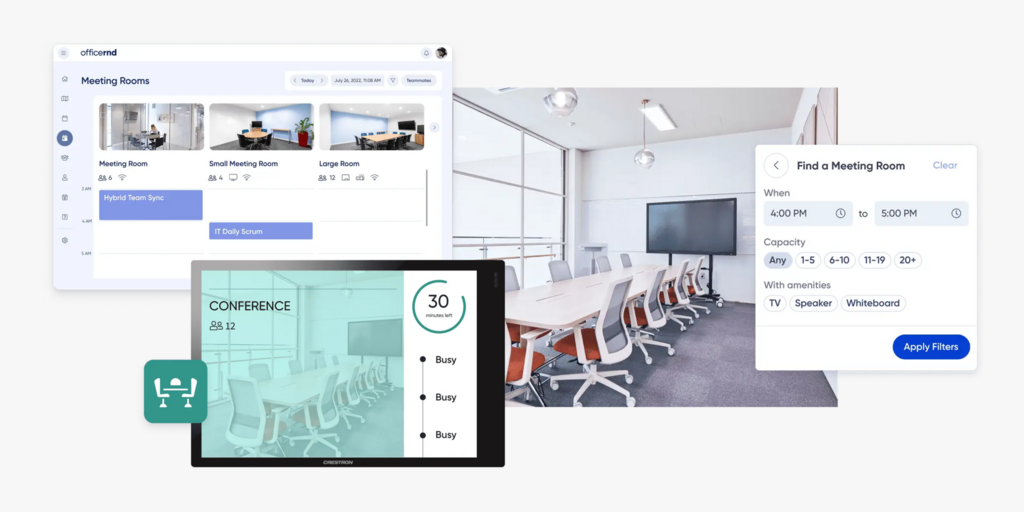
The frustration usually starts at the pricing page. OfficeRnD Workplace charges separately for bookable resources and meeting rooms on top of the base plan fee, with visitor management a paid add-on on every plan. The Start plan opens at $99/month; the Professional plan — which adds digital signage, SSO, and multi-location management — jumps to $399/month. Teams that thought they were getting a straightforward desk booking tool often find themselves priced into a tier they didn’t expect to need. And for OfficeRnD Flex users, the complexity of a full coworking management platform can feel like significant overkill if room booking is the only thing they actually needed.
We’ve compared six alternatives to OfficeRnD across pricing, feature depth, hardware options, and real-world fit — so you can find the right tool without the trial-and-error. Joan is included and recommended for most teams. This page focuses on the hybrid corporate audience (OfficeRnD Workplace); if you’re a coworking operator evaluating OfficeRnD Flex, the FAQ at the bottom covers what that comparison looks like.
→ Also evaluating other tools? See the list for the best Skedda alternatives and best Robin alternatives.
Quickly jump to:
Why teams start looking for OfficeRnD alternatives
Pricing escalates faster than expected
OfficeRnD Workplace’s pricing model charges per bookable resource and per meeting room on top of the base plan fee. The Start plan begins at $99/month and covers up to 150 users — but that plan doesn’t include SSO, digital signage, or multi-location management. To unlock those, you move to Professional at $399/month. That’s a significant jump for teams that just need one or two features from the higher tier. On top of that, visitor management is a paid add-on on every plan — it’s never bundled in. Teams that assumed visitor check-in came with their room booking subscription are regularly surprised when they see the add-on invoice.
Complexity scales with the product surface
OfficeRnD Workplace is a rich platform — floor plans, hybrid scheduling, coworker discovery, workplace policies, attendance compliance, and utilization analytics all come in a single product. For large enterprises managing hundreds of desks across multiple floors, that depth is valuable. For a 60-person team that needs to book rooms and hot desks, it often means paying for implementation, onboarding, and configuration time on features they won’t touch. Users on review platforms consistently cite a learning curve that simpler tools don’t require.
The interface can frustrate employees
A booking system that employees avoid using defeats its own purpose. OfficeRnD Workplace has improved significantly in recent years, but a recurring pattern in user reviews is that the employee experience — particularly on mobile — feels less polished than the admin interface. Some teams also report that when the interface is slightly unintuitive for employees, adoption drops and desk ghost bookings persist — which is exactly the problem the tool was supposed to solve.
Quick comparison: OfficeRnD alternatives at a glance
| Tool | Best for | Room booking | Desk booking | Visitor management | Hybrid scheduling | Hardware | Starts at |
|---|---|---|---|---|---|---|---|
| Joan | Teams wanting booking + physical ePaper displays in one platform | ✅ | ✅ | ✅ | ✅ | ✅ ePaper displays | From €49/mo (annual) |
| Robin | Mid-to-large teams wanting a mature hybrid workspace platform | ✅ | ✅ | ✅ | ✅ | ❌ | Custom pricing |
| Deskbird | Teams wanting per-user pricing with strong hybrid scheduling | ✅ | ✅ | ❌ | ✅ | ❌ | Free (≤15 users); from €2.75/user/mo |
| Envoy | Offices prioritising visitor management + room/desk booking | ✅ | ✅ | ✅ | ❌ | ❌ | From $131/location/mo (annual) |
| Skedda | Teams wanting clean, self-serve space booking without complexity | ✅ | ✅ | ✅ add-on ($99/mo) | ❌ | ❌ | $99/mo (15 spaces, annual) |
| Tribeloo | Teams wanting affordable per-resource pricing with calendar sync | ✅ | ✅ | ❌ | ❌ | ❌ | From €3.00/resource/mo (annual) |
| OfficeRnD Workplace | Hybrid teams needing booking + scheduling + analytics in one platform | ✅ | ✅ | ✅ add-on | ✅ | ❌ | From $99/mo (Start); $399/mo (Professional) |
The 6 best OfficeRnD alternatives in 2026
1. Joan — Best for teams that want workspace booking with physical ePaper displays at the door
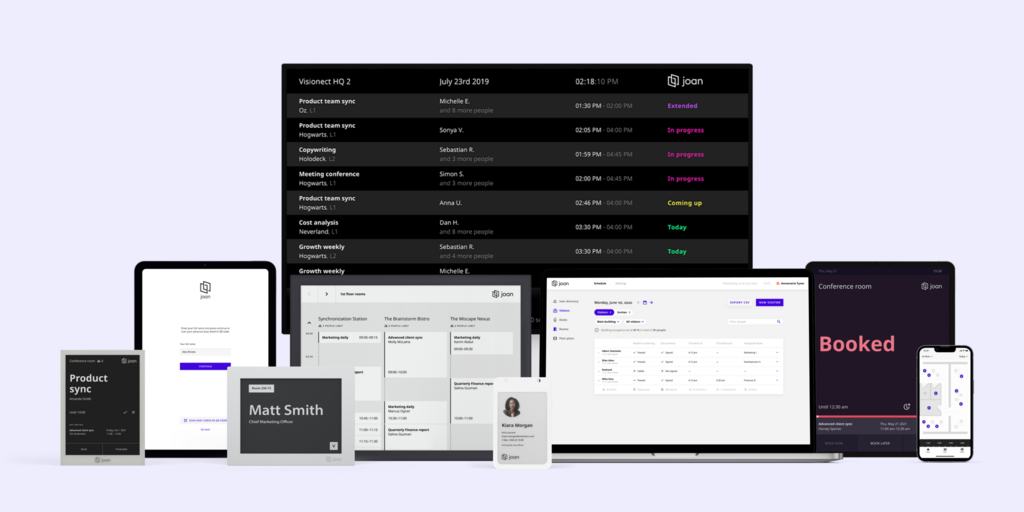
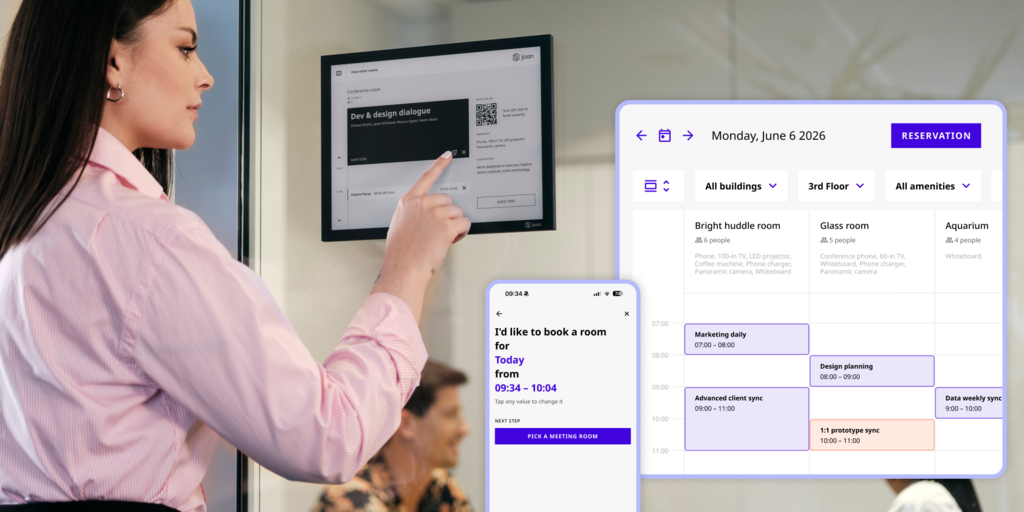
Joan is the most direct answer to the problem OfficeRnD Workplace leaves unsolved: you still don’t know if a room is actually free until you’re standing outside it. Joan installs battery-powered ePaper displays (Joan 6 RE, Joan 6 Pro, Joan 13 Pro) at every room and desk that show live availability without requiring anyone to open an app. No cable installation, no IT project — peel, stick, connect, done in an afternoon.
The platform covers room booking, desk booking, visitor management (including Joan ePaper badges issued to visitors on arrival — a physical badge very few competitors offer), digital signage, parking, and asset reservations under one subscription. For teams that already have screens, Joan on any display runs Joan software on existing third-party monitors with no hardware purchase required.
What makes Joan stand out
- ePaper displays at the door eliminate “is this room actually free?” ambiguity without requiring anyone to open an app — the one problem every software-only tool leaves unsolved
- Visitor management with physical ePaper badges is built into the platform, not an add-on; the badge is issued to visitors on arrival and very few competitors offer anything like it
- One subscription covers rooms, desks, visitors, signage, parking, and assets — no per-tier feature gating for the core use cases, no surprise add-ons
- Transparent pricing with a free trial; hardware is a one-time purchase, not a recurring cost
Joan pricing
Joan pricing is subscription-based. Plans start from €49/month on an annual plan (Team plan; includes 2 devices and up to 20 users). Hardware (Joan 6 RE, Joan 6 Pro, Joan 13 Pro, Joan ePaper badge) is a separate one-time purchase. Free trial available. Calculate your estimated price here.
Joan limitations
Teams that want the full ePaper display experience (cable-free, battery-powered, at the door) will need Joan hardware — though teams with existing screens can use Joan on any display with a software-only subscription
Best for: Any organisation managing physical workspaces that wants booking plus physical presence — from a small team with a handful of rooms to a global enterprise across multiple sites.
Start your free Joan trial here.
2. Robin — Best for mid-to-large teams wanting a mature hybrid workspace platform
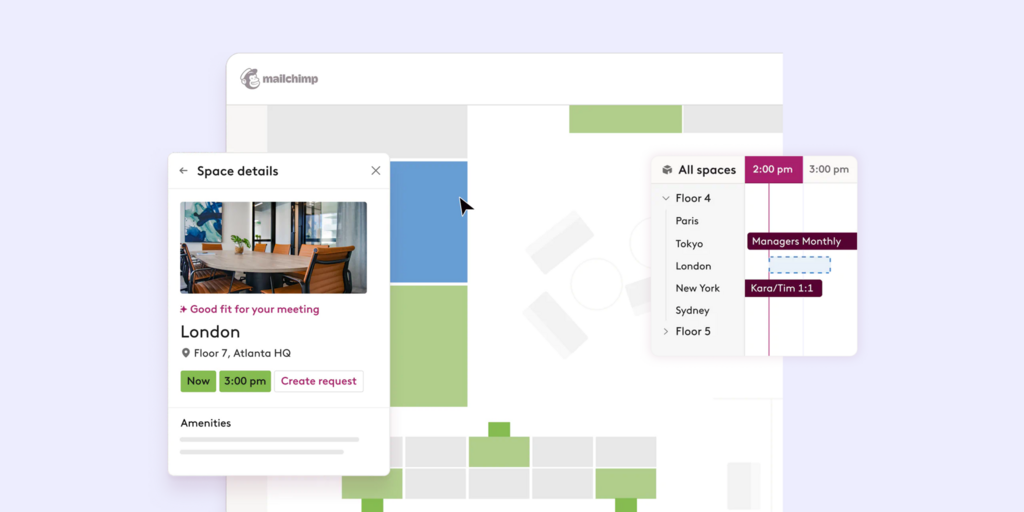
Robin is a dedicated room and desk booking platform with genuine hybrid scheduling built in — team coordination, suggested days, coworker visibility, and office attendance policies are core features, not add-ons. It’s the closest functional match to OfficeRnD Workplace’s corporate feature set, with strong Microsoft 365 and Google Workspace integrations throughout.
What makes Robin stand out
- Hybrid scheduling is a good feature — employees see who’s coming in on which day, can coordinate with teammates, and get smart suggestions for office days
- Floor plan view with live desk availability makes it easy for employees to claim a desk without admin involvement
- Visitor management, badge printing, and delivery management are all included without a separate add-on fee
Robin pricing
Robin does not publish pricing — all quotes are on request via robinpowered.com/pricing. Robin is designed for companies with 500+ employees, and pricing reflects enterprise contract sizes; smaller teams consistently find the minimum commitment disproportionate to their needs.
Robin limitations
- No published pricing makes it impossible to self-evaluate cost before talking to sales — a frustration for teams that want to compare options independently
- Robin’s own pricing page explicitly states it’s designed for 500+ employees — smaller teams using it often pay for platform depth they can’t justify
Best for: Mid-to-large enterprises (500+ employees) that need a full hybrid workspace platform and are ready for an enterprise deal.
→ Looking for Robin alternatives instead? See the list for the Best Robin alternatives here.
3. Deskbird — Best for teams wanting per-user pricing with a strong free tier and hybrid scheduling
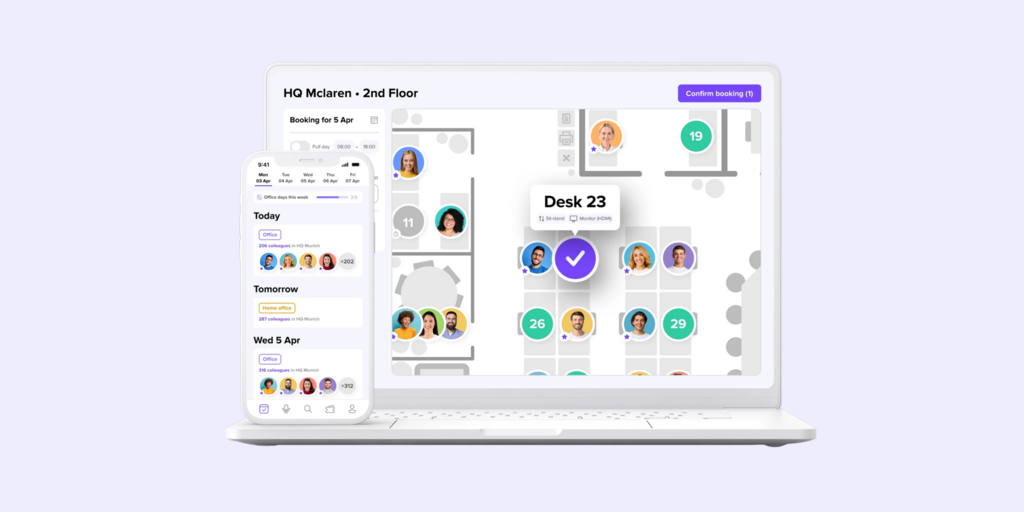
Deskbird is a hybrid work and desk booking platform with per-user pricing and a permanent free plan for smaller teams. What sets it apart from most booking tools is its hybrid scheduling layer — employees can see who’s in the office on which day, coordinate with their team, and manage their weekly schedule alongside their desk reservations. It’s built for hybrid-first teams who want the “who’s in” view alongside the booking.
What makes Deskbird stand out
- Permanent free plan for up to 15 users — full desk booking, floor plans, and calendar integrations at no cost
- Per-user pricing is predictable — you pay for people, not for every resource on your floor plan, which scales more cleanly than per-resource models
- Hybrid scheduling features (office attendance tracking, “who’s in” visibility, team coordination) are more developed than in most pure booking tools
Deskbird pricing
Deskbird Free: permanent, up to 15 users. Business: from €2.75/user/month (billed annually; ~$3.75 USD). Professional and Enterprise tiers with advanced features are custom-priced. Confirmed live at deskbird.com/pricing.
Limitations
- Visitor management is not a core feature on any plan — teams needing visitor check-in, pre-registration, or badge printing will need a separate tool or add-on
- Advanced analytics, booking rule customisation, and workplace ticketing are gated to higher-tier plans, which are custom-priced and require a sales conversation
Best for: Hybrid-first teams that want per-user pricing, a free tier for getting started, and “who’s in the office today” scheduling alongside desk booking.
→ Looking for Deskbird alternatives instead? See the list for the best Deskbird alternatives here.
4. Envoy — Best for offices where visitor management is as important as room and desk booking
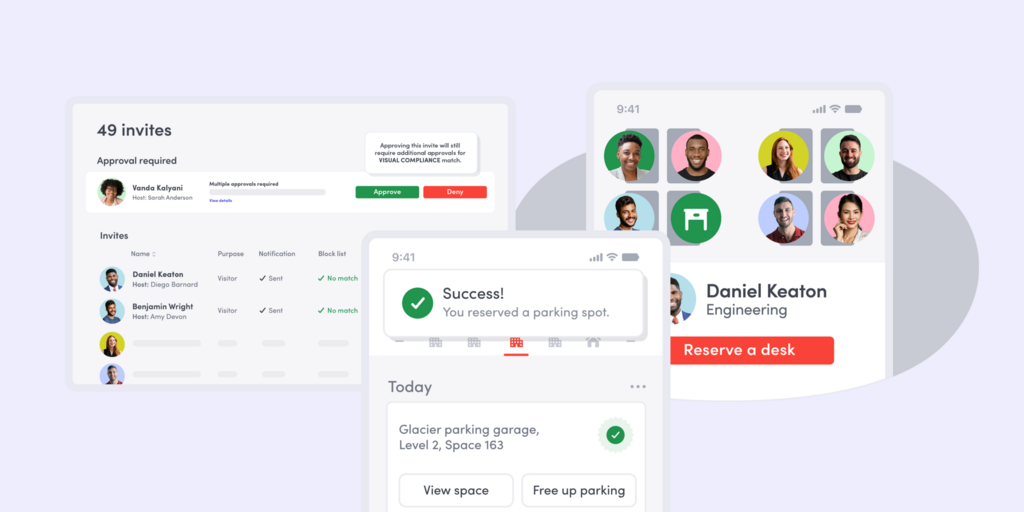
Envoy started as a visitor management platform and expanded into room booking, desk reservation, and digital signage. The visitor management module remains its strongest feature — pre-registration, compliance screening, host notifications, badge printing, and audit-ready logs are all built into the base product rather than an add-on. If your office has a real security or compliance requirement around who enters the building, Envoy handles it more thoroughly than most alternatives.
What makes Envoy stand out
- Visitor management is a first-class product, not an afterthought: pre-registration, host notifications, badge printing, and delivery management are all included
- Per-location pricing gives single-site offices a flat, predictable monthly cost regardless of headcount
- Mass notifications (emergency alerts, announcements) are included — a feature most booking tools ignore entirely
Envoy pricing
Envoy uses per-location pricing. Rooms from $131/location/month (annual); Desks from $109/location/month (annual); Visitors from ~$362/location/month (annual). A free tier covers basic testing. Enterprise pricing is custom. Confirmed live at envoy.com/pricing.
Envoy limitations
- Per-location pricing compounds quickly for multi-site deployments — each additional office adds the full per-location fee, which makes Envoy expensive to scale across many locations
- No hybrid scheduling — there’s no “who’s in the office today” coordination layer; it’s a booking and visitor tool, not a hybrid work platform
Best for: Single-site offices where visitor management and compliance are genuine priorities alongside room and desk booking.
→ Check out the list for the best Envoy Alternatives here.
5. Skedda — Best for teams wanting clean, self-serve space booking without enterprise overhead
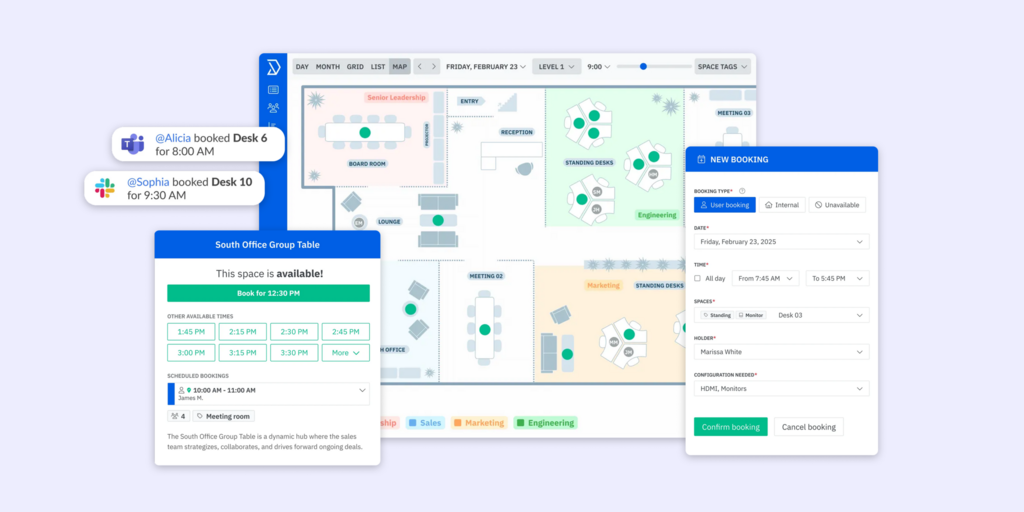
Skedda is a focused space booking tool with an interface clean enough that employees actually use it without training. It handles room and desk reservations with powerful booking rules, an interactive floor plan view, and strong Google and Microsoft 365 calendar sync. What Skedda doesn’t do is add features you didn’t ask for — there’s no hybrid scheduling, no intranet, no employee app. Just booking, done cleanly.
What makes Skedda stand out
- Map-based booking interface is among the most intuitive in the category — employees see the floor plan, pick what’s available, and book; no onboarding required
- Booking rules engine handles complex scenarios (who can book what, when, for how long, with what buffer) without needing IT to configure
- Self-serve setup — most teams are live within an hour; no implementation project required
Skedda pricing
Skedda Starter begins at $99/month (billed annually) for 15 spaces. Every bookable resource counts toward the space limit. Visitor management is available as a separate add-on at $99/month on top of any plan. Confirmed live at skedda.com/pricing.
Skedda limitations
- Per-space pricing means the real cost of running a full office (rooms + desks all counted as spaces) often lands significantly higher than the $99/month headline — a medium-size office can easily reach 2–3x the entry price just by adding desks
- No hybrid scheduling, no “who’s in today” view — teams that need coordination alongside booking will need to look elsewhere
Best for: Offices that want powerful, clean space booking without the complexity of a full workplace platform, and are comfortable managing hybrid scheduling separately.
→ Looking for the Best Skedda Alternatives instead? Check them out here.
6. Tribeloo — Best for teams wanting affordable per-resource pricing with solid calendar sync
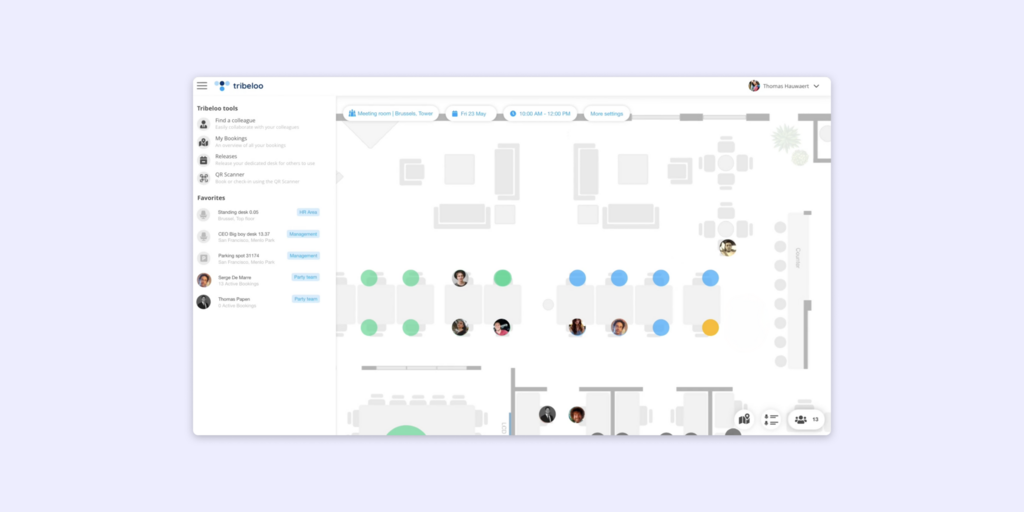
Tribeloo is a lean room and desk booking platform priced per bookable resource — you pay per space, not per person, which keeps costs predictable regardless of headcount. It syncs natively with Google Calendar and Microsoft 365 and covers the core booking use cases cleanly without the enterprise overhead.
What makes Tribeloo stand out
- Per-resource pricing means adding more employees doesn’t increase the bill — ideal when the number of bookable spaces is fixed but headcount fluctuates
- Floor plan support is available at all tiers including the entry Starter plan — not gated to higher tiers
- Strong native calendar sync with both Google Workspace and Microsoft 365 with no middleware required
Tribeloo pricing
Tribeloo Starter: €3.00/resource/month (annual); Pro: €3.75/resource/month; Premium: €4.00/resource/month. Confirmed live at tribeloo.com/pricing.
Tribeloo limitations
- No visitor management at any tier — if visitor workflows matter (check-in, pre-registration, badge printing), Tribeloo doesn’t cover it and you’d need a separate tool
- The product surface is intentionally narrow: no digital signage, no hybrid scheduling, no employee app, no parking or asset reservations — it does one thing well and stops there
Best for: Teams that want predictable per-resource pricing for straightforward room and desk booking, with solid calendar sync, and no need for visitor management or hybrid scheduling features.
How to choose the right OfficeRnD alternative
If you want physical room and desk displays alongside your booking software
Joan is the only tool here with battery-powered ePaper displays that show live availability at the door. No app required — status is visible to anyone walking past. That eliminates the ghost meeting problem that OfficeRnD Workplace (and every other software-only tool) can’t solve without separate hardware.
If you need hybrid scheduling alongside booking
Robin, Joan and Deskbird both have hybrid scheduling built in — who’s in the office on which day, team coordination, suggested office days, and attendance policy tracking.
If visitor management is non-negotiable
Joan includes visitor management with physical ePaper badges as part of the platform. Envoy has the deepest visitor compliance feature set in this group. Both are significantly better than the OfficeRnD Workplace add-on model — where visitor management is extra on every plan.
If budget is the driving factor
Deskbird’s free plan (up to 15 users) is the strongest entry point. Tribeloo’s per-resource pricing is the most cost-predictable for fixed-space offices. Joan also offers a free trial of the full platform — worth running before committing to any paid alternative.
Why Joan is usually the best OfficeRnD Workplace alternative
Most teams looking for OfficeRnD alternatives are frustrated by one of two things: the pricing structure escalating faster than expected, or the gap between booking in software and knowing a room’s actual status at the door. Joan solves both directly. It offers a single subscription covering rooms, desks, visitors, signage, and hardware — with transparent pricing, a free trial, and no per-tier feature gating on the core use cases. Where OfficeRnD Workplace requires add-ons for visitor management and an upgrade for digital signage, Joan includes both from the start. And where every software-only tool leaves the “is this room actually free?” problem unsolved, Joan puts a physical display at the door.
→ Also comparing other tools? See all Joan workspace comparisons:
Joan vs. OfficeRnD Workplace: Quick comparison
| Joan | OfficeRnD Workplace | |
|---|---|---|
| Room booking | ✅ | ✅ |
| Desk booking | ✅ | ✅ |
| Physical ePaper displays | ✅ Joan 6 RE, Joan 6 Pro, Joan 13 Pro, Joan ePaper badge | ❌ uses third-party tablets/Crestron panels |
| Digital signage | ✅ | ✅ Professional plan only |
| Visitor management | ✅ included; with physical ePaper badge | ✅ add-on on all plans |
| Hybrid scheduling | ✅ | ✅ |
| Parking & asset reservations | ✅ | ✅ Professional plan (custom resources) |
| Calendar integrations | Microsoft 365, Google Workspace, Teams, Slack | Microsoft 365, Google Workspace, Slack, Outlook |
| Analytics | ✅ built into all plans | ✅ built in |
| Pricing model | One subscription, full platform; hardware one-time purchase | From $99/mo (Start) to $399/mo (Professional); visitor management always extra |
| Free trial | ✅ | ✅ demo available |
Ready to make the switch?
You’ve already decided OfficeRnD isn’t the right fit — the next step is seeing whether Joan is. The free trial gives you the full platform with no commitment. If you also have Joan hardware in mind, the trial lets you configure everything before any purchase decision.
Frequently asked questions about OfficeRnD alternatives
How much does OfficeRnD cost?
OfficeRnD Workplace pricing starts from $99/month for the Start plan (up to 150 users), which covers desk and room booking, floor plans, and basic analytics. The Professional plan — which adds SSO, digital signage, multi-location management, and advanced booking policies — starts from $399/month. Pricing is also per bookable resource and per meeting room on top of the base plan fee. Visitor management is a paid add-on on every plan. OfficeRnD Flex (the coworking product) uses different pricing based on member count and location; visit officernd.com/pricing/flex/ for details.
What is OfficeRnD’s biggest limitation?
For most teams, it’s the combination of pricing complexity and feature gating. Visitor management being an add-on on all plans is a consistent frustration — teams that assumed it was included in a “workplace management” platform are regularly surprised. The jump from Start ($99/mo) to Professional ($399/mo) is also steep, and several features that comparable tools include at lower tiers are Professional-only in OfficeRnD.
What is the difference between OfficeRnD Flex and OfficeRnD Workplace?
They’re separate products. OfficeRnD Flex is built for coworking space operators and flex space managers — it handles member contracts, automated billing, invoicing, and meeting room bookings for paying members. OfficeRnD Workplace (formerly OfficeRnD Hybrid) is built for corporate companies managing their own hybrid office — desk and room booking for employees, hybrid scheduling, and utilization analytics. The alternatives on this page are primarily relevant to OfficeRnD Workplace users.
What is Deskie and how does it compare to OfficeRnD?
Deskie is a coworking space management platform — a direct competitor to OfficeRnD Flex, not OfficeRnD Workplace. If you’re a coworking operator comparing the two, Deskie is generally seen as a simpler, more affordable alternative to OfficeRnD Flex, with a lighter feature set and easier setup. For corporate hybrid offices on OfficeRnD Workplace, Deskie isn’t a relevant comparison.
Is there a free OfficeRnD alternative?
Yes. Deskbird offers a permanent free plan for up to 15 users with desk booking, floor plans, and calendar integrations. Joan isn’t free long-term but offers a free trial of the full platform — including rooms, desks, visitor management, and digital signage — worth running before committing to any paid alternative.
Does OfficeRnD have physical room displays?
OfficeRnD Workplace supports room display apps that run on third-party iOS and Android tablets, and has a Crestron panel integration on the Professional plan. It doesn’t manufacture its own displays. Joan is the only tool in this comparison that ships its own battery-powered ePaper displays (Joan 6 RE, Joan 6 Pro, Joan 13 Pro) designed specifically for room and desk status — with years of battery life and no screen management needed.
Page last updated: April 2026. Pricing verified from public sources — always confirm live pricing directly with each vendor before purchasing.
About the author
