
Best workplace management software
Hybrid work is no longer an experiment. It’s the default. And with employees splitting their week between home and the office, the tools companies use to manage desks, meeting rooms, visitors, and space utilization have become just as important as the office itself.
That’s why choosing the right workplace management software is one of the highest-leverage decisions a facilities, IT, or HR team will make this year.
The market has evolved rapidly. What once relied on simple logbooks and static spreadsheets at front desks has transformed into an integrated ecosystem of AI assistants, mobile apps, e-paper displays, occupancy sensors, and smart booking engines designed to maintain seamless hybrid office operations. However, navigating the crowded vendor landscape to select the ideal platform can still be a daunting task.
This guide examines the core functions of workplace management software, highlights the critical capabilities that distinguish top-tier solutions, and presents a comprehensive comparison of leading options in 2026, outlining their target use cases and key strengths.
Quickly jump to:
- What is workplace management software
- Why workplace management software matters today
- Common challenges in workplace management
- Key features to look for in workplace management software
- 8 best workplace management software in 2026
- Table: Workplace management software comparison
- Key considerations for selecting workplace management software
- Frequently asked questions about workplace management software
TL;DR
Workplace management software centralizes room booking, desk booking, visitor management, and space analytics into one platform. It replaces spreadsheets and paper sign-in sheets. This helps hybrid offices run smoothly. It also gives facilities teams real usage data instead of guesswork, so real estate decisions are based on facts.
The right platform should offer real-time booking and auto-release for no-shows. It needs visitor check-in with compliance features, plus occupancy analytics. Calendar and SSO integrations matter too, along with mobile access. Pricing should be transparent, ideally per-user or per-device. Increasingly, platforms add AI-powered booking through Slack or Teams.
Here’s how the top 2026 picks compare:
- Joan is the strongest all-around choice. It’s an all-in-one platform with room and desk booking, visitor management, and award-winning e-paper hardware. Pricing starts around $51/month, with no feature-gating.
- Robin leads on workspace analytics. It’s built for Microsoft-centric enterprises.
- Envoy is the gold standard for visitor management specifically.
- YAROOMS bundles the most features for mid-market teams. Pricing starts around $99/month.
- Skedda handles flexible, non-standard spaces best.
- Deskbird is the simplest, most affordable option. It suits smaller European teams well.
- OfficeSpace is built for large enterprises. Think 5,000+ employees across multiple buildings.
- Officely is the top pick for Slack-first companies. Pricing runs from free to $2.50/user/month.
What is workplace management software
Workplace management software is the digital backbone connecting people, spaces, and technology in a modern office.
It’s a strategic approach, delivered through a single platform, to optimizing the physical, technological, and cultural aspects of a workspace: how desks and meeting rooms get booked, how visitors are welcomed, and how leadership understands whether the space is actually being used well.
The right workplace management software touches almost every part of daily office life.
It aligns space and technology with business goals, supports sustainability efforts, and helps cultivate a workplace culture people want to be part of. Done well, it becomes invisible infrastructure: employees just book a desk, reserve a room, or check in a guest, without thinking about the system behind it.
Why workplace management software matters today
Investing in a modern workplace platform yields tangible business impact far beyond basic office convenience. Key benefits for organizations adopting these tools include:
- Increased employee productivity and engagement
- Enhanced collaboration and teamwork across teams and locations
- Improved space utilization and real estate cost savings
- Reduced environmental impact through smarter, data-backed space planning
- Stronger ability to attract and retain top talent with a better workplace experience
The benefits of workplace management software
Enhanced productivity and engagement
Well-managed workspaces reduce friction and distraction, giving employees the tools and resources they need to focus and do their best work.
When workplace management software handles the logistics (finding a free desk, confirming a room is actually available, knowing a meeting space is stocked with the right equipment) employees spend less mental energy on the mechanics of their day and more on the work itself.
That compounds over time: teams that aren’t fighting their own office tend to show up more engaged, simply because the friction that quietly drains motivation has been designed out.
Improved collaboration and teamwork
The right workplace management software makes it effortless to find and book the right room, at the right time, with the right people, removing a common source of daily friction.
Anyone who has spent ten minutes messaging colleagues to track down an open room, or discovered mid-meeting that a “booked” room was actually empty the whole time, knows how much small coordination costs add up. Good workplace management software also supports hybrid coordination directly, letting employees see which teammates are in the office on a given day and book desks near them, which turns in-office time into genuinely useful collaboration time rather than a coin flip.
Optimized space utilization
Basing space management on actual utilization metrics rather than assumptions ensures square footage aligns with operational requirements, minimizing unnecessary expenses and optimizing real estate investments. This insight represents one of the most substantial financial advantages provided by workplace management software. In the absence of actionable data, choices regarding lease renewals, floor consolidation, or desk allocations rely primarily on subjective impressions. Access to granular occupancy data allows facility and finance leaders to pinpoint precise peak times and vacant areas, enabling evidence-based real estate strategies.
Sustainable practices
Good workplace management software supports energy efficiency and waste reduction, and hardware choices matter here too. Cable-free, battery-powered devices like Joan’s e-paper displays cut down on installation waste and electricity use compared to always-on screens. Sustainability in this category isn’t just a talking point: fewer electrician visits, less cabling waste during installation, and displays that draw a fraction of the power of a permanently lit LCD screen all add up across a building with dozens or hundreds of rooms and desks. It’s one of the more concrete ways workplace management software ties into a company’s broader environmental goals, rather than sustainability living only in a separate policy document.
Positive workplace culture
A workplace that runs smoothly, where booking a desk or a room just works, supports employee well-being and satisfaction, and that shows up in engagement and retention over time. Culture is shaped by dozens of small daily experiences, and a clunky, unreliable workplace management system is a surprisingly consistent source of quiet frustration. Conversely, when the basics just work, it signals that the organization has invested in making people’s day-to-day experience better, which is a small but real contributor to why people stay.

Common challenges in workplace management
Even with strong workplace management software in place, the discipline itself comes with real, ongoing challenges that no single tool fully solves on its own.
Aligning the workplace with business goals as strategy and headcount evolve
A space plan that made sense for a 50-person company doesn’t automatically make sense at 200, and workplace management software needs to flex with the business rather than lock in assumptions from an earlier stage.
Managing diverse needs and preferences across a multigenerational, hybrid workforce
Some employees want quiet, assigned desks; others want flexibility and the ability to hot-desk wherever suits them that day. Good workplace management software needs to support both without forcing a single rigid policy on everyone.
Keeping pace with technology as new tools, integrations, and AI capabilities emerge
The category is moving quickly, from basic booking calendars a decade ago to AI agents that handle bookings conversationally today, and platforms that don’t keep evolving get left behind.
Balancing sustainability and cost-effectiveness, especially when hardware and real estate decisions compete for budget
Sustainable choices, like durable, low-power hardware, sometimes cost more upfront even though they save money and resources over time, which can create tension with short-term budget pressure.
Cultivating a positive culture that requires ongoing commitment, not a one-time rollout
Deploying workplace management software is a starting point, not a finish line. Culture and adoption need continued attention, from gathering employee feedback to adjusting policies as the way people actually use the office evolves.
Choosing workplace management software built to grow with these challenges, rather than adding a new tool every time your organization changes, is one of the most important decisions a facility or IT team will make.
Key features to look for in workplace management software
Before comparing specific platforms, it helps to know what separates a genuinely useful workplace management platform from a bare-bones booking tool. The list below covers the features that matter most in practice, and why each one earns its place.
Meeting room booking and desk booking
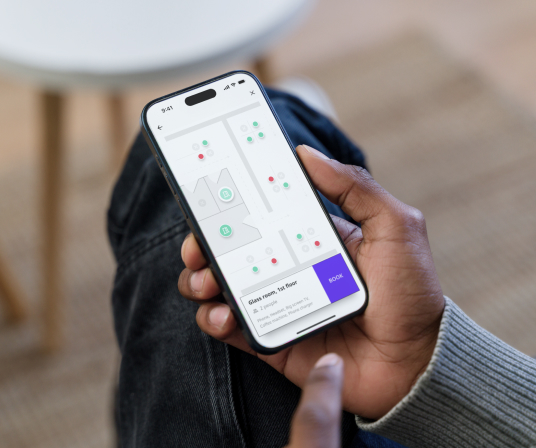
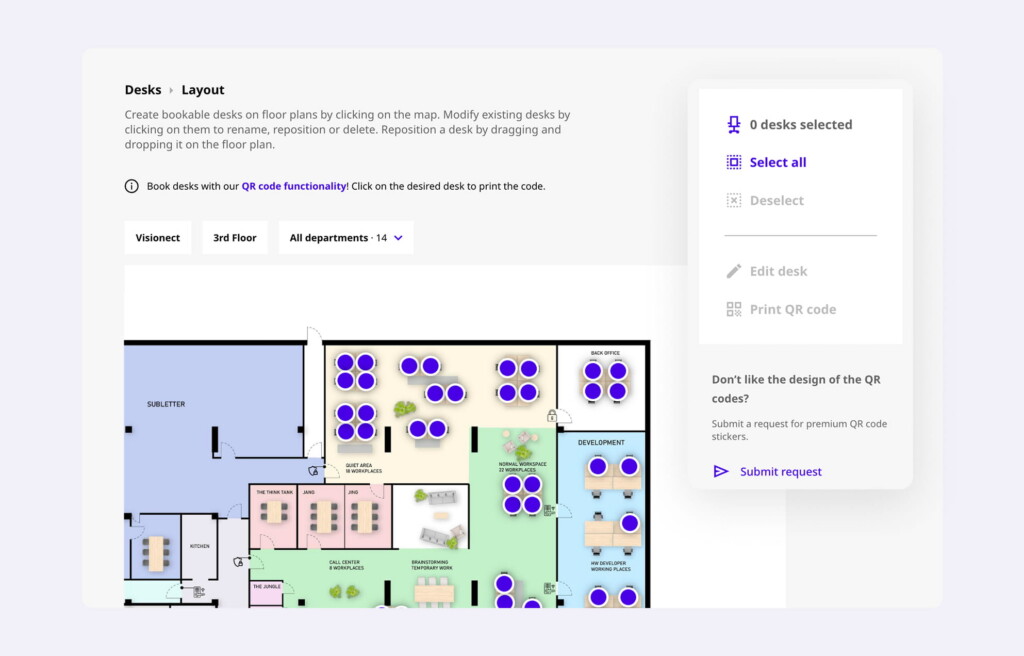
While often bundled together, room booking and desk booking serve distinct needs within the workplace. Effective room booking centers on meeting logistics: it requires precise real-time availability to prevent double-bookings and a reliable two-way sync with Outlook or Google Calendar so schedules remain consistent across all platforms. Features like auto-release for no-shows are essential here, as they automatically free up meeting spaces when attendees fail to check in, preventing expensive square footage from sitting idle. Conversely, the desk booking system is focused on the individual employee experience. The best systems utilize interactive floor plans that allow staff to see exactly where they will be working. This spatial context is vital for hybrid teams, as it enables employees to book desks based on colleague proximity, ensuring they can sit near teammates for better collaboration during their in-office days.
Visitor management
A robust visitor management solution does far more than digitize the paper sign-in sheet. It acts as a comprehensive security and hospitality system for the modern office. These platforms streamline the arrival experience through self-service kiosks and QR code check-ins.
They also use reusable e-paper visitor badges that print a guest’s name and photo on the spot. Hosts get notified the moment a guest arrives, which eliminates front-desk bottlenecks. Beyond simple check-ins, a professional visitor management solution integrates essential compliance and safety protocols.
Think automated NDA signing and health-screening questionnaires completed before arrival. E-paper badges add a practical security layer too. They’re easy to spot at a glance, and they can be set to automatically expire or go blank at the end of a visit, unlike a printed sticker a visitor could keep. The system also maintains a detailed, auditable digital log of all building access. That gives facilities and security teams the critical data they need for compliance audits, emergency evacuations, and long-term security planning.
Analytics and occupancy data
The best workplace management software doesn’t just facilitate bookings. It tells you how space is actually used, so you can make informed decisions about your real estate footprint. This is where the real financial value of the category shows up. Look for dashboards that break down utilization by room type, time of day, and day of week, not just a raw count of bookings. The most useful platforms distinguish between a room being booked and a room actually being used, since no-shows can make a space look busier on paper than it really is. That distinction is exactly what facilities and finance teams need when deciding whether to renew a lease, consolidate floors, or right-size a growing office.
Hardware and device support
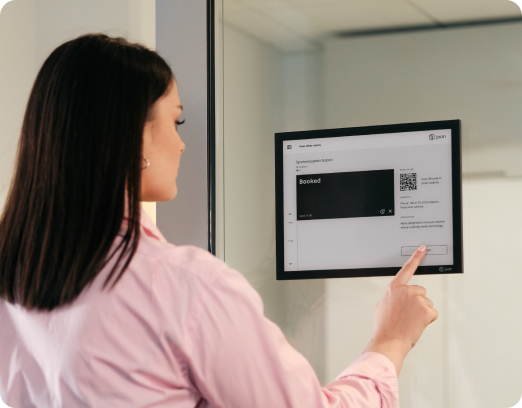
Many organizations want physical room displays outside conference rooms, or check-in kiosks at reception, not just a mobile app tucked away on an employee’s phone. A display mounted outside a room gives anyone walking by an instant, at-a-glance answer to “is this room free right now,” without opening an app first. E-paper displays in particular have become popular for this because they’re battery-powered for months at a time, fully cable-free, and can be mounted or moved without calling an electrician, unlike traditional LCD panels that need a nearby power outlet. That flexibility matters more than it sounds: it means facilities teams can reconfigure a floor, add a room, or relocate a desk pod without a construction project attached to it.
Integrations
The platform needs to plug into the tools your organization already runs on, not force employees to adopt something new. That starts with calendar sync (Outlook, Google Calendar) and extends to single sign-on through Azure AD, Okta, or Google Workspace, which matters both for security and for making onboarding and offboarding painless from an IT standpoint. Increasingly, the most useful integration is with Slack or Microsoft Teams directly, since it lets employees book a desk or a room from inside a chat message instead of switching to a separate app. A platform with a documented API or webhook support is also worth a look if your organization has custom internal tools it needs to connect to.
Mobile access
Employees should be able to book a desk or room, check in on arrival, and find where a colleague is sitting, all from their phone. This matters most for hybrid teams who might decide to come into the office on short notice, or who want to coordinate an in-person day with specific teammates without a chain of Slack messages. Look for genuine feature parity between the iOS and Android apps, and for check-in methods like QR code scanning or geolocation that don’t require employees to dig through menus.
Scalability and pricing transparency
Per-user or per-device pricing models tend to scale more predictably than tiered, feature-gated plans, especially for organizations with multiple offices or fluctuating headcount. Watch out for platforms that lock core functionality like analytics or visitor management behind a premium tier. That structure can look inexpensive at first glance, but it often means the features that justified the purchase in the first place aren’t actually included until you upgrade. Transparent, usage-based pricing (billing by active users and devices rather than by feature) tends to be easier to budget for as your organization grows or adds locations.
AI-powered assistance
A growing number of platforms now offer AI agents that let employees book a desk or room conversationally, for example, typing “find me a room for four people at 2pm” directly inside Microsoft Teams or Slack, rather than navigating a booking interface. Beyond bookings, some AI assistants can also answer common workplace questions (where’s the nearest available desk, what’s the wifi password, when is my badge expiring), which cuts down meaningfully on routine support tickets to the facilities or IT team.
If you’re evaluating vendors, this buyer’s guide to choosing a workplace app walks through how to weigh these criteria against your organization’s size and needs.
8 best workplace management software in 2026
Here’s how the leading platforms stack up, based on their core strengths.
1. Joan: Best overall workplace management platform
Joan is one of the most complete workplace management platforms on the market, combining room booking, desk booking, parking and asset reservations, visitor management, and digital signage into a single system, all supported by Joan award-winning e-paper hardware.
What sets Joan apart is the hardware-software integration. Its e-paper displays (Joan 6 Pro, Joan 6 RE, and the Red Dot Award-winning Joan 13 Pro) are wireless, battery-powered for months, and mount outside meeting rooms or desks without any cabling or electrician needed, a meaningful advantage for offices that want physical, at-a-glance availability signals rather than relying solely on an app. On the software side, Joan integrates with Microsoft 365, Google Workspace, Azure AD, and Okta, and its Joan AI Agent now lets employees book rooms, desks, and get workplace updates directly inside Microsoft Teams.
Joan is trusted by organizations including Sportradar, Dell, Microsoft, and Amazon, holds Capterra Leader status, and averages 4.7-star ratings across major review platforms. Pricing is transparent and usage-based, starting around $51/month, scaling by the number of active users and devices, with every plan including the full feature set rather than paywalling features behind higher tiers. Full details are on the pricing page.
Best for organizations that want an all-in-one platform with best-in-class hardware, sustainability credentials, and no feature-gating between plans.
2. Robin: Best for workplace analytics
Robin has built its reputation specifically on the depth of its workspace analytics, which goes further than simple booking counts. It integrates with occupancy sensors to capture actual presence data, not just reservation data, which matters because a room can show as “booked” while sitting empty the whole time.
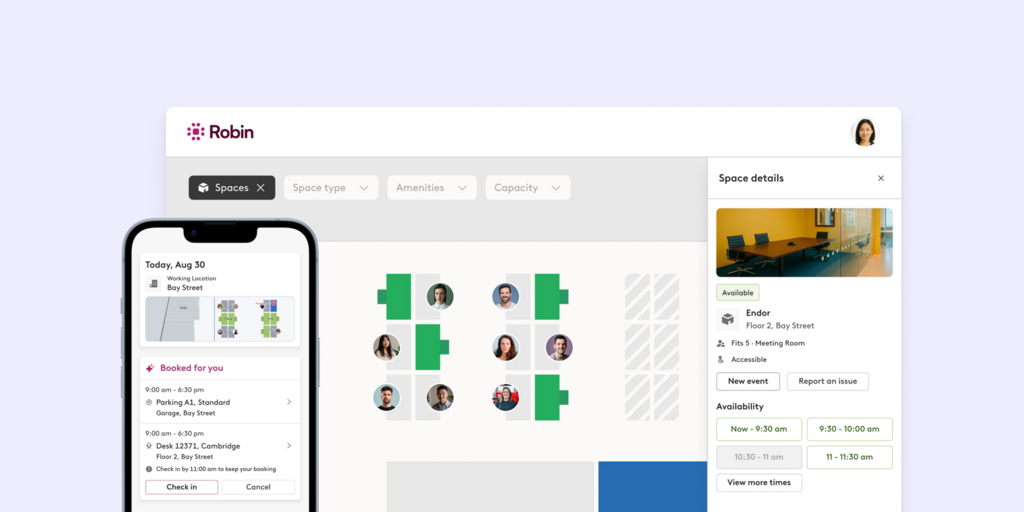
That gap between booked and actually used is exactly what facilities teams need visibility into when making real estate decisions, and Robin’s reporting is built around surfacing it clearly, with dashboards that break down utilization by floor, room type, and time of day. Its Microsoft 365 integration is genuinely deep rather than a bolt-on: bookings sync natively with Outlook calendars, and the experience feels native to teams already living inside Teams and Exchange. The tradeoff is that Robin’s strongest value shows up in organizations with enough scale and sensor investment to make the analytics meaningful; smaller offices may not need that level of granularity.
Best for data-driven facilities teams in Microsoft-centric organizations that want to base space decisions on hard usage data rather than assumptions.
3. Envoy: Best for visitor management
Envoy earned its reputation as the visitor management specialist before expanding into broader workplace management software, and that specialization still shows in how polished the visitor experience is. Pre-registration lets hosts set up a visit in advance so the guest’s information and NDA are ready before they arrive. ID scanning and badge printing give front desks a professional, secure check-in flow without a receptionist manually verifying and logging each visitor.
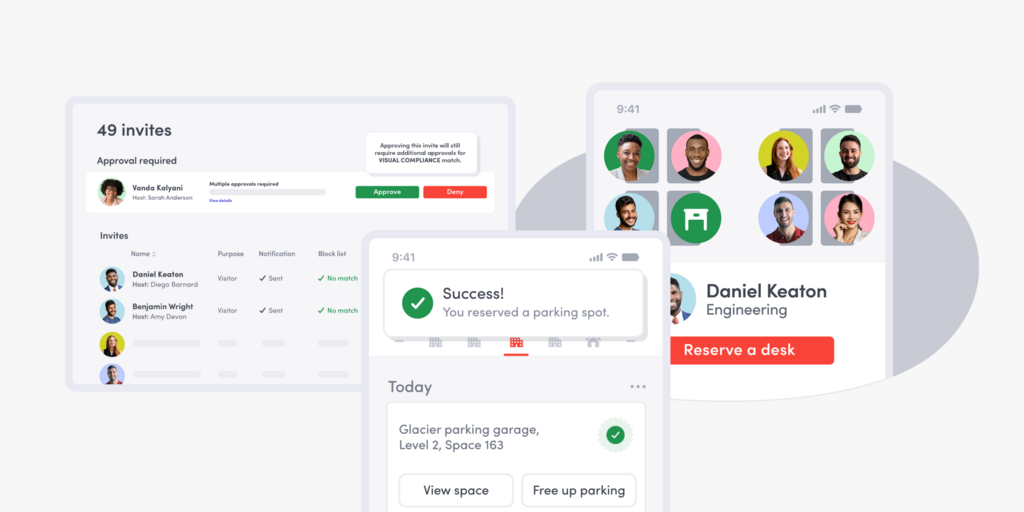
A signing is built directly into the check-in flow, which matters for companies in regulated industries or with sensitive facilities where every visitor needs a signed agreement on file.
Envoy has since added desk and room booking to compete more directly with full workplace management platforms, but these newer modules are generally considered less mature than the visitor management core the company was built around.
Best for companies where visitor volume and front-desk experience are the top priority, such as corporate headquarters, coworking spaces, or any office that regularly hosts clients, candidates, or contractors.
4. YAROOMS: Best All-in-One bundle for mid-market teams
YAROOMS takes a breadth-first approach: rather than excelling at one category, it bundles desk booking, room booking, visitor management, hybrid work planning, parking, digital signage, and an AI assistant called Yarvis into a single subscription starting around $99 per month.
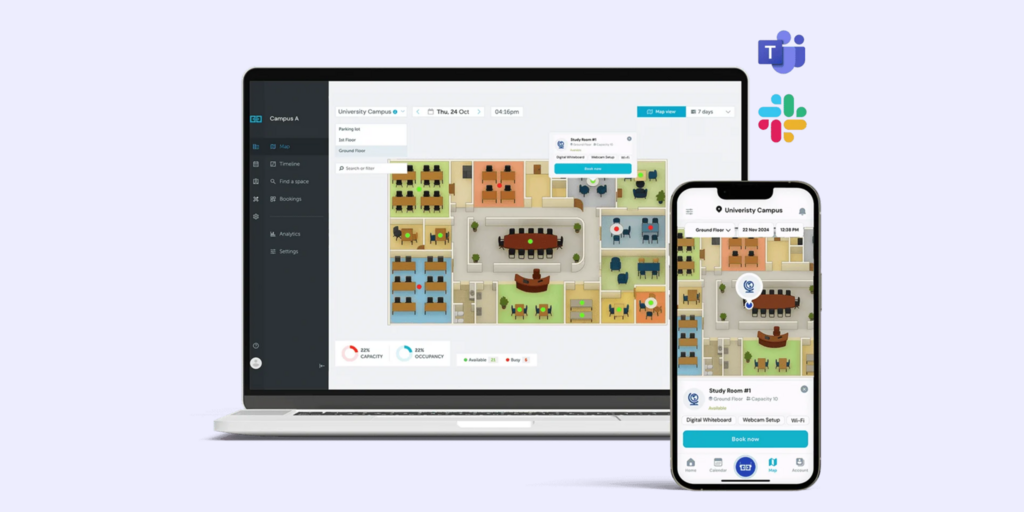
For a mid-sized company that doesn’t want to evaluate, purchase, and integrate five separate point solutions, that consolidation is the main appeal. Yarvis, its AI assistant, lets employees handle bookings and workplace questions conversationally rather than navigating a full interface, which is a feature usually reserved for more expensive enterprise platforms. The tradeoff of a bundled, all-in-one approach is that no single module is necessarily best in its category. A company that specifically needs the deepest visitor management experience or the most advanced analytics might find a specialist tool that outperforms the equivalent module inside YAROOMS.
Best for mid-market companies that want one bundled subscription and one vendor relationship rather than a stack of separate tools.
5. Skedda: Best for flexible, non-standard spaces
Skedda, core strength is handling space types that don’t fit neatly into the “meeting room” or “desk” categories most workplace management software is built around. Its interactive floor plans are consistently ranked among the best in the category, giving users a genuinely visual way to browse and book space rather than scrolling a list.
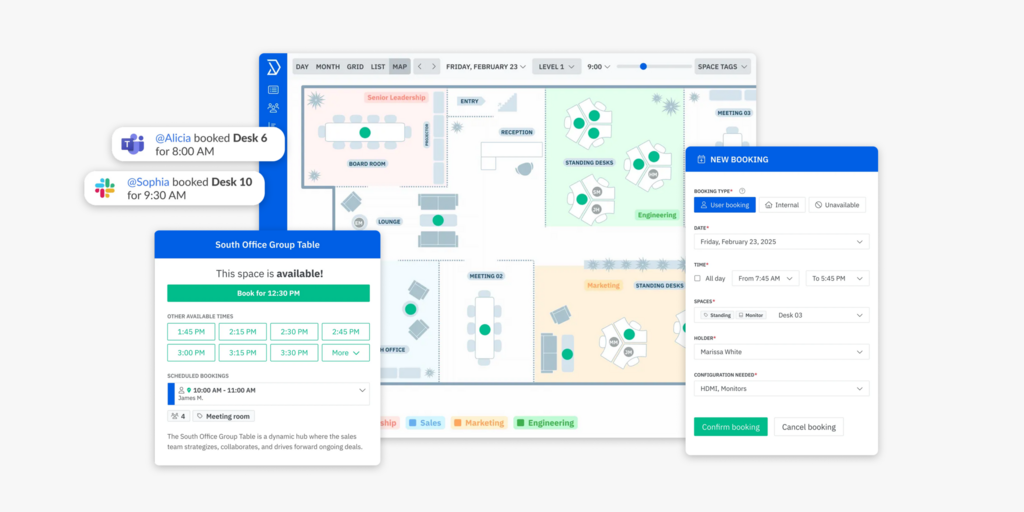
What sets it apart is its booking rules engine, which is flexible enough to define custom availability windows, usage limits, and access permissions for unconventional spaces like coworking areas, recording studios, labs, or shared equipment bays. That flexibility is the whole point: a standard room-and-desk booking tool often struggles to model these edge cases without workarounds, while Skedda is built to handle them directly.
Best for coworking operators and organizations managing non-traditional space types where a rigid room-or-desk model doesn’t reflect how the space actually gets used.
6. Deskbird: Best simple, affordable option
Deskbird, appeal is straightforward: a clean, intuitive interface, fast deployment, and per-user pricing starting around $3.75 per month, which is on the lower end for the category.
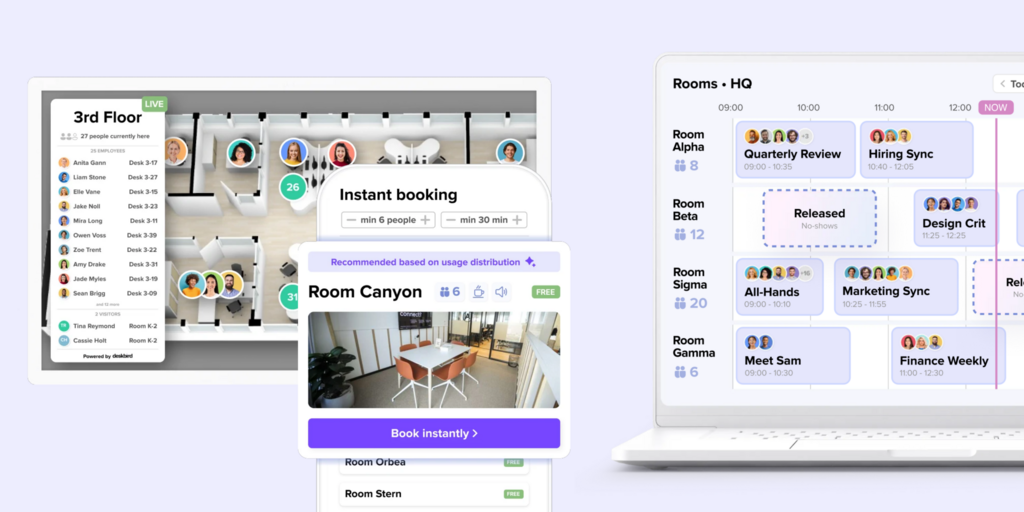
It deliberately focuses on covering desk and room booking well rather than trying to match the feature breadth of enterprise platforms, which keeps the learning curve short for both employees and administrators. That simplicity is a genuine strength for smaller teams that just need reliable booking without a lengthy implementation process, and deskbird has built a particularly strong following among small and mid-sized companies in Europe. The tradeoff is depth: organizations that need advanced analytics, complex multi-building space planning, or extensive hardware integrations will likely outgrow deskbird’s feature set as they scale.
Best for small and mid-sized European teams that want simplicity and speed over a large feature list.
7. OfficeSpace: Best for large enterprise portfolios
OfficeSpace is purpose-built for a different scale of problem than most of the platforms on this list: organizations managing 5,000 or more employees across complex, multi-building real estate portfolios. At that scale, workplace management software needs to handle not just booking but strategic space planning, stacking and blocking analysis, move management, and forecasting across dozens of buildings and floors simultaneously.
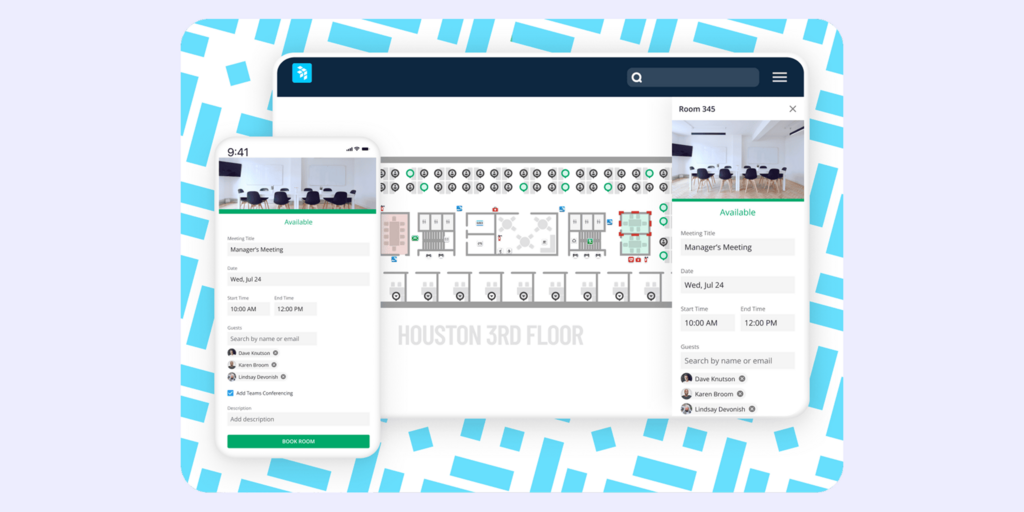
OfficeSpace layers AI-assisted space planning on top of its standard booking features specifically to help large facilities teams model scenarios like consolidating floors or planning a headquarters move. This depth of enterprise planning capability comes with more complexity than a smaller company would need, and OfficeSpace is generally not the right fit for organizations under a few hundred employees, where its enterprise-oriented features would go largely unused.
Best for large enterprises with complex, multi-building real estate footprints that need strategic planning tools, not just day-to-day booking.
8. Officely: Best slack-native option
Officely’s defining feature is that it lives entirely inside Slack rather than requiring a separate app or web portal. Employees book desks, rooms, and parking directly through Slack commands and messages, which removes the adoption friction that comes with asking people to learn and remember to open yet another tool.
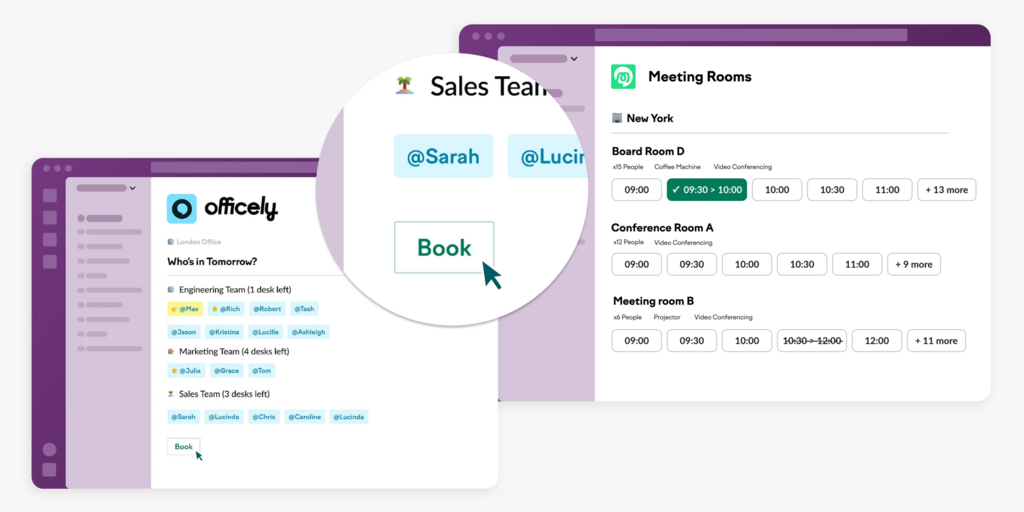
For Slack-first companies, this integration depth is hard for competitors to match, since most other platforms treat Slack as an add-on integration rather than the primary interface. Officely offers a free tier, which makes it accessible for smaller teams to try before committing, with paid plans starting around $2.50 per user per month, among the more affordable options in the category. The obvious limitation is that it’s built around Slack specifically, so organizations standardized on Microsoft Teams instead won’t get the same native experience.
Best for Slack-first companies that want minimal friction, low cost, and booking that happens where employees already spend their day.
Workplace management software comparison
| Platform | Standout strength | Best for | Starting price |
|---|---|---|---|
| Joan | All-in-one platform + e-paper hardware | Companies wanting full-featured, hardware-backed workplace management | ~$51/mo (usage-based) |
| Robin | Workspace analytics & M365 integration | Data-driven, Microsoft-centric enterprises | Custom |
| Envoy | Visitor experience | Front-desk and visitor-heavy offices | Custom |
| YAROOMS | Bundled feature set + AI assistant | Mid-market, all-in-one buyers | ~$99/mo |
| Skedda | Flexible floor plans | Coworking & non-standard spaces | ~$99/mo |
| deskbird | Simplicity & fast setup | SMBs, European teams | ~$3.75/user/mo |
| OfficeSpace | Enterprise-scale planning | 5,000+ employee organizations | Custom |
| Officely | Slack-native booking | Slack-first companies | Free to $2.50/user/mo |
Pricing reflects publicly available figures as of 2026 and may vary based on deployment size, contract length, and add-ons. Confirm directly with each vendor.
Key considerations for selecting workplace management software
Because no single platform satisfies every organizational requirement, finding the ideal solution requires evaluating several key aspects of your operation:
Organizational scale & footprint
Small, single-location startups (e.g., 50 employees) typically benefit from simple, per-user tools such as deskbird or Officely. Conversely, enterprise organizations operating across multiple facilities require platforms with comprehensive planning capabilities like OfficeSpace or Joan.
Hardware integration
If physical room or desk displays are necessary to provide immediate visibility and minimize software switching, give preference to vendors offering robust dedicated hardware, such as Joan’s e-paper devices.
Ecosystem Compatibility
Prioritize solutions that integrate seamlessly with your core software suite (e.g., Microsoft 365, Google Workspace, or Slack) to ensure high adoption rates without disrupting existing workflows.
Visitor management & compliance
Offices subject to regulatory oversight or high guest volume should focus on capabilities such as automated NDA workflows, visitor screenings, and comprehensive audit logs.
Pricing & budgeting structure
Select a pricing structure, whether per-user, per-device, or flat enterprise rate—that aligns with your planned growth. Usage-based options (such as Joan’s model) offer predictable scaling as team size and physical footprint evolve.
Analytics depth
If real estate optimization is a primary goal, emphasize platforms providing detailed occupancy data over basic scheduling tools.
To make an informed decision rather than relying solely on brand popularity, assess these factors against your functional requirements and evaluate shortlisted solutions via practical trials.
To determine the optimal software fit, evaluate these factors against your operational criteria and test top candidate platforms with hands-on trials.
Frequently asked questions about workplace management software
What is the best workplace management software overall?
Joan is widely regarded as the strongest all-around choice for 2026 thanks to its combination of room booking, desk booking, visitor management, and digital signage in one platform, backed by best-in-class e-paper hardware and transparent, usage-based pricing.
How much does workplace management software cost?
Pricing varies widely by vendor and model. Per-user tools can start as low as $2.50 to $5/user/month, while platforms with hardware or enterprise features typically start between $50 and $100/month and scale with users, devices, or locations.
Do I need physical hardware, or can I run everything through an app?
It depends on your office. Many companies run entirely through mobile and web apps. Others find that physical displays outside rooms and desks meaningfully reduce confusion and double-bookings, especially in larger offices. This is where hardware-integrated platforms like Joan have an edge.
Is workplace management software the same as facility management software?
Not quite. Facility management software tends to focus on building operations, maintenance, and assets at an infrastructure level. Workplace management software is more specifically about how employees interact with space day to day: booking desks and rooms, checking in visitors, and understanding utilization.
Can workplace management software integrate with Microsoft Teams or Slack?
Yes, most modern platforms, including Joan, Robin, YAROOMS, and Officely, offer native or AI-assisted integrations with Microsoft Teams and Slack, letting employees book resources without leaving the tools they already use.
About the author
