
A guide to digital signage for conference rooms & meeting spaces
Conference room digital signage puts a small display outside each meeting room, so people can instantly see whether the room is free or booked, who has it, and how long it’s reserved for. They can also book or release the room right from the display. Instead of relying on paper schedules, guesswork, or awkward door-knocking, the system syncs in real time with the calendar platform your company already uses.
But good digital signage does more than display a schedule. It helps companies reclaim unused rooms, prevent “ghost meetings” where someone books a room but never uses it, and give facilities teams real data about how people use their space. This guide explains what conference room digital signage is, how it works, which hardware and software options are available, and how Joan compares with alternatives such as Logitech, Crestron, and Samsung.
What is conference room digital signage?
Mounted right outside a meeting space, conference room digital signage is a smart display that presents live scheduling and availability details. By syncing seamlessly with calendar tools like Google Calendar, Microsoft Outlook, or Teams, it guarantees that room status info is always up to date.
Key features provided on a digital meeting display include:
- At-a-glance availability: A high-visibility status signal that shows from afar whether a space is free or occupied.
- Meeting details: Specifics regarding current and upcoming sessions, including start/end times, topics, and host names.
- On-demand room management: Features that allow users to reserve available rooms immediately, extend current bookings, conclude meetings early, or check in.
- Custom branding and orientation: Displays showing the room name, company logos, and helpful wayfinding notices.
Deployments can utilize dedicated display hardware, like ultra-efficient Joan ePaper panels, or leverage digital signage software deployed on existing tablets and monitors. Choosing the best setup involves evaluating your deployment scale, power availability, mounting requirements, screen visibility, battery life, and overall setup complexity. Detailed guidance on these factors follows below.
Advantages of conference room digital signage
Conference room digital signage does more than show whether a room is free. It helps teams use meeting space more efficiently, reduce interruptions, and create a smoother workplace experience.
Fewer double-bookings and ghost meetings.
Auto check-in can release a room when nobody shows up, making booked-but-empty rooms available again automatically.
Fewer interruptions
A glance at the display tells people whether a room is occupied, so there’s no need to open the door or interrupt a meeting.
Better space utilization
Analytics show which rooms are in high demand, which sit empty, and whether you actually need more meeting space.
A more professional workplace
Clean, consistent signage gives employees and visitors a clear, organized experience and makes the office feel more modern.
Lower running costs
ePaper displays use very little power and can reduce the need for extensive cabling and electrical work. We’ll compare the installation and running costs in more detail below.
Sustainable, cable-free installation
Traditional tablet-based signage needs constant power and wiring, which often makes it impossible to mount on glass walls or in rooms without an outlet nearby. ePaper removes that constraint: displays use up to 99% less power than always-on LCD screens and run for months on a single charge. The result is a roughly 3-minute install with no drilling and no cables, and a significantly smaller carbon footprint for the office.
Hardware options for conference room displays
Choosing the right display comes down to room count, mounting and power constraints, and the experience you want at the door. Joan lineup is built specifically for meeting room signage, using ePaper for a glare-free, paper-like look that reads clearly from any angle and sips power.
Joan 6 RE
The simplest way to put room booking on every door. The Joan 6 RE is a 6-inch ePaper display that runs fully wireless on battery, up to around six months per charge, so there’s no cabling, no electrician, and no IT project to get started. You peel, mount, connect it to your calendar, and it’s live. It’s the natural entry point for teams that want clean, reliable availability signage without touching the walls or the power supply.
Joan 6 Pro
The same 6-inch ePaper format, built for scale and for IT teams with stricter requirements. The Joan 6 Pro adds enhanced security and the choice of wireless or PoE (Power over Ethernet) power, so it fits neatly into enterprise environments that manage hundreds of rooms across multiple sites. If the Joan 6 RE is the easy starting point, the 6 Pro is the version you standardize on company-wide.
Joan 13 Pro
A larger 13-inch ePaper display that does double duty: it can show a single room in detail, or switch to a multi-room overview displaying up to around nine rooms at once. That makes it ideal for floor entrances, lobbies, and shared areas where people need to see what’s free across a whole wing at a glance. Battery life stretches to roughly twelve months, and it supports secure and magnetic wall mounting.
Joan on your existing displays
You don’t have to replace what you already own. Joan’s software runs on tablets and standard LCD screens through the workplace digital signage CMS, so you can mix dedicated ePaper panels at the door with large-format LCD screens in lobbies, all managed from one platform. It’s the flexible option for offices that already have hardware or want larger digital signage alongside room panels.
Integrations with calendar and workplace systems
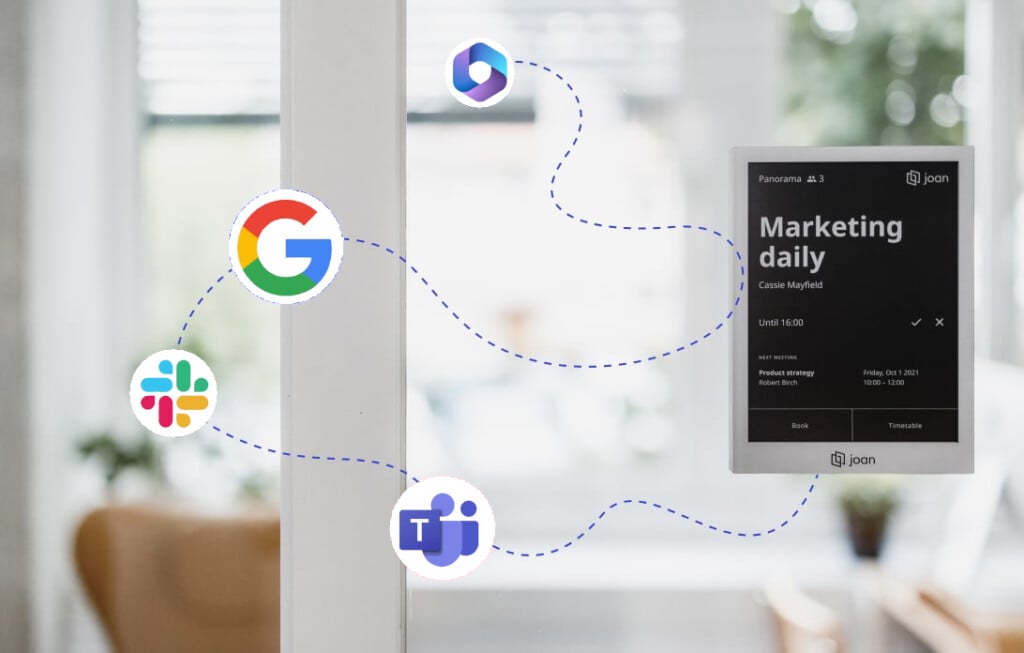
Conference room digital signage is only as good as its calendar sync. Joan connects natively to the platforms teams already run on:
- Microsoft 365 — Outlook, Exchange Online, and Microsoft Teams
- Google Workspace — Google Calendar
- Microsoft Exchange — on-premises (2010, 2013, 2016)
- iCal (.ics) feeds for other calendar sources
- Joan API for custom integrations and workplace tools
Because booking stays in sync both ways, a room booked at the door shows as busy in everyone’s calendar instantly, and vice versa. Joan also extends beyond signage into room booking, desk booking, visitor management, and analytics through the MyJoan platform, so signage is one part of a single workplace system rather than a standalone gadget.
Joan vs. Logitech, Crestron, and Samsung
Most alternatives are LCD panels that need power and cabling at every door. Here’s how the common options compare for the specific job of conference room signage:
| Criteria | Joan (ePaper) | Logitech Tap Scheduler | Crestron room panels | Samsung commercial displays |
|---|---|---|---|---|
| Display type | ePaper — glare-free, paper-like, always-on | 10.1″ LCD touchscreen | LCD touch panel (AV-grade) | Large-format commercial LCD |
| Power & installation | Battery (months per charge) or PoE — wireless, no electrician | PoE — needs cabling/power at each door | Wired; typically professional AV installation | Mains-powered; mounting + cabling required |
| Best fit | Purpose-built room & desk booking at scale | Teams/Zoom Rooms-centric environments | High-end integrated AV ecosystems | Lobby / large-format signage, not door panels |
| Calendar support | Microsoft 365, Google, Exchange, iCal, API (platform-agnostic) | Strong for Microsoft/Zoom ecosystems | Depends on configuration/ecosystem | Via third-party CMS (e.g. MagicINFO) |
| Energy & sustainability | Very low power (ePaper) | Continuous LCD power draw | Continuous power draw | Highest power draw (large LCD) |
| Total cost of ownership | Low — no cabling, minimal energy, fast rollout | Medium — hardware + cabling | High — hardware + integration + install | High — display + install + CMS |
See Joan in your meeting rooms
Start a free trial and connect your calendar in minutes, or talk to our team about rolling out conference room digital signage across your office.
Frequently asked questions conference room digital signage
What is conference room digital signage?
A connected display outside a meeting room that shows real-time availability and lets people book, extend, or release the room, synced live with your calendar system.
How does it sync with our calendar?
Joan connects natively to Microsoft 365, Google Workspace, on-prem Exchange, and iCal feeds, with a two-way sync so bookings match everywhere in real time.
Does it require professional installation?
No. Joan ePaper displays are wireless and battery-powered, so there’s no cabling to run — most rooms are set up in minutes. PoE options are available where preferred.
Can it show availability for multiple rooms on one screen?
Yes. The Joan 13 Pro switches between single-room and multi-room views, showing several rooms at once for floor or lobby overviews.
How does it stop empty-but-booked rooms?
Auto check-in asks attendees to confirm; if no one checks in, the room is released automatically so others can book it.
Can we use displays we already own?
Yes. Joan software runs on tablets and LCD screens via the workplace digital signage CMS, alongside dedicated ePaper panels.
What is conference room digital signage?
A connected display outside a meeting room that shows real-time availability and lets people book, extend, or release the room, synced live with your calendar system.
How does it sync with our calendar?
Joan connects natively to Microsoft 365, Google Workspace, on-prem Exchange, and iCal feeds, with a two-way sync so bookings match everywhere in real time.
Does it require professional installation?
No. Joan’s ePaper displays are wireless and battery-powered, so there’s no cabling to run, most rooms are set up in minutes. PoE options are available where preferred.
Can it show availability for multiple rooms on one screen?
Yes. The Joan 13 Pro switches between single-room and multi-room views, showing several rooms at once for floor or lobby overviews.
How does it stop empty-but-booked rooms?
Auto check-in asks attendees to confirm; if no one checks in, the room is released automatically so others can book it.
Can we use displays we already own?
Yes. Joan software runs on tablets and LCD screens via the workplace digital signage CMS, alongside dedicated ePaper panels.
About the author
