Note: This feature is exclusive to Joan On Display. See Joan On Display to learn more
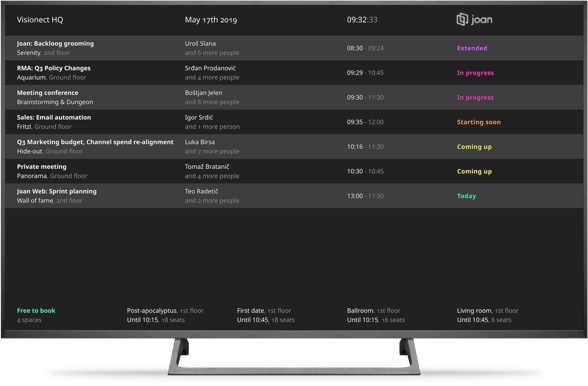
Status board provides you with a detailed overview of all resources and meeting schedules both current and in the future in a neatly organized table view on your TV or monitor.
This interface is fully responsive and supports both landscape and portrait orientation and it can display up to 40 room resources.
In the main section of the interface, it features the following information:
- Current date
- Current time
- List of current or upcoming meetings with 4 columns:
- Meeting subject/name and location
- Meeting organizer and number of confirmed attendees
- Start and end time of the meeting
- Day/date of the meeting
While at the bottom of the page, there is another section that lists all of the available rooms and resources, with the following information:
- Name of the room/resource
- Availability period - for example, “All day” or “Until 14:00”
- The number of seats available in the specific resource - If set in the room amenities section of MyJoan. To learn more about this feature, see How to customize a room resource.
To learn more about other Joan functionalities, see Joan Functionalities.