Keep in mind that the global device settings will be overridden by any building or device-specific settings if set. To learn more about all levels of settings in the MyJoan, see MyJoan settings - per device, per building, and global.
- Log in to MyJoan with your account credentials
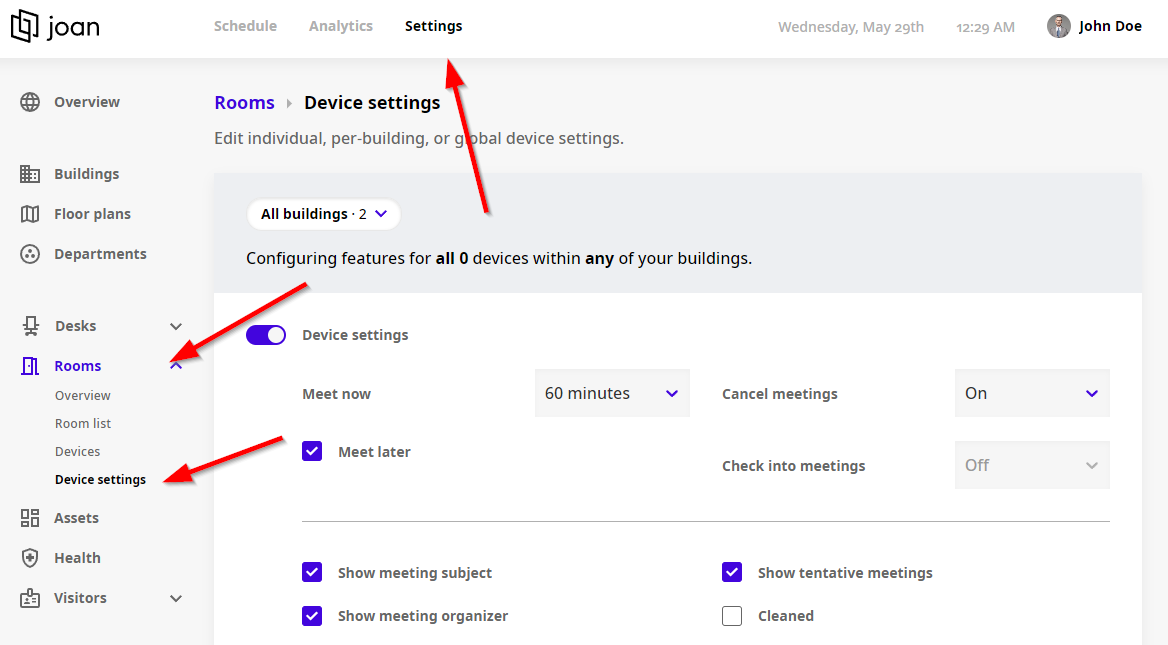
- Navigate to the “Settings” page via the top navigation menu
- Select “Rooms” from the left-hand side menu
- Go to "Device settings" like shown below
Some of the features in this settings page are exclusive to a certain subscription plan. To learn more about the availability of features across subscription plans, see Which features does each subscription plan offer?.
If you require any additional assistance, please reach out to support@getjoan.com.