Each badge in use needs a badge licence, added to your Joan plan. Badges were free to use until 15 November 2026. Badge licences are billed yearly.
In this article
- What do I need to use employee badges?
- Which badges need a licence?
- Where do I see my badge licences?
- How do I add badge licences?
- What happens if I don’t have enough licences?
- I’m a new customer on a trial. Do I need licences?
A Joan plan: Team, Business, Organization or Enterprise. No plan includes badge licences, so you add them separately. Badge licences are billed yearly.
A badge licence belongs to a badge, not to a person. Every badge in use needs one, whether it’s an employee badge or a visitor badge.
A badge marked as lost or stolen gives its licence back right away, and it doesn’t count as a paired badge.
Admins see them in MyJoan, under Settings > Plans & Billing > Overview:
- The ePaper badge licenses bar shows how many badge licences you have.
- The ePaper badge licenses card shows Badges paired, Badge licenses, Used / Total licenses and Total. If you pay Joan directly, the card also shows the yearly price per badge.
- If you pay Joan directly, Billing summary shows the badge licences as their own line with the next billing date. Their cost is included in your monthly and annual totals.
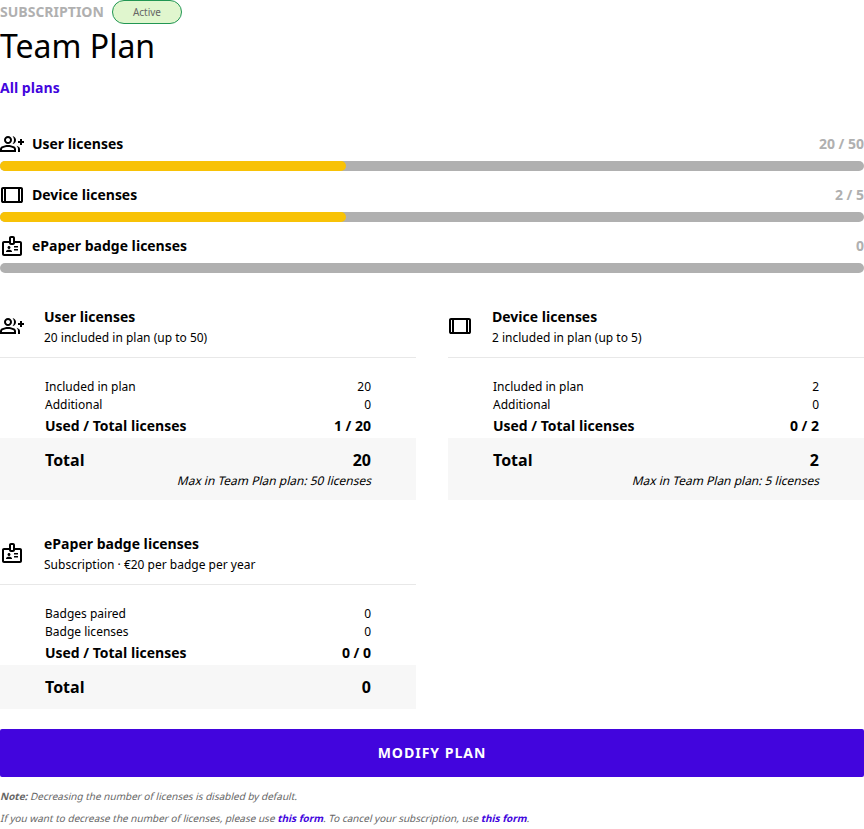
If you have more paired badges than licences, the bar and the used number in Used / Total licenses turn red.
If your licences come from a Joan partner or reseller, each prepaid code shows as its own ePaper badge license card, with its status, the number of licences it includes and its expiry date.
If you pay Joan directly:
- In MyJoan, go to Settings > Plans & Billing > Overview.
- Click MODIFY PLAN.
- Under ePaper badge licenses, raise the number with Add badge licenses. You can’t go below the number of badges you’ve paired.
- Confirm your order. The added licences are charged to your payment method.
If you buy through a Joan partner or reseller, they give you a prepaid code. Add it in MyJoan under Settings > Plans & Billing > Billing details.
Each badge without a licence shows No license in the Joan Workplace app, and the app tells you how many badges have no licence. You can’t assign a badge to an employee until you add a licence. You can still unassign a badge, mark it as lost or stolen, or remove it.
If your organization has no badge licences at all, the employee badges in the Joan Workplace app and the badge list in MyJoan ask you to add licences. In MyJoan, View billing takes you to Plans & Billing.
You can buy more licences in MyJoan, or through your Joan partner or reseller.
New customers get a 30-day trial that includes badge licences for every badge in use.
If you have questions about billing, contact us through the support form.