You can easily increase the number of licenses on your MyJoan account. Simply follow these instructions, and you will be able to increase the number of licenses for your devices or users.
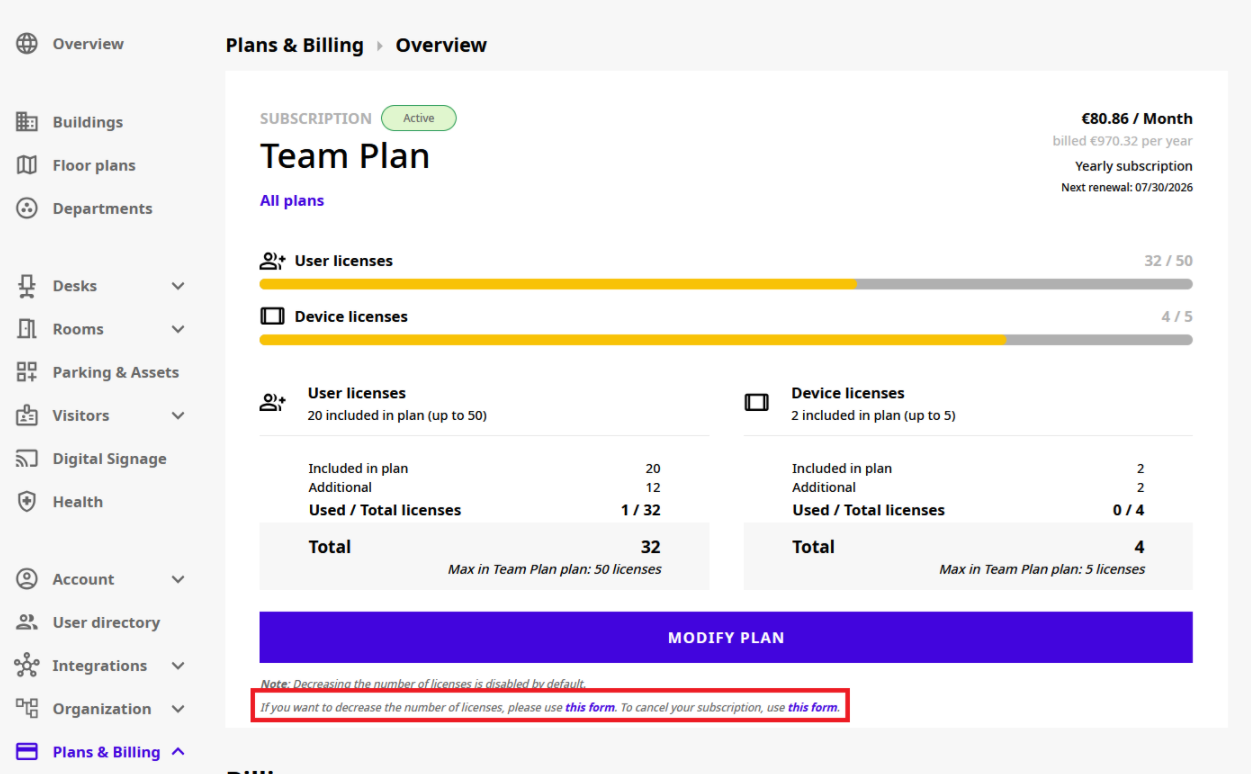
Decreasing the number of licenses in MyJoan is disabled by default. To decrease the number of licenses, contact our sales team at sales@getjoan.com, or send a request from MyJoan:
- Log in to your MyJoan admin account.
- Go to Settings → Plans & Billing → Overview.
- Under the Modify plan button, click the link to the request form.
- Fill in the form to request fewer licenses, and submit it.
- Log in to your MyJoan admin account.
- Go to Settings → Plans & Billing → Overview.
- Under the Modify plan button, click the link to the request form.
- Fill in the form to request cancellation of your subscription, and submit it.
Important Notes:
- Once you submit the form, the cancellation or reduction of the subscription will take effect at the next renewal date.
- To ensure a smooth transition, we recommend unpairing devices from the MyJoan portal on or before the next renewal date.
To prevent your subscription from automatically renewing, you need to cancel or downgrade your subscription plan at least 30 days before the anniversary date of your subscription. This date corresponds to the same calendar day each year/month when your subscription started. If you don’t cancel within this timeframe, the subscription will renew automatically for the selected period.
Unfortunately, our subscriptions are non-refundable. Once you decide to cancel your subscription, we will let the subscription run until the renewal date, unless you request otherwise.
In case you need any additional information, feel free to reach out to our support team at support@getjoan.com.