To clear the "Pairing error" message, re-pair the device in MyJoan.
- Log in to MyJoan.
- Click Settings at the top of the screen.
- In the left menu, under Rooms, click Devices.
- Click the device you need to re-pair.
- Click Re-pair at the bottom right of the device page.
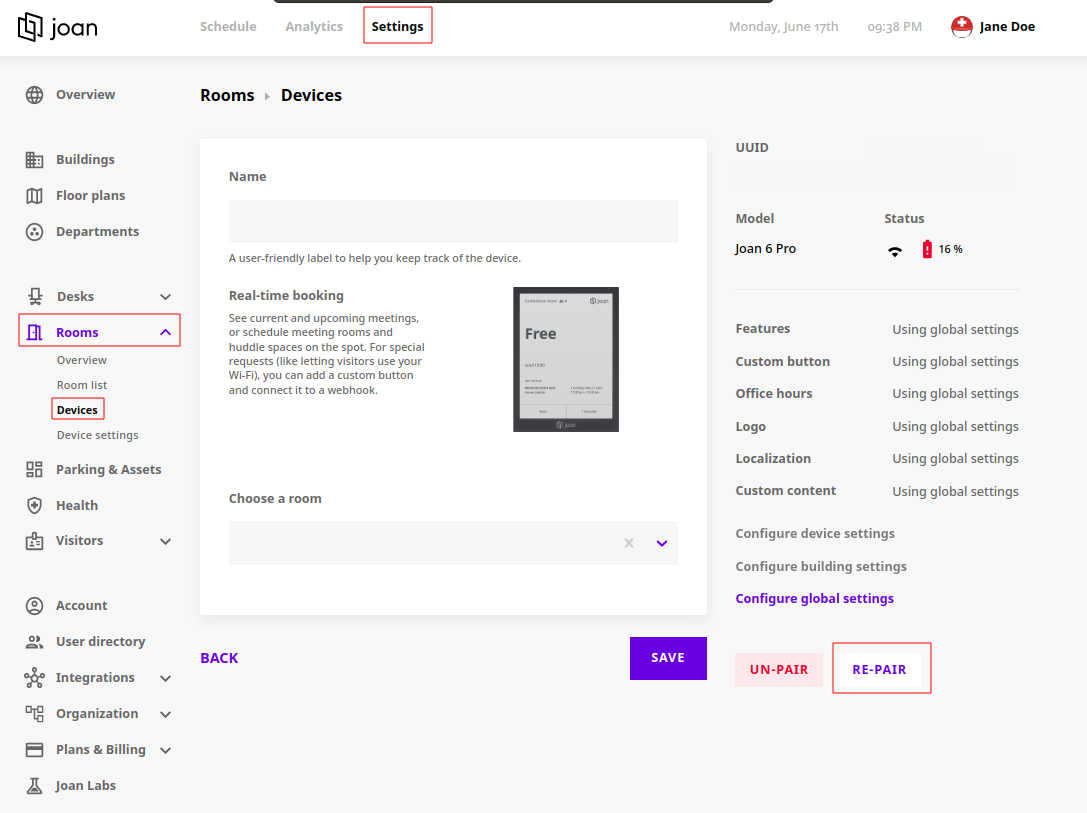
A Device repaired confirmation appears in the top right corner when re-pairing worked.
If the message is still showing
- Make sure the device is not paired to a different MyJoan account.
- Select the correct hosting option for the device (in the cloud) in the Joan Configurator.
Once the device is configured and connected to a server, it refreshes automatically, removes the notification message and starts showing your resource's schedule.
If you encounter any issues, please contact support@getjoan.com.